

The most important part of an office phone installation often happens before anyone picks up a handset. A search for “office phone system installation sydney” can bring up practical questions about network readiness, number porting and whether staff will miss calls during the changeover. The right plan depends on how your team handles calls, where people work and what your office network can support.
Installation is a sequence of decisions and checks, not simply plugging in phones. With a clear plan, you can prepare the right information, identify connectivity issues early and schedule a controlled transition. This guide covers design, setup, testing and cutover, including call flows, extensions and features such as auto-attendants. It also explains what to discuss with a provider so the system suits your office’s daily requirements and supports both in-office and remote staff. These considerations apply whether your team is in Sydney or handles calls across locations such as Brisbane and the Gold Coast.
Key Takeaways
- Start with how your team handles calls, who needs an extension and where staff work before choosing a system.
- Check internet and network suitability, phone locations, power, cabling and Wi-Fi coverage before setup is planned.
- Compare cloud phone systems with on-premises PBX options by considering where system functions are hosted and what equipment and administration each requires.
- Plan office phone system installation sydney as a sequence: confirm scope, prepare the site, configure and test, then coordinate cutover and staff communications.
- Ask providers for a written scope that clarifies configuration, devices, number-porting coordination, testing, handover and ongoing support.
Office phone system installation in Sydney starts with your call-handling needs
Keeping client calls reliable during a phone-system change starts with defining how those calls should be handled. Before requesting office phone system installation sydney, map who answers incoming calls, where calls go when someone is unavailable and which staff need to make or receive business calls away from the office. These requirements shape the system design and help prevent important call paths from being missed.
Installation scope is the agreed combination of business requirements, connectivity, configuration, testing and handover. A traditional office phone system may use a private branch exchange (PBX) to manage internal and external calls, while a cloud phone system hosts core functions elsewhere. Either way, start with how your team works, not with a feature list.
What should a Sydney business define before requesting installation?
Prepare a simple picture of your people, locations and existing numbers. Include:
- Staff and teams, required extensions, shared phones, and remote or mobile users.
- How incoming calls should reach reception, departments, voicemail or an after-hours contact.
- Existing business numbers, noting which ones you want to retain.
Also distinguish a single-site office, where staff share a reception point, from a distributed team that needs calls handled across locations. If your business operates across Sydney, Brisbane or the Gold Coast, note which teams need to answer calls for each location. This gives the provider a practical basis for discussing the system and any number-porting coordination.
Which phone-system outcomes should the installation support?
Link each feature to a real customer or staff need. An auto-attendant can guide callers to the right team, while call routing directs calls according to your agreed call flow. Conferencing and extension management may also support collaboration and daily call handling across office and remote staff.
Separate what must work on launch day from what can be added later. For example, prioritise the main business number, reception routing and essential extensions first, then discuss other configuration needs with your provider. Business Telecom can scope office phone systems around an organisation’s call flows, with options including call routing, auto-attendants, conferencing and extension management. A clear requirements list makes that conversation more useful and keeps the planned change focused on reliable client communication.
Check Sydney office connectivity, network and site readiness before setup
A phone system can be configured correctly and still deliver poor call quality if the office connection or network isn’t suitable. Before setup, ask the provider and your IT contact to review internet performance, local network conditions and the number of calls staff may handle at the same time. This can identify capacity or coverage issues before they affect testing or daily calls.
If you’re researching “office phone system installation sydney”, include both connectivity and premises in your preparation. Check NBN service availability at the office address and document your current business connectivity arrangements, but don’t assume a particular connection type will suit every site. Requirements vary with the system, equipment and building, so confirm them with your provider or IT contact.
How can you check whether the office network is ready for VoIP?
Ask the provider or IT contact to assess whether your connection can support expected simultaneous calls alongside normal business internet use. Review the network equipment, the availability of wired connections at desk-phone locations and whether any quality-of-service settings are already in place. These details can help identify where voice traffic may compete with other activity.
Agree who will investigate connectivity issues if call quality is affected during testing. A clear handover between your phone provider, IT contact and internet provider can help pinpoint whether the cause is the phone configuration or the wider network.
What should you prepare at a Sydney office site?
Mark proposed handset positions, including shared reception desks, and check nearby power, cabling routes and Wi-Fi coverage where staff may use wireless devices. Identify how the provider or IT contact will access relevant communications equipment. Site conditions differ, so verify device, cabling and network requirements before arranging work.
Building logistics matter too. Confirm access arrangements, tenancy approvals and any conditions for work in shared spaces or near building infrastructure with the property manager. Raise these requirements early, particularly if building management needs to coordinate access or approve changes.
- List handset locations and note any shared reception positions.
- Check available power, cabling routes and Wi-Fi coverage at planned work areas.
- Confirm access to communications equipment and any building approvals required.
Before agreeing on an installation date, ask your provider and IT contact to confirm the site-specific prerequisites and who is responsible for resolving issues found during testing. Business Telecom provides office phone systems for Sydney businesses; review its business phone system options as part of your planning.
Choose an installation approach that fits your office phone system
The installation plan depends partly on where the system’s core functions are hosted. With a cloud phone system, the provider hosts those functions and staff connect using supported desk phones, computers or mobile devices. An on-premises PBX has equipment located at the business site, so planning needs to account for that hardware and who will maintain it.
Neither approach suits every organisation. Cloud calling can support staff working across offices or remotely, while an on-premises setup may suit businesses that prefer to manage equipment at their own site. In either case, check the network, user devices and ongoing administration requirements before committing. For office phone system installation sydney, compare the practical work involved, not just the system label.
How do installation requirements differ?
Cloud installation typically centres on configuring users, call flows and supported devices, then checking that the office connection and network can handle the service. Depending on the system, staff may use desk phones or apps on computers and mobiles. An on-premises PBX also requires planning for equipment location and site hardware, as well as configuration and ongoing management. Confirm who will administer the system and handle support for each approach.
| Approach | Installation considerations | Questions to confirm |
|---|---|---|
| Cloud phone system | Provider-hosted functions, user and call-flow configuration, supported staff devices and connection suitability. | Which devices are supported? Who manages configuration and ongoing administration? |
| On-premises PBX | Equipment at the business site, suitable space and connections, system configuration and maintenance responsibilities. | What site hardware is required? Who maintains the equipment and manages changes? |
Which installation details should you confirm before choosing?
Don’t assume existing equipment will work with a new system. Ask whether current handsets and network equipment are compatible, and confirm whether business numbers can be retained or need to be ported. Number-porting processes and timing depend on the provider and circumstances, so clarify responsibilities and the proposed schedule before planning a changeover.
Then review how extensions, call queues, auto-attendants and conferencing will be configured. Consider how staff will answer calls across Sydney offices and remote locations, and whether they’ll use shared desk phones, individual handsets or supported apps. Business Telecom provides cloud phone systems and office phone systems, with options that can include call routing, auto-attendants, conferencing and extension management.
The right setup depends on your call flows, connectivity, locations and support preferences. Use those factors to compare proposals and confirm what the installation includes before proceeding.
Plan the Sydney installation and call cutover in clear steps
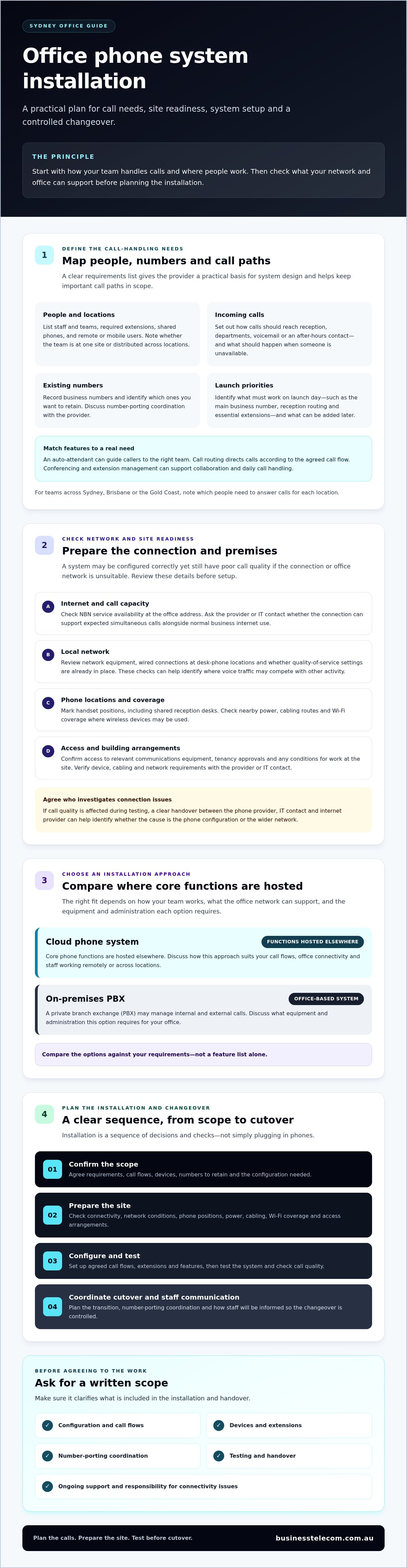
A controlled changeover starts with clear responsibilities and a shared schedule. For office phone system installation sydney, agree on the number-porting process with the provider, confirm when calls are expected to move and identify who staff should contact if something doesn’t work as planned. A transition plan can reduce uncertainty, but no cutover should be treated as guaranteed disruption-free.
Use this sequence to keep the work organised:
- Confirm the scope. Document the agreed call flows, users, features, devices and business numbers involved.
- Prepare the site. Complete the agreed connectivity, equipment and access checks before configuration begins.
- Configure the system. Set up extensions, call groups, auto-attendant messages and routing rules to match the approved design.
- Test the setup. Check internal and external calls, voicemail, conferencing and supported devices before calls are moved.
- Cut over calls. Coordinate timing and number-porting arrangements with the provider, and follow the agreed escalation process if an issue arises.
- Hand over the system. Confirm test results, record any outstanding issues and make sure staff know how to use the system and report problems.
What happens during phone system configuration and testing?
Test the system against the call flows your business has approved. Check that extensions and call groups reach the right people, auto-attendant messages are accurate and routing rules behave as intended. Place calls to and from external numbers, then test voicemail and conferencing where included. Record each issue, who will address it and the retest outcome before signing off.
How can you reduce disruption when moving business calls?
Before cutover, agree with the provider on the schedule, each party’s responsibilities and an escalation contact. Confirm the number-porting process and required steps directly with the provider, as arrangements can vary. Tell staff what is changing, when to expect it and where to report call issues. This gives the team a clear response path without assuming every transition will be interruption-free.
Ask for testing and handover responsibilities to be clear before work begins. To discuss a business phone system and its call-management requirements, contact Business Telecom.
Select an office phone system installation partner in Sydney
A suitable provider should be able to explain how your requirements will shape the system, implementation and ongoing support. For office phone system installation sydney, assess more than the equipment or features on offer. Look for a clear discovery process, a design that reflects your call flows, and defined responsibilities for testing and handover.
Use this checklist when comparing providers:
- Discovery: Do they ask about staff, extensions, locations, call flows and essential launch requirements?
- System design: Can they explain why the proposed office phone system suits your needs, including how it supports in-office and remote staff?
- Implementation: Are configuration, equipment, site tasks and customer responsibilities clearly set out?
- Testing and handover: Is it clear what will be tested, how issues will be recorded and what guidance staff will receive?
- Support and coverage: Have you confirmed Sydney service coverage, Australian-based support arrangements and any requirements specific to your premises?
What should a phone installation quote or scope make clear?
Ask for a written scope that separates included work from tasks your business must arrange. It should identify the equipment and configuration involved, installation activities, number-porting coordination, testing and handover responsibilities. Confirm who provides any required information or site access, and how staff guidance and post-install support are handled.
Clarify the process for changes, too. If site conditions or business requirements differ from the original plan, ask how the impact will be reviewed and agreed before additional work proceeds. This keeps expectations and responsibilities visible for both sides.
How can Business Telecom support a Sydney office setup?
Business Telecom serves businesses in Sydney, Brisbane and the Gold Coast with business VoIP, cloud phone systems and office phone systems, including systems designed and installed for SMEs. Depending on the system, features can include call routing, auto-attendants, conferencing and extension management. These capabilities can be scoped around the call flows and operating requirements established during discovery. Business Telecom also provides Australian-based technical support.
Confirm service coverage, delivery approach, number-porting process and site-specific requirements directly with any provider before agreeing on a plan. Discuss your office requirements with Business Telecom to explore a business phone system that aligns with your team’s call handling and operating needs.
Set up your next phone system change with confidence
A well-planned installation starts with the way your business handles calls, then aligns the system with your connectivity, staff locations and support needs. Define essential call flows, confirm site and network readiness, and agree on configuration, testing, number-porting responsibilities and cutover arrangements before calls move. This gives your team a clear plan without assuming the transition will be disruption-free.
Choosing a provider for office phone system installation sydney also means looking beyond setup. Confirm what the scope includes and how the system will be supported after handover. Business Telecom provides office phone systems and business VoIP solutions for Australian businesses, serves Sydney, Brisbane and the Gold Coast, and offers Australian-based technical support. Systems can include call routing, auto-attendants, conferencing and extension management, scoped to your operating requirements.
Ready to plan a system around your office’s call needs? Discuss your Sydney office phone system requirements with Business Telecom and take the next step with a clearer plan.
Frequently Asked Questions
What does office phone system installation include?
Office phone system installation usually covers planning call flows, checking site and connectivity requirements, configuring the system, testing it and handing it over. The exact scope depends on the approach and your business needs. It may include setting up extensions, call routing or auto-attendants, and preparing supported devices. Ask the provider to document what’s included, who handles number porting and testing, and what your staff need to do.
How long does it take to install an office phone system in Sydney?
There isn’t one standard timeframe for office phone system installation in Sydney. The schedule can depend on the number of users and devices, site readiness, configuration needs and arrangements for transferring existing numbers. Ask the provider to confirm the expected stages and timing for your specific setup, including any dependencies on your business or other providers. Allow time for testing and staff guidance before relying on the new system for daily calls.
Can we keep our existing business phone numbers when changing systems?
You may be able to retain existing business numbers, but confirm this with the new provider before scheduling the changeover. Ask which numbers can be transferred, what information or authorisation is required, how the porting process will be coordinated and when the provider expects the transfer to occur. Don’t cancel the current service until you’ve confirmed the plan with the providers involved. Include number testing in the cutover checklist.
Does a cloud phone system need a separate internet connection?
Not necessarily. Cloud phone systems operate over an internet connection, but whether your existing business connection is suitable depends on its performance, network setup and expected simultaneous calls. Ask your provider or IT contact to assess capacity alongside normal business internet use. Discuss whether a separate connection is appropriate for your circumstances rather than assuming one is required. Test call quality on the planned network before the system is accepted.
Do we need new desk phones for an office phone system installation?
Not always. Whether existing handsets can be reused depends on their compatibility with the proposed system, so have the provider check them before making a decision. Some cloud systems may also support calling through computers or mobile devices, subject to the system and supported applications. Confirm which devices are included in the scope, whether any need replacing and what staff will use at desks, reception and remote locations.
How can a business minimise disruption during phone system installation?
Minimise disruption by agreeing on a written cutover plan before calls move. Confirm the schedule, number-porting responsibilities, testing steps and escalation contact with the provider. Test internal and external calls, voicemail, routing and supported devices, then tell staff what is changing and where to report problems. A planned transition can help the team respond quickly if an issue arises, but don’t assume any provider can guarantee a disruption-free changeover.
Can a Sydney office use a cloud phone system for remote staff?
Yes. A cloud phone system can support in-office and remote staff using supported desk phones, computers or mobile devices, depending on the system selected. Confirm how staff will access extensions, receive calls and use features such as call routing or conferencing across locations. Business Telecom provides cloud phone systems and business VoIP, serving businesses in Sydney, Brisbane and the Gold Coast, with Australian-based technical support.