
Choose a phone system around how calls move through your business, not just the handsets on desks. For Australian SMEs, business phone systems can use traditional landlines, internet-based VoIP or cloud-hosted services. Each approach handles calls differently, so start by mapping who answers, where calls need to go and which devices staff use.
It’s reasonable to be cautious about changing a system your staff and customers rely on. Consider how calls are answered and routed, whether your team works across one or several sites, and what needs to happen to your existing number during a transition. The right fit depends on these practical needs, not simply on which option sounds newest.
This guide explains how landline, VoIP and cloud systems work, compares their core differences and helps you identify requirements before speaking with a provider. It also covers what to plan for when upgrading in Australia, including call flows, extensions, internet reliance and number porting. Use these checks to compare options for your operations, whether your business is in Sydney, Brisbane or the Gold Coast.
Key Takeaways
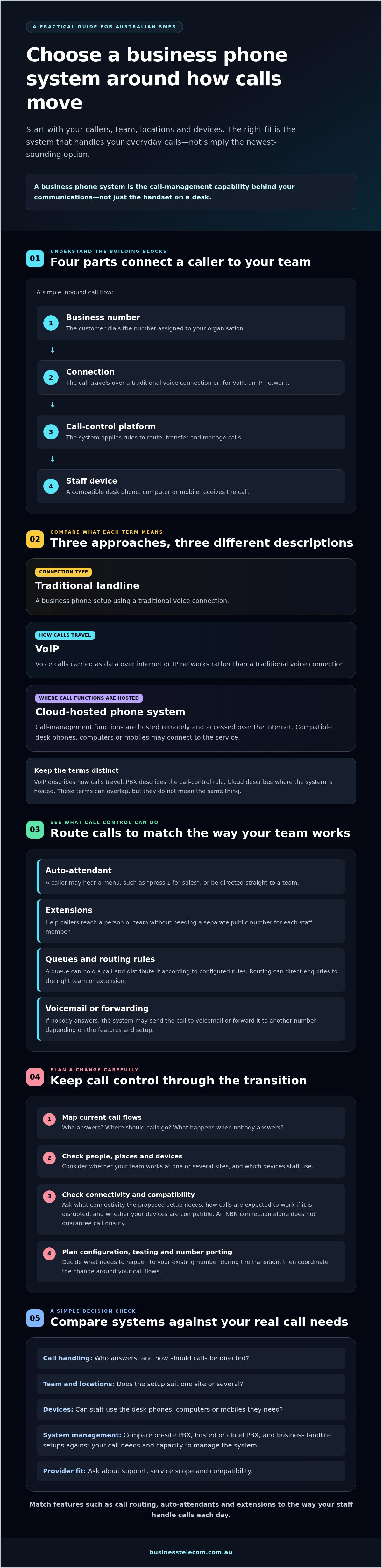
- Understand how business phone systems connect numbers, call-control platforms and devices across teams and locations.
- Compare on-site PBX, hosted or cloud PBX and business landline setups against your call needs and capacity to manage the system.
- Map call flows and check connectivity before planning a change, so you can coordinate configuration, testing and number porting.
- Assess providers with practical questions about support, service scope and compatibility.
- Match features such as call routing, auto-attendants and extensions to the way your staff handle calls each day.
What business phone systems do for Australian SMEs
A business phone system brings together the services, software and devices an organisation uses to manage calls. It connects business numbers to staff and applies rules for answering, transferring and directing calls. The setup might use a traditional landline, VoIP or a cloud-hosted platform.
A phone system is the call-management capability behind your business communications, not simply the physical handset on a desk. A handset is one way to make and receive calls. The system also relies on a connection and functions that control where calls go. A Business telephone system overview provides further background on common system types and features.
Extensions let callers reach a person or team without needing a separate public number for each staff member. Call routing directs incoming calls according to set rules, while shared numbers give the business a consistent contact point. Auto-attendants and extension management can help organise everyday enquiries as a team grows or responsibilities change.
What happens when a customer calls your business?
A call starts at the business number and follows the system’s call-handling instructions. The caller might hear an auto-attendant menu, such as “press 1 for sales”, or be directed straight to a team. An extension connects them to a particular staff member. If several people can answer, a queue can hold the call and distribute it according to configured rules.
If nobody answers, the system may send the call to voicemail or forward it to another number, depending on its features and setup. These options can help a small team manage calls while staff are serving customers, away from their desks or working across locations. In a larger office, routing can direct enquiries to the right people without requiring callers to know individual staff numbers.
Which terms should a first-time buyer understand?
VoIP means voice calls carried over an internet connection. PBX is the call-control system that manages internal calls between extensions and external calls to and from the business. It can apply rules for routing, transferring and handling calls.
Cloud describes where the phone-system functions are hosted, not a type of handset. A cloud phone system can connect compatible desk phones, computers or mobiles, while call management is hosted remotely. The distinction matters: VoIP describes how calls travel, PBX describes the call-control role, and cloud describes where that system is hosted. These terms can overlap, but they don’t mean the same thing.
How business phone systems connect people, devices and locations
A call system links four basic parts: the number a customer dials, the connection carrying the call, the platform applying call rules and the device used by a staff member. In a cloud setup, the platform is hosted and accessed over an internet connection. In an on-site setup, call-control equipment is located at the business premises.
Simple inbound call flow: Business number → connection → call-control platform → staff device
- Business number: The customer dials the number assigned to your organisation.
- Connection: The call travels over a traditional voice connection or, for VoIP, an IP network.
- Call-control platform: The system applies routing rules, such as directing the call to a team or extension.
- User device: A compatible desk phone, computer or mobile receives the call.
With a hosted system, staff may use a desk phone at the office, a computer with calling software or a mobile configured to access the service. This can connect people working at different sites through the same call-management setup. The available devices and configuration depend on the system and provider, so confirm compatibility before planning a change.
Where calls use VoIP, the NBN connection may form part of the path between your workplace and the hosted platform. Suitability depends on factors such as connection performance, other network use and system configuration. Ask what connectivity the proposed setup needs and how calls are expected to work if that connection is disrupted. An NBN connection alone doesn’t guarantee call quality.
How do VoIP and cloud phone systems handle calls?
VoIP carries voice as data over IP networks rather than using a traditional voice connection. A cloud PBX provides call-management functions hosted by a provider and accessed over the internet. The terms describe different things: VoIP is a way of carrying calls, while cloud PBX describes where call-control functions are hosted. A cloud system may use VoIP, but the terms aren’t interchangeable.
What changes between on-site and hosted systems?
With an on-site system, call-control equipment is kept at the business, so equipment upkeep and configuration need to be handled locally or arranged with a support provider. A hosted system shifts platform hosting to a provider, while the business still depends on suitable connectivity and compatible devices. Configuration responsibilities vary by service. Neither approach is automatically more reliable. Compare what your team must manage and what support is included.
Before comparing business phone systems, list the devices, sites and connections your team relies on. Then confirm how the proposed setup handles each one, including what happens if an internet connection is unavailable.
Compare business phone system approaches against your real call needs
The right fit depends on how calls arrive, who needs to answer them and how much system management your team can take on. Compare business phone systems by their everyday requirements, not by labels alone. The options below are general patterns. Actual features and responsibilities depend on your existing infrastructure and the provider’s service scope.
| System approach | Typical fit | Management needs | Key dependency |
|---|---|---|---|
| Traditional on-site PBX | A business that needs centrally managed extensions and has a suitable on-site setup. | Equipment and configuration are managed at the premises or with an appointed support provider. | On-site equipment, compatible devices and appropriate support arrangements. |
| Hosted or cloud PBX | Teams needing shared call handling across users or locations, including staff using desk phones, computers or mobiles. | Call-control functions are hosted by a provider. Confirm who manages configuration and user changes. | Internet connectivity, compatible devices and the provider’s service scope. |
| Simpler business landline setup | A small, single-site team with straightforward calling needs and limited extension or routing requirements. | Management may be more direct, but check how calls are handled and what changes can be made. | The available line service, connected phones and the features included in the setup. |
Which system suits a single office or a growing team?
Start with the number of people who answer calls, your busy periods and whether customers need to reach individuals or shared teams. A single office with simple call patterns may not need extensive routing. If staff need extensions, shared answering or calls passed between teams, compare how each option supports those workflows. Centralised call management can make it easier to organise users or locations, but ask how configuration changes are handled before assuming they are simple.
What changes for remote staff and multiple sites?
List the devices staff need to use at each location. A hosted system may allow a mix of desk phones, computers and mobiles, subject to compatibility and configuration. Shared routing can direct calls to a team across sites rather than one office, but check internet availability at each workplace and how the provider manages the setup. No system type is automatically best for every SME. Match the choice to your call patterns, infrastructure and support requirements, whether your team is in Sydney, Brisbane, the Gold Coast or spread across locations.
Plan a business phone system change without losing call control
A smooth change starts with a clear record of how calls work now and how they should work after the switch. Migration planning should include checks for your business number, connectivity and call flows. Number porting is a process to coordinate with the providers involved, not an automatic outcome. Confirm eligibility, timing and responsibilities before setting a change date.
What should you confirm before changing providers?
Document the details a provider will need to configure the new system, and identify anything the current setup depends on:
- Numbers and users: List each business number, user, extension, device and location.
- Call handling: Record opening hours, routing rules, shared answering, voicemail and call forwarding.
- Number porting: Ask the current and proposed providers whether each number can be ported, how the process is managed and what timing to plan for.
- Connectivity and equipment: Check that the business internet connection is suitable for the proposed setup, and identify any legacy equipment that could affect the change.
- Continuity arrangements: Agree on fallback routing if the new setup or connection is unavailable, how after-hours calls should be handled, and which staff or provider contacts to use if an issue arises.
Don’t assume all numbers or existing devices will transfer unchanged. Ask the providers to confirm what can be retained and what needs to be configured or replaced.
How can you reduce disruption during the change?
Use an ordered plan and schedule configuration and testing around business operations where practical:
- Document current call flows and confirm the intended routing for each number.
- Check connectivity, devices and any dependencies on legacy equipment with the provider.
- Agree who will configure the system, coordinate number porting and communicate the change.
- Test inbound and outbound calls, transfers, extensions, voicemail and after-hours routing before relying on the new setup.
- Tell staff what is changing, when it will happen, how calls should be handled and where to report problems.
Test the system against real work. Check that a customer call reaches the right team, can be transferred to another extension and follows the correct route if nobody answers. Make sure staff know the fallback process and have relevant support contact details to hand.
Before changing providers, discuss your phone system migration requirements and confirm how number porting, configuration and support responsibilities will be handled.
Choose a business phone system provider for dependable support and growth
A provider’s offer should match the way your team handles calls today and the changes you can reasonably anticipate. Compare business phone systems by service scope and ongoing responsibilities, not just the features shown in a proposal. Ask for clear, documented terms so you know what support covers and what your business must manage.
What should you ask a phone system provider?
Use your current call flows and device list to guide the discussion. Ask the provider to explain who is responsible for setup, day-to-day administration and resolving faults, then confirm the arrangements in writing.
- Support: What are the support hours, how do you contact the team, and how are issues escalated?
- Configuration: Who sets up call routing and extensions, and who handles changes when staff or workflows change?
- Compatibility: Can your existing numbers and devices be used? What internet connection does the proposed service rely on?
- Features and scope: Which calling features are included, and are there any user, device or service requirements to understand?
- Service commitments: What response or availability terms are documented, and what responsibilities remain with your business?
Check whether the system can support realistic growth, such as adding users or a location, without assuming every change is automatic. If reporting or administrative controls matter to your team, ask what’s available, who can access it and whether it’s part of the proposed service. Avoid relying on general claims about uptime, savings or response times. Assess the written terms and how they fit your operational needs.
How Business Telecom can support your evaluation
Business Telecom provides business VoIP, cloud phone systems, office phone systems and business landlines for Australian organisations, with a focus on SMEs. Its phone services include call routing, auto-attendants, conferencing and extension management. These capabilities can be compared with practical needs, such as directing enquiries to the right team, helping staff manage shared calls or connecting extensions across the organisation.
Business Telecom offers Australian-based customer support and serves Sydney, Brisbane and the Gold Coast. Confirm current service availability and support arrangements for your location, then compare the proposed scope with your numbers, devices, connectivity and workflows. Explore Business Telecom’s business phone systems to assess how the available options align with your requirements.
Make your next phone system decision with confidence
The right fit starts with your call flows, team setup and continuity needs, not the equipment alone. Compare on-site, hosted and landline approaches against how staff answer calls, where they work and what your current infrastructure supports. Before changing providers, document your numbers and routing, check connectivity, and agree on how porting, testing and fallback arrangements will be managed.
These practical checks make it easier to assess business phone systems on more than headline features. Confirm what each provider includes, who handles configuration and support, and how the service can accommodate realistic changes to your team. Clear responsibilities help you plan with fewer surprises.
Business Telecom provides business VoIP, cloud phone systems and landline services, with Australian-based customer support. Use your requirements to compare the available options, including support for businesses in Sydney, Brisbane and the Gold Coast.
Ready to assess your options? Explore Business Telecom’s phone system options.
Frequently Asked Questions
What is a business phone system?
A business phone system is the services, software and devices an organisation uses to manage calls. It connects business numbers to staff and applies rules for answering, transferring and directing calls. Depending on the setup, it may use landlines, VoIP or a cloud-hosted platform. Extensions, shared numbers, call routing and voicemail help teams manage customer enquiries and internal conversations through an organised system, rather than relying on individual handsets alone.
What is the difference between VoIP and a cloud phone system?
VoIP describes how a voice call is carried: over an internet protocol (IP) network rather than a traditional voice connection. “Cloud” describes where the phone system’s call-management functions are hosted. A cloud phone system can use VoIP, but the terms aren’t interchangeable. When comparing options, ask what connection the service relies on, where call functions are hosted and what features and support are included.
Can a business phone system work on mobiles and computers?
Yes, some systems let staff make and receive business calls on compatible mobiles and computers as well as desk phones. This can help connect a team working across an office, different sites or remotely, provided the service and devices are configured to support it. Confirm which devices are compatible, how staff access the system and whether calls can follow the same business number and routing rules across devices.
Can I keep my business phone number when changing providers?
You may be able to keep an existing business number, but porting isn’t automatic or guaranteed. Eligibility, timing and the process depend on the number and the providers involved. Before making changes, ask your current and proposed providers to confirm whether the number can be transferred, who coordinates the request and what steps you need to complete. Plan call routing and testing around the confirmed porting arrangements.
Is a cloud phone system suitable for a small business?
A cloud phone system can suit a small business if its features, connectivity requirements and management arrangements match the way the team handles calls. It may help staff share call handling across locations or use compatible desk phones, computers and mobiles. Compare the service with your call patterns, internet connection, existing devices and need for extensions or routing. Ask the provider what setup and ongoing administration your business will manage.
What happens to business calls if the internet connection goes down?
If your phone service relies on the internet, a connection outage may affect calls using that service. What happens next depends on the system and any fallback arrangements configured in advance. Ask whether calls can be redirected to another number, what happens to voicemail and how staff should handle urgent enquiries. Confirm the process with your provider, then make sure employees know who to contact and what steps to follow.
How do I choose a business phone system for a growing team?
Choose by mapping how calls are answered now and what may change as the team grows. Check how the system handles new users, extensions, shared call routing, additional devices and locations, then clarify who manages configuration and user changes. Assess reporting and administration against genuine business needs, and ask for service commitments in writing. For SMEs in Sydney, Brisbane and the Gold Coast, confirm local availability and support arrangements with each provider.