

A business landline is a continuity decision, not just a handset choice. A search for “business landline Australia” may bring to mind a copper line on a desk, but traditional PSTN and ISDN services are being progressively decommissioned. For most businesses in NBN-serviced areas, the practical choice is now between internet-based voice options, rather than whether to order a traditional line.
It’s reasonable to be cautious: customer calls need to reach the right people as your team, premises or call volumes change. The right setup depends on more than the connection. Call routing, extensions, support arrangements and a plan for power or internet interruptions all affect continuity.
This guide compares fixed voice, VoIP and cloud phone systems in practical terms. You’ll learn what to assess for reliability, features and support, and how to match an option to your team without limiting future changes. It also covers questions to ask providers about your existing setup and call-continuity needs, so you can make an informed choice for your business in Sydney, Brisbane or the Gold Coast.
Key Takeaways
- When comparing business landline australia options, look beyond the handset to how each service connects and is managed.
- Use internet, power, equipment and provider support as practical checkpoints when assessing call continuity.
- Match features such as number handling, call routing, extensions and conferencing to the way your team works.
- Check service availability for each business location before narrowing down providers and plans.
- Prepare your current provider details, user numbers and call-flow requirements to make the comparison more useful.
What does a business landline in Australia include today?
A business landline is a fixed-voice service an organisation uses to make and receive calls, usually through a business phone number. The word “landline” describes how the service is used, not necessarily the technology carrying the call. Depending on the provider and setup, a business number may connect through a traditional fixed line, VoIP or a cloud phone system.
In Australia, the underlying network is changing. Traditional copper PSTN and ISDN services are being progressively decommissioned, and most businesses in NBN-serviced areas can no longer order new traditional PSTN lines. The history of telecommunications in Australia explains how the network has evolved. Today, the practical decision is usually which voice service and call-management arrangement suits your organisation.
A business landline Australia search should lead to business-focused voice options, not a residential home phone plan or mobile-only calling. Mobiles can be part of a team’s call handling, but they don’t by themselves provide the shared number, extensions or central call management an organisation may need. Consider where staff work, how calls should flow, what connectivity is available and what support the business requires.
What makes a business phone service different from a home landline?
A business service may need to handle calls for several people or teams, direct callers to the right place and provide a consistent experience. Depending on the system, features can include shared call handling, extensions, call routing, auto-attendants or conferencing. Check which functions are included in the specific service rather than assuming every business plan offers the same features.
Support arrangements matter too. Requirements vary with team size, operating hours and customer contact volume, so ask how technical issues are handled and what assistance is available for your setup. Business Telecom includes Australian-based technical support in its offering. Confirm the support arrangements and service availability for your location.
What do fixed line, VoIP, and cloud phone mean?
Fixed voice refers to a phone service associated with a business number or location, rather than a mobile-only service. It may use different underlying technology. VoIP, or Voice over Internet Protocol, carries calls over an internet connection. Cloud phone systems manage calls through a provider-hosted system, rather than relying solely on phone equipment at the business premises.
These terms describe different aspects of a service, not interchangeable product names. VoIP describes how voice travels; “cloud” describes where key phone-system functions are hosted. When comparing options, identify both the connection method and how calls, numbers and extensions are managed. This makes it easier to check whether the setup suits your premises and everyday call flows.
How Australian business landline options differ behind the handset
The handset doesn’t tell you how a service connects or where its call-management functions sit. Traditional fixed voice, VoIP and cloud phone systems describe different parts of a setup, and they can overlap. For a business landline Australia comparison, assess the connection, equipment and management model together.
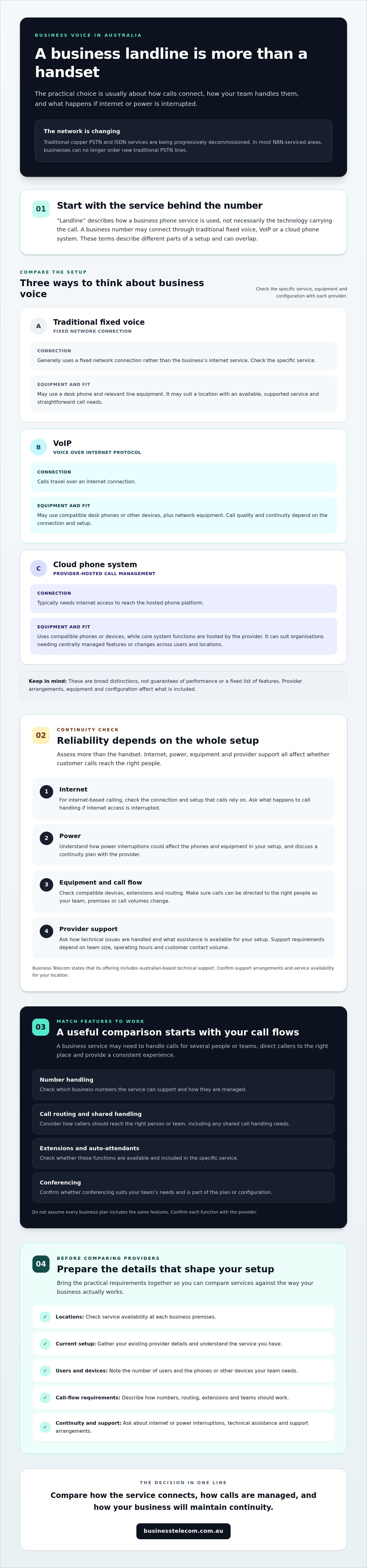
| Option | Internet dependency | Typical hardware | Flexibility and business fit |
|---|---|---|---|
| Traditional fixed voice | Generally uses a fixed network connection rather than the business’s internet service; check the specific service. | Desk phone and relevant line equipment. | May suit a location with an available, supported service and straightforward call needs. |
| VoIP | Calls travel over an internet connection. | Compatible desk phones or other devices, plus network equipment. | Can suit teams wanting internet-based calling; call quality and continuity depend on the connection and setup. |
| Cloud phone system | Typically needs internet access to reach the hosted phone platform. | Compatible phones or devices; core system functions are hosted by the provider. | Can suit organisations needing centrally managed features or changes across users and locations. |
These are broad distinctions, not guarantees of performance or a fixed list of features. Provider arrangements, equipment and configuration affect what’s included. Check which service is available at each premises, then confirm it supports your required numbers, devices and call flows.
Traditional fixed voice and internet-based calling
A fixed voice service connects calls through a fixed network, while VoIP carries voice over an internet connection. Neither approach is automatically more reliable for every organisation. With VoIP, assess internet stability and the equipment supporting it. With any fixed service, confirm network availability, provider support and what happens if local equipment loses power.
Australia’s traditional copper PSTN and ISDN services are being progressively decommissioned. Most businesses in NBN-serviced areas can no longer order new traditional PSTN lines, though availability can vary by location and network type. Verify current options with a provider before planning a change. When comparing VoIP with a fixed service, weigh the dependencies and call-management features against your actual business needs.
On-premises PBX and hosted cloud phone systems
An on-premises PBX is phone-system equipment located at the business, where system management and maintenance may involve local hardware. A hosted cloud phone platform places core system functions with the provider and is generally accessed through an internet connection. The balance of equipment, management and flexibility depends on the service selected. Ask which system functions are hosted and what equipment your staff will need at each location.
Business Telecom can discuss fixed-voice and modern phone options against your existing setup. Explore business phone system options and check which features and support arrangements apply to your requirements.
Will an Australian business landline keep calls reliable?
Reliability depends on the whole service, not just the phone. A VoIP or cloud phone system needs a working internet connection and powered network equipment. A fixed service relies on its network, provider and equipment being available. A practical business landline australia assessment identifies what could interrupt calls and what your team will do if it happens.
Compare continuity across four areas:
- Internet: Ask whether calls depend on your business internet connection and what happens if it drops out.
- Local power: Check which modems, routers, handsets or phone-system equipment need power. Ask whether a battery backup is suitable for your setup.
- Provider support: Confirm how to report a fault, the support hours and contact channels, and how issues are escalated. Verify any claims about response or restoration times in the provider’s terms.
- Equipment and continuity: Find out what equipment is required and whether call diversion or another continuity option is available for your service.
Ask providers to explain outage procedures for the configuration they’re proposing. A feature being available doesn’t mean it’s included or configured, so confirm what your business needs to arrange and test independently.
What happens to VoIP calls during an internet or power outage?
VoIP calls need an active internet connection, and the compatible equipment handling those calls needs power. If either is unavailable, calls may be interrupted. Ask whether your service supports diversion to another number during an outage, how that option is activated, and whether there are limits or setup requirements. Don’t assume the feature is included.
Prepare a simple fallback process for essential customer calls. Record who should be contacted, which alternative number to use and how staff will communicate the change. If a UPS or call-diversion option is part of your plan, test it rather than relying on an untested assumption.
How should businesses assess Australian network changes?
Availability can vary by address, provider and network type. NBN Co’s fixed-line transition information is a useful starting point for understanding changes to services on the NBN network. Traditional copper PSTN and ISDN services are being progressively decommissioned, and most businesses in NBN-serviced areas can no longer order new traditional PSTN lines. The position may differ in Fixed Wireless and Sky Muster areas.
Before changing services, ask your current provider what technology supports each business number, whether a transition affects your premises and what steps are required. Confirm the details for every location, particularly if you use connected equipment such as alarms, EFTPOS terminals or lifts. A provider’s general description isn’t a substitute for checking your service status and continuity requirements directly.
How to compare business landline providers and plans
Start with your team’s actual call patterns, not a provider’s headline feature list. Use this framework to shortlist business landline options in Australia and check that the proposed service fits each location.
- Map call needs. Note your business numbers, who answers each line, busy periods, call transfers and any need for conferencing. Include every premises and team that needs to make or receive calls.
- Check address availability. Ask providers to confirm service and connection options at each business address. Clarify installation requirements, required equipment and the steps involved in moving or keeping existing numbers.
- Compare features and inclusions. Match call routing, auto-attendants, extensions, conferencing and compatible devices to your workflows. Ask what’s included in the specific service, what needs configuration and whether additional equipment is required.
- Verify support and conditions. Confirm support channels, hours, fault escalation arrangements and the service conditions that apply. Review number handling, call inclusions, usage limits and what happens if your needs change.
Look past broad claims such as “flexible” or “business-ready”. Ask the provider to explain how the proposed setup would handle a real call, from a customer dialling your main number to reaching the right person or team. When comparing costs, identify which features, equipment and call inclusions are covered, then confirm applicable charges directly with providers.
Which business landline features should you assess?
An auto-attendant may help direct callers through menu options, while call routing can send calls to the appropriate team or extension. Consider whether those functions match how customers contact you and whether the routing rules can reflect your operating arrangements. Extensions can help callers reach staff directly; conferencing may support collaboration across teams or locations. Confirm each feature is available in the service you’re considering and clarify how it will be set up.
What should Sydney, Brisbane, and Gold Coast businesses ask providers?
For each location, verify address-level availability, installation requirements and how technical support is delivered. Business Telecom lists Sydney, Brisbane and the Gold Coast among its service areas and includes Australian-based technical support in its offering. Confirm current coverage and support arrangements for your premises, along with the call-management features available with your selected service.
Ask how the setup can accommodate staff changes, a move to another premises or shifts in call volume. Share your current provider details, locations, user numbers and call-flow needs to make the discussion specific. Discuss your business phone system requirements before settling on an option.
Choose a business landline setup that supports your next step
The right business landline setup depends on how your team works, where it operates and what callers need from you. Premises and connectivity shape which services are available. Call workflows determine the numbers, routing and extensions required. Continuity and support needs help you assess provider arrangements. Compare these factors together rather than choosing on technology alone.
Review your setup if calls are reaching the wrong people, customers struggle to get through, or your current system no longer fits the team. Planned growth, additional sites or more flexible work can also prompt a review. Discuss support expectations early, especially if interruptions would affect customer service or daily operations. If you’re preparing to change systems, plan the change around your current numbers, call flows and continuity requirements.
What information helps a provider recommend a suitable solution?
A clear brief makes provider discussions more useful. Before you compare options, gather:
- Locations: The business address for each site and any planned moves or additional premises.
- Current service details: Your provider, phone numbers, existing equipment and any known connection requirements.
- Team requirements: The number of users and extensions, plus how staff answer, transfer and share calls.
- Call patterns: Typical call volumes, opening hours, routing needs and any conferencing requirements.
- Continuity expectations: Which calls are essential, what fallback process you need and what outage options the provider can confirm.
Ask the provider to explain which features are included in the proposed service, what equipment or configuration is required, and which service conditions apply. Confirm address-level availability and support arrangements for every location rather than assuming the same setup will suit each site.
When should a business discuss its current phone setup with a provider?
Start a conversation when call handling no longer supports your staff or customer experience, or before a change to your premises, workforce or operating model. Business Telecom provides business landline, VoIP, cloud phone and office phone system options for Australian organisations, with stated service areas including Sydney, Brisbane and the Gold Coast. Confirm current availability and support coverage for your location, and ask which call-management functions apply to the service you’re considering.
Bring your current provider details, locations, user numbers and call-flow requirements to the discussion. Business Telecom can review your existing setup and continuity needs as you consider a practical next step. Discuss your business phone system requirements with the team.
Choose a voice setup your business can rely on
The right business landline Australia option depends on more than the connection type. Match the service to your premises, call flows and team, then check internet and power dependencies, equipment, support arrangements and the features included in your selected setup. Confirm availability and conditions with the provider before making a change.
Business Telecom provides business landline, VoIP, cloud and office phone services, with Australian-based technical support included in its offering. Prepare your current service details, business locations, user numbers and call-handling needs so you can discuss practical options and continuity requirements clearly.
Discuss business phone options with Business Telecom and take the next step towards a setup that fits how your team works. With the right information and a clear comparison, you can make a confident choice for your business.
Frequently Asked Questions
What is a business landline in Australia?
A business landline in Australia is a fixed-voice service an organisation uses to make and receive calls through a business number. The term doesn’t necessarily mean calls travel over a traditional copper line: the service may use fixed network infrastructure, VoIP or a cloud phone system. Business setups can also include shared call handling, extensions or routing, depending on the provider and configuration. Check the technology and inclusions behind the service name.
Is VoIP considered a business landline?
VoIP can function as a business landline service if it provides fixed-voice calling for your organisation. The term describes how calls are carried, over an internet connection, rather than whether the service is for business or home use. A VoIP service may use a business number and compatible desk phones or other devices. Confirm how calls are managed, what equipment is required and whether the service fits your premises and workflows.
Can a business keep its existing landline number when changing providers?
You may be able to keep an existing business number when changing providers, but number transfer depends on the number type, service and provider arrangements. Ask the new provider to confirm eligibility and explain the transfer process before you proceed. Don’t cancel your existing service until you’ve confirmed the correct timing and steps with both providers. If the number is important to customer recognition, include it in your changeover and continuity plan.
How reliable is a business landline that uses the internet?
An internet-based business landline can support dependable calling when its connection, local network equipment and provider arrangements suit the business’s needs. Reliability isn’t determined by the phone service alone. Ask what happens if the internet connection drops, how faults are reported and escalated, and whether call diversion is available for your setup. Check the equipment involved and consider testing any continuity options rather than relying on general claims about reliability.
What happens to a business landline during an NBN or power outage?
During an NBN outage, VoIP calls may stop if the service can’t reach the internet. A power outage can also affect modems, routers, handsets or other equipment needed for calling. The impact depends on the service and setup. Ask your provider about available call diversion, outage procedures and equipment requirements. For essential calls, document a fallback contact process and confirm who will respond if your usual phone service is unavailable.
Do small businesses need a traditional landline or a cloud phone system?
Small businesses don’t all need the same phone setup. Consider your premises, call flows, internet dependency, continuity needs and how your team may change. A cloud phone system can suit businesses seeking provider-hosted call management, while traditional copper PSTN services are being progressively decommissioned and are generally no longer available to order in NBN-serviced areas. Check options for your address and compare the features and support arrangements that apply.
What should I ask a business landline provider before signing up?
Ask the provider to confirm service availability at each address, number handling, required equipment, installation needs and which features are included. Check support channels, escalation arrangements and what happens during internet or power outages, including whether call diversion is available. Business Telecom provides business landline, VoIP, cloud and office phone services, with Australian-based technical support included in its offering. Confirm current availability and support coverage for your location, including Sydney, Brisbane or the Gold Coast.