

The cheapest VoIP plan can cost your business more if calls drop, essential features cost extra or support is hard to reach. If you’re comparing cheap business voip australia options, look beyond the advertised rate and check what your team needs to make and manage calls reliably.
A low monthly price is appealing when you’re managing operating costs. But the real value depends on call allowances, hardware, number porting and ongoing charges, as well as how well the service works over your NBN connection. A cheaper plan makes sense only if it supports the way your business communicates.
This guide explains how to compare affordable business VoIP options by total cost, reliability and useful features, rather than price alone. You’ll learn what to assess for your call volumes, how NBN suitability, devices and number porting affect your decision, and why Australian-based support matters. The aim is a manageable phone system that fits your team, supports staff in the office or working remotely, and keeps everyday calls running smoothly.
Key Takeaways
- Compare cheap business voip australia options by the full cost and how well they fit your team, not just the advertised rate.
- Use a consistent checklist to account for call usage, setup, numbers, hardware and the features staff rely on.
- Assess internet performance and office Wi-Fi alongside the VoIP plan to understand what can affect call quality.
- Map users, locations, call flows and number requirements before comparing systems, so you can focus on practical essentials.
- Cloud calling across desk phones, computers and mobiles can support SMEs, with Australian-based technical support.
Cheap business VoIP Australia: what counts as good value?
Business VoIP carries calls over an internet connection instead of a traditional voice line. A low advertised rate alone won’t tell you whether a service suits your team. Compare the complete setup: how staff make and receive calls, whether call quality is dependable, which features are included and what ongoing charges apply. That’s how to assess cheap business voip australia options for value, not just price.
VoIP can support office desk phones as well as calls through computers and mobile devices. A hosted PBX manages business calls in the cloud, so call management doesn’t depend on an on-site PBX unit. It can help organise extensions and call flows across devices and locations. For a technical overview, see Voice over IP (VoIP) technology.
Good value comes from matching the system to your actual requirements. Consider:
- Call needs: how your team handles incoming and outgoing calls.
- Reliability: whether the internet connection and office network can support clear calls.
- Features: which call-handling tools staff need to serve customers and colleagues.
- Ongoing charges: what applies beyond the advertised service rate, including usage or equipment costs.
This guide provides a practical framework for assessing a suitable setup. It isn’t a detailed price comparison. Instead, it shows what to compare so a low headline rate doesn’t distract from operational fit.
How business VoIP works in an Australian office
With VoIP, calls travel over your internet connection rather than a traditional voice line. Depending on how the system is configured, staff can use desk phones, computers or mobile devices. A hosted PBX provides cloud-based call management without on-site PBX hardware, helping coordinate extensions and call routing across an office or distributed team.
When a lower-cost VoIP setup makes sense
A lean setup can be good value when it covers your team’s call patterns and essential call handling without adding capability you won’t use. Needs vary: a sole operator may want a straightforward way to answer business calls, while a growing team may need extensions and call routing. A multi-site office may need consistent call management across locations. Lower cost should mean right-sized, not missing key functions.
Start by mapping users, locations and how calls should reach the right person. That gives you a clear basis for comparing options in the sections ahead.
What makes cheap business VoIP cost-effective beyond the advertised rate?
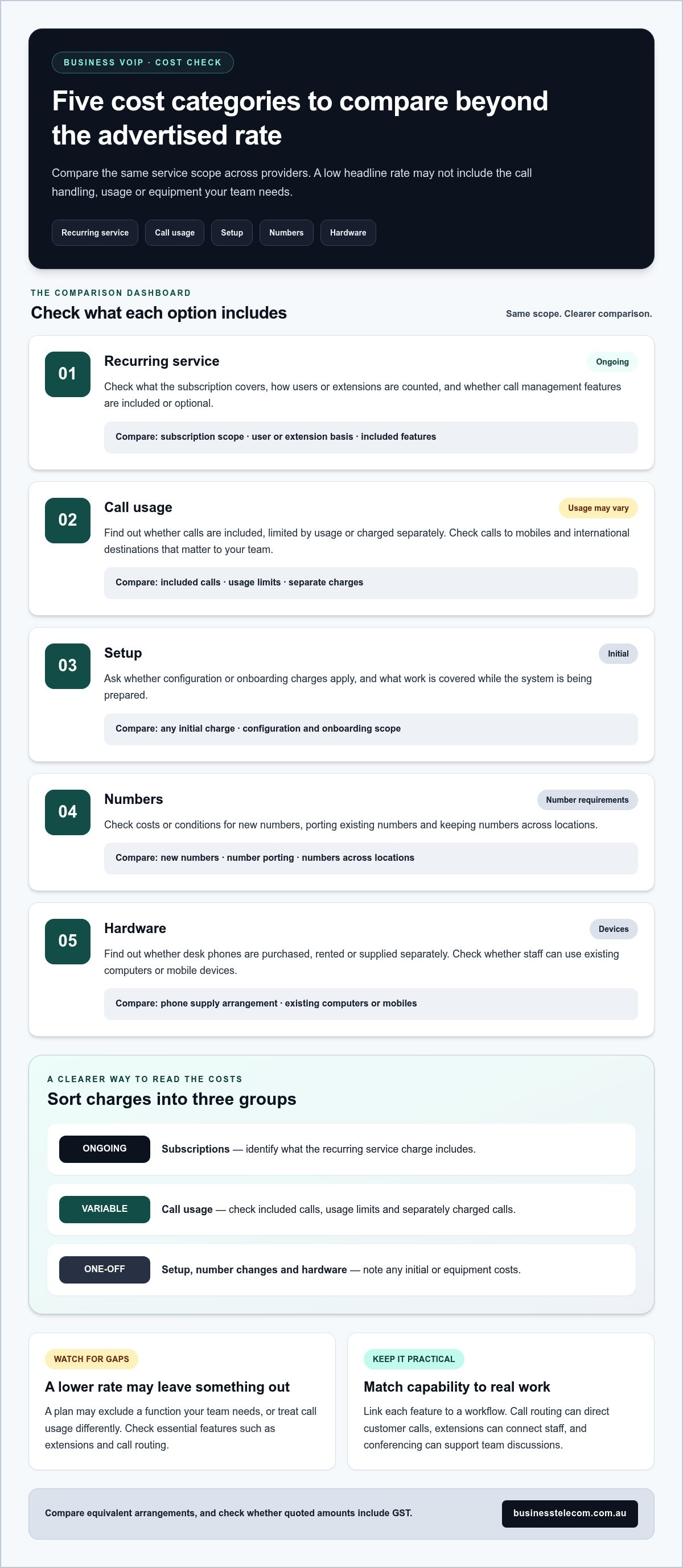
A useful comparison includes more than the recurring service charge. Call usage, number requirements, equipment and setup can all affect what your business pays over time. Use the table below to compare options on the same basis, rather than focusing on headline rates alone.
| Cost category | What to compare |
|---|---|
| Recurring service | What the subscription covers, how users or extensions are counted, and whether call management features are included or optional. |
| Call usage | Whether calls are included, subject to usage limits or charged separately, including calls to mobiles and international destinations relevant to your team. |
| Setup | Any initial configuration or onboarding charges, and what work is covered as your system is prepared. |
| Numbers | Costs or conditions for new numbers, existing number porting and keeping numbers across locations. |
| Hardware | Whether desk phones are purchased, rented or supplied separately, and whether staff can use existing computers or mobile devices. |
Compare the same service scope and note whether quoted amounts include GST. A plan that looks cheaper may exclude a function your team needs or treat call usage differently. For a detailed pricing discussion, see the separate Business Phone System Cost Australia guide.
Which VoIP cost categories should a business compare?
Separate ongoing subscriptions from variable call usage and one-off items such as setup, number changes or hardware. Then check whether essential functions, such as extensions or call routing, are included or treated as optional extras. This helps you compare equivalent arrangements instead of mismatched plan descriptions.
How to avoid paying for features your team will not use
Start with the work, not the feature list. Link each capability to a real workflow: call routing can direct customer calls, extensions can connect staff, and conferencing can support team discussions. If a feature has no clear use, it may add complexity without improving day-to-day operations.
Leave room for change without buying excess capacity upfront. A sole operator, a growing team and a multi-site office have different needs, so right-size the setup for current users and likely changes. Businesses comparing cheap business voip australia options can use this approach to control spend while retaining the call handling their operations depend on.
For Gold Coast SMEs, a tailored business VoIP setup can align calling features and devices with the way the team works, without adding capabilities that serve no practical purpose.
Is cheap business VoIP reliable enough for Australian businesses?
A lower-cost service isn’t automatically unreliable. Call quality depends on more than the plan: the provider’s service and support matter, as do your NBN connection, office network and local conditions. Assess these factors separately to understand what the provider manages and what your business needs to prepare.
Hosted VoIP can suit different operating models, though the benefits and trade-offs vary:
- One office: Cloud call management can connect desk phones and extensions without an on-site PBX. Calls still rely on the office internet connection and network.
- Remote or mobile staff: Staff can use computers or mobile devices to support flexible work. They’ll need a suitable internet or mobile connection wherever they take calls.
- Teams with a continuity requirement: Calls can be managed across users and devices, but a local power or internet outage can interrupt service unless you plan an alternative.
That’s the practical balance with cheap business voip australia: affordability and reliable calls can go together when the system suits the network and the business has a sensible continuity plan. No provider can control every factor that affects a call.
What affects VoIP call quality over the NBN?
Stable performance matters as much as connection speed. Available bandwidth, network congestion and office Wi-Fi quality can all affect calls, particularly when staff are using the connection for other work. Test calls during your usual busy periods, not only when the office network is quiet. For desk phones, a wired network connection can reduce reliance on Wi-Fi. Where supported and configured, network prioritisation can also give voice traffic preference.
For Australian businesses, NBN performance can vary with connection type and local conditions. If calls are already affected by dropouts or congestion, address those network issues as part of your planning rather than assuming a different VoIP plan will resolve them.
Plan for continuity, support and number porting
Decide how customers can reach you if the office internet or power fails. Call forwarding may help if it’s available and configured for your system. An alternative contact process gives staff another way to respond. VoIP equipment relies on local power, so consider what happens if the modem, router or NBN equipment loses power.
Moving an existing business number is a coordinated transition task. Plan the port with the service changeover so staff know when to use the new system and how to handle calls during the switch. Australian-based technical support is another practical consideration, particularly when resolving NBN, network or number-porting issues. Business Telecom provides Australian-based technical support for business customers.
How to compare cheap business VoIP providers: a five-step checklist
Build your shortlist around business requirements, not the advertised rate. Record the details below once, then use the same checklist to assess each option. This keeps the comparison focused on what your team needs to handle calls day to day.
- 1. Map users and devices. Count staff who need phone access and note whether each person needs a desk phone, desktop calling, mobile calling or a combination. Include remote staff and separate office locations.
- 2. Sketch your call flows. Trace how an incoming call should reach the right person or team. Note business hours, voicemail, extensions and any call routing or auto-attendant requirements. Include common scenarios, such as a receptionist transferring a caller or a customer reaching a shared team.
- 3. List your number requirements. Record which existing numbers need to be retained and whether you need local numbers or 1300 or 1800 numbers. Note which staff or locations use each number, so number handling forms part of the comparison.
- 4. Compare like-for-like scope. Against your requirements, record included call-management features, usage terms, hardware needs and support arrangements. Separate essential capabilities from optional extras, and compare the same number of users and devices across each option. Check that quoted amounts are presented on the same basis, including whether they include GST.
- 5. Review the changeover plan. Set out the steps for number porting, configuring devices and preparing staff to use the new system. Consider how calls will be handled during the transition and what the team should do if the internet connection is interrupted. For help understanding number retention, refer to the guide on keeping a landline number when switching to VoIP.
Your shortlist should show which systems cover essential workflows, what sits outside the quoted scope and how the transition will be managed. That makes it easier to judge cheap business voip australia options by practical fit rather than headline price alone.
For a business VoIP setup tailored to your users, locations and call flows, discuss your business phone requirements with Business Telecom.
Business Telecom: a practical cheap business VoIP option for Australian SMEs
Choosing a business phone system means balancing call needs, reliability, useful features and ongoing charges. Business Telecom provides business VoIP and hosted cloud phone systems for small and medium-sized Australian businesses. You can shape a setup around how staff answer calls, work across locations and stay connected with customers, without paying for capability your team won’t use.
How Business Telecom supports everyday business calling
Cloud calling lets staff use desk phones, computers and mobile devices, connecting people working in the office with those who are remote. Call routing and auto-attendants can direct callers to the right team or extension, while conferencing supports group discussions. These functions organise everyday call handling, with the setup shaped around how your business operates.
Business Telecom provides Australian-based technical support for business customers, with a local focus that includes the Gold Coast, Sydney and Brisbane. This local context can be useful when planning a business phone system around Australian teams and their day-to-day calling needs.
What to prepare before requesting a tailored business setup
A clear outline of your requirements makes it easier to discuss a system that fits your operations and budget. Gather a few practical details first:
- Users and locations: note how many staff need calling access, where they work and whether they need desk phones, computers or mobile devices.
- Numbers: list existing business numbers and identify which ones your team needs to retain.
- Call handling: describe how calls should move through the business, including business hours, voicemail, extensions and any call-routing or auto-attendant needs.
- Team requirements: note whether staff need conferencing and how they currently collaborate by phone.
- Budget priorities: distinguish essential functions from extras, so the proposed setup can focus on practical value.
This information gives the conversation a clear starting point. It also connects the phone system’s capabilities to real workflows, rather than choosing features simply because they appear in a plan description.
If you’re assessing cheap business voip australia options for your SME, discuss a business phone setup with Business Telecom’s team. Share your users, locations, numbers and call-handling needs to explore an arrangement aligned with how your organisation works.
Choose a phone setup that fits your team
The right VoIP choice is about more than a low advertised rate. Compare the full service scope, call usage, numbers, setup and hardware, then check that the features you’re paying for support real business workflows. Call reliability also depends on your internet connection and office network, so include those in your decision.
Use the five-step checklist to document your users, locations, call flows and number requirements before comparing options. A clear brief makes it easier to find cheap business voip australia that balances cost, capability and dependable day-to-day calling.
Business Telecom provides business VoIP and cloud phone systems designed for Australian SMEs, with Australian-based technical support and a local focus across Sydney, Brisbane and the Gold Coast. Discuss a business phone setup that fits your team, including how staff use desk phones, computers and mobile devices. With your requirements in view, you can move forward with a phone system that supports the way your business works.
Frequently Asked Questions
Is cheap business VoIP reliable for an Australian business?
Yes, a lower-cost VoIP service can be reliable if it suits your business and your internet connection performs consistently. Call quality can be affected by NBN stability, network congestion and office Wi-Fi, not just the provider’s plan. Test calls during busy periods and consider wired connections for desk phones. Reliability also depends on support and having a plan for internet or power interruptions.
How much does business VoIP cost in Australia?
Business VoIP pricing varies with the number of users, call usage, included features, phone numbers, setup and hardware. A headline rate may not include every item your team needs, so compare the same service scope and check whether quoted amounts include GST. To assess value, weigh recurring and one-off charges against your call requirements rather than relying on a single advertised figure.
Can I keep my existing business phone number when switching to VoIP?
In many cases, an existing business number can be ported to a VoIP service, but the move needs to be planned with the changeover. Record the numbers you want to retain and coordinate the porting process so staff know how calls will be handled during the transition. Include any local, 1300 or 1800 numbers in your requirements, as number arrangements can vary.
Does business VoIP work over the NBN?
Yes, business VoIP can operate over an NBN connection. Call quality depends on the connection’s stability and available capacity, as well as network congestion and office Wi-Fi performance. Consider how the network behaves during your usual busy periods, especially when calls coincide with other online work. Wired connections for desk phones and suitable network prioritisation can help manage voice traffic.
What features should I look for in an affordable business VoIP system?
Choose features that support your actual call workflows. Call routing and auto-attendants can direct callers to the right team, while extensions help connect staff and conferencing supports group discussions. Also consider whether employees need to call using desk phones, computers or mobile devices. A good fit includes the functions your team will use without adding unnecessary capability.
Is hosted VoIP cheaper than a traditional business phone system?
Not always. Hosted VoIP may reduce the need for on-site PBX hardware, but the total cost depends on subscriptions, call usage, setup, numbers and devices. A traditional system may also involve equipment and ongoing support costs. Compare the full service scope over the period that matters to your business, including the features and hardware each option requires, before deciding which offers better value.
What happens to business VoIP calls if the internet goes down?
If the connection carrying your VoIP service fails, calls using that connection may stop until service returns. Plan an alternative, such as call forwarding to a mobile where configured, or a separate process for customers to reach your team. Also consider local power outages, which can affect the NBN equipment, modem and router. Business Telecom provides Australian-based technical support for customers in Sydney, Brisbane and the Gold Coast.