
The lowest call rate won’t tell you whether a customer can reach the right person when your team is split between the office, home and the road. For Australian businesses comparing business phone plans australia, the key question is how calls will be answered, routed and managed each day.
Mobile, landline and VoIP services work differently, so a suitable setup depends on your call volumes, how staff work and what should happen when someone is unavailable. Start by defining those needs. It can help you avoid a system that restricts your team as roles or work locations change.
This guide compares the main business voice options by call handling, flexibility, support and fit. You’ll see how mobile plans, business landlines and cloud phone systems differ, and what to consider around call continuity, setup and future growth. Cloud calling can support staff across desk phones, computers and mobile devices, while features such as call routing, auto-attendants, conferencing and extensions help organise team workflows.
Key Takeaways
- Compare business phone plans australia by how they manage calls and support your team, not by headline allowances alone.
- Distinguish mobile SIM plans, business landlines and cloud VoIP by who receives calls, which devices staff can use and how routing works.
- Review inclusions and exclusions in writing so your comparison reflects the full service and its administration needs.
- Map call flows, users and devices before choosing a setup, then plan a rollout that suits your operating model and future team growth.
- Business Telecom’s voice solutions bring call routing, auto-attendants, conferencing and extension management together.
Business phone plans in Australia: what are you actually comparing?
A business phone plan combines voice connectivity, call handling and support. It might connect individual mobiles, provide a business landline or route calls through a VoIP or cloud phone system. Because the term covers different services, start by identifying what each option does and how your team will use it.
A business phone plan is the voice service and call-management setup a team relies on, not simply a mobile allowance assigned to an employee. A consumer mobile plan typically connects one person’s device to a mobile network. A business voice system can also direct incoming calls, help staff share responsibility and set what callers hear when a team member is unavailable.
Call allowances alone don’t show whether a service includes shared numbers, extensions, queues or routing. These functions shape everyday workflows. For example, a customer calling your main number might reach reception, a selected team or an extension, depending on the setup. Include support in your comparison, especially if staff rely on the phone service to serve customers.
Telecommunications in Australia operates within a legislative framework that includes the Australian Telecommunications Act 1997. When choosing a service, the practical starting point is how your business needs to make and receive calls.
Business mobile plans and business voice systems serve different jobs
A mobile plan connects an individual staff member’s handset to a mobile network. It suits people who need to be reachable away from the office. A business voice system organises calls for the wider team through shared numbers, queues or extensions. The two can work together: staff may answer office calls on a desk phone, computer or mobile device, depending on the system and their role.
What businesses may mean by a phone plan
VoIP carries calls over an internet connection. A cloud PBX manages business calling through a hosted phone system, while desk phones provide a familiar handset interface. A business landline is another voice arrangement, often associated with a fixed office phone number and phone service.
These terms describe different parts of a setup, rather than always representing separate choices. A service can combine voice connectivity with call-management functions such as routing, auto-attendants, conferencing and extensions. Compare how calls are handled, which devices the team can use and what support is provided, not just the plan label.
Businesses assessing business phone systems for Australian SMEs can use the same distinction to connect terminology with daily needs. First decide whether you need individual mobile connectivity, coordinated team call handling or both.
Business phone plan options in Australia: compare how each handles calls
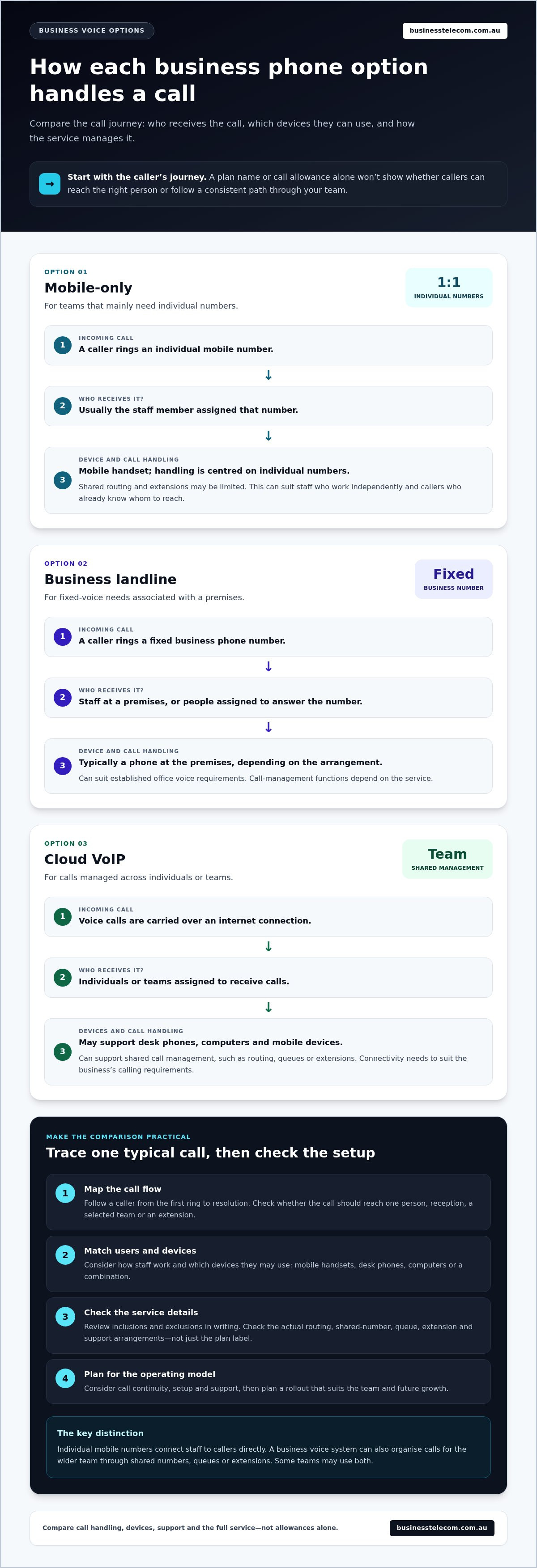
Compare how each service receives, distributes and manages calls, not just the name on the plan. A business might use individual mobile numbers for some staff and a shared office number for customer enquiries. The right fit depends on whether callers need to reach people directly or follow a consistent path through the team.
| Option | Who receives calls? | Device flexibility | Routing and management |
|---|---|---|---|
| Mobile-only | Usually the staff member assigned the number | Mobile handset | Call handling is centred on individual numbers; shared routing and extensions may be limited |
| Business landline | Staff at a premises or people assigned to answer a fixed business number | Typically a phone at the premises, depending on the arrangement | Can suit established office voice requirements; call-management functions depend on the service |
| Cloud VoIP | Individuals or teams assigned to receive calls | May support desk phones, computers and mobile devices | Can support shared call management, such as routing, queues or extensions |
This comparison is a starting point: services in the same category can include different features. Compare the actual call-handling functions, devices and management arrangements. A plan label alone won’t tell you whether several staff can answer one number, transfer calls or use extensions.
Plan names describe a service category, not the call-handling capability your team will receive. To compare business phone plans Australia businesses can use, map a typical incoming call from first ring to resolution, then assess how each option supports that journey.
Mobile-only plans for teams that mainly need individual numbers
Mobile-only arrangements can suit staff who need direct contact on their own numbers, such as a solo operator or a team that works independently in the field. They’re straightforward when callers already know whom to reach. If reception needs to direct enquiries, colleagues need common extensions or calls should move through a shared queue, individual numbers alone may not provide enough central control.
Cloud VoIP and business landlines for shared call handling
VoIP carries calls over an internet connection, and a cloud phone system can manage how calls reach staff. Because voice uses the internet connection, the business needs connectivity suitable for its calling requirements. Cloud systems can support staff on desk phones, computers and mobile devices, including people working away from the office. Business landlines may suit premises with established fixed-voice needs. The business landline options comparison explores fixed-voice considerations in more detail.
For a shared business number, decide who answers first, where calls go if that person is unavailable, and how staff manage transfers or extensions. Business Telecom’s business voice options bring together VoIP, cloud phone systems and business landlines, with call-management capabilities shaped around team workflows.
How to compare business phone plans beyond monthly allowances
A useful comparison covers the whole service your team will operate, not just the monthly allowance. Proposals may have similar call inclusions but differ in device options, call management, support and responsibility for routine changes. Compare those details against your actual workflows before weighing headline features.
Get inclusions and exclusions in writing. Don’t assume that “unlimited” covers every call type, or that call transfers, voicemail, conferencing and extensions come as standard. Check which users or numbers each inclusion applies to, whether conditions apply and how charges or limits are described. Clear documentation helps you compare like with like and avoid surprises during setup.
Call features, extensions and shared numbers
Start with common call journeys. When a customer rings your main number, should an auto-attendant offer options, should a team member answer first, or should the call go to a queue? Match routing, conferencing and extensions to tasks staff perform regularly. A shared number gives customers one consistent point of contact while calls are directed among the people responsible for them. The business VoIP provider buyer’s guide provides further context for assessing service and provider fit.
Support, flexibility and service continuity
Compare support arrangements and the work involved in administering the service. Establish who manages user changes, device setup and call-flow updates, and how your team can raise a technical issue. Business Telecom provides Australian-based technical support for business customers. Consider whether staff need desk phones, computers or mobile devices across office and remote locations, and whether the setup supports those working patterns.
Continuity planning starts with deciding what your team should do if a device, internet connection or part of the phone setup becomes unavailable. Record who needs to know about an issue, how calls should be handled and what steps staff should follow. Treat a recovery feature as included only when the written service details specify it.
Use this checklist to compare proposals consistently:
- Call handling: Which numbers, routing paths, queues and extensions are included?
- Devices and users: Which devices can staff use, and how are users added or changed?
- Inclusions: Are call types, features, limits and exclusions clearly documented?
- Support and administration: Who handles technical issues and routine service changes?
- Continuity: What steps can your team take if part of the setup is unavailable?
Score each proposal against the same requirements and note unanswered items rather than assuming they’re covered. This makes your business phone plans Australia comparison practical: the service that fits your call flows, working arrangements and support needs may be a better match than one with a longer feature list.
Choose a business phone plan around your team and operating model
Start with how your team works, then match the phone setup to its call patterns. A comparison of business phone plans Australia teams are considering should account for who calls, who answers, where staff work and how the setup may need to change as the business grows.
- Map your call flows. List public numbers, departments, opening hours and who answers each type of call. Note busy periods, where calls should go if the first person is unavailable, and whether staff need overflow handling or conferencing.
- Identify users and locations. Record which employees need a business number, whether they work at one premises or across locations, and how callers should reach each role or team.
- Choose devices around the work. Decide whether staff need desk phones, computer calling, mobile access or a combination. Include people who move between the office and other locations.
- Compare management needs. Consider how calls, users and extensions will be managed, who will handle routine changes, and whether useful capabilities add unnecessary complexity.
- Plan the rollout. Set out call flows and user requirements, then organise setup and staff familiarisation in manageable stages. Give staff clear instructions for answering, transferring and escalating calls.
Map callers, call paths and staff locations
Describe how calls move through the business. For example, a customer enquiry might go to a shared number, then to a relevant department or staff member. Note who is responsible at each step and what should happen during busy periods. This call map helps show whether individual numbers are enough or the team needs a coordinated system.
Plan for growth and a manageable rollout
Consider more than your current headcount. New employees, roles or locations may mean adding users, extensions or call-routing paths. A staged rollout can help staff learn the system as the business introduces changes in a controlled way. Compare practical trade-offs between cost, capability and administration in this practical guide to affordable business VoIP.
Different teams will prioritise different capabilities. A solo operator may value direct calls and a simple setup. A growing office may need a shared number, extensions and clearer call distribution. A distributed team may prioritise access across desk phones, computers and mobile devices, along with consistent call handling across locations.
Businesses in Sydney, Brisbane and the Gold Coast can draw on local specialist support when planning business voice requirements. Business Telecom helps organisations align business VoIP, cloud phone systems and landlines with their team workflows. Explore Business Telecom’s business voice solutions to consider a setup built around how your team handles calls.
Business Telecom phone plans: bring calls, teams and support together
Once you’ve mapped callers, staff and devices, choose a voice setup that can meet those day-to-day needs. Business Telecom provides business VoIP, cloud phone systems, office phone systems and business landlines for Australian SMEs. The focus is connecting the voice service with a call-handling approach that suits how your organisation works.
Rather than judging business phone plans Australia by a feature list, consider how each capability supports a real task. A customer calling your main number may need to reach reception, a specific team or an extension. Staff may need to answer from an office desk phone, a computer or a mobile device when working elsewhere. Mapping those needs helps shape the setup around your call flows.
A business voice setup shaped around real call workflows
An office phone system can bring call routing and extension management into a coordinated call-handling plan. For example, a business can organise how incoming calls reach relevant staff instead of relying only on customers knowing individual numbers. Auto-attendants can guide callers through options, while conferencing supports conversations that involve multiple people.
Cloud phone systems support calls across desk phones, computers and mobile devices. This can help office-based and remote colleagues use the business voice setup in ways that suit their roles. Decide which staff need each device type and how they should receive calls, then match the configuration to those requirements.
Local Australian support for business communications
Support is part of the overall service fit. Australian-based technical support gives business customers a local point of assistance for technical issues. Clear responsibility for service administration also helps teams understand how routine changes are handled. As part of continuity planning, identify who manages phone-system changes and what staff should do if a call-handling issue affects their work.
Business Telecom’s business voice services support organisations across Sydney, Brisbane and the Gold Coast. Whether you run a growing office, an established business or a team working across locations, plan around users, call paths and devices to make the system easier to use and manage.
Discuss a business phone setup for your team and the call flows your organisation needs to manage.
Take the next step towards a phone setup that fits
Before deciding, turn your comparison into a short working brief. Note the calls your team handles, who needs to answer them, which devices they use and what support matters to your operations. This gives you a practical basis for discussing business phone plans australia and avoids choosing on headline allowances alone.
Business Telecom works with Australian SMEs on business VoIP and cloud phone systems, with Australian-based technical support for business customers. Consider how call routing, auto-attendants, conferencing and extension management could support the way your team works now and as it changes. A clear picture of your call flows makes the conversation focused and useful.
Discuss a business phone setup that suits your team and take the next step towards a voice system that supports your organisation’s day-to-day work.
Frequently Asked Questions
Are business phone plans different from business mobile plans?
Yes. A business mobile plan connects a staff member’s handset to a mobile network, while a business phone plan may also refer to a shared voice system for the organisation. For example, a sales employee might use an individual mobile number while the main office number is managed separately. Identify whether you need mobile connectivity, team call management or both before comparing options.
Can a business phone plan support staff working remotely?
Yes, a cloud phone system can support business calls on compatible desk phones, computers and mobile devices, including for staff away from the office. Decide how remote employees should receive calls and whether they need to use a business number rather than a personal one. Test the chosen devices and internet connection in the locations where staff regularly work to identify practical issues before relying on the setup.
How do I compare business phone plans in Australia?
Compare what each proposal covers for users, numbers, devices, call management, support and administration. If you searched for “business phone plans australia”, look beyond headline allowances and compare the same requirements across each option. Check how changes, such as adding a staff member or adjusting a call path, are handled. A written comparison makes differences in scope easier to spot and keeps the decision tied to your business needs.
Do business phone plans include VoIP and a cloud phone system?
Some do, but the terms describe different parts of a service. VoIP carries calls over an internet connection; a cloud phone system provides hosted call management and may use VoIP. A business service can combine voice connectivity with features such as extensions or call routing, but inclusions vary. Business Telecom provides business VoIP and cloud phone systems for Australian SMEs.
Can I keep my existing business phone number when changing plans?
If you’re switching between VoIP providers in Australia, number portability arrangements allow businesses to retain existing phone numbers. Plan the transfer as part of the changeover and avoid cancelling the current service before the number transfer is coordinated. If you’re moving between different types of service, the process can depend on the number and service involved, so include number continuity in your implementation plan.
Is a cloud phone system suitable for a small Australian business?
It can suit a business that needs a shared way to manage calls or expects its staffing and work locations to change. A small firm might start with a main business number and a straightforward call path, then add users or extensions as needs develop. Consider whether your internet connection and preferred devices suit internet-based calling, and keep the initial setup aligned with real workflows.
What should a business phone plan include for a growing team?
Look for a setup that can accommodate additional users, extensions and call-routing changes, with clear arrangements for managing updates. Consider how new staff will receive calls, which devices they can use and who maintains the system as roles change. Get inclusions and exclusions in writing, then document the process for onboarding users so growth doesn’t leave call handling unclear.