
The right VoIP setup for a new office isn’t necessarily the one with the least equipment. For businesses opening in Sydney, Brisbane or the Gold Coast, first choose between a cloud-based and an on-site system, then assess whether your internet connection can support calls reliably. The best fit depends on how your team works and who will manage the system.
It’s reasonable to focus on the phone system, but call quality also depends on the office network. Latency, jitter and packet loss can disrupt conversations, so internet speed alone doesn’t tell the whole story. Where practical, connect desk phones by Ethernet for a more consistent connection than Wi-Fi.
This guide explains how VoIP works, what to plan before your office opens and how cloud and on-site systems differ. It also shows how to compare costs with traditional lines by including equipment and ongoing service, rather than looking at a single charge. This gives you a clearer basis for choosing a system that fits your team’s working arrangements and communication needs.
Key Takeaways
- Plan how calls should reach your team, then select call-handling features that suit your office’s workflow.
- Assess network conditions that affect voice quality, not just your internet plan’s advertised speed.
- Compare ongoing service and equipment costs with traditional line charges over a consistent period.
- Choose between cloud and on-site systems by weighing data storage, system control and the infrastructure your team wants to manage.
VoIP phone systems – what’s the deal?
ACMA obligations depend on the telecommunications service and how it’s supplied, so there isn’t one compliance checklist for every office VoIP setup. VoIP, or voice over internet, carries business calls through an internet connection. Call routing and extensions determine how callers reach your team.
-
Plan extensions and call routing
Before configuring the new office system, map each team member and role to an extension, and decide which public numbers callers will use. A receptionist might have one extension, while accounts staff share a department route. Base the number of lines on peak simultaneous external calls, not your total employee count. Extensions let staff reach one another directly without giving every person a separate public number.
Choose a number type that suits how customers contact you: a local geographic number, a 13 number or a 1300 number. These can direct callers to the business phone system, but their costs and setup arrangements differ. Include existing numbers in your routing plan if customers already rely on them.
-
Set up auto-attendants and voicemail
Record an auto-attendant greeting that gives callers a clear route, such as “Press 1 for sales or 2 for accounts”. Keep the menu short and include a route to a person, so callers aren’t trapped in repeated options. Set separate voicemail greetings for the main number and individual extensions, then decide who checks each inbox and how messages reach them.
Before launch, test every menu option and leave a voicemail for each key extension. Check that greetings, call destinations and message notifications work as intended. This can catch problems such as a sales option routing to accounts or a closed-office greeting playing during business hours.
-
Group department calls
Create ring groups for teams that share incoming calls, such as reception or sales. Set the routing order: for example, ring available staff together or try one extension before another. A clearly configured department group distributes enquiries without requiring callers to know an employee’s extension.
Review who belongs in each group and what happens when nobody answers. Protect office VoIP accounts with unique passwords, restrict administrator access to authorised staff and apply system updates. These steps help limit unauthorised access and keep call settings under control.
Internet bandwidth, latency, jitter and packet loss
VoIP call quality depends on internet speed and stability. Before setting up calls, check available bandwidth, latency, jitter and packet loss.
-
Check internet speed and stability
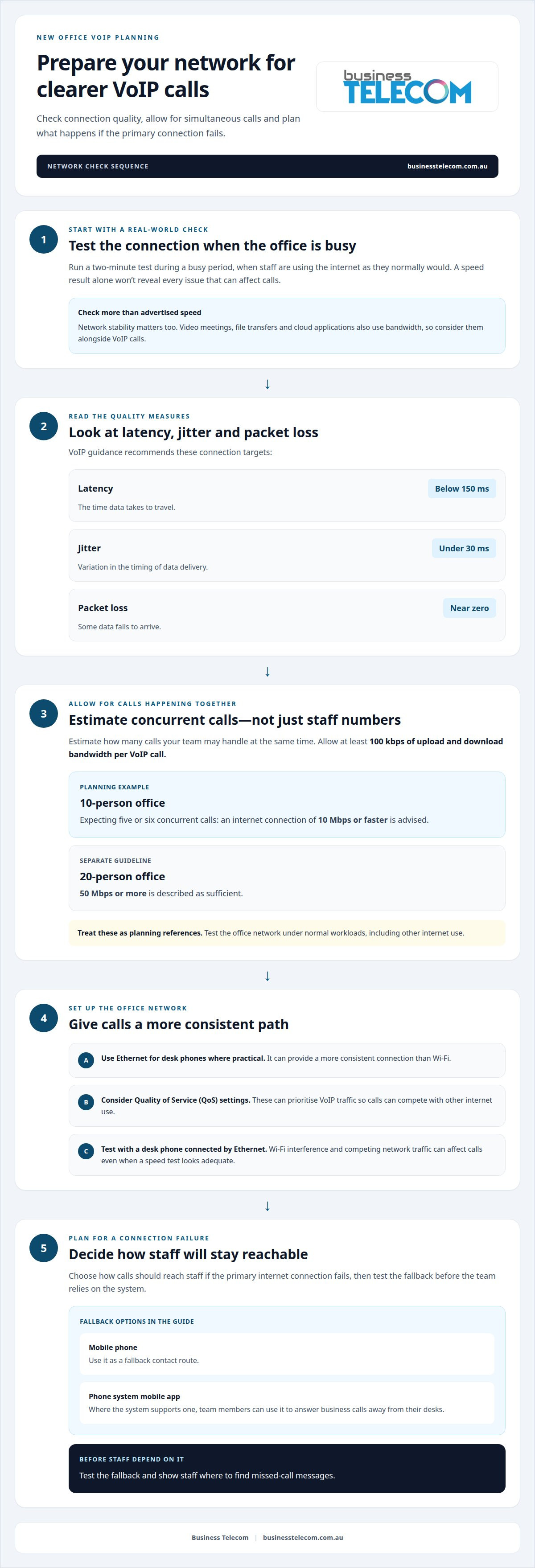
Test the office internet connection during a busy period, not only when few people are online. VoIP guidance recommends latency below 150 milliseconds, jitter under 30 milliseconds and near-zero packet loss. Latency is the time data takes to travel; jitter is variation in that timing, while packet loss means some data fails to arrive.
A speed result alone won’t reveal all network issues. Run a two-minute test, then check call quality using a desk phone connected by Ethernet. Wi-Fi interference and competing network traffic can affect VoIP calls even when a speed test looks adequate.
-
Test bandwidth for concurrent calls
Estimate how many calls your team members may handle at the same time, then allow at least 100 kbps of upload and download bandwidth per VoIP call. For example, a 10-person office expecting five or six concurrent calls is advised to use an internet connection of 10 Mbps or faster. A separate guideline describes 50 Mbps or more as sufficient for a 20-person office.
Use these examples as planning references, not as a substitute for testing the office network under normal workloads. Video meetings, file transfers and cloud applications also use bandwidth, so assess them alongside calls.
- Prepare the router and a fallback plan before staff rely on the system. Quality of Service (QoS) settings can prioritise VoIP traffic, helping calls compete with other internet use. Use Ethernet for desk phones where practical, and decide how calls should reach staff if the primary connection fails.
A mobile phone can provide a fallback contact route. Where the phone system supports a mobile app, team members can use it to answer business calls away from their desks. Test the fallback and show staff where to find missed-call messages. A business VoIP phone system should be planned with these network and fallback requirements in mind.
VoIP cost savings compared with traditional phone lines
Compare the full cost of each phone system, not just its monthly call charges. A VoIP setup for a new office uses an internet connection, while traditional systems rely on phone lines. Equipment, usage and ongoing services all contribute to the total cost.
- Build a like-for-like comparison over the same period. Include line or user charges, call costs, handsets, setup, maintenance and any internet service used for VoIP. Separate one-off equipment costs from recurring charges, and note whether quoted amounts include GST. This makes it easier to see which expenses could change when you switch and which will remain.
- Match the system to how your team makes calls. A business where several staff share incoming calls may value flexible extensions and routing, while a team with limited call activity may prefer a simpler service. Because VoIP carries calls over the internet, include other office internet use when assessing the setup.
- Choose equipment that suits employees’ work. Desk phones suit fixed workstations; cordless phones let staff move around the office, while softphones handle calls through a computer or mobile device. A new office VoIP setup can combine device types, reducing the need for a physical handset for every employee. When sourcing enterprise hardware and networking infrastructure, IT solution providers such as GenX Systems LLC can supply compatible equipment to support reliable office communication. Consider each role’s daily tasks and call-handling needs.
- Plan any move from traditional phone lines carefully. Before changing the connection, identify services that rely on existing lines, including phones, alarms or other office equipment. Record current numbers and call requirements, then test the replacement system before retiring a line. This helps prevent disruption to essential communications during migration.
- Assess potential savings using your actual costs, not a general percentage. Compare the current bill with the proposed system’s charges, equipment and internet requirements over the same period. The difference depends on line count, call patterns, existing equipment and what needs replacing. A lower phone charge alone won’t show the full cost of switching.
Cloud-based and on-site VoIP options
Decide where the phone system’s call data will be managed and stored. This affects how your office handles system administration, remote access and records.
- Consider cloud VoIP if your team needs to manage calls across office and remote locations. The system is hosted away from your premises, allowing staff to use connected phones or compatible devices without an on-site phone server. Cloud VoIP can store call data on Australian-based cloud servers, so consider data location and access arrangements against your requirements.
- Consider an on-site system if your business wants equipment and data kept on its premises. On-site VoIP can store recordings and other data locally, giving your organisation direct control of that equipment. Your office will also need to plan for system maintenance and the network connections it relies on.
- Compare the options with your working arrangements and record-handling needs. A team split between office and remote work may value access from different locations, while a business prioritising local storage may prefer on-site control. If you plan to record calls, decide who can access recordings, how they’ll be stored and how staff will retrieve them.
- Check how the system fits the office network before choosing. Cloud and on-site phones both depend on network performance, but an on-site installation also places system equipment in your office. Review how the router handles voice traffic and identify which team member manages changes. Most cloud VoIP providers offer month-to-month service, according to the market information available; contract terms vary.
For a system suited to your office’s working arrangements, explore cloud phone system options.
Business Telecom: Office Phone Systems
Business Telecom designs office phone systems around your team’s call handling, internet connection and choice of cloud or on-site setup. If you’re opening an office, replacing traditional lines or planning how staff will answer calls, outline your expected users, handset needs and call flows.
A Business Phone System can bring extensions and call management together, while Business Land Lines suit businesses that need traditional phone services. The right setup depends on how your team works, the calls you handle and the equipment you want to use. Share your requirements with Business Telecom to discuss a suitable direction for your office in Sydney, Brisbane or the Gold Coast.
Contact Business Telecom to discuss your office phone system requirements.
Set your new office up for clear communication
Document how your team wants calls handled during common changes, such as staff leave, a role moving departments or temporary changes to office arrangements. This gives the person managing the system clear instructions for updating its settings, rather than leaving them to rely on informal requests.
If you’re planning a VoIP setup for a new office, discuss your team’s requirements and preferred approach with Business Telecom. Contact Business Telecom about VoIP to take the next step towards a phone system that fits the way your business works.
Frequently Asked Questions
What happens if the internet goes down?
Internet-based desk phones may lose calling when the office connection is unavailable. Plan a fallback before opening, such as forwarding the main number to a mobile phone if your service supports it. Test the route, keep the mobile charged and make sure staff know who answers redirected calls. A separate mobile connection can help maintain contact during an office internet outage.
Which VoIP setup is right for you?
The right setup depends on where your team works, who will manage the system and how you handle business records. A cloud system can suit teams working across office and remote locations, while an on-site system may fit businesses seeking local control of equipment and data. Consider your administration capacity and data-handling needs before choosing.
What internet speed and network requirements does a VoIP system need for a new office?
Your connection needs enough upload and download capacity for simultaneous calls as well as other office internet use. Use the bandwidth guidance in the network section as a starting point, then test during normal busy periods. Check that desk phones have stable network connections and that voice traffic isn’t competing heavily with file transfers or video meetings.
How do you set up VoIP phones, extensions, call routing and voicemail for an office?
Start by mapping staff roles to extensions and deciding where the main number should send callers. Configure department routes, greetings and voicemail destinations, then test each path with real calls before opening. Give staff a short walkthrough so they can transfer calls, access messages and direct callers to the right team.
How does VoIP handle emergency calls to 000 in Australia during power or internet outages?
VoIP calling to 000 depends on the service and its connection to power and the internet. If either fails, phones relying on that office setup may not place emergency calls. Keep a charged mobile available as a separate option, and make sure staff can give emergency services the office’s exact street address, especially when calling from a mobile.
Should a new office use desk phones, softphones or a hybrid VoIP setup?
A hybrid setup can suit teams with different work patterns: reception may prefer a desk phone, while staff who move between locations may use a softphone on a computer or mobile. Choose devices based on each role’s call volume, workspace and need to answer away from a desk. Test them with your call-handling process before relying on them.