

After-hours calls don’t have to disappear into an unchecked voicemail box. A voicemail to email setup for Gold Coast businesses sends recorded messages to a nominated inbox, so your team can review and respond when they’re available.
It keeps messages accessible beyond the office phone, but it doesn’t answer calls for you. The result depends on how your phone system routes after-hours calls, which inbox receives messages and how your team follows up.
This guide explains how after-hours voicemail reaches your inbox, how to change its destination and how staff can listen from different devices and locations. It also covers what a professional setup needs to account for, including your existing phone system and call-handling process. Use these details to decide whether voicemail to email suits your team and what to discuss when arranging the setup.
Key Takeaways
- Understand how after-hours calls can be directed to voicemail and messages delivered to a nominated inbox.
- Learn what business and phone-system details help a provider change the voicemail destination accurately.
- See how emailed messages can fit into your team’s call-back process and day-to-day workflow.
- Consider how staff can access voicemail across different devices and locations, including when working away from the office.
After-hours voicemail delivered to an email inbox
After-hours voicemail can be emailed to a nominated business inbox when a call reaches the voicemail service. Staff can review messages later and follow up through their usual communications process. A voicemail-to-email setup for a Gold Coast business depends on its phone system and how incoming calls are routed outside business hours.
Audio file delivery
The email can include the caller’s recording as an audio attachment. Staff open it using a compatible email app or audio player, then use the details in the message to plan a response. A provider can test a sample voicemail to check that the attachment arrives and plays on the devices your team uses.
Australian privacy and consent obligations depend on the business and how it collects and uses recordings. Set a clear purpose for keeping messages, limit mailbox access to staff who need it, and inform callers about recording where applicable. For a shared inbox, assign named users and agree on how recordings will be handled.
Business phone and VoIP systems may support voicemail to email. The platform and its configuration determine how the feature works, not whether your business is located on the Gold Coast.
To set up delivery, provide the destination email address and appropriate mailbox access. Check that email settings allow the voicemail notification and attachment through, as spam filters or mailbox rules can affect delivery. For businesses managing broader network configurations and mailbox security, managed service providers such as Telx Computers can help ensure these communications integrate seamlessly. Never share personal email passwords as part of the setup.
Staff can listen on an iPhone or Android if their email app supports the recording format. If a message doesn’t arrive, the provider can review the destination, delivery records and spam filtering, then test the route again.
VoIP system configuration
On a VoIP system, configure voicemail delivery for the relevant user, number or after-hours call route. Your business supplies the intended recipients, call-handling schedule and access requirements. Then test a message for each affected route. Available settings vary by platform, so the options depend on your existing system.
An example business-hours greeting gives opening hours as 9 to 5. Conditional call forwarding can send an unanswered call to another phone after, for example, 15 seconds.
Having a provider change the voicemail destination
A provider changes the voicemail destination within your existing phone system, then tests the route to confirm it directs messages to the intended inbox. For a Gold Coast business, the setup should reflect which incoming calls need an after-hours voicemail option, such as calls to the main number or a particular team line.
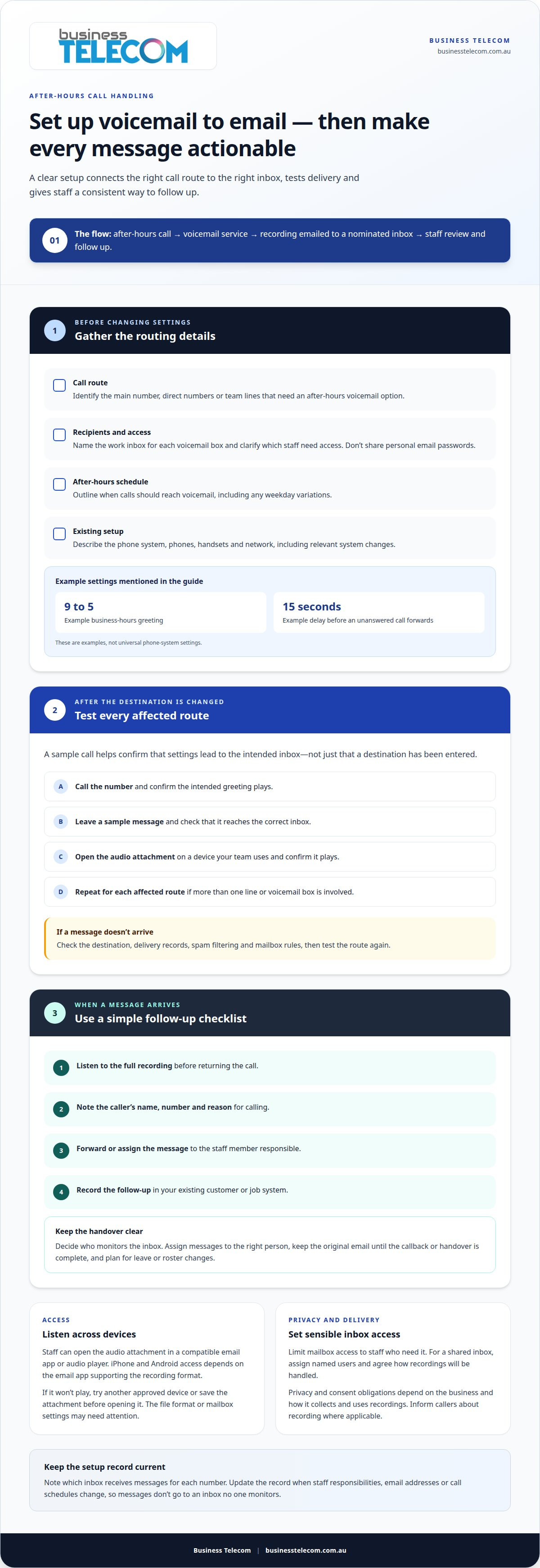
Start by reviewing the current call flow and identifying the voicemail box linked to each number or handset. Provide the phone numbers, destination work inboxes, after-hours schedule and staff responsible for follow-up. If different teams handle calls, specify which inbox should receive each team’s messages and who needs access.
- Call route: identify the main number, direct numbers or team lines that need voicemail.
- Recipients: provide the work inbox for each voicemail box and clarify who needs access.
- Schedule: outline when calls should reach after-hours voicemail, including weekday variations.
- Existing setup: describe the phones, handsets and network, including relevant system changes.
Once settings are changed, test the route with a sample call. Confirm that the greeting plays, a message can be recorded and the email reaches the correct inbox. If several lines are involved, test each affected route to catch an incorrect destination before staff rely on the new arrangement.
Record which inbox receives messages for each number. If staff responsibilities, email addresses or call schedules change, use that record to update the correct destination. This helps prevent messages from going to an inbox no one monitors.
A provider can align voicemail routing with your business phone system requirements, including the numbers and teams that need separate destinations. That gives the setup discussion a practical focus: how your business wants after-hours calls handled.
Listening to emailed voicemail messages
Open the notification in your work inbox and play the attached recording. On a laptop, the audio may play within the email or open in a compatible media app. On a mobile, tap the attachment and choose an available audio player. Controls vary by email app and recording format.
If the recording won’t play, try another approved device or save the attachment before opening it. For example, a receptionist could switch from a mobile to a work laptop and replay the message in a supported audio player. If neither device opens it, the file format or mailbox settings may need attention, and partnering with an outsourced IT provider like JOB Technologies can help small to medium businesses keep their workplace systems running smoothly.
Use a consistent process to turn each message into a clear next step:
- Listen to the full recording before returning the call.
- Note the caller’s name, number and reason for calling.
- Forward or assign the message to the staff member responsible.
- Record the follow-up in your existing customer or job system.
For example, reception can send a booking enquiry to the staff member managing appointments instead of forwarding every message to the whole team. Keep the original email until the callback or handover is complete, so you can revisit details if the caller’s request needs clarification.
To return a call, use the number in the message or your business contact records. Confirm that it belongs to the caller before calling, especially if the recording is unclear. Calling from a business phone line can keep customer communications separate from an employee’s personal number. Caller ID presentation depends on the phone system and carrier.
For Australian businesses, decide who monitors the voicemail inbox and how messages are assigned. A shared mailbox may suit reception teams, while individual inboxes can direct messages to specific staff. Set a handover process for leave or roster changes so messages still reach an available team member.
Listening to voicemails on different devices and locations
Access from different locations depends on how your business manages email accounts and staff coverage. A Gold Coast employee working from another site may need access to the same authorised business mailbox used at the main office. Agree on account access before staff move between locations, so messages aren’t tied to one person’s desk or work pattern.
Device settings can affect how quickly staff notice a new message. For example, an employee away from the office may have notifications switched off during a meeting, while reception monitors a shared account throughout the day. Set notification preferences to match each person’s responsibilities instead of assuming every device will alert every user.
If your team works across several locations, decide which location handles each caller’s follow-up. A Gold Coast office could receive general enquiries while another worksite handles a specific service area. Clear routing and assigned responsibilities reduce confusion when employees at different sites see the same customer message.
Consider these points when planning access across your business:
- Work locations: identify where staff need to access the business mailbox.
- Coverage: nominate who monitors messages when the usual recipient is unavailable.
- Notifications: align alerts with each person’s role and working arrangements.
- Follow-up ownership: make clear which team responds to each type of enquiry.
Review the arrangement when staff change roles, work locations or email accounts. If a team member moves from reception to field work, for instance, you may need to change who monitors general enquiries. This keeps voicemail handling aligned with how the team operates, without relying on one employee to be in a particular place.
To discuss how your phone arrangements can support staff working across locations, talk with Business Telecom.
When reviewing voicemail access across locations, consider whether your business phone system suits the way your organisation operates. Your choice may depend on the number and locations of offices, staff needs, existing services and infrastructure, desired functions and budget. These factors help you plan how staff access messages and which features support their work. Matching the system to those needs provides a clearer basis for voicemail arrangements across your locations.
Business Telecom
Business Telecom helps Gold Coast businesses consider voicemail delivery as part of their wider phone system requirements. If after-hours messages are difficult to access or your team is reviewing call handling, discuss how a Business Phone System or Office Phone System could fit your needs.
When discussing your requirements, explain which calls should reach voicemail, who needs access to messages and where staff need to listen. These details help shape a practical phone system discussion around your team’s work patterns and existing setup.
To discuss voicemail and your business phone requirements, contact Business Telecom.
Make after-hours follow-up part of your call plan
Before changing your phone setup, decide what should happen after a message arrives. Assigning someone to follow up and agreeing on a consistent callback process can make voicemail a useful part of your communications.
For a voicemail-to-email setup on the Gold Coast, choose an arrangement that reflects how staff handle calls, who needs access to messages and how your business manages customer information. Business Telecom can discuss these requirements alongside your existing business communications and phone system needs.
Bring your call-handling priorities to the discussion, including which calls need after-hours voicemail and who should receive messages. This gives you a practical starting point for deciding how voicemail delivery can support your team.
Discuss voicemail setup with Business Telecom and take the next step towards a call process that suits your business.
Frequently Asked Questions
Can you prevent me from missing calls?
No voicemail setup can guarantee every call is answered, but your call flow can give incoming calls another route before voicemail. For example, a business phone system can ring a colleague or reception first, then send an unanswered call to voicemail. This gives callers another chance to reach staff, while email delivery helps your team see messages they leave.
Can voicemail messages be sent as audio attachments or transcribed to text?
Voicemail can arrive by email as an audio attachment for staff to play on a compatible device. Text transcription depends on whether the phone platform supports it and how the feature is configured. If your team needs written records, decide whether staff need the original recording, a transcript or both, and consider how they’ll handle transcription errors.
How to set up voicemail-to-email on an iPhone or Android in Australia?
Configure voicemail delivery to the nominated work inbox and test it with a sample message. On an iPhone or Android, open the email attachment and play it using an app that supports the recording format.