An auto attendant for a small business on the Gold Coast can greet callers, present clear menu options and route calls to the right person, team or voicemail. It provides a consistent first point of contact while helping staff manage incoming calls alongside their daily work.
For a small team, the challenge is balancing customer calls with appointments, jobs and other tasks. A well-planned call flow shows callers where to go, including when the right person is unavailable.
This guide explains how an auto attendant works, how it can direct calls to the right destination and support call planning, and what to consider when arranging a professional setup. You’ll also learn how the greeting, menu choices and call routing can be shaped around the way your business handles enquiries and routine administration.
Key Takeaways
- Map your common call types and decide which person or team should handle each one.
- Prioritise clear menu options and practical call-routing features that suit your team’s daily workflow.
- Understand how call recording, privacy and automated menus affect the way your phone system should be set up.
- Plan how calls should be handled if your internet connection is interrupted, including suitable backup arrangements.
What is an auto attendant and how does it work for a small business?
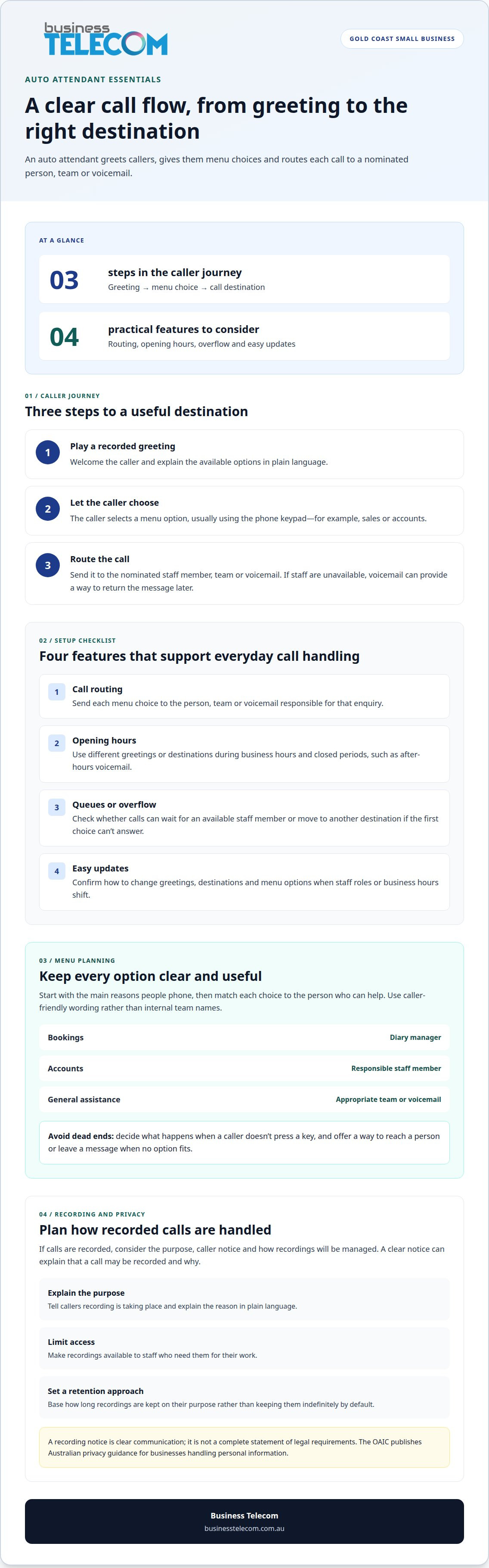
An auto attendant is an automated phone menu that greets callers and directs them to the right person or destination. For example, callers might press one for sales, two for accounts or another option to leave a message. This gives them a clear route without requiring a staff member to answer and transfer every call.
Call handling follows a simple sequence. First, the system plays a recorded greeting. The caller then selects a menu option, usually using the phone keypad. The system routes the call to a nominated staff member, team or voicemail. Someone calling about accounts, for instance, can choose that option instead of explaining their enquiry to a receptionist.
A Gold Coast business might offer separate options for new enquiries and existing customers, routing each caller to the appropriate destination. If staff are unavailable, the call can go to voicemail so the business can return the message when someone is free, rather than interrupting every task to transfer calls.
Small-business employees often juggle several responsibilities. A caller with a billing query may need a different destination from someone asking about a new service. A menu can separate these enquiries at the start of the call, helping callers reach the staff member responsible for each matter.
Start planning the call flow by listing the main reasons people phone. A business might group enquiries into bookings, accounts and general assistance, then assign each option to an appropriate destination. Keep the choices clear and focused. A long list of departments can slow callers down and make a small business sound larger than it is.
An auto attendant manages the first step of call handling; it doesn’t replace staff who answer enquiries or make decisions. Its value depends on accurate routing, a clear greeting and up-to-date destination details. For a small business on the Gold Coast, match each menu choice to the person who can resolve that caller’s need.
What features should a Gold Coast small business look for in an auto attendant?
Choose features that fit the way your team handles calls, rather than adding options for their own sake. A Gold Coast trades business might direct callers to bookings, service enquiries or voicemail. A professional practice may need separate routes for appointments and accounts. In either case, every option should lead somewhere useful.
Use a greeting and menu callers can understand the first time they hear them. Say “press one for bookings” rather than using internal team names. Keep the choices focused, and offer a way to reach a person or leave a message when none of the options fits.
- Call routing: Send each menu choice to the staff member, team or voicemail responsible for that enquiry.
- Opening hours: Set different greetings or destinations for business hours and closed periods, such as directing after-hours calls to voicemail.
- Call queues or overflow: Check whether calls can wait for an available staff member or move to another destination when the first choice can’t answer.
- Easy updates: Confirm how greetings, staff destinations and menu options are changed when roles or business hours shift.
Decide what happens when callers don’t press a key. A default route, such as a receptionist or general voicemail, prevents the menu from becoming a dead end. If your business takes bookings, test that the booking option reaches the person who manages the diary.
If staff work from different locations, routing calls to more than one destination may be useful. For example, a call could ring an office phone and an approved remote endpoint, depending on the system. Ask how staff availability is managed and whether changing a destination requires technical support.
Test the setup from a caller’s perspective before launch. Follow the routes for a new customer choosing “sales”, an existing customer choosing “accounts” and a caller reaching voicemail. This helps confirm that each route is clear, current and practical for your team.
What Australian rules apply to call recording, privacy and automated phone menus?
Call recording and automated menus require careful handling of the information callers share. For a Gold Coast business, consider why calls are recorded, who can access the recordings and how they’re managed. The Office of the Australian Information Commissioner (OAIC) publishes Australian privacy guidance for businesses reviewing their handling of personal information.
Before recording calls, identify the business purpose, such as documenting a customer’s booking instructions. Tell callers that recording is taking place and explain why in plain language. For example, an opening notice could say, “This call may be recorded to help us manage your enquiry.” Treat this as clear communication, not a complete statement of legal requirements.
Plan how recordings will be managed after each call. Limit access to staff who need recordings for their work, and establish a process for handling requests or complaints. A practice manager reviewing a disputed appointment may need access, while unrelated staff may not. Set a retention approach that reflects the recording’s purpose instead of keeping files indefinitely by default.
Automated menus can prompt callers to share information, so avoid asking for sensitive details in a greeting or menu option when a simpler route will do. A menu can direct callers to “appointments” or “accounts” without asking them to say personal information aloud. Make the options clear and provide an alternative for callers who can’t use the keypad.
Review the entire caller journey before launch, including the greeting, menu wording, recording notice, voicemail prompt and destinations. Check that an accounts enquiry follows the intended process before callers are prompted to share details. Keep business-hours and after-hours scripts consistent, and review them when the recording purpose or call flow changes.
Privacy and call-recording obligations depend on the organisation and circumstances. Use OAIC guidance when considering personal information, and obtain advice about the requirements that apply to your business before recording calls or collecting information through a phone menu.
How reliable are cloud auto attendants during internet outages, and what backup options are available
A cloud auto attendant relies on a working connection between your phone system and the cloud service. If your Gold Coast premises loses internet access, calls using that connection may not reach desk phones there. The impact depends on the system configuration and whether another route is available.
An internet outage doesn’t necessarily stop every call. A cloud system can be configured to redirect calls if an office connection fails. For example, incoming calls could go to an approved mobile number or another site. Set up the destination and call-handling rules in advance.
Useful continuity options include:
- Call diversion: Send calls to a nominated mobile or alternate number during an outage.
- Secondary internet connection: Use a separate connection as a backup for internet-dependent calling at the premises.
- Power backup: Keep essential network equipment operating during a local power interruption, where suitable backup power is available.
- Voicemail: Provide callers with a message option if staff can’t answer through the usual route.
During setup, map and test the primary call route and its fallback. For example, simulate an unavailable office connection and confirm whether a new enquiry reaches the nominated alternate destination. Make sure the greeting and voicemail instructions also match the fallback arrangement.
For a small Gold Coast team, choose backup routes that staff can manage during a disruption. Discuss cloud phone continuity options before finalising the call flow, so the planned alternative fits your phones, connection and daily call handling.
Business Telecom: SMALL BUSINESS PHONE SYSTEMS
Business Telecom helps businesses in Gold Coast, Sydney and Brisbane with phone system requirements. Before choosing a system or configuration, confirm which options and features are currently available. When planning a new setup or reviewing how callers reach staff, consider how your team handles messages and calls during an internet disruption.
Start with a clear picture of your users, existing phone arrangements and common call types. These details can help you assess a suitable call flow, including your preferred greeting, menu options and destinations. The right arrangement depends on how staff handle enquiries and which phone system suits your operations.
Considering an auto attendant for your Gold Coast business? Contact Business Telecom to discuss your phone system requirements and confirm whether this feature is available for your needs.
Make your next phone system decision with confidence
Before arranging an auto attendant for a small business on the Gold Coast, decide who will manage the call flow after setup. Assign responsibility for updating greetings and destinations when staff roles, business hours or enquiry processes change. A clear owner helps keep the system aligned with the way your business operates.
For businesses in Sydney, Brisbane and the Gold Coast, the right phone system setup depends on existing arrangements and how the team needs to handle calls. Sharing these practical requirements helps shape a conversation about a suitable setup.
If you’re ready to discuss the next step, contact Business Telecom about your call needs. A clear plan can help your team make a considered decision and move forward with confidence.
Frequently Asked Questions
Which Australian phone providers offer auto attendant services to small businesses on the Gold Coast?
When comparing phone providers for your Gold Coast business, ask whether they offer auto-attendant call handling and can configure it for your requirements. Check whether the provider can map your call flow, configure the system and support the phone setup your business plans to use.
How much does an auto attendant cost in Australia, including setup, monthly fees and call charges?
The total cost depends on the phone system, setup requirements, number of users, equipment and calling arrangements. Ask for the proposed charges to be broken down into ongoing service, setup, phones and call usage, so you can see what each covers. Request a quote from Business Telecom for pricing suited to your needs.
How do hosted VoIP auto attendants compare with traditional phone systems and answering services?
Hosted VoIP runs through an internet-based phone platform, while a traditional system may rely on equipment at your premises. Both can direct calls, but their setup and ongoing management differ. An answering service uses people to handle calls on your behalf, rather than an automated menu to route them. The right approach depends on whether you need call direction, live message-taking or both.
What internet, phone numbers and equipment are needed to set up an auto attendant in Australia?
A hosted VoIP auto attendant needs an internet connection and a way for staff to take calls, such as desk phones, computers or mobile devices. Equipment needs vary: a team using computers or mobiles may need different equipment from one using desk phones, and engaging an IT network administration partner like Uptime Co. can help ensure the underlying technology and hardware run smoothly. Number portability may allow your business to keep its existing number, subject to eligibility and transfer arrangements.
How can a provider set up and customise an auto attendant, and what information does a small business need to supply?
Ask the provider whether it can configure the greeting, menu choices and call destinations around your business’s call process. To plan the setup, outline your preferred greeting, business hours, staff or team destinations, voicemail instructions and the main reasons customers call. For example, a clinic could set separate routes for appointment enquiries and accounts, each directed to the appropriate destination.
Can a business keep its existing Australian phone number when switching to an auto attendant?
Number portability may allow a business to keep its existing phone number when switching systems, subject to eligibility and transfer arrangements. Provide the number and relevant account details during transition planning, then confirm how it will be used in the proposed call flow.