
What if customers could reach your team through one professional phone system, whether staff are at home, in the office or moving between locations? A remote work phone system Australia businesses can rely on brings calls together across a distributed team, rather than leaving staff to manage separate devices and numbers.
Remote flexibility shouldn’t mean inconsistent customer service or unclear call handling. A cloud phone system can connect staff using desk phones, computers and mobile devices, so your team can handle business calls without everyone being in one office.
This guide explains how cloud calling connects remote and office-based employees, and how call routing, auto-attendants, conferencing and extension management support customer access and staff coordination. You’ll also learn how to match devices and calling functions to different work patterns, and how to plan for clear, consistent calls across your Australian team.
Key Takeaways
- A remote work phone system can give remote and office staff one organised business calling experience.
- Map the customer call journey to see how routing can direct callers to the right staff, wherever they’re working.
- Choose desk phones, computer calling or mobile access according to each role’s work setting, call pattern and equipment needs.
- Consider connectivity and competing network traffic to support clear calls from different locations.
- Before setup, document caller needs, staff locations and call-handling requirements to guide practical decisions.
What is a remote work phone system, and what does it solve for Australian businesses?
A remote work phone system lets staff make and receive business calls from different locations through a shared phone service. One employee might answer on an office desk phone, another on a computer at home, and a third on a mobile device while travelling between work sites. The device can change while the business number and call-handling arrangements remain organised.
For customers, the goal is straightforward: provide a consistent way to contact the business without making them guess which employee is available or which number to call. Call routing, auto-attendants and extensions can direct enquiries and connect colleagues across locations. Together, these functions create a repeatable way to manage incoming and outgoing calls, rather than just a collection of separate phones.
Cloud phone systems commonly use Voice over IP (VoIP), which carries voice calls over internet connections. That differs from relying on separate personal mobile calls, general messaging apps or residential phone plans. Those tools may work for individual conversations, but they don’t provide shared business numbers and coordinated call handling by themselves. A remote work phone system is the calling framework, not a particular handset or app.
Remote calling supports a work arrangement, while the phone system manages how calls move through the business. Staff can work away from the office and still follow shared call flows, such as directing a new enquiry to the right team or making an extension available to colleagues. This helps maintain familiar workflows without requiring everyone to work in the same location.
How does a remote phone system differ from separate mobile numbers?
When staff use separate numbers, customers may need to save individual contacts, and call handling can depend on each person’s availability. A shared business system can coordinate calls across staff and locations using a common business number and configured routing. Staff can answer on the device that suits their work, while callers continue to use the same business contact point.
Which Australian businesses benefit from distributed calling?
Distributed calling is useful when a team regularly works across locations. A hybrid office can connect employees at home and on site, while field-based staff can stay reachable without returning to a central desk. Small and medium businesses with teams in different offices can also use shared call handling to keep enquiries moving through familiar workflows.
A team that works in one place and has straightforward call needs may not need a remote setup. But when staff move between home, office and job sites, a cloud phone system can bring business calling together across desk phones, computers and mobile devices. Start by identifying where calls need to go and how customers should reach the team.
How a cloud phone system routes customer calls to remote and office staff
A cloud phone system can send incoming calls through a call flow configured for the business, rather than tying each call to a phone on a particular office desk. Depending on the setup, callers might hear a greeting, choose a team or be directed to a person or group. Remote and office-based staff can take part in that flow using connected devices.
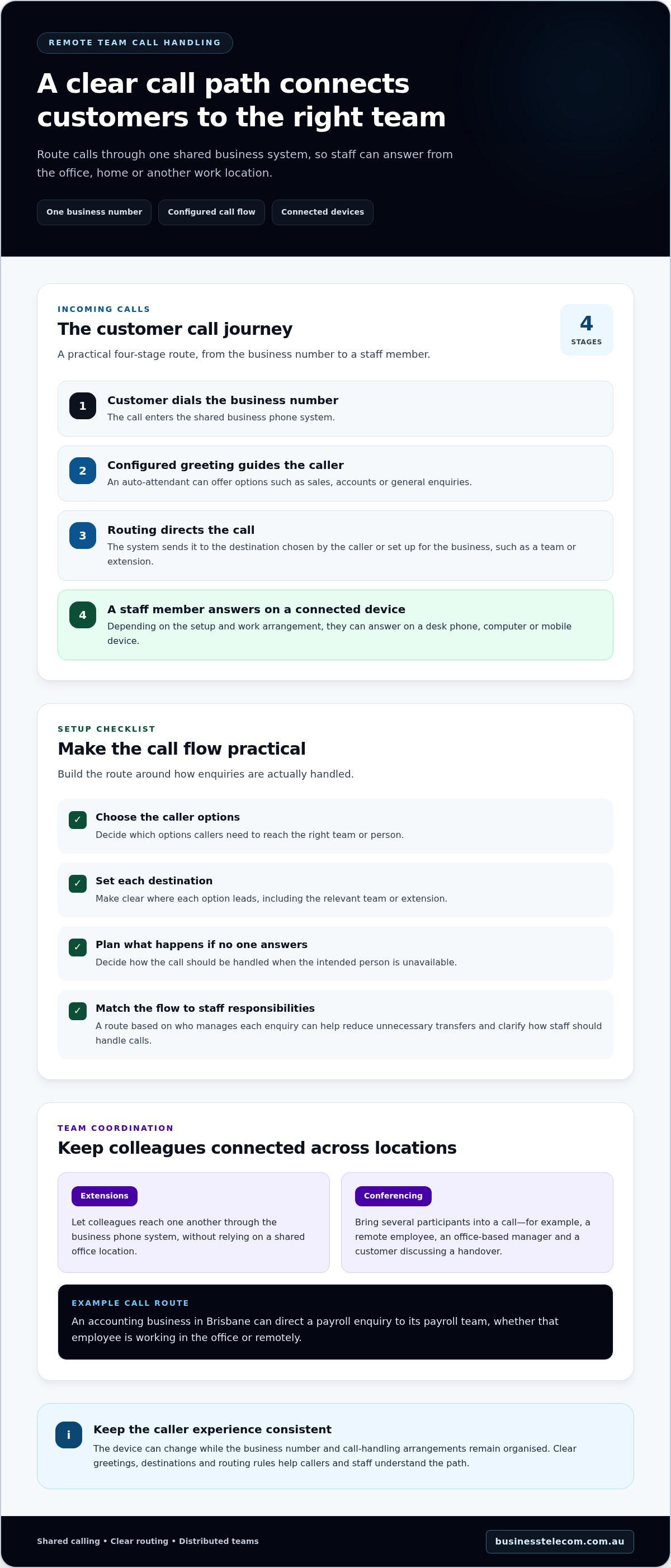
A typical call journey looks like this:
- The customer dials the business number. The call enters the business phone system.
- The caller hears the configured greeting. An auto-attendant may offer options, such as sales, accounts or general enquiries.
- The system directs the call. Routing sends the call to the destination selected by the caller or defined in the business’s setup, such as a team or extension.
- A staff member answers. The relevant employee takes the call on a connected desk phone, computer or mobile device, according to the system setup and their work arrangement.
This sequence gives you a practical starting point for planning customer access. A remote work phone system can use different call paths for different needs, but the greeting, destinations and routing rules should be clear to both callers and staff.
What happens when a customer calls the main business number?
An auto-attendant can greet callers and guide them towards the right destination, while call routing connects them with the relevant person or team. For example, an accounting business in Brisbane might direct a payroll enquiry to its payroll team, whether that employee is working in the office or remotely. The route should reflect how the business actually assigns and handles enquiries.
How do extensions and conferencing support a distributed team?
Extensions let colleagues reach one another through the business phone system, without relying on a shared office location. Conferencing brings several participants into a call, which can help a remote employee, an office-based manager and a customer discuss a handover together. These features support coordination, but the business still needs to decide who is responsible for each enquiry.
Keep the call flow practical. Decide which options callers need, where each option leads, and what should happen if the intended person can’t answer. A flow based on real responsibilities can reduce unnecessary transfers and help staff know how to manage an enquiry. Routing behaviour depends on the system configuration and the business’s requirements.
Remote work also raises questions beyond call routing. Staff seeking information about the tax treatment of eligible work-from-home expenses can refer to the Australian Taxation Office (ATO) guidelines on working from home expenses. For businesses planning how calls should move across locations, cloud phone systems for distributed teams can connect those workflow needs with a business calling setup.
Desk phone, computer or mobile: which setup suits remote staff?
The right calling device depends on each person’s responsibilities, work location and call pattern. You don’t have to choose one endpoint for everyone: a cloud phone system can support desk phones, computers and mobile devices, so staff can use the setup that fits their work.
Use this comparison as a starting point for a remote work phone system Australia setup. Match devices to actual work patterns, not job titles alone.
| Option | Work setting | Call volume | Mobility | Dedicated equipment |
|---|---|---|---|---|
| Desk phone | Fixed home workspace or office desk | Can suit frequent, back-to-back calls | Low; best when the user usually works from one place | Dedicated handset and desk space |
| Computer-based calling | Home office or workplace with a computer | Can suit regular calls alongside computer-based tasks | Moderate; the user can work from different desks | Uses a computer and suitable audio equipment |
| Mobile-device calling | Field work or changing work locations | Can suit staff who handle calls between other duties | High; the device travels with the user | Uses a mobile device rather than a fixed handset |
When does a desk phone make sense for a remote worker?
A dedicated handset may suit someone who spends much of the day making or answering calls from a consistent home workspace. It provides a familiar, fixed calling position and keeps phone calls separate from computer tasks. The trade-off is less flexibility: employees who regularly change locations may prefer a device they can take with them.
When are computer or mobile calls more practical?
Computer calling can suit staff who already work at a laptop or desktop, such as someone moving between customer calls and other office tasks. Mobile calling is a practical option for field-based staff who travel between appointments or sites. For either setup, make sure employees know which device to use for business calls and how it fits the team’s call-handling process.
Consider everyday tasks before assigning devices. Does the role need a stable calling position, frequent movement, or the ability to work on a computer while speaking? Would a dedicated handset help the employee focus, or add equipment they rarely use? The answers may point to a mixed setup, with different endpoints for different roles.
Device choice is only one part of planning. The Australian SME business phone systems guide puts endpoint decisions in the context of wider system selection. For organisations that need support configuring and managing work devices across distributed teams, managed IT providers such as CX IT Services can help coordinate the wider technology environment. Aim for a clear, manageable arrangement: equip each role for its work pattern while keeping business calls within the team’s chosen phone system.
Will a remote work phone system deliver reliable, professional calls?
Remote calls can sound professional when the call flow and each staff member’s connection are planned and tested. A phone system organises how calls reach the team, but it can’t control every factor that affects voice quality at a home or work site. Internet performance, local network conditions and power all matter. Assess where staff work, test calls in realistic conditions, and agree what to do if a connection fails.
What affects remote call quality over Australian internet connections?
Voice calls need a stable connection. Interruptions or congestion can cause broken audio, while latency, the delay as voice travels between callers, can make conversation feel out of sync. NBN connections are part of the connectivity context for many Australian workplaces, but the network name alone doesn’t guarantee call quality at a particular address. Home Wi-Fi, other devices and simultaneous online activity can also affect a call.
Test from the locations where employees regularly work, not just from the office. Make sample calls during typical busy periods and listen for delay, drop-outs or unclear speech. If an issue occurs, record where and when it happened, which device was in use and whether other online activity was underway. Those details are more useful for investigating a problem than assumptions about a location’s connection.
How can a business plan for internet or power interruptions?
For customer-facing roles, document a simple continuity plan before an outage occurs. Identify who communicates a temporary change, how staff will keep one another informed, and which agreed alternative contact route to use. For example, a team might direct urgent enquiries to an agreed business mobile contact while a remote employee’s internet is unavailable. Choose an option that fits the business’s phone arrangements and responsibilities.
Consider power interruptions separately. If a home router or calling device loses power, an employee may be unable to use that setup even if the business phone system is operating. Make the fallback clear: record the responsible person, approved temporary contact details and how the usual call-handling process will resume when service returns. Keep instructions accessible to relevant staff, and review them when roles or work arrangements change.
A remote work phone system australia plan should account for normal working conditions as well as practical exceptions. Preparation can make issues easier to recognise and manage, but it can’t remove outages or guarantee call quality. Business Telecom provides cloud phone systems for remote and office calling, with call routing and extension management to support business call handling. Explore cloud phone systems for your team.
How to plan a remote phone system for your Australian business
Start with how your team works and what callers need. A clear plan helps you match call handling, staff locations and devices before configuring a system. It also gives employees a shared understanding of where calls should go and what to do if the usual arrangement changes.
- Map who calls and why. List your business numbers, common enquiry types and the destinations callers need, such as sales, accounts or a particular staff member.
- Record call patterns. Note typical call volumes, busy periods and operating hours. Identify roles that answer frequently, make outbound calls or need to join customer and team discussions.
- Map staff locations and devices. Record who works in the office, from home, across multiple sites or in the field. Match each role with a desk phone, computer calling or mobile access based on its daily responsibilities.
- Set out call-handling needs. Decide where routing should direct enquiries, whether an auto-attendant would help callers, and which staff need extensions or conferencing for handovers and team discussions.
Use the map to spot gaps. If callers need to reach a team rather than an individual, define that destination and who should answer. If a role moves between locations, include the devices that support its work and how the employee will stay connected to the business call flow.
What requirements should a business map before implementation?
Bring the information together in one working plan: business numbers, call volumes, operating hours, staff roles, work locations and common caller destinations. Add the required routing, auto-attendant, conferencing and extension arrangements. Note which roles need dedicated desk phones, computer calling or mobile access, then use the plan to guide system configuration and staff instructions.
How can Business Telecom support remote and office-based calling?
Business Telecom provides cloud phone systems for Australian businesses, supporting calls through desktop phones, computers and mobile devices. Call routing, auto-attendants and extension management organise how customers reach staff across office and remote locations, while conferencing supports calls involving several participants. Business Telecom also provides dedicated Australian customer support and serves businesses in Sydney, Brisbane and the Gold Coast.
With your requirements mapped, you can discuss a setup shaped around your team’s locations, roles and call flow. Explore a business phone system for remote and office calling.
Make your team’s next phone setup work smarter
Turn your remote-work needs into a clear calling plan. Start with one practical priority, such as making sure new enquiries reach the right team or helping staff manage handovers across locations. Then decide how that priority should shape your call flow, staff responsibilities and continuity arrangements.
A well-planned remote work phone system australia setup should support the way your business works without adding unnecessary complexity. Keep the plan straightforward, involve the people who handle customer calls, and refine it as your team’s work patterns change.
Business Telecom helps Australian businesses plan phone systems for distributed calling. Discuss a business phone system for your team and take a practical next step towards a more connected way of working.
Frequently Asked Questions
What internet connection does a remote work phone system need?
A remote work phone system needs a stable internet connection that can support voice calls alongside other work traffic. There isn’t one connection type or speed that suits every team, because call quality also depends on how many people are online and what they’re doing. Test calls from staff work locations, including home offices in Sydney, Brisbane or the Gold Coast, while typical online tasks are running.
Can remote staff use their personal mobiles for business calls?
Yes, staff may be able to use a mobile device for business calls if it’s set up as an endpoint in the business phone system. This can help separate business calling from personal conversations and contacts. Agree on how staff should make outbound calls, return missed calls and manage business availability on the device. The right arrangement depends on the system configuration and your organisation’s policies.
Can a remote phone system support staff working across different Australian cities?
Yes. A cloud phone system can support staff in different Australian cities when their devices have suitable internet access and are configured for the business system. For example, a business with employees in Sydney and Brisbane can organise calls around roles and customer needs rather than requiring everyone to use one office. Business Telecom serves businesses in Sydney, Brisbane and the Gold Coast.
What happens to business calls if a remote worker’s internet drops out?
If a worker’s internet connection fails, calls may not reach that person’s internet-connected device until the connection returns. The effect on other staff depends on how the business has configured call handling. Decide in advance who should monitor affected calls and which alternative contact route to use. Share the instructions with the team so customers aren’t left relying on one unavailable employee.
Is a remote work phone system suitable for a small business?
It can suit a small business when staff work across locations or need a more coordinated way to manage customer calls. Start by identifying the problem to solve, such as getting calls to the right role when the usual contact is working remotely. If the team works in one place and has simple calling needs, a more involved setup may not add enough value. Base the decision on your actual workflows.
Can a remote phone system handle calls outside business hours?
It can be configured to manage calls according to the business’s operating hours and after-hours process. For example, an auto-attendant could provide a greeting that directs callers to the appropriate next step, based on the system setup. Decide whether callers should hear an information message, select an option or follow another agreed route, and make sure recorded instructions reflect how your business handles enquiries.