
A professional phone setup for a small business in Sydney often uses cloud-based VoIP. Staff can take business calls through desktop or mobile apps, with desk phones as an option. Call quality depends on a reliable, business-grade internet connection. Setting up a cloud business number can take from a few hours to a couple of days, depending on system complexity and whether you’re porting an existing number.
A professional phone setup for a small business in Sydney involves more than choosing a phone system. Clear call routing, suitable devices and staff who know how to manage calls help customers reach the right person and keep daily work moving.
This guide explains how to plan a professional phone setup for a small business in Sydney, compare cloud and office-based options, and prepare for number porting. You’ll also learn how to set up phones and train your team, so your decisions reflect current work patterns and future business needs.
Key Takeaways
- Match a cloud VoIP system to your team’s size, working patterns and need for desk phones or app-based calling.
- Understand how hosted PBX and virtual phone systems handle calls, users and integrations before choosing a setup.
- Plan number porting and call rerouting together to help keep incoming calls moving during a transition or internet outage.
- Choose a local, toll-free or mobile business number based on how customers contact you and the impression you want to create.
- Set clear call-handling rules and train staff on the everyday tasks that keep customer communication consistent.
What is the best phone system for a small business in Australia?
For many small businesses, cloud-based VoIP offers a flexible phone system without on-site server infrastructure. The right setup depends on team size, work locations, call-routing needs and internet reliability. Planning a professional phone setup for a small business in Sydney starts with these everyday requirements.
Cloud VoIP for Sydney businesses
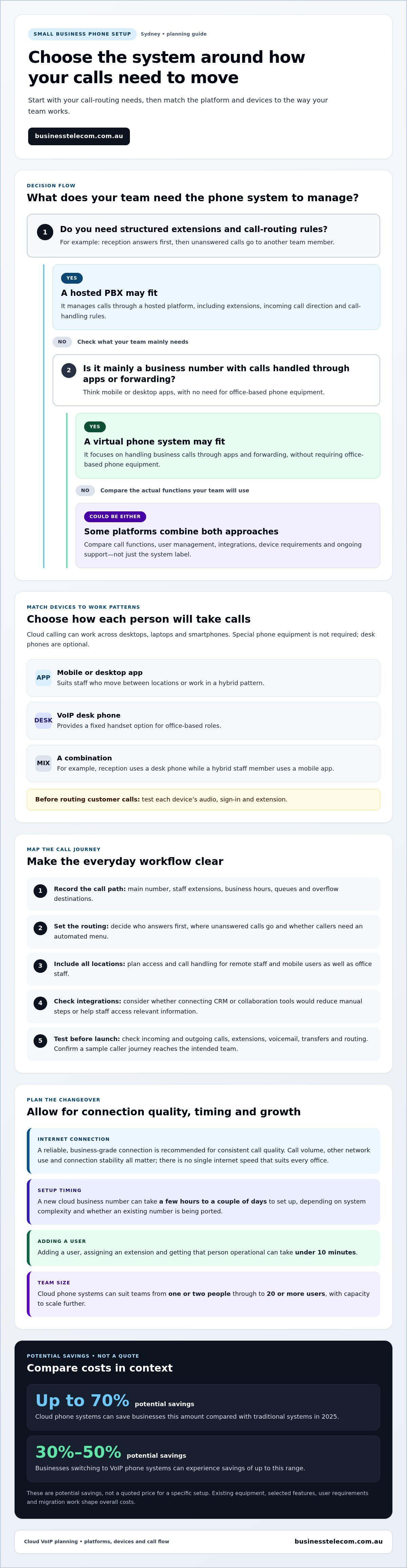
Cloud VoIP carries business calls over the internet rather than relying on a traditional phone network and on-site server. A reliable, business-grade internet connection is recommended for consistent call quality. Before choosing a system, map how calls should reach staff: who answers first, where unanswered calls go and whether callers need an automated menu.
Cloud phone systems can suit teams from one or two people through to 20 or more users, with capacity to scale further. For example, a small Sydney office can start with a shared main number and add individual extensions as its team grows.
Cloud setup for small and hybrid businesses
A cloud phone system works across desktops, laptops and smartphones, making it practical for staff who split their time between the office and other locations. Team members can use mobile or desktop apps without special phone equipment. Decide which staff need business calls on each device, then set their availability and call routing around their working patterns.
Adding a user, assigning an extension and getting that person operational can take under 10 minutes. This helps a small team adjust its phone setup as roles change or new staff join.
Hosted PBX for Australian small businesses
A hosted PBX manages business calls through a cloud service instead of equipment installed at the office. It can organise extensions, direct incoming calls and apply call-handling rules. Set routing to match your workflow: for example, send callers to reception first, then redirect unanswered calls to a team member.
Cloud phone services can also integrate with CRM and collaboration tools. Consider which systems staff use during customer calls and whether connecting them would reduce manual steps or help staff access relevant information.
Phone apps and VoIP desk phones
Choose app-based calling, VoIP-enabled desk phones or a combination of both. Apps suit staff who move between locations, while desk phones provide a fixed handset for office-based roles. A cloud system doesn’t require special equipment, so desk phones are optional, not a prerequisite.
List each employee’s calling needs before assigning devices. For example, reception may use a desk phone, while a hybrid staff member uses a mobile app. Test each device’s audio, sign-in and extension before directing customer calls through it.
For a professional phone setup for a small business in Sydney, plan routing, staff access and device setup together. A new cloud business number can take from a few hours to a couple of days to set up, depending on complexity and whether an existing number is being ported. Configure the system around how your team handles calls.
What is the difference between a hosted PBX and a virtual phone system?
A hosted PBX provides central call management through a hosted platform, including extensions and call-routing rules. A virtual phone system focuses on handling business calls through apps and forwarding, without requiring office-based phone equipment.
For reliable VoIP calls, use a business-grade internet connection and network equipment that can handle voice traffic consistently. There’s no single internet speed that suits every office: call volume, other network use and connection stability all matter.
Both options can support business phone systems, but the distinction helps clarify what your team needs. A hosted PBX suits businesses that want structured extensions and call routing. A virtual system can suit teams that mainly need a business number and calls through mobile or desktop apps. Some platforms combine both approaches, so compare the functions rather than relying on the label alone.
Plan the system around real workflows
Start consultation and system mapping with the calls your team handles. Record the main number, staff extensions, business hours, call queues and overflow destinations. For example, a caller might reach reception first, then a sales queue if the receptionist is busy. This map gives the setup a clear operating plan.
Next, identify the tools staff use during calls. CRM and collaboration integrations can bring customer records, voice and messages closer together. Choose integrations that support existing work rather than adding advanced features without a clear purpose. Include remote staff and mobile users in the plan so call handling stays consistent across locations.
Compare the full operating picture
Compare systems by their included call functions, user management, integrations, device requirements and ongoing support. Find out how routine changes, such as adding an extension or updating routing, are handled. These practical details matter more than a long feature list when your team needs straightforward daily management.
Cloud phone systems can save businesses up to 70% compared with traditional systems in 2025. Businesses switching to VoIP phone systems can experience savings of up to 30% to 50%. These are potential savings, not a quoted price for your setup. The business’s existing equipment, selected features, user requirements and migration work shape overall costs.
Test before the full launch
Before deployment, test incoming and outgoing calls, extensions, voicemail, call transfers and routing. Use a sample caller journey, such as pressing 1 for Sales, and confirm the call reaches the intended team. Test mobile and desktop access separately, then correct any unclear greetings or incorrect destinations.
After launch, ongoing support should cover routine system changes and fault resolution. A useful handover explains how staff update greetings, manage messages and report call issues. Documenting these steps helps the team use the system consistently as roles and workflows change.
Number porting and internet outage call rerouting
Australian phone services use provider porting processes, and businesses can port a 1300 number to a new provider in most cases. Caller ID and call recording settings should reflect your business’s service terms and privacy requirements. If recording is enabled, include a clear notice in the greeting and decide who can access recordings.
There’s no fixed number of business lines or handsets for every small business. Start with how many people handle calls at the same time, then consider peak periods, shared reception duties and whether staff use mobile apps. A team with one receptionist and several mobile workers may need a different setup from an office where several staff answer calls together.
Before porting, list every number that customers use, including the main number and any 1300 number. Match each number to its current purpose, such as sales, bookings or a direct staff line. Then map where calls should go after the transfer, so the new routing preserves the customer journey rather than simply forwarding every call to reception.
Use a staged porting plan. Confirm the numbers and account details involved, schedule the transfer with your provider, and test incoming calls once the number moves. Check caller ID, outbound calls and voicemail too. A test from a mobile phone can show whether customers hear the correct greeting and reach the intended team.
Call routing can send calls to a person, queue or alternate number. For example, route calls to reception first, then send unanswered calls to a sales queue or voicemail. Voicemail-to-email can deliver messages to a nominated inbox, while call recording can support internal review when used appropriately. Decide who monitors each message inbox and how quickly staff should respond.
Give each user an extension and define their place in the call flow. A new team member might receive a direct extension, while the main number still rings through reception. An automated attendant can present a short menu, such as “Press 1 for Sales”, and direct callers without a staff member manually transferring every call.
Plan for an internet outage by setting an alternate call destination, such as a mobile number, where the system supports that routing. Test the fallback before relying on it, including what callers hear and where unanswered calls go. This gives staff a clear procedure if office internet drops and business calls need another route.
Keep the setup scalable by documenting numbers, extensions, greetings and fallback destinations in one call-flow record. Review it whenever staff roles change or a new service line is added. An up-to-date record makes changes easier to manage and helps prevent calls reaching an old extension or unattended voicemail box.
How Can I Improve Office Phone Setup For Small Businesses?
Choose numbers and devices based on how customers contact you and where staff take calls. A clear plan can make office, mobile and remote communication feel seamless without adding unnecessary infrastructure.
Choosing a business phone number
A local number can give customers a recognisable point of contact for a Sydney business. Australian toll-free business numbers can begin with 1300 or 1800. An 1800 number suits businesses that want to offer customers completely free inbound calls. Compare these choices by customer audience, call purpose and how you want the business to appear.
A mobile business number can suit a sole operator or staff member who handles calls while travelling. Keep customer-facing calls connected to the business rather than relying on a personal number. For example, direct calls to a main number first, then route them to the staff member responsible for that enquiry.
Mobile apps, softphones and desk phones
Softphones paired with quality headsets offer a flexible option for remote or hybrid teams. Staff can make and receive business calls through a desktop or mobile app rather than being tied to a handset at a desk. This works well when employees move between workspaces or share office desks.
Office-based staff who prefer a physical handset can use modern SIP desk phones with HD audio. Decide which roles need a fixed phone, then match devices to daily tasks. Reception may benefit from a desk phone, while a staff member working across locations may prefer an app and headset.
Mobile compatibility and global reach
Check how the phone platform handles business calls across desktop and smartphone apps. A cloud-based business phone service can support remote access to business calls from anywhere, helping staff stay connected outside the office. Before rollout, test sign-in, audio and call handling on each device employees will use.
For staff working across locations or time zones, set clear availability and routing rules. For example, direct calls to the on-duty team during business hours, then use a recorded greeting or voicemail outside those hours. Keep the greeting current when opening hours or responsibilities change.
Support for remote and mobile work
Build remote access into the call flow from the start. Assign each employee an extension, decide which calls should ring their mobile app, and set a destination for unanswered calls. This keeps customer enquiries connected to the right role, whether staff are in the office or working remotely.
Test the setup with a real call from outside the business. Check whether caller ID appears correctly, transfers reach the intended colleague and voicemail messages go to the right place. Review the call flow whenever a team member changes roles so the phone system continues to reflect how the business works.
Office phone setup and staff training
A reliable office phone setup involves more than installing hardware. Map where each device sits, who answers the main number and what happens when staff are unavailable. For example, reception can answer first, then transfer calls to sales or direct callers to voicemail. Traditional phone system installations take days, so plan around staff schedules and business operations.
Before installation, list each desk phone, desktop app and mobile user. Match devices to roles: reception may need a handset with easy call transfers, while a hybrid employee may use a desktop softphone. Check the office network connection and test audio at each workstation. This device-by-device review helps identify issues before customers rely on the new setup.
Staff training should cover the calls employees handle every day. Show each person how to answer, transfer, put callers on hold and retrieve voicemail. Then practise a real example, such as transferring a customer from reception to accounts. Include instructions for using the desktop app and any desk phone so staff can handle calls consistently across devices.
Give the team a simple call-handling guide with the current greeting, extension list and escalation path. For instance, the guide can explain where to transfer an urgent customer enquiry when the usual contact is away. Keep it accessible on staff desktops and update it when roles, extensions or routing change.
Test the full call flow before launch. Call the main number from an external mobile, listen to the greeting, select a menu option and confirm the call reaches the right person. Check voicemail delivery and any CRM integration used during customer conversations. Fix incorrect greetings or destinations before directing regular business calls through the system.
- Practise call transfers between reception and another team member.
- Confirm every staff member can access their extension and voicemail.
- Test the greeting and routing from an external phone.
- Show staff how to report device or audio problems.
After launch, review call answer times and abandoned calls weekly. If customers wait too long, adjust ringing rules, queue handling or the greeting. For example, a clearer menu may direct callers to the right team sooner. Ask staff to report recurring issues, such as missed transfers, then use those examples to refine the setup and training.
For an office phone setup that includes hardware, call handling and staff readiness, plan your business phone setup around the way your team works.
Business Telecom: Business Phone System
Business Telecom helps small businesses turn their call-flow plans into practical phone setups. Its Business Phone System and Office Phone Systems support organisations reviewing how staff answer, transfer and manage customer calls. Consider this option when your current arrangement leads to missed calls, unclear routing or difficulty supporting office and mobile staff.
Business Telecom also offers Business Land Lines and SMALL BUSINESS PHONE SYSTEMS. These options can suit businesses that need an office-based setup or a system shaped around a smaller team. The right configuration depends on how calls arrive, which staff handle them and what devices they use. An outline of your numbers, users and call-handling needs is a useful starting point.
Contact Business Telecom to discuss a phone setup for your business.
Set your next phone system up for the way you work
A phone system should support the business you’re building, not just the calls you handle today. Before making changes, write down what staff need from the system now and what may change as your team, roles or customer contact channels evolve. That brief gives your setup a practical direction and keeps decisions focused on everyday work.
For a professional phone setup for a small business in Sydney, Business Telecom offers Business Phone System, Business Land Lines and Office Phone Systems. These options give businesses a starting point for planning a new arrangement or reviewing an existing office setup.
Share your priorities, such as how customers reach your team and how staff need to handle calls. A clear discussion can help connect those requirements to a suitable setup. Contact Business Telecom to discuss your phone setup and take the next step with a plan shaped around your business.
Frequently Asked Questions
Do I need a 1300 number or can I use a local number?
You can use a local number; a 1300 number is an option, not a requirement. A local number can suit a business that wants a Sydney presence, while 1300 numbers can provide a consistent contact point across different areas. Consider where your customers are, how they usually contact you and whether the number will appear on signage, invoices or advertising. Keep the same number across customer touchpoints for easier recognition.
Is VoIP reliable enough for a small business in Australia?
VoIP can support dependable business calling when the internet connection and office network handle voice traffic consistently. Assess connection stability, the number of simultaneous calls and other network demands, such as video meetings or large file transfers. A business-grade internet connection is recommended for consistent call quality. Test calls from the devices staff will use, including desktop apps, mobile phones and desk handsets, before relying on the system for customer enquiries.
What Should I Do Now?
Start by documenting how your business handles calls today. Note the numbers customers use, who answers each call type, where calls should go when staff are busy and which employees work remotely. Then list the changes you need, such as a new greeting or clearer routing for enquiries. This requirements list gives a phone-system discussion a practical focus and helps you compare options against real working needs.
What professional phone systems are suitable for small businesses in Sydney?
Cloud VoIP, hosted PBX and business landline systems can all suit small businesses, depending on their call workflows and equipment preferences. A cloud-based setup can work for teams using mobile and desktop apps, while an office system can include desk phones and extensions. Business Telecom offers Business Phone System, Office Phone Systems and Business Land Lines. Match the system to your staff’s devices, customer call patterns and preferred way to manage calls.
How much does small business phone setup cost in Sydney, including equipment, installation and monthly plans?
The price depends on the setup and is provided after a quote request. Cost factors include the number of users, selected equipment, installation requirements, call features and whether existing numbers need porting. App-based calling and desk-phone setups have different equipment needs, while call routing and integrations can affect configuration work. Prepare your user list, device preferences and call-flow requirements to make your quote request more specific.
What are the differences between VoIP, cloud PBX and traditional business phone systems?
VoIP describes calls carried over an internet connection. A cloud PBX uses hosted software to manage business calls, extensions and routing, often using VoIP to connect calls. Traditional business phone systems rely on physical phone infrastructure at the premises. For example, a business that wants staff to answer through desktop or mobile apps may favour cloud calling, while an office with established fixed-phone needs may consider a traditional system.
Which Australian providers offer business phone systems and support in Sydney?
Business Telecom offers business phone systems in Sydney, Brisbane and the Gold Coast, including cloud phone systems, VoIP options, office systems and business landlines. For a Sydney business, outline how calls should reach staff, which devices they use and whether existing numbers matter. This gives Business Telecom a clear basis for discussing a suitable system and how it can support day-to-day call handling.
What steps are involved in setting up business phones, including porting existing numbers?
Begin by listing your current numbers, users, devices and call destinations. Map the new extensions, greetings and routing, then configure the system and test incoming and outgoing calls. If you’re porting a number, identify it and its current use, arrange the transfer as part of the changeover, and test it once moved. Also check voicemail, caller ID and any alternate destinations staff rely on for customer calls.