
A reliable phone system should fit how and where your team works. Gold Coast small business communication solutions can include internet-based VoIP and cloud phone systems for calls, voicemail and call routing, keeping staff connected in the office, at home or on the move. Cloud systems can also scale up or down as your business needs change.
Clear, dependable communication need not add complexity to daily operations. The right setup helps staff handle calls consistently and keep business conversations moving across different work locations.
This guide explains what cloud phone systems can include, how remote calling works, and what to consider when choosing a solution for your team. It also outlines how an Australian business phone provider can help put a practical system in place.
Key Takeaways
- Match a hosted cloud phone system to your team’s call-handling needs, work locations and plans for change.
- Understand how VoIP carries calls over the internet and can reduce reliance on traditional phone lines.
- Plan call routing around who answers, where calls should go and how callers are handled when staff are unavailable.
- Consider how remote calling and communication apps can help staff stay connected across locations.
- Compare solutions by the practical features, management effort and flexibility your business needs.
Hosted cloud phone systems for small and medium businesses
A hosted cloud phone system uses an internet connection rather than relying entirely on equipment at your premises. For a Gold Coast team, the right setup depends on call volumes, work locations, connectivity and how calls should reach staff.
Cloud-hosted PBX and VoIP
A cloud-hosted PBX manages business calls through an online platform, while VoIP carries voice calls over the internet. Systems can include voicemail, call routing and integrations with business applications. Cloud systems can scale up or down as your needs change, and provider-managed maintenance reduces the upkeep required from a small business.
Business connectivity plan comparisons
NBN and fibre use fixed connections, while 5G connects through a mobile network; business broadband plans vary by provider and connection type. Compare the service available at your Gold Coast premises, expected call and data use, upload capacity, service support and what happens if the connection drops. For example, a clinic relying on internet calls throughout the day should consider a backup connection and test call quality from its actual workspaces.
VoIP calls depend on a working internet connection. Compare plans against the number of simultaneous calls your team needs and its other online activity. Ask how the setup behaves during an outage and include that response in your continuity plan.
Business call and customer data requirements
Australian businesses should treat telemarketing calls, SMS marketing, call recording and customer information as separate compliance areas. Set procedures for identifying marketing messages, handling opt-outs, notifying callers about recording and limiting access to stored customer data. Requirements can depend on the activity and jurisdiction, so document the purpose of each practice and how staff should follow it.
For example, prepare a call-recording notice for staff to use consistently, and define who can access recordings and when they are deleted. Include SMS consent and opt-out handling in the same operational process as campaign approvals.
Phone and messaging system setup
Start by mapping the team’s call paths: who answers the main number, where enquiries are transferred and what callers hear when staff are unavailable. Then match each role to a desk phone, mobile or computer-based calling method. A small sales team might need a shared inbound number and clear transfer routes, while staff in different locations need access to calls away from the office.
Choose a phone system around these workflows, then test it before relying on it. Check inbound and outbound calls, voicemail, call routing and any messaging tools included in the platform. Train staff on transfers and voicemail, assign an administrator to manage user access, and review the call flow when responsibilities change.
VoIP services
VoIP carries voice calls over the internet, offering another way to manage calls without relying solely on traditional phone lines. For a Gold Coast business, consider how the service fits call patterns, internet connectivity and existing phone equipment. A clear requirements list helps distinguish essential calling functions from extras the team may not use.
Start with the daily call flow. A trades business may need staff to answer calls from the office or while out on jobs, while a professional practice may prioritise a shared main number and transfers between reception and specialists. Record who makes and receives calls, which devices they use and what should happen when someone is unavailable. This gives the system design a practical starting point.
SIP Trunking services
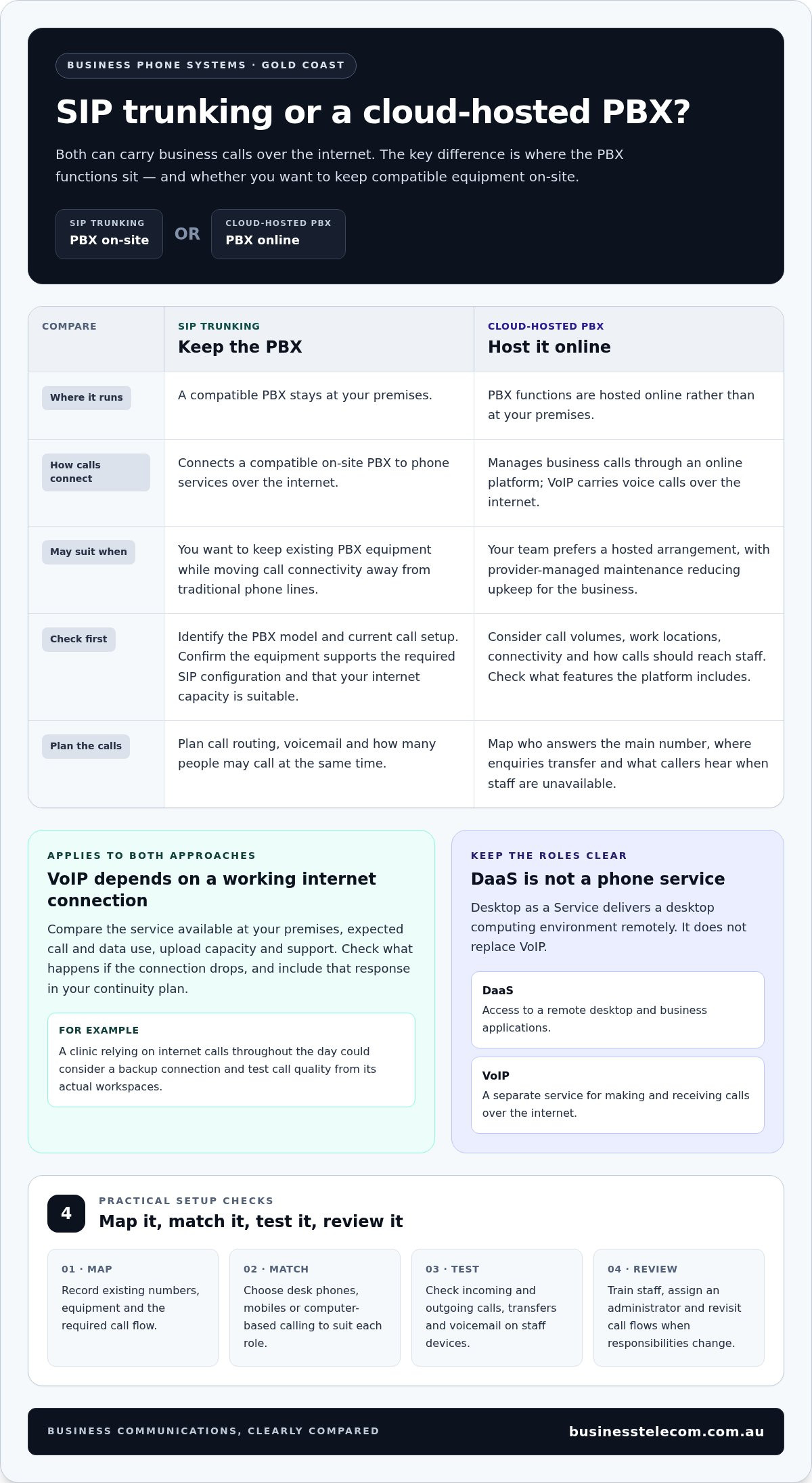
SIP trunking connects a compatible on-site PBX to phone services over the internet. It can suit a business that wants to keep existing PBX equipment while moving call connectivity away from traditional phone lines. Before choosing this approach, identify the PBX model, current call setup and internet capacity. Then establish whether the equipment supports the required SIP configuration.
A cloud-hosted phone system works differently: its PBX functions are hosted online rather than at the business premises. Choose based on whether retaining on-site equipment is useful or the team prefers a hosted arrangement. In either case, plan for call routing, voicemail and the number of people who may call at the same time.
Desktop as a Service and calling
Desktop as a Service, or DaaS, delivers a desktop computing environment remotely. It is not a phone service or a replacement for VoIP. A business might use DaaS to give staff access to a consistent work desktop, then use a separate VoIP service for calls. Keep these functions distinct when planning systems, permissions and support responsibilities.
For example, a staff member working remotely may access business applications through DaaS and make calls through a VoIP phone system. Consider how each service relies on internet access, where staff sign in and who manages user access. Clear responsibilities make it easier to diagnose whether a problem affects calling, desktop access or both.
Before adopting VoIP or SIP trunking, map existing numbers and equipment, then document the required call flow. Test incoming and outgoing calls, transfers and voicemail on the devices staff usually use. Plan how the team will communicate during an internet interruption, because VoIP calls rely on connectivity. A considered setup supports smoother daily operations and clearer troubleshooting.
For a practical next step, compare your requirements with these business phone system options, focusing on the calling setup your team needs.
Call routing and inbound call management
Call routing determines where an incoming call goes and what happens if the first person cannot answer. A Gold Coast accounting practice, for example, could direct new client enquiries to reception and existing client calls to their assigned adviser. Mapping these paths helps reduce transfers, missed calls and caller uncertainty.
List the reasons customers call, then match each to a person or team. A plumbing business might route urgent repair enquiries to the service desk and quote requests to a sales coordinator. Keep menu choices short and use familiar wording so callers can find the right option without listening through a long sequence.
Common routing patterns serve different needs. A ring group alerts several staff members, while a queue holds callers until someone is available. A timed route can send calls to a different team outside normal operating hours. Choose a pattern based on staff coverage and call volume, not the number of available features.
- Ring group: Use for a shared reception line where several people can answer.
- Queue: Use when calls need to wait for the next available staff member.
- Menu: Direct callers to a team, such as bookings or accounts.
- Fallback: Send unanswered calls to voicemail or another nominated team.
Set a clear fallback for every route. If the reception group cannot answer, for example, the system might send the caller to a staffed queue or a recorded message with next steps. Keep messages accurate when opening hours or team responsibilities change. Specific instructions are more useful than a generic greeting.
Advanced call management can include voicemail, transfers and reporting on call activity. Use reports to spot patterns, such as a recurring queue at lunchtime or calls reaching the wrong department. Treat these as prompts to adjust staff coverage or routing. Reports show activity, but managers still need to interpret what customers require.
Test the call flow from an external telephone before launch. Try each menu option, make a transfer, leave a voicemail and test the fallback when nobody answers. Repeat the checks after changes to numbers, roles or schedules. A simple test record can note the route, expected result and any issue to fix.
Keep the design easy to maintain. Assign an administrator, record who owns each route and review the setup when the team changes. A new service line may need its own menu option, for example, while a departed staff member’s extension should no longer receive calls. Clear ownership helps direct incoming calls to the right place.
Mobile and remote working
Remote work changes where staff need to answer business calls. A Gold Coast team might include office-based administrators, mobile technicians and employees working from home. A cloud phone system can keep staff connected across these locations. First decide which roles need calls on the move, access to shared numbers or desk phones.
Mobile calling should fit the job, not create another channel to monitor. A technician visiting a customer may need to answer calls routed from the office, while a manager may need to transfer enquiries to the right team member. Map these tasks before choosing devices or software. Decide, too, how staff identify business calls and record follow-up actions consistently.
Unified communications apps can bring messaging and video conferencing together in one platform. This can help remote colleagues move from a written update to a video discussion without losing the thread. A project team, for instance, might use messaging for routine coordination and video conferencing for a detailed client handover. Set clear channel expectations so urgent requests do not disappear among general updates.
- List each role: Note who works in the office, remotely or on the road.
- Match the device: Choose a desk phone, mobile or computer-based option for each task.
- Set call handling: Decide how calls reach staff and where unanswered calls go.
- Agree on messaging: Define which channel staff use for urgent issues, client updates and team discussion.
Before rollout, test the working pattern with a small group. Ask an office-based colleague to transfer a call to a remote team member, then check that the recipient can answer and return it. Test messaging and video conferencing separately. These checks help identify whether a problem relates to a device, network connection or app configuration.
Set straightforward access and handover practices. Give each worker an individual account, remove access when a role changes and show staff how to sign in on approved devices. Reassign a departing employee’s calls rather than leaving them attached to an unused account. Keep a short internal guide to call transfers, voicemail and preferred messaging channels.
Review the setup when work patterns change. A business adding remote staff may need different call routes, while a mobile team may need clearer rules for returning missed calls. Cloud phone systems can scale up or down from one month to the next, making them adaptable as team requirements shift. The key is to align phone and messaging arrangements with actual work practices.
Australian business communications provider
An Australian provider can help a Gold Coast business match phone services to its work patterns, team structure and connectivity. Do not compare options on appearance alone. Map the required functions first, then assess how each system supports them.
Which Gold Coast providers offer business phone systems, VoIP and unified communications? Providers serving Gold Coast businesses offer business phone and VoIP options, while unified communications features vary by platform. Compare systems against specific needs, such as desk-phone calling, remote access, messaging or video conferencing.
Evaluate the system’s core components separately. A business phone system manages calls and features such as voicemail and routing; VoIP carries calls over the internet. Unified communications can bring messaging and video conferencing together. A team handling customer enquiries may need reliable call transfers, for example, while a distributed project team may value shared messaging.
Use a practical comparison process:
- List requirements: Record call flows, staff locations, devices and essential features.
- Map dependencies: Identify the internet connection and existing phone equipment the setup relies on.
- Compare management: Assess how users, numbers, call routes and access are administered.
- Test common tasks: Check a transfer, voicemail and remote call using the devices staff will operate.
Ask how the proposed system handles routine changes. A growing team may need additional users, while a business changing its opening hours may need revised call routing. Cloud phone systems can scale up or down as team requirements change. Clarify who manages system maintenance and how staff access support information.
Are there Queensland or Australian grants or support programs for small businesses adopting digital communication technology? Programs have different purposes and eligibility criteria, so assess their guidelines against the proposed project and business profile. Treat phone or communications expenditure as eligible only where the relevant guidelines expressly allow it.
Keep the decision tied to the work the system must support. A Gold Coast retailer may prioritise inbound call handling, while a consultancy with remote staff may focus on calling across locations. Document the required functions and test them before rollout. That gives the business a clear basis for comparing Australian providers and selecting a setup that fits its operating needs.
Australian telecommunications providers serving the Gold Coast offer business phone systems and VoIP. Unified communications capabilities depend on the platform, so compare them against the features your team needs.
Business Telecom: Business Phone System
Business Telecom provides business phone systems for small businesses that need a practical way to manage everyday calls. Its business landlines and office phone systems can suit teams relying on established office calling, while small business phone systems can be tailored to a team’s operating needs.
Consider Business Telecom when you’re ready to move from comparing options to defining the phone setup your business needs. Bring an outline of your call flow, staff roles, work locations and current equipment. These details help match your requirements to an appropriate business phone system.
For a practical next step, contact Business Telecom to discuss your business phone system requirements.
Turn your communication priorities into a clear plan
Turn your team’s priorities into a practical decision brief. Note who handles calls, which customer interactions need a clear path and what may change as the business grows. This gives your planning a concrete starting point and keeps the setup focused on daily work.
For businesses considering Gold Coast small business communication solutions, Business Telecom offers business phone systems, business landlines and office phone systems. These options provide a basis for discussing how your team handles calls and what setup best aligns with its operations.
Before taking action, write down the call-handling tasks that matter most and the equipment your team currently uses. A concise outline makes it easier to discuss your needs and identify a suitable direction without unnecessary complexity.
Discuss your phone system requirements with Business Telecom and take the next step towards a setup that supports your team’s work.
Frequently Asked Questions
What business communication solutions are available for small businesses on the Gold Coast?
Gold Coast small businesses can choose hosted cloud phone systems, VoIP, business landlines and office phone systems. The right fit depends on whether calls need to stay tied to a premises or follow staff across locations, and whether existing equipment remains useful. A professional office may prioritise reception handsets, while a mobile service team may need business calling on devices used away from the office. Define these needs before comparing options.
Which communication solutions suit Gold Coast businesses with remote or mobile staff?
Cloud-based VoIP that supports calling on desk phones, computers and mobile devices can suit teams working across locations. Consider how staff will handle calls while moving between the office and a job site, and how colleagues can take over customer follow-up. A field worker could handle an enquiry on a mobile device, then pass the details to an office colleague. Set clear device access and handover practices.
What cybersecurity and outage risks affect cloud-based business communications, and how can businesses reduce them?
Cloud communications can be disrupted by internet outages or unauthorised access to staff accounts. Reduce account risks by giving each worker an individual login, using strong, unique passwords and limiting administrator access to those who need it. For continuity, document how staff should handle urgent calls during an internet interruption and keep the process accessible offline. Review access when roles change and practise the fallback with the team.
What Australian rules apply to business calls, SMS marketing, call recording, and customer data?
Treat telemarketing calls, SMS marketing, call recording and customer information as separate compliance areas. Set procedures for identifying marketing messages, handling opt-outs, notifying callers about recording and limiting access to stored customer data. Requirements can depend on the activity and jurisdiction.
Which Gold Coast providers offer business phone systems, VoIP, and unified communications?
Business Telecom provides business phone systems.