
The right office phone system isn’t necessarily the one with the most handsets. Searching for “office phone systems australia” often comes down to a practical question: which setup will handle your calls reliably and fit the way your team works?
Cost, phones and familiar features matter, but your system also needs to support your call flows and staff locations. A change shouldn’t leave callers unsure where to go or make everyday tasks harder. Start by looking at how calls are answered, transferred and managed across your team.
This guide compares cloud, on-site and landline phone systems, and explains how their features and hardware fit different work patterns. It covers practical points to consider before changing systems, including call routing, auto-attendants, conferencing and extensions for office-based and remote staff using desk phones, computers and mobile devices. Use these comparisons to identify a solution for your Australian business and plan the next steps.
Key Takeaways
- Compare cloud phone systems, on-site PBX arrangements and business landlines by how they handle infrastructure, remote access and call management.
- Understand how VoIP carries calls over an internet connection and connects callers with the right people and devices.
- Use your incoming-call types, user groups, operating hours and escalation needs to guide your choice of features.
- Assess office phone systems australia against your team’s call workflows, not just the number of handsets.
- Plan a smoother transition by accounting for existing numbers, call flows, user setup and business continuity.
Office phone systems: what Australian businesses need
An office phone system brings together the voice service, user extensions, devices and call-management functions a business uses to handle calls. It can connect desk phones, computers and mobile devices, giving staff ways to make and receive calls that suit their roles and work locations. A handset is only one endpoint. The system behind it determines how calls reach people and how the team manages them.
For businesses comparing office phone systems australia, start with the call workflow rather than the handset count. Ask who answers incoming calls, how callers reach the right team, where staff work and what should happen if the usual contact is unavailable. A business phone system is organised around shared business calls, extensions and call handling, unlike a residential phone service. For a broader technical overview of a business telephone system, including PBX arrangements, see Wikipedia.
What does an office phone system include?
The service carries calls, extensions identify users or teams, and devices let people answer. Call-management features connect these parts. An auto-attendant can greet callers and offer options, while call routing directs them to a person, group or destination. For example, callers selecting sales can be directed to the sales team instead of relying on one staff member to transfer every enquiry.
Extensions also make internal calls straightforward, while conferencing lets staff speak with colleagues or customers in a shared call. Together, these functions provide a consistent way to manage routine calls, whether employees use desk phones in a multi-desk office or computers and mobiles while working remotely.
Which Australian businesses benefit from a structured phone system?
A structured system is useful wherever calls are shared or need to reach the right person reliably. Customer-facing teams can direct enquiries by department, while a multi-desk office can use extensions to connect staff without requiring a separate published number for every person. Businesses with several locations can organise calls around teams and responsibilities, so callers don’t have to guess who to contact.
Consistent handling matters when several employees answer the same incoming lines. Clear routing can reduce unnecessary transfers, and defined extensions make it easier for colleagues to reach one another. The right level of call management depends on the work. A small team may need straightforward call distribution, while a larger or distributed team may benefit from more structured routing and access across different devices.
Business Telecom designs and installs office phone systems for businesses in Sydney, Brisbane and the Gold Coast. Systems can support office and remote staff using desktop phones, computers and mobile devices, with Australian-based technical support. Base your decision on how calls move through the business, the continuity your team needs and the level of control you want over call handling.
How an Australian office phone system connects calls, users and devices
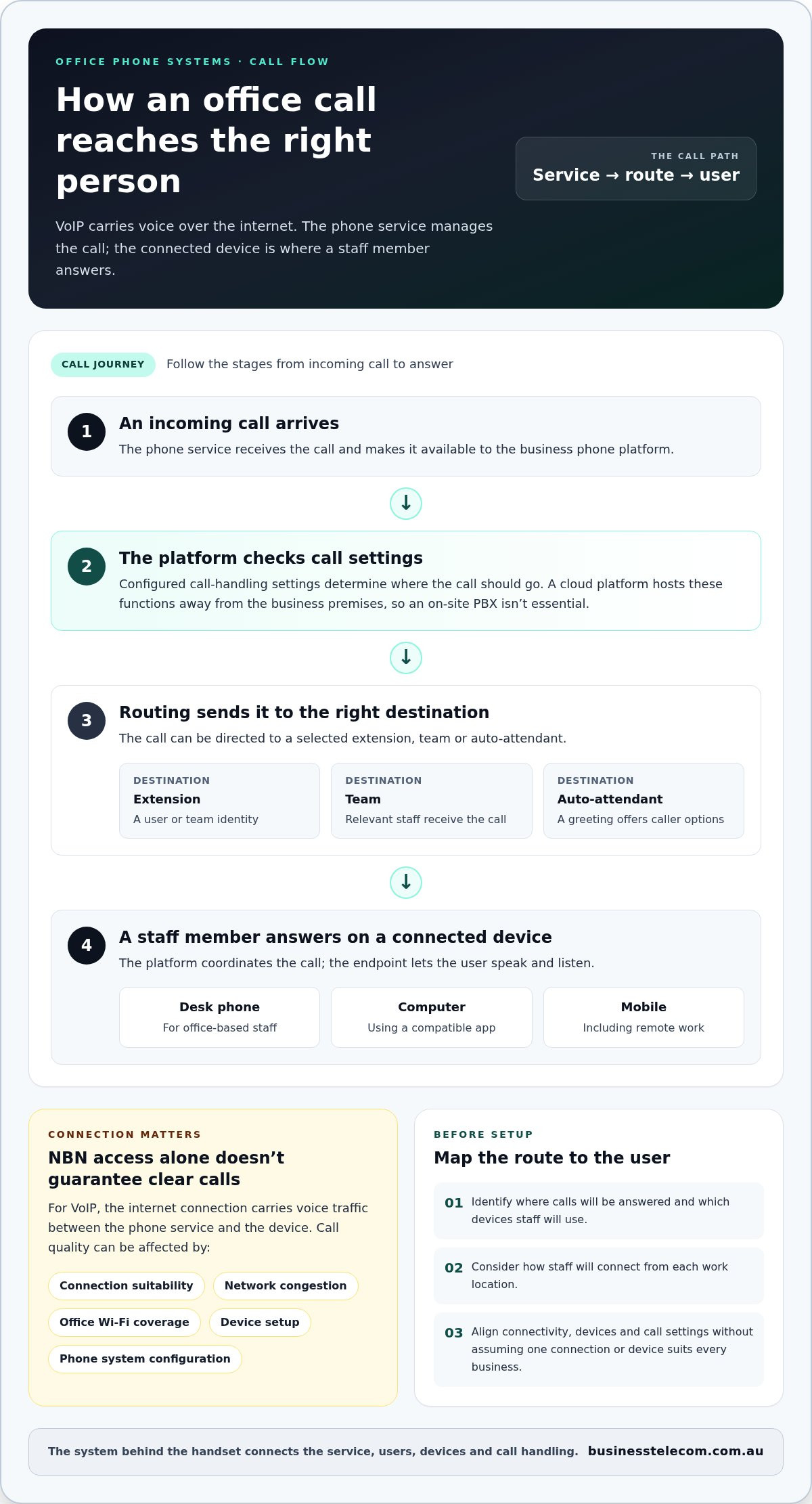
An office call needs both a voice service and a route to the person answering. In an internet-based system, an incoming call reaches the phone platform, which applies the business’s call-handling settings and directs it to the right user or group. That person answers on a desk phone, computer or mobile device. The connection between these parts is what makes the system more than a collection of handsets.
VoIP, or Voice over Internet Protocol, carries voice calls over an internet connection. When comparing office phone systems australia, distinguish the phone service from the device: the service manages numbers, users and call functions, while a handset or app is the endpoint used to speak and listen.
How do VoIP and cloud phone systems handle office calls?
In a typical call path, the phone service receives an incoming call, checks the configured routing and sends it to a selected extension, team or auto-attendant. For example, a caller can choose a department from a menu and have the call ring the relevant staff member or group. The settings determine where calls go; the connected device lets the user answer.
A cloud phone platform hosts call-management functions away from the business premises, so an on-site PBX isn’t essential. Staff can use compatible desk phones or apps on computers and mobiles, including when working remotely. The platform coordinates the call, while each device provides access to it. For background on the Australian telecommunications market, IMARC Group provides an overview of top telecommunication companies in Australia.
What role do the NBN and office devices play?
For VoIP calls, the internet connection carries voice traffic between the phone service and the user’s device. The NBN may provide that connection at the office, but having an NBN service alone doesn’t guarantee clear calls. Call quality can be affected by the suitability of the connection, network congestion, office Wi-Fi coverage, device setup and phone system configuration.
Consider where calls will be answered and which devices staff will use. A receptionist may prefer a desk phone, while a remote employee may answer through a computer or mobile app. A well-designed system accounts for these endpoints and how calls move between users. Business Telecom’s business phone systems support desktop phones, computers and mobile devices, with Australian-based technical support.
Before setup, map the route from an incoming call to its intended user and consider how staff will connect from each work location. This helps align internet connectivity, devices and call settings without assuming that one NBN speed or device will suit every business.
Compare office phone system options for Australian businesses
The main difference between a cloud phone system, an on-site PBX and business landlines is where call services are managed and how users access them. The right fit depends on existing equipment, staff locations, call-handling needs and how much system management your business wants to take on. No single approach suits every organisation.
| Option | Infrastructure responsibility | Remote access and devices | Call management |
|---|---|---|---|
| Cloud phone system | Call platform is hosted off-site; the business manages users and settings. | Can support office and remote users across compatible desk phones, computers and mobiles. | Can include centralised routing, auto-attendants, conferencing and extensions. |
| On-site PBX | Phone system equipment is installed at the business premises and needs ongoing management. | Often centred on the office setup; remote access depends on system configuration. | Features depend on the PBX equipment and how it has been configured. |
| Business landlines | Voice service uses fixed business lines; equipment and call handling depend on the arrangement. | Typically associated with phones at the business premises; remote access may be more limited. | May suit straightforward calling, while advanced call handling depends on the system in use. |
Cloud phone system or on-site PBX: what changes?
With a cloud system, the service platform is hosted away from the office, and staff access its functions through compatible devices. This can suit businesses supporting people across office and remote locations. An on-site PBX keeps core equipment at the premises, which may suit a business with existing infrastructure or particular operational requirements. Include that equipment, its maintenance and how it fits a potential change in your comparison.
Business landline or VoIP: how should you compare them?
A traditional landline carries calls over a fixed voice connection, while VoIP carries voice over an internet connection. The difference affects how connectivity fits into your phone setup, but it isn’t the only consideration. Think about whether your team needs shared extensions, call routing or access from multiple device types, alongside any preference for fixed-line calling. Business Telecom provides business landlines and VoIP phone systems.
For a practical comparison of office phone systems australia, map your current numbers, equipment, staff locations and incoming-call workflows. This helps you see whether existing on-site equipment remains useful, whether remote access is a priority and how much call management the team needs. Choose a system to meet those requirements, not simply to match the number of handsets.
Choose office phone system features around your team’s call workflows
Choose features by tracing how calls move through the business, from the first ring to the person who can resolve the enquiry. Before comparing functions in office phone systems australia, map the everyday requirements that shape that journey:
- Incoming-call types: Identify sales enquiries, customer support calls, supplier calls and calls for specific staff.
- User groups: Note which teams share calls, who needs an individual extension and who handles overflow.
- Operating hours: Record when calls are answered and what callers should hear or do outside those hours.
- Escalation needs: Decide where a call should go if the first person or team can’t answer.
This map helps distinguish essential features from complexity the team won’t use. It also gives you a basis for planning consistent call handling across office-based, mobile and remote staff.
Which call-management features solve common office problems?
Call routing sends incoming calls to the appropriate extension, team or destination. For instance, a business that shares customer enquiries across a team can route calls to that group instead of relying on one person to transfer each call. An auto-attendant gives callers structured options to help direct them to the right department. Extensions make it easier for staff to reach colleagues, while conferencing supports discussions with several participants.
Match each feature to a defined task. If callers regularly need to choose between departments, a menu may help. If colleagues need to coordinate across locations, conferencing and extensions may be more useful.
How should a system support office and remote staff?
Different roles call for different devices. A receptionist handling a steady flow of incoming calls may prefer a desk phone, while a remote team member may use a computer or mobile device. Some staff may need an individual extension; others may only need to join conferences or answer calls routed to a shared group.
Plan for shared coverage and availability, including who receives calls when a colleague is away or already engaged. Consistent routing and extension settings can help callers reach the right team without requiring everyone to use the same handset. Keep access straightforward and avoid adding functions that don’t support a real workflow.
Business Telecom can align office phone system features with your team’s call patterns and device needs. Discuss your business call workflows to explore a setup built around the way your staff work.
Plan office phone system implementation and ongoing support
A well-planned rollout starts with how the business handles calls today, not with the installation date. Document existing numbers, extensions, call routes and essential operating hours, then use that information to configure the new system and prepare staff. This creates a clear reference point and helps limit disruption to customers and daily operations.
What should businesses prepare before a phone system rollout?
Before setup, bring together the details that shape the call experience:
- Numbers and extensions: Record the business numbers in use, who or what each extension serves, and any shared lines.
- Call routes: Map where calls go, including team queues, transfers and escalation points.
- Operating hours: Note when calls are answered and what should happen outside those hours.
- Devices and users: Identify who needs a desk phone, computer access or mobile calling, based on their role and work location.
- Continuity needs: Identify critical incoming calls and the coverage required while the system is being configured and handed over.
This groundwork helps align the system configuration with actual workflows. A practical rollout can then move through requirements, configuration, user setup and operational handover. During handover, staff should understand how to use their extensions and relevant call functions, and the business should have a clear view of how calls are meant to flow. Number migration can involve additional steps, so include it in the wider continuity plan.
How can local Australian support help after setup?
Support matters beyond the initial setup. As staff roles and call patterns change, businesses may need help understanding system functions or adjusting how users and calls are managed. Australian-based technical support gives teams a local point of assistance for business voice services and can help keep day-to-day operation aligned with the system’s configuration.
Business Telecom supports businesses in Sydney, Brisbane and the Gold Coast with office phone systems and related business voice solutions. Its Australian-based technical support complements a setup designed around your numbers, users and call flows.
For businesses reviewing office phone systems australia, a clear implementation plan turns system selection into a manageable operational change. Discuss your office call requirements with Business Telecom to explore a phone setup suited to your team and workflows.
Build a phone system around the way your team works
The right office phone system starts with your call workflows, staff locations and continuity needs, not simply the number of handsets. Compare cloud, on-site and landline approaches against the way your business handles calls, then select features that address real operational needs. Planning for numbers, call routes and user access can also make a system change easier to manage.
For businesses weighing up office phone systems australia, a well-matched solution can support office and remote users while bringing call routing, auto-attendants, conferencing and extensions into everyday use. Business Telecom combines these business phone functions with Australian-based technical support.
Discuss an office phone system for your business and take the next step towards a setup that fits your team’s call requirements. Start with your call workflows, staff locations and continuity needs.
Frequently Asked Questions
What is an office phone system?
An office phone system combines a business voice service, user extensions, devices and call-management functions. It lets a business organise incoming calls, connect staff internally and direct callers to the right person or team. For example, an auto-attendant can offer department options, while extensions help colleagues reach one another. Depending on the setup, staff may use desk phones, computers or mobile devices to handle calls.
Are VoIP and cloud phone systems the same thing?
No. VoIP describes how calls travel: voice is carried over an internet connection. A cloud phone system describes where the phone platform and its call-management functions are hosted. Cloud systems commonly use VoIP, but the terms refer to different parts of the setup. The service manages calls and users, while a desk phone, computer or mobile app gives each staff member a way to make and receive calls.
Can an office phone system support staff working remotely?
Yes. A cloud phone system can let staff handle business calls through compatible desk phones, computers or mobile devices while working away from the office. The system can also use extensions and call routing to connect calls to the right person or team. Plan access around each role and work location, so remote employees can take part in business call handling without requiring every user to have a desk phone.
Does an office phone system need the NBN?
An internet-based phone system needs a suitable internet connection, but it doesn’t necessarily have to use the NBN. The NBN is one way Australian businesses connect to the internet; other connection types may also carry VoIP calls. Call quality depends on factors such as the connection, network conditions, devices and system configuration, so an NBN plan alone can’t guarantee call performance. Consider connectivity at each site where staff will use the system.
Can a business use desk phones and mobile phones on one system?
Yes. A business phone system can support staff using desk phones alongside computers and mobile devices, depending on the system and user setup. For example, office reception staff might answer on desk phones, while employees who travel or work remotely use a computer or mobile device. Extensions and call routing can help keep calls organised across these endpoints. Assign devices according to each person’s work rather than issuing a handset to every user by default.
How do I choose an office phone system for a small business in Australia?
Start by mapping the calls your business receives, the staff who answer them, operating hours and any escalation needs. Then compare cloud, on-site and landline approaches against your existing equipment, team locations and desired call-management functions. For small businesses in Sydney, Brisbane and the Gold Coast, assess office phone systems australia by workflow fit, device access, continuity planning and support, not handset numbers alone.
What happens to business calls during an office phone system change?
Call continuity depends on how the change is planned and configured. Before rollout, record current numbers, extensions, call routes and essential operating hours, then plan how incoming calls will be handled during the transition. Include user setup and an operational handover so staff know how to answer and transfer calls on the new system. Number changes or migration may involve separate steps, so include them in the transition plan rather than assuming calls will transfer automatically.