

A fast NBN plan alone won’t guarantee clear, dependable business calls. With business VoIP over NBN, call quality depends on the whole connection path: the NBN service, your office network and the phone system configuration. That matters when several staff need to speak with customers at once, or when an outage could interrupt incoming calls.
Before relying on an internet connection for business calling, it helps to understand what the setup needs and where problems can arise. This guide explains how VoIP and NBN work together, what to assess before choosing a setup, and which network conditions can affect voice quality and continuity.
You’ll see how the NBN connection carries calls between your devices and the phone system, why congestion and connection type matter, and how traffic prioritisation may help manage call quality. We’ll also cover practical resilience considerations, including what happens if power or internet access is lost. Use these checks to set clear expectations for a phone system used on desk phones, computers or mobiles.
Key Takeaways
- Business VoIP over NBN carries calls through your internet connection, business network and phone system, so each part affects the overall experience.
- Assess bandwidth alongside latency, jitter, packet loss and congestion to understand how simultaneous calls and other online activity may affect voice quality.
- Choppy audio, delays and dropped calls can point to different issues. Record when they happen and which users are affected to help narrow down the cause.
- Test calls and check the NBN connection, Wi-Fi, router, handsets and phone system settings in sequence to identify where a problem may be occurring.
- Plan your phone system around call volumes, staff locations, devices and call-handling needs, considering how connectivity, cloud features and handsets work together.
Business VoIP over NBN: What It Is and How the Connection Works
Business VoIP carries voice calls over an internet connection. The NBN provides internet access, while the phone system manages how calls are handled. Keeping these roles distinct helps you assess your setup. The NBN service moves data to and from your premises; the VoIP phone system provides calling features such as extensions and call routing.
With business VoIP over NBN, the connection path includes the caller’s device, the office network, the internet connection and the phone system. Each has a different job, but they must work together for calls to reach staff smoothly.
How a business VoIP call travels over NBN
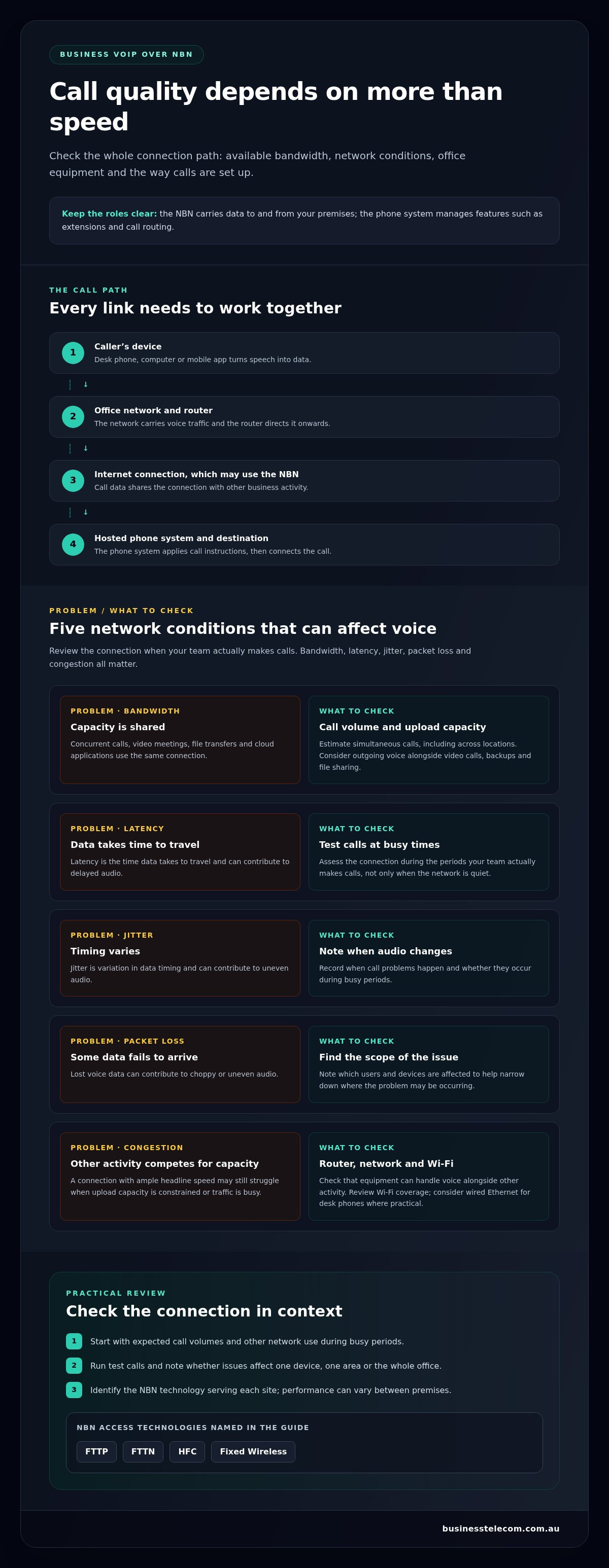
A call starts on a desk phone, computer or mobile app. The device converts speech into data and sends it through the business network to the router. The router directs it over the internet connection, which may use the National Broadband Network (NBN), to the hosted phone system. That system applies the call-handling instructions, then connects the call to its destination, such as a colleague’s extension or an external number.
The NBN carries call data; it doesn’t decide which extension rings or play an auto-attendant greeting. Those functions sit within the phone system. Incoming calls travel the reverse route, reaching the phone system first so it can direct them to the right person or destination.
What businesses use VoIP over NBN for
Businesses use VoIP for everyday inbound and outbound calls. Features such as call routing, auto-attendants, conferencing and extension management help staff handle calls across teams and locations. A customer can call the main business number and be directed to the right team, while staff can make outgoing calls from their assigned extensions.
Depending on the setup, staff can use desk phones in the office, computers or mobile devices. This helps teams manage business calls across different work settings. Unlike a traditional landline, which uses a phone access path, VoIP sends calls as data over an internet connection. The NBN connection is also shared with other business activity, such as email and cloud applications. Calls therefore rely on the wider network as well as the phone service.
When reviewing an existing setup, identify the internet connection, router and office network, and phone system separately. The following sections explain how network conditions affect call quality and what to check when calls become unreliable.
What NBN Connection and Business Network Do VoIP Calls Need?
Speed alone can’t determine VoIP call quality. Available bandwidth, latency, jitter, packet loss and congestion all affect how voice data travels across the connection. Bandwidth is the capacity available for calls and other online activity. Latency is the time data takes to travel, jitter is variation in that timing, and packet loss occurs when some data fails to arrive. These conditions can contribute to delayed or uneven audio, especially when the network is busy.
Assess the connection at the times your team actually makes calls. Concurrent calls, video meetings, file transfers and cloud applications share the business connection. A service with ample headline speed may still struggle if upload capacity is constrained or traffic becomes congested during busy periods. The right requirements depend on expected call volumes, network conditions and phone-system configuration, rather than one speed tier that suits every business.
How NBN connection types can affect business voice
Australian premises may connect through Fibre to the Premises (FTTP), Fibre to the Node (FTTN), Hybrid Fibre Coaxial (HFC) or Fixed Wireless. The NBN is Australia’s national wholesale open-access data network, but access technology, service configuration and performance can vary by premises. Identify the technology serving each site and assess the connection in practice instead of assuming every location will perform the same way.
Network checks to make before relying on VoIP
For business VoIP over NBN, start with the calls your team needs to support, then consider what else uses the network at busy times. A practical review should cover:
- Concurrent calls: Estimate how many calls may happen at once, including calls across separate locations.
- Upload capacity: Consider outgoing voice traffic alongside video calls, backups and file sharing.
- Router and network: Check that the router and business network can handle voice traffic alongside other activity.
- Device connection: Review Wi-Fi coverage where staff use wireless devices, and consider wired Ethernet for desk phones where practical.
Run test calls during busy periods and note whether problems affect one device, one area or the whole office. This can help distinguish a wider connection issue from local Wi-Fi coverage or network equipment problems. Include these checks in your phone-system planning, alongside call handling and staff device needs.
Once you understand the connection and expected call patterns, you can shape the phone system around your operation. Explore business VoIP and cloud phone systems as part of that planning.
Will Business VoIP over NBN Be Reliable? Call Quality and Outages
It can be reliable, but no single part of the setup determines the result. Business VoIP over NBN depends on the full path: the internet connection, router and internal network, devices, and phone-system service. A fault or interruption at any point can affect calls, even if the other parts are operating normally. NBN Co’s consultation paper discusses VoIP in the context of the network and its framework.
Call symptoms can help narrow down the cause. Choppy audio may indicate congestion or inconsistent network performance. Delay can make conversation difficult, while dropped calls may point to a connection interruption or a fault elsewhere in the service. Symptoms alone don’t confirm the cause. Record when they happen, which devices or staff are affected, and whether other online tasks are running at the same time.
Common causes of poor VoIP call quality
Large uploads, cloud backups and simultaneous video meetings can compete with voice traffic for network capacity, particularly during busy periods. Local issues matter too: weak Wi-Fi coverage or a poorly placed router can affect wireless phones and mobile apps, even if a wired device elsewhere works well. Look for patterns before changing settings. If the problem affects one room or device, investigate the local network; if it affects multiple users at once, consider a wider connection or service issue.
Planning for NBN, power or equipment interruptions
Map what stops if the NBN connection, local power or office equipment becomes unavailable. An NBN outage can interrupt internet-based calling. A power failure can also disable the NBN connection box, router and phones unless they have suitable backup power. A business network fault may affect only some devices, while a phone-system service issue can disrupt calling even when general internet access is available.
Continuity options could include using mobiles or an alternate internet connection, but whether calls can move to them depends on the phone-system configuration, device access and available connectivity. Treat these as planning considerations, not a guarantee that calls will continue through every outage. Test the arrangements and document who handles incoming calls if the usual setup is unavailable.
For Triple Zero access and other emergency-calling arrangements, follow current guidance from the Australian Communications and Media Authority (ACMA) and Triple Zero. Don’t assume calls will behave a particular way during a power or internet interruption. To plan calling features and devices around your business needs, explore business VoIP and cloud phone systems.
How to Prepare and Troubleshoot VoIP Calls on an NBN Connection
Use a consistent troubleshooting sequence before changing network settings or replacing equipment. For business VoIP over NBN, work out whether a call problem is limited to one device, tied to a particular area or affecting the wider service. A clear record of symptoms helps your technical support team investigate without guesswork.
A practical call-quality troubleshooting sequence
- Record the symptoms: Note whether audio is choppy, delayed or interrupted, and record the time and duration of the problem.
- Identify who is affected: Check whether the issue involves one handset, several users, one office area or the whole business.
- Compare devices and connections: Where practical, test a wired desk phone against a Wi-Fi-connected phone or app. If only wireless devices are affected, local coverage may be a factor.
- Check the connection: Note any internet interruptions or other signs of a wider service issue, and whether other online business tools are affected.
- Repeat a test call: Compare results at a different time, especially if symptoms coincide with large uploads, cloud backups or video meetings.
Keep a simple log with the time, location, affected device and concurrent network activity. A problem that repeatedly occurs in one room calls for a different investigation than calls dropping for everyone during a connection interruption. The pattern helps separate possible NBN service issues from Wi-Fi coverage, router or handset faults, and phone-system configuration problems.
Preparing a business network for VoIP
Before relying on the system, plan how desk phones and other calling devices will connect, and consider what else shares the network during busy periods. Check that router placement supports work areas, cabling is secure and Wi-Fi coverage is consistent where staff need to call. Where practical, a wired connection can help establish whether wireless coverage is affecting a device.
Avoid making unfamiliar router or phone-system changes during business hours. Settings can affect other users or interrupt calling, so document the current setup and involve suitable technical support when a change is needed. For a planned phone migration, map existing numbers, devices, call routing and staff requirements before the change, then schedule testing as part of the transition.
For help matching a business phone system to your calling setup, explore Business Telecom’s business VoIP phone systems.
Choosing Business VoIP over NBN for Your Australian Business
Choose a phone system around the way your business handles calls, not just the advertised speed of its NBN service. For business VoIP over NBN, consider expected call volumes, how many locations need access, which devices staff use and what callers should experience. Connectivity carries the calls; the VoIP service and phone system provide the calling functions, while handsets, computers and mobiles let staff use them.
Think through a typical busy period. A single-site team may need extensions and call routing to direct customers to the right person. A business with staff working across an office and on mobiles may also need conferencing and consistent access to business calling across devices. These needs shape the system design, while the NBN connection and office network need to support the expected activity.
Which businesses may benefit from VoIP over NBN
VoIP can suit small and medium businesses looking to manage calls across office and mobile devices through one business phone system. It can support teams that need extensions, call routing, conferencing or an auto-attendant to direct incoming calls. Business Telecom provides business VoIP and cloud phone systems for Australian SMEs, including businesses in Sydney, Brisbane and the Gold Coast.
What to plan before moving business calls to VoIP
Before planning a move, create an inventory of the phone setup and how it works day to day. Record:
- Numbers: List the business numbers staff and customers use.
- Users and extensions: Map each employee, team or location to the calling access they need.
- Call flows: Document where calls go, including reception, departments, voicemail and any after-hours routing.
- Devices: Note which staff rely on desk phones, computers or mobiles.
Plan how staff will communicate during the cutover and how incoming customer calls will be handled while the new setup is tested. Confirm which call flows need to work from day one, then test the key routes and devices before relying on them for normal business. Use an Australian VoIP systems buying guide alongside your inventory to compare the features and setup options relevant to your business.
Business Telecom’s business VoIP options can help you plan calling around your users, devices and call-handling needs. A considered setup connects the right phone features to your business requirements and the NBN service already in place.
Plan a More Dependable Business Phone Setup
Dependable business VoIP over NBN starts with understanding the whole setup. The NBN connection carries voice data, while network conditions and phone-system configuration also influence call quality. Assess likely simultaneous calls and busy-period traffic, then record how calls should reach staff across your locations and devices.
Plan for interruptions as well as everyday call handling. Knowing which numbers, extensions and call routes matter helps you prepare for a smoother transition and clearer continuity arrangements. Business Telecom provides business VoIP and cloud phone systems for Australian small and medium-sized businesses, with features including call routing, auto-attendants, conferencing and extension management. Australian-based technical support and local coverage in Sydney, Brisbane and the Gold Coast support its business offering.
Explore Business Telecom business VoIP solutions to plan a phone system around your team’s calling needs. A clear approach to connectivity, features and support helps you make informed decisions about your business communications.
Frequently Asked Questions
Can you use business VoIP over NBN?
Yes. Business VoIP uses an internet connection, including an NBN service, to carry calls between staff and customers. A suitable setup depends on the connection’s performance, the office network and the phone system, not the NBN label alone. Staff may make calls using compatible desk phones, computers or mobile devices. Business Telecom provides business VoIP and cloud phone systems for SMEs in Sydney, Brisbane and the Gold Coast.
Is NBN reliable enough for business VoIP calls?
NBN can support reliable business VoIP calls when the connection and the rest of the network path perform consistently. Congestion, router or Wi-Fi issues, devices and phone-system configuration can also affect call quality. Consider how the connection performs during busy periods, when calls may coincide with video meetings or large uploads. Testing calls across different devices and times can help show whether the setup meets your business needs.
What NBN speed do I need for business VoIP?
There’s no single NBN speed tier that suits every business. The capacity you need depends on the number of simultaneous calls, available upload capacity, other internet use and how the phone system is configured. Email, cloud applications, file transfers and video calls share the connection with voice traffic. Assess expected call volumes and observe performance during busy periods, rather than choosing a speed based on download capacity alone.
Why do VoIP calls sound choppy over NBN?
Choppy audio can result from network congestion, inconsistent connection quality, weak Wi-Fi, router issues or a problem with a handset or phone-system setting. Large uploads and video meetings may compete for network capacity while calls are in progress. Note when the issue occurs, which users and devices are affected, and what else is using the network. Comparing a wired phone with a Wi-Fi-connected device can help narrow down the cause.
What happens to business VoIP during an NBN outage?
If the NBN connection is unavailable, internet-based calls at the affected premises may stop working. Local power loss can also interrupt calling if the NBN connection box, router or phones lose power. Some phone systems may support continuity arrangements such as directing calls to mobiles or using alternate connectivity, depending on their setup. Plan and test these options in advance, and don’t assume calls will continue through every outage.
Can business VoIP work over Wi-Fi?
Yes, compatible phones and calling apps can use Wi-Fi, provided the wireless network has suitable coverage and performance. Signal strength can vary between rooms, and other devices sharing Wi-Fi may affect call quality. Test calls where staff need to use them, including during busy periods. If a desk phone has poor audio over Wi-Fi, comparing it with a wired connection can help identify whether wireless coverage is contributing.
Can I keep my business phone number when moving to VoIP over NBN?
In Australia, number portability arrangements can allow businesses to transfer existing phone numbers when moving to VoIP. Plan the transfer as part of the changeover: list the numbers in use, map each one to its destination and call route, and schedule testing so staff know how incoming calls will be handled. Include geographic and non-geographic business numbers in your inventory, and coordinate the transfer to reduce the risk of disruption.