

VoIP changes how a business call travels, not what your customers expect from the conversation. It carries voice calls over an IP network rather than an analogue network. A local VoIP provider in Sydney can help design a setup around the way your team handles calls. The technology is only one part of the decision: the system also needs to suit your customers, staff and working arrangements.
If you’re reviewing your business phone arrangements, start with what calls need to do: help customers reach the right person, give staff a clear way to manage conversations and support the way your team works. A system that fits those routines is easier to assess than one chosen by technical labels alone.
This guide covers what Sydney businesses should consider when exploring VoIP, from choosing a system and planning a switch to assessing support and cloud-hosted features. Use these points to weigh practical fit before deciding on your next step.
Key Takeaways
- Plan a number transfer early and map out which business numbers your team needs to retain.
- Assess your internet connection and calling requirements before choosing a VoIP setup for your Sydney business.
- Clarify how support is provided and what response arrangements suit your business hours and call volumes.
- Compare cloud phone and hosted PBX features against your team’s call-handling needs before settling on a system.
Keeping phone numbers when switching providers
For a Sydney small business, look for a business VoIP system that supports team calling, number porting and the way staff work. Home users need a residential phone service, which is a different category from a business phone system.
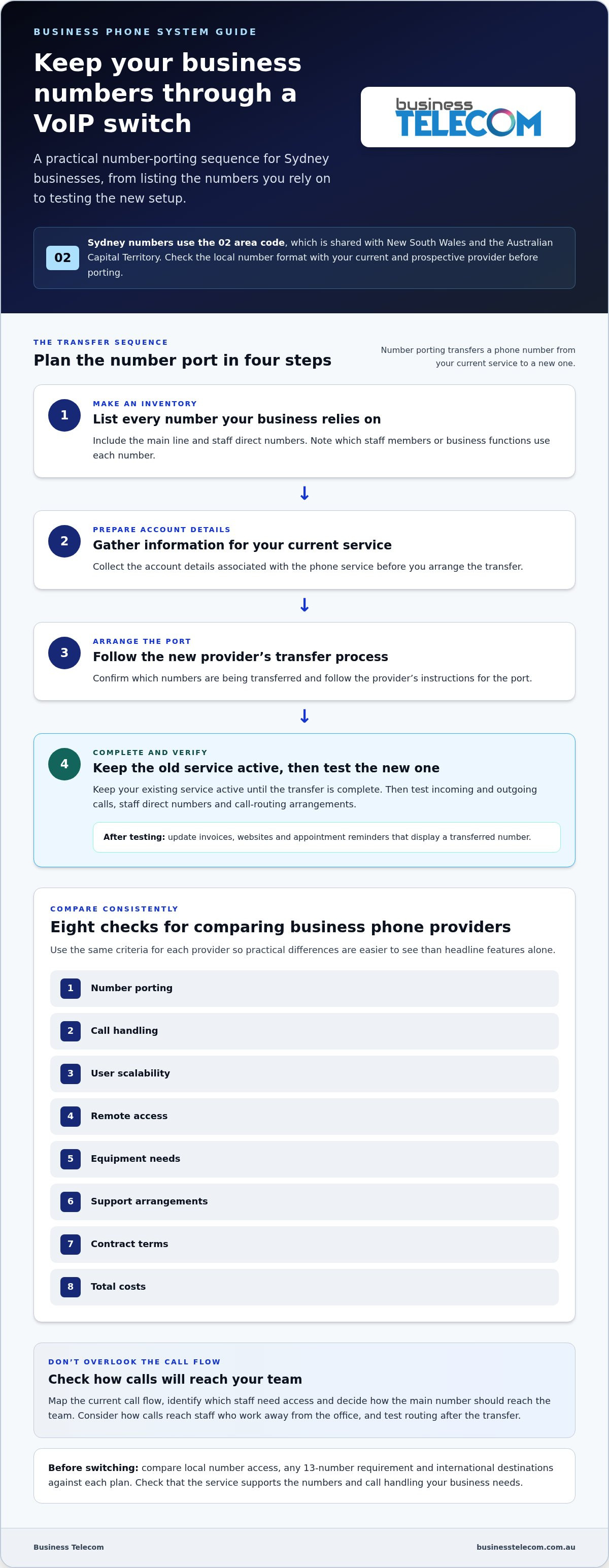
Number porting transfers a phone number from your current service to a new one. Sydney numbers use the 02 area code, shared with New South Wales and the Australian Capital Territory. Check the local number format with your current and prospective provider before porting. Before a switch, identify every number your business relies on, including the main line and any direct numbers.
Prepare the transfer with these steps:
- List the numbers to keep and note which staff or business functions use each one.
- Gather the account details associated with the current phone service.
- Arrange the transfer with the new provider and follow its porting process.
- Keep the existing service active until the transfer is complete, then test incoming and outgoing calls.
Test your main number, staff direct numbers and call-routing arrangements. If customers use a number on invoices, websites or appointment reminders, update those materials once the transfer is complete.
When comparing eight business phone providers, use the same criteria for each: number porting, call handling, user scalability, remote access, equipment needs, support arrangements, contract terms and total costs. A consistent checklist makes meaningful differences easier to spot than headline features alone.
Small and remote teams should map how calls reach staff. For example, a team member away from the office may need calls directed to their assigned device. A well-planned system can reflect current roles and adapt as staffing or call patterns change. Keeping existing numbers is only one part of a successful switch. The system and infrastructure also need to fit how your business operates.
Business VoIP services in Sydney and regional NSW
Some VoIP services support calls to local and international numbers that receive regular calls. Compare local number access, any 13-number requirement and international destinations against each plan before switching.
Small-business provider selection
For an Australian small business, compare systems against your team’s calling patterns, internet setup and number requirements. Check what the plan includes, how voicemail works and how staff can access calls away from the office. A Sydney team with remote workers may value flexible call access, while a single-site business may prioritise straightforward call handling.
Ask how users, call routing and equipment work together. A clear comparison helps you avoid choosing a plan based on headline features alone.
Calling plans and number options
Local calling, international destinations and 13 numbers are separate requirements to assess. Some VoIP services allow calls to local, long-distance, mobile and international numbers that can receive regular phone calls. For a business that advertises a 13 number, check that the service supports the required number and call handling before planning a switch.
Review which destinations are included, how calls are charged and whether your existing numbers can be ported. These details help determine whether a plan suits your Australian customers and staff.
Switching to business VoIP involves more than moving calls to the internet. Map your current call flow, identify which staff need access, and decide how the main number should reach the team. Most Australian businesses can switch within a few days, depending on internet setup and hardware.
Plan the change around your existing phone system. After the transfer, test voicemail, incoming calls and outgoing calls, then update customer-facing contact details where needed. This gives staff a clear transition instead of leaving call handling to chance.
For teams connected with Business Telecom across Sydney, internet quality and hardware influence how well VoIP fits daily operations. Mobile data on 3G, 4G or 5G can carry calls, but a slow connection can affect call quality or drop calls. Consider where staff work and how they’ll access the system before choosing a setup.
Local customer support and response times
Support matters when a fault affects incoming calls, voicemail or a busy call centre. A local VoIP provider in Sydney should explain how to report faults, which support channels are available and how issues are prioritised. Ask how an urgent outage is distinguished from a minor handset issue.
Provider support is most useful when it translates into practical guidance for your network and call flow. For example, a support specialist should help identify whether a call-quality issue affects one phone or several users. Ask how troubleshooting works, what information staff should provide and how progress is communicated.
Response times need context. Review support hours, fault categories and stated targets, then compare them with the hours your business relies on calls. A clinic receiving appointment calls throughout the day has different operational needs from a small office that can return calls later. Also establish who handles issues involving internet access, handsets and VoIP services.
Clear implementation steps help reduce avoidable disruption. Confirm who configures users, call routing and voicemail, and how staff will learn the new process. Before going live, test incoming and outgoing calls, voicemail messages and any call recording or call centre functions your team uses. A named contact and agreed escalation path help staff know what to do if something fails.
Because VoIP uses an internet connection, connectivity problems can affect calls. A separate power source and a 4G/5G backup connection can help maintain service reliability, provided the equipment and connection are available and configured for that purpose.
Plan continuity around your workflow: identify essential calls, who should receive them during an interruption and how staff will communicate if the primary network is unavailable. For example, document an alternative contact method and make sure employees know where to find it. These arrangements complement provider support, but they don’t remove the system’s dependence on power and connectivity.
Cloud VoIP and hosted PBX features
A hosted PBX is a business phone system managed over the internet rather than through equipment housed at your office. Cloud VoIP carries calls through an IP network, while the hosted system manages how they reach staff. For a Sydney business, the practical value is coordinating calls across office and remote work locations.
Call routing directs incoming calls according to rules your business sets. For example, a main number could ring reception first, then send unanswered calls to voicemail. An auto attendant can offer menu options, such as sales or accounts. These functions help organise enquiries, but the right configuration depends on your call flow and staffing.
Cloud systems can support flexible working by letting staff access business calls away from a fixed desk, depending on the system and devices used. A remote team member could handle calls alongside office colleagues, while managers adjust call arrangements as roles change. This can reduce reliance on a single physical phone at the office.
Before choosing features, write down how calls should move through your business:
- List the teams or people who answer each type of enquiry.
- Set out what callers should hear when staff are busy or unavailable.
- Identify whether voicemail, call queues or a call centre arrangement would help.
- Separate essential functions from options that would add unnecessary complexity.
Hosted phone services still depend on suitable internet access and power wherever calls are made. A cloud system can simplify changes to users and call rules, but it doesn’t remove the need to plan for connectivity interruptions. Match the system design to your network, devices and support process.
The clearest takeaway: choose a hosted PBX for the call-handling tasks your team actually needs, not a long feature list. Explore cloud phone system options for your Sydney business and consider how each function would work in practice.
Business Telecom: Business Phone System
Business Telecom provides Business Phone Systems for businesses in Sydney reviewing their calling arrangements. A system can suit a team replacing an ageing setup or establishing phone service for a new office. Start by identifying who needs business calling and how the system should fit your operation.
Before discussing options, note your preferred handsets or devices, how many staff need access and any requirements for your existing business landlines. These details help shape a practical conversation about a system suited to your workplace, rather than choosing features without a clear purpose. Business Telecom also provides Office Phone Systems for businesses assessing their office communications.
To discuss your Sydney business phone system requirements, contact Business Telecom or visit businesstelecom.com.au.
Take the next step with a phone system that fits
Your next step is to turn your requirements into a clear system brief. Note how your team handles calls now, what needs to change and which functions are essential. This gives you a practical basis for discussing options with a local VoIP provider in Sydney, without making the decision on features alone.
Business Telecom provides Business Phone Systems, business landlines and Office Phone Systems. These services can support you when replacing an existing setup or planning how your team will manage business calls. Focus the discussion on your users, call flow and day-to-day operations, so the system supports your work without adding unnecessary complexity.
When you’re ready to discuss your requirements, contact Business Telecom about VoIP. A considered next step can help you move towards a phone system that works for your business.
Frequently Asked Questions
But what is VoIP?
VoIP is a way to make voice calls using an internet protocol network. For a business, calls can be managed through a hosted phone system rather than relying solely on traditional phone infrastructure. For example, a Sydney office could use one business number to reach staff at different work locations, depending on how its system is configured.
Can I switch VoIP providers and keep my numbers?
Businesses can often request to transfer existing numbers when changing VoIP providers. Start by listing the numbers attached to your current account and identifying which ones customers use. If you have separate numbers for reception and departments, include each one in the transfer plan, then test them after the change.
What are the leading reasons to choose a local VoIP provider in Australia?
A local provider can be a good fit if you want support aligned with Australian business operations and a system designed around your call-handling needs. Compare support channels, operating hours, escalation processes and assistance with number transfers. For example, a Sydney business receiving calls during local trading hours needs clear instructions for reporting a fault during that period.
Is VoIP suitable for businesses of all sizes?
VoIP can suit businesses of different sizes, but the right setup depends on users, call volumes, work locations and internet performance. A small consultancy may need a straightforward way to direct calls to its team, while a larger business may need more structured call handling. Map these requirements before selecting a system, rather than choosing by business size alone.
Is VoIP legal and compliant with Australian regulations?
VoIP is a communications technology, but using it doesn’t automatically make every business practice compliant. Consider how your organisation handles personal information, customer calls and any call recordings, and make sure internal processes reflect the obligations that apply to your operations. For example, decide who can access recordings and how staff explain recording practices to callers.
Looking for business VoIP in Sydney or regional NSW?
Start by recording your users, current numbers, calling patterns and any remote-work requirements. These details help shape a practical discussion about a business phone system. Business Telecom supports businesses in Sydney, Brisbane and the Gold Coast, as well as across New South Wales and Queensland. Contact Business Telecom to discuss business VoIP options suited to your team.