
Can your business keep its Queensland number and understand what you’re paying for before switching? Cloud phone system pricing in Brisbane depends on setup requirements and how many user lines are billed. Businesses moving an NBN phone service can usually keep their existing number, making it possible to plan a system change without losing a familiar point of contact.
Look beyond a headline rate when comparing systems. Consider the plan, call requirements and any equipment or setup your team needs. Ask providers whether their cloud phone systems include features such as call routing, auto-attendants and extension management, and check how these fit the way staff handle calls.
This guide explains how deployment costs and line-based billing shape the overall decision, what can affect a switch, and how number transfers fit into the process. It also considers how to assess a proposed system against your business’s call-handling requirements. You’ll have a more practical basis for evaluating options and planning a transition for your Brisbane team.
Key Takeaways
- Separate deployment work from ongoing subscriptions to understand the full cost structure before choosing a system.
- Clarify whether billing is based on staff who need calling access or the individual phone lines your business uses.
- Plan a number transfer as part of the move. Retaining your Queensland business number may be possible, subject to number eligibility and the transfer process.
- Match the plan to your calling needs and required features, then explore Business Telecom’s cloud phone systems for your Brisbane team.
Why Brisbane Businesses Use Cloud Phone Systems
A hosted phone system makes and routes calls over an internet connection rather than relying on an on-site PBX. For a Brisbane business, this can help connect office staff, employees working from home and team members using mobiles. Call routing directs incoming calls to the right person or group, supporting consistent handling of customer enquiries.
NBN readiness depends on the connection supporting the way your team makes calls. A provider can assess the existing setup, including how many people call at once and whether staff use desk phones, computers or mobiles. Those details help shape a system that fits a small practice, a multi-room office or a business with people working across locations.
Australian cloud phone providers may support local Brisbane numbers, and calls can be routed to staff across different devices. Local call charges depend on the plan and its billing arrangements, so review those separately from the number of users or devices.
Businesses switching an NBN phone service to a cloud system may be able to retain existing phone numbers, depending on the service and number-porting arrangements. Number porting transfers a number to a new service, which can help preserve a familiar business contact while the call setup changes. Confirm whether your numbers can be transferred and include any numbers you want to keep in your transition plan.
Cloud calling relies on internet access and powered equipment, so an outage can affect desk phones. Brisbane businesses should plan how staff can make or receive calls if the office connection or power fails, including whether mobiles provide an alternative. Consider how emergency calls are handled for office and remote users, whose locations may differ.
To plan a switch, list your current numbers, users, devices and call-routing needs. Discuss these requirements with your chosen provider, and confirm whether it can support the proposed system and number transfers. This preparation helps clarify how calls will reach staff at desks, home offices and on mobiles.
Upfront installation and deployment costs
Upfront costs cover the work needed to configure a cloud phone system, not just ongoing calling. For deployments serving 10-50 users, the setup depends on how the business handles calls, which devices staff use and whether existing numbers need transferring. A provider’s quote should separate setup tasks from recurring subscriptions and equipment.
Deployment may involve configuring users, call flows, voicemail and direct numbers, then testing the system before staff rely on it. A Brisbane office with a simple call path needs different configuration from a practice routing calls across teams. Call recording or other requested functions can also affect setup requirements. The provider should show which work is included in the quote.
Cloud calling uses an internet connection, but the monthly internet service remains a separate business cost. Compare that ongoing expense with existing phone services, maintenance and equipment commitments before estimating savings. An unlimited calling allowance may suit a team with regular outbound calls, while usage-based calling may better match a different pattern. The right comparison uses your actual call needs.
Consider contract terms and hardware alongside the monthly plan. Clarify the contract length, cancellation conditions, included support and whether handsets are purchased, supplied or optional. Staff who mainly use mobiles may need fewer desk phones, while reception or shared work areas may benefit from handsets. Keep equipment distinct from recurring service charges when reviewing costs.
Desk phones can add an equipment cost, while using compatible existing devices may affect what needs to be supplied. Installation needs also depend on the office layout, internet readiness and number of users. Ask for a clear breakdown of the proposed setup and costs.
The price depends on the business’s requirements and is given after a quote request; user numbers, call routing, devices, integrations and deployment complexity shape the estimate. A clear cloud phone system deployment plan helps show which costs are upfront and which continue during service.
Per-line rather than per-user billing
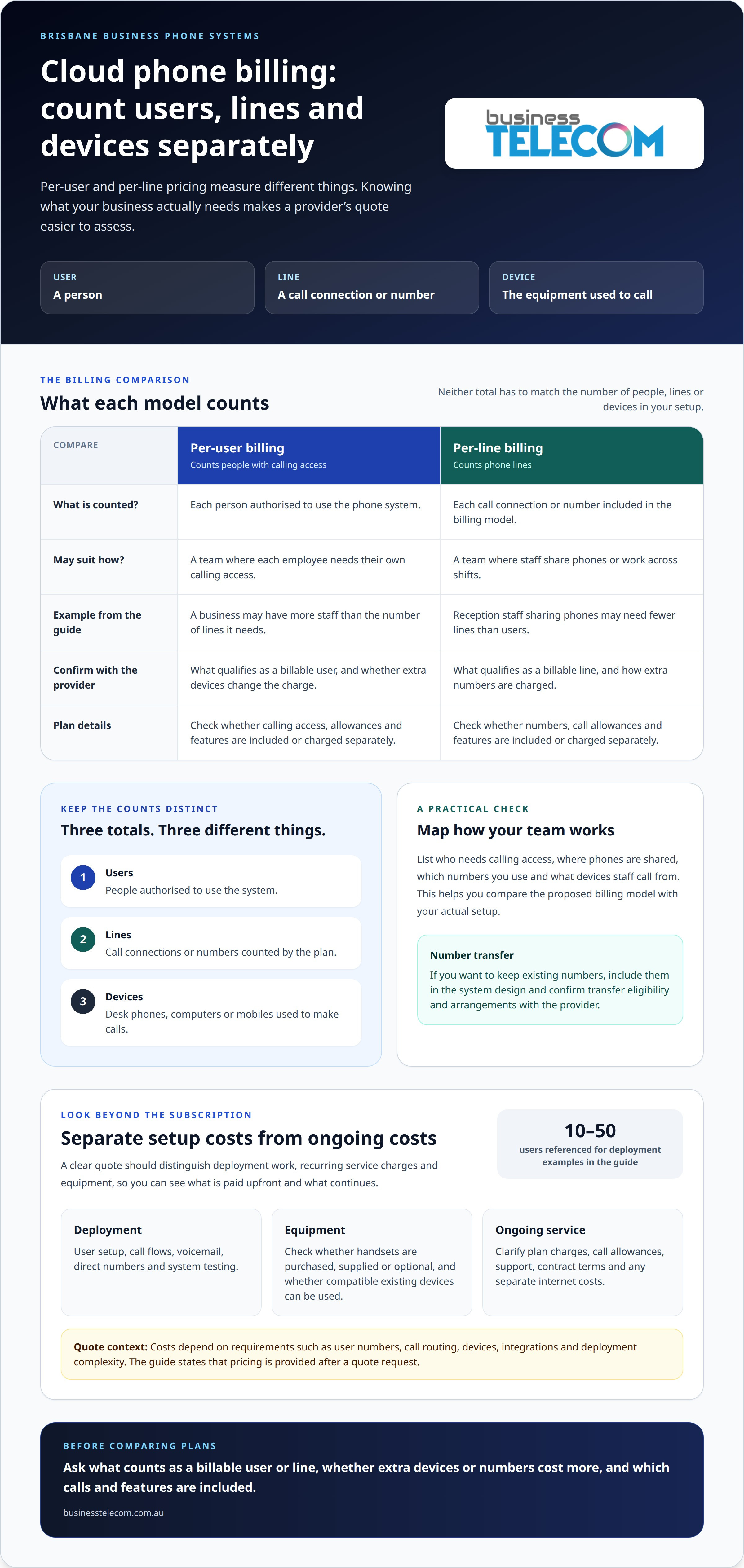
Per-user billing charges for each person with calling access; per-line billing counts phone lines. These measure different things. A Brisbane business with staff sharing reception phones may need fewer lines than users, while employees using separate extensions may each need individual access.
A user is a person authorised to use the system. A line is a call connection or number, and a device is the handset, computer or mobile used to make calls. These totals do not have to match. For example, a call centre may have multiple staff sharing a smaller pool of lines.
Cloud phone system per-user pricing can make budgeting easier when each employee needs their own access. If staff share a desk phone or work across shifts, a per-line model may better reflect how the business operates. Ask the provider to define what counts as a billable user or line, and whether additional devices affect the charge.
Check whether the recurring plan charge covers calling access, phone numbers and call allowances, or whether separate charges apply. Also clarify how extra numbers and call features are handled. Number porting transfers an existing phone number to the new service, so include every number you want to retain in the system design.
Basic and premium plans may differ by calling allowances and features. Check the provider’s plan details to confirm whether national calls are included and what limits or additional charges apply. A business with mostly local calls may weigh allowances differently from one making regular national calls.
Before selecting a billing model, map staff access, shared handsets, mobiles and business numbers. Then ask for a like-for-like breakdown showing users, lines, devices and any separate charges. This makes the monthly commitment easier to understand and helps prevent a mismatch between the invoice and how your Brisbane team connects.
Brisbane cloud phone system pricing per line
A per-line rate is only one part of your monthly phone-system cost. For cloud phone system pricing in Brisbane, first establish whether the quote bills by line, user or both. Then check what each recurring charge covers. A Brisbane business with reception, sales and accounts teams may have different user and line requirements, so the billing basis matters.
Build the estimate around how calls move through your Queensland business. Ask whether the proposed system can support a reception queue, direct numbers for staff and shared voicemail. Check whether call recording is available and whether it affects the plan or configuration. List the functions your team needs, then compare quotes against that same list, including any costs to operate each function.
Consider which devices staff need. Ask the provider whether calls can be made and answered on computers, mobile devices and desk phones, and whether those options are included in the proposed system. Employees answering calls on computers or mobiles may have different needs from reception staff using desk phones.
For a South East Queensland business with one public number and several teams, consider how incoming calls should reach each group. A line count alone does not show whether the proposed setup supports queues, direct numbers or after-hours voicemail. Plan for busy periods and how staff will manage messages outside business hours.
An assessment of cloud phone system pricing in Brisbane should account for users, lines, call allowances, requested features, hardware and setup complexity. Ask the provider for a quote based on your requirements, with recurring service charges shown separately from equipment or deployment costs. This can help you relate each item to a business requirement and understand the proposed commitment.
To discuss your team’s call flow and equipment needs, discuss your Brisbane phone system requirements.
Business Telecom: Business Phone System
Business Telecom serves businesses in Brisbane. The phone system options available to your business depend on your requirements, including how your team handles calls and which devices or features you need. Discuss these details with Business Telecom before deciding whether a cloud-based or office system is suitable.
Start by identifying what prompted your review. You might be moving to cloud calling, replacing an office setup that no longer suits your operations or considering whether a business landline remains appropriate. Clarifying the outcome you want helps focus the discussion on a suitable system, rather than features your team will not use.
Share your business requirements and discuss which phone system direction fits your plans. Contact Business Telecom to talk through the next step.
Plan the next step for your Brisbane team
Treat a phone-system change as a business process decision, not just a technical purchase. Assign someone to coordinate staff feedback, approve call-handling choices and keep decisions moving.
Use the quote discussion to explain what a good customer call should look like, from the first ring to resolution. Include who handles overflow, where unanswered calls go and which teams need access away from the office. This gives the system design a clear operational purpose.
Cloud phone system pricing in Brisbane is easier to assess alongside your service priorities than as a single line item. Keep your agreed requirements available as the business changes, so future system adjustments continue to support your customer-service goals.
Before the changeover, let staff know how calls will reach them and where to direct questions. A shared understanding helps the team approach the transition with confidence.
Contact Business Telecom about pricing to discuss the right next step for your business.
Frequently Asked Questions
Can I keep my business phone number when moving to a VoIP provider in Queensland?
Number portability may allow Queensland businesses to retain existing phone numbers when switching to VoIP, subject to number eligibility and transfer requirements. This can help customers continue using a number they already know even as the call system changes. Include every number you want to keep in the transition plan, including direct numbers used by staff or separate numbers for business functions.
Do I need to buy new phones or hardware?
Not necessarily. A cloud phone system may support calls through desktop phones, computers and mobile devices without an on-site PBX. Confirm with Business Telecom which devices are supported for the system you’re considering. For example, employees who mainly call from computers or mobiles may have different needs from reception staff handling calls at a desk.
How much is that including GST?
The total including GST depends on the quoted service and what it includes. For a Brisbane business, cloud phone system pricing can be affected by user and line requirements, setup complexity, calling allowances and any equipment required. The exact amount for your circumstances is provided in a quote. Check that the quote clearly distinguishes service charges, setup work and hardware, and states its GST treatment.
Is there a lock-in contract?
A plan’s monthly price does not, by itself, determine whether a service has a lock-in contract. Contract duration and exit conditions come from the agreement for the selected phone system. Before committing, understand how long the arrangement runs, what happens if your business needs change and whether charges apply when the service ends. These terms affect the overall commitment beyond the monthly price.
What do cloud phone systems cost per user per month in Brisbane, Australia?
There isn’t one per-user rate that applies to every Brisbane business. The quote depends on the number of users, how many lines are needed, calling allowances, selected features and any equipment or deployment work. Compare plans using the same requirements, including which staff need calling access and whether they share devices. The exact price for your business is provided in a quote.
Are Australian GST, setup, porting, handset, or call charges extra?
Check the plan details rather than assuming setup, number porting, handsets or calls are bundled into one subscription. Confirm with Business Telecom whether number portability is available for your number and which devices the cloud system supports. Review the plan and any equipment requirements to understand the costs before choosing a system.