
The best VoIP phones for a small business in Sydney in 2026 aren’t necessarily the handsets with the longest feature list. The right choice depends on how your team handles calls: desk phones suit staff who work at a fixed station, while softphones let people call through a computer or mobile device.
You’re weighing more than the handset itself. Call features, contract terms and keeping your existing business number can all affect whether a phone system suits your day-to-day needs.
This guide compares five VoIP phone options for Sydney small businesses, including desk-phone features and Australian handset prices. You’ll learn how to assess the best VoIP phones for your small business in Sydney in 2026, compare call routing, number portability and contracts, and narrow down a setup that suits your team.
Key Takeaways
- Match desk phones to the system’s SIP compatibility and the way your team handles calls before choosing handsets.
- Prioritise call routing and other features around how customers reach your team, rather than paying for functions you won’t use.
- Plan number porting alongside contract terms, and keep the existing service active until the transfer is complete and tested.
- Compare handset models as a separate equipment cost from ongoing service, then weigh their features against each employee’s needs.
How can a provider help you choose the right VoIP phone for your small business?
A phone system should match your calling patterns, office layout and existing equipment. For businesses in Sydney, Brisbane or the Gold Coast, compare handset compatibility, call handling, support and continuity before choosing a setup.
Desk phones and SIP compatibility
A SIP desk phone connects to a VoIP service through the Session Initiation Protocol. Compatibility depends on the handset’s specifications and the provider’s configuration, so match both before deployment.
When sourcing handsets for a Sydney business, delivery timing depends on stock, model choice and order processing. Include these factors in your changeover plan alongside the required equipment.
Cordless and Wi-Fi VoIP phones
Cordless phones use a base station, while Wi-Fi phones connect through a wireless network. A provider can assess coverage around work areas, base-station placement and handset compatibility, then compare those options with a softphone for staff who move between desks.
For a small office, test the intended connection and call areas before choosing cordless or Wi-Fi handsets. This can help identify dead spots that might disrupt everyday communications.
Reliability, support and security risks
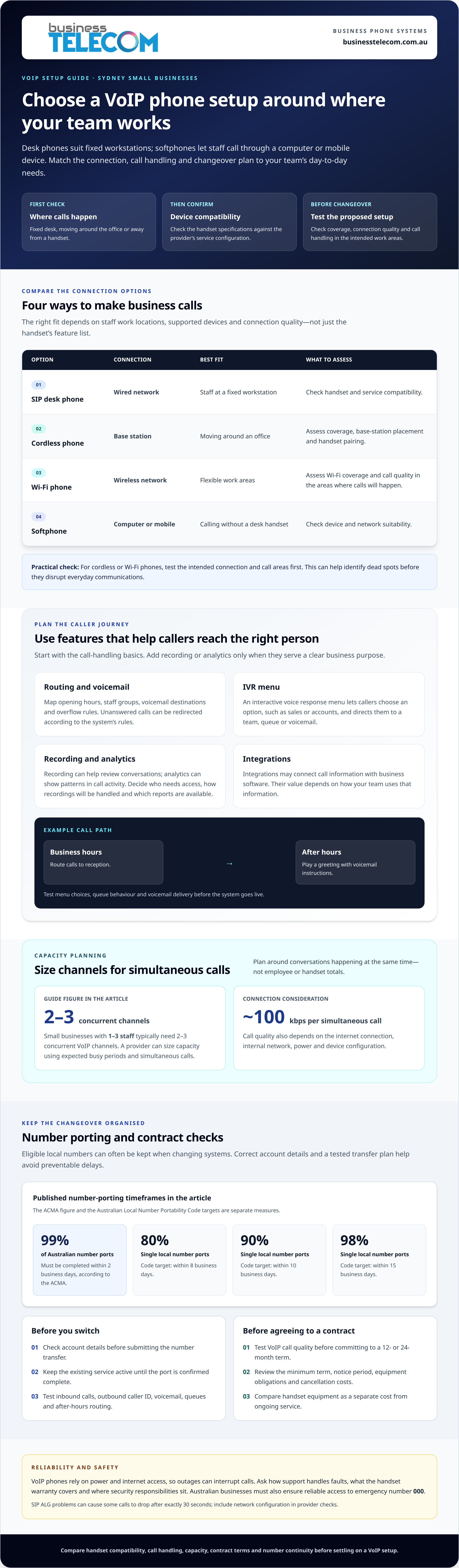
A provider assesses call quality by considering the internet connection, internal network, power and device configuration. Each simultaneous VoIP call uses roughly 100 kbps, and SIP ALG problems can cause some calls to drop after exactly 30 seconds.
Ask how support handles faults, what the handset warranty covers and where security responsibilities sit. VoIP phones rely on power and internet access, so outages can interrupt calls; Australian businesses must also ensure reliable access to emergency number 000.
| Option | Connection | Best fit | Provider assessment |
|---|---|---|---|
| SIP desk phone | Wired network | Fixed workstation | Check handset and service compatibility |
| Cordless phone | Base station | Movement around an office | Assess coverage and handset pairing |
| Wi-Fi phone | Wireless network | Flexible work areas | Assess Wi-Fi coverage and call quality |
| Softphone | Computer or mobile connection | Calling without a desk handset | Check device and network suitability |
Choose the option that fits your team’s work locations, supported devices and connection quality, then have the provider test the proposed setup.
Call routing, IVR, recording and analytics features
VoIP features should help callers reach the right person and staff manage enquiries. Start with call routing, voicemail and an automated greeting. Consider recording or analytics only when they serve a clear business purpose.
An interactive voice response menu, or IVR, lets callers choose an option such as sales or accounts. Configure each choice to direct callers to a team, queue or voicemail. Separate greetings can guide callers during and after business hours, while overflow rules can redirect unanswered calls.
Call recording can help review conversations, while analytics can reveal patterns in call activity. Before adding either, decide who needs access, how recordings will be handled and which reports the system provides. Integrations may connect call information with business software, but their value depends on how your team uses the information.
Plan concurrent channels around simultaneous conversations rather than employee or handset totals. Australian small businesses with 1-3 staff typically need 2-3 concurrent VoIP channels. A provider can use expected busy periods and the number of calls your team handles together to size capacity. This helps avoid choosing channel numbers based only on the total staff count.
During setup, map opening hours, staff groups, voicemail destinations and overflow rules. For example, a Sydney office could route calls to reception during business hours, then play an after-hours greeting with voicemail instructions. Test menu choices, queue behaviour and voicemail delivery before the system goes live.
Compare plans by checking which call features, channels, integrations and hardware are included. A package with a long feature list may not suit a team that needs only straightforward routing and voicemail. Match the plan to the caller journey and the tasks staff need to complete.
Contracts, cancellation and number portability
Australian businesses can often keep eligible local numbers when changing phone systems, provided their account details are correct. Number porting transfers an existing number to the new service, so include it in your changeover plan. Incorrect account details can delay the transfer or require corrections.
According to the ACMA, 99% of Australian number ports must be completed within two business days. The Australian Local Number Portability Code sets separate targets for single local number ports: 80% within 8 business days, 90% within 10 business days and 98% within 15 business days. These are distinct targets, so allow time for the transfer and organise the new service around its progress.
Contract terms matter because cancellation timing can affect service continuity or trigger charges under an agreement. Test VoIP call quality before committing to a 12 or 24-month contract. Review the minimum term, notice period, equipment obligations and any cancellation costs. Keep the existing service active until the port is confirmed complete and the transferred numbers work on the replacement system.
For a Sydney business, Business Telecom can coordinate number porting and phone system setup. We guide you through the required account information, submit the transfer request, then configure calling and voicemail for the new service. After the numbers move, test inbound calls, outbound caller ID, voicemail, call queues and after-hours routing before relying on the system.
Porting several numbers or changing account details can make a transfer more involved. Provide the correct number list, account name and service details early, and agree how you’ll receive progress updates. This helps you plan the changeover and prepare staff for the new calling arrangements.
Before signing, align the contract start date with the planned port and setup milestones. Keep the old service running until the new numbers have transferred and been tested, then cancel according to the notice requirements in your existing agreement.
Desk-phone models and Australian handset prices
For a Sydney small business, compare handset costs separately from phone-system service costs. Your choice depends on the model, the number of devices and whether desk phones suit the way your staff work.
These prices were tracked on 23 October 2026. They’re useful comparison points, not a like-for-like feature ranking: match each model’s specifications to your requirements before selecting devices.
Use the estimate to separate hardware spending from ongoing service charges. It does not include other possible costs, such as installation or configuration.
Before ordering, confirm that each handset works with the selected VoIP platform and supports the calling functions you need. An incompatible device can complicate setup, while buying a handset for every employee may add unnecessary equipment. Depending on their work, some staff may suit desk phones and others softphones.
Enterprise-level features are not automatically necessary for a smaller team. Compare a handset’s specifications, compatibility and day-to-day fit rather than choosing by model name alone. A team replacing fixed office phones may prioritise compatible desk devices, while flexible workers may need fewer physical handsets.
Use price examples as a starting point for budgeting, then decide who needs a physical phone. Have the selected devices configured with the phone system and test calls before staff depend on them. This keeps handset choices tied to business needs, not assumptions about what every user requires.
Business Telecom: SMALL BUSINESS PHONE SYSTEMS
Business Telecom helps Sydney businesses select a small business phone system that fits their calling needs. Whether you’re replacing equipment or moving to VoIP, the right setup depends on how staff handle calls, where they work and which numbers need to stay in use.
Discuss your requirements, including the number of users, preferred desk phones or softphones, call routing and number porting. Business Telecom can help you choose from its Business Phone System or Office Phone System options for practical everyday call handling.
To discuss a phone system for your Sydney business, contact Business Telecom.
Make your next phone-system decision with confidence
Choosing the best VoIP phones for your small business in Sydney in 2026 is a starting point, not the whole communications plan. Give one person responsibility for the decision, record what the system needs to support, and revisit those requirements when your team or working arrangements change. That keeps future adjustments connected to business needs rather than driven by new hardware alone.
Business Telecom provides Business Phone Systems, Business Land Lines and Office Phone Systems for businesses in Sydney, Brisbane and the Gold Coast. Discuss how a new setup can support your team’s working needs and communication goals.
Discuss your phone-system options with Business Telecom and take the next step at a pace that suits your business.
Frequently Asked Questions
Desk Phones vs Mobiles and Laptops: What Should Your Staff Use?
Choose devices based on where each person handles calls and the work they do. A receptionist managing shared incoming calls may benefit from a desk phone, while someone working away from the office may prefer a mobile or computer-based softphone. When staff rely heavily on softphones, having dependable maintenance support from providers such as SIMSIM Repairs for mobile and computer upkeep helps prevent unexpected hardware downtime. Map roles and work locations first, then match each device to the calls it needs to handle.
How can a provider help choose VoIP desk phones for a small business in 2026?
Before choosing a provider, confirm whether it can help plan handset requirements, match devices to the phone platform and configure the setup for staff roles. For example, a shared reception desk may need a different arrangement from a staff member who makes occasional outbound calls. Review the proposed device allocation and setup scope before ordering.
Which VoIP phone brands and models are available in Australia?
Yealink T31P, Yealink T33G and Yealink T43U are examples of handset models to check with Australian sellers. Their Australian availability and current pricing are unverified, so confirm both before comparing them. A model name alone doesn’t determine whether a handset suits your team. Compare its specifications and compatibility with your chosen phone platform.
How much do VoIP phones cost in Australia, including GST?
Treat this as an indicative device budget, separate from ongoing phone-system service charges. For an accurate GST-inclusive total, compare the final amounts on supplier quotes or invoices. Your handset model and quantity will affect the equipment budget.
Which VoIP phones work with popular Australian hosted PBX providers?
A SIP-capable phone may work with a hosted PBX if the provider supports its model and provisioning method. The SIP label alone does not guarantee compatibility with every platform or feature. Before choosing a handset, match its model to the hosted service and confirm how it will be configured. This is especially useful when retaining existing phones during a system change.
What internet speed and network setup do VoIP phones need?
VoIP call quality depends on more than the internet plan’s advertised speed. Network congestion, Wi-Fi coverage, router configuration and other traffic can all affect calls. Assess how your office connection performs during busy periods and where phones will be placed. A stable wired connection for fixed desk phones can reduce reliance on variable wireless coverage.