
You can usually keep your existing business number when moving to VoIP. Number transfers can take varying amounts of time, so keep your current phone service active until the transfer is complete. A VoIP migration for a small business is easier to plan when the number transfer and system setup are treated as separate steps.
The number itself is only one part of the change. You’ll also need to plan how calls will be routed, confirm that your internet connection and equipment suit the new setup, and manage the transition without disrupting everyday conversations.
This guide explains how to prepare your account details, configure the new phone system, schedule the number port and test the setup before go-live. It also outlines the factors that shape VoIP costs, helping you plan around your business’s requirements.
Key Takeaways
- Understand how a cloud phone system handles calls over the internet and what that could mean for your team’s call flow.
- Prepare the account and number details needed for a port, and consider whether existing handsets can work with the new setup.
- Plan the cutover around your business’s busiest periods, with a backup way to handle urgent calls.
- Build a realistic migration budget by accounting for the system, equipment, number transfer and any setup requirements.
#1: What Is A Cloud Phone System And How Does It Work?
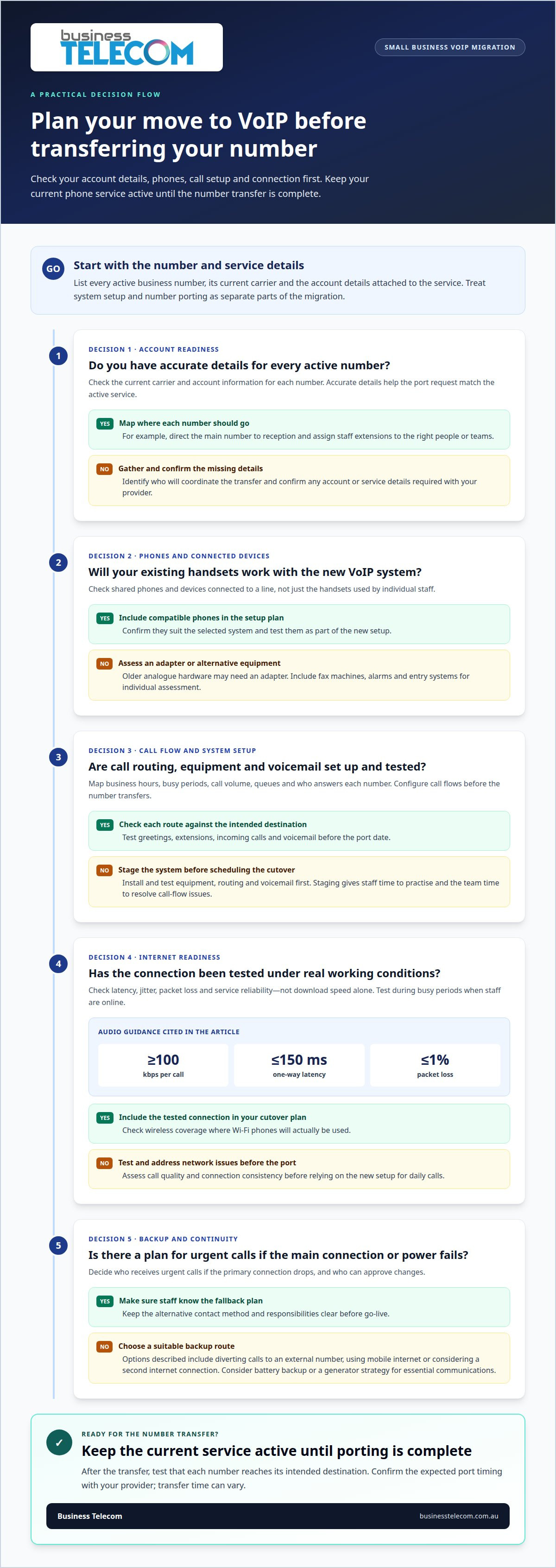
Australian VoIP providers must register a service address for emergency calling under ACMA emergency call service rules. For good audio, allow at least 100 kbps per call; engineering guidance recommends one-way latency no higher than 150 ms and packet loss no higher than 1%.
- Audit your current setup. List each business phone number, user, handset and connected device, then note how calls are handled. For example, record whether reception transfers calls, staff use voicemail, or after-hours calls need a different greeting. Include fax machines, alarms and entry systems for individual assessment.
- Map your call flow and usage. Record business hours, busy periods, call volume, queues and who answers each number. Decide whether callers need options such as an auto attendant, which directs callers through a recorded menu, or voicemail when staff are unavailable. This map guides system configuration.
- Choose the right phone setup. A cloud-hosted phone system runs through an internet connection, with its call functions managed online rather than solely by equipment in your office. Staff can use compatible desk phones or a VoIP phone, depending on the system. Test Wi-Fi where wireless phones will actually be used.
- Compare Microsoft Teams Phone with dedicated VoIP. Teams Phone suits businesses that want calling within the Microsoft Teams environment. A dedicated VoIP system centres on business telephony and call management. Compare the daily call flow, administration and user experience your team needs before selecting an approach.
Can I keep my landline number?
Australian businesses can generally keep their existing business numbers when moving to VoIP. A VoIP migration for a small business starts by identifying active numbers, account details and how each number should handle calls.
-
Check Provider and Handset Compatibility
List each telephone number, its current carrier and the account details attached to it. Accurate information helps ensure the port request matches the active service. Establish who will coordinate the transfer and how the porting process works. Check whether your existing handsets are compatible with the new VoIP system, as older analogue hardware may need an adapter. Include shared phones and any devices connected to a line.
-
Plan Number Porting and Extensions
Map each number to its intended destination before requesting a transfer. For example, send the main number to reception and assign staff extensions to the right people or teams. The 8 to 15 business day timeframe for an individual local-number port, and the allowance of up to 30 business days for specified complex-port metrics, should be verified against current requirements and your provider’s advice before relying on them.
- Keep the existing phone service active until porting is complete. Before relying on claims about number porting under the Telecommunications Numbering Plan 2025 or a losing telco’s obligations, check the current rules and requirements with an appropriate source. Confirm any account or service details required for the port with your provider.
- Plan the migration around the port date, allowing time to test greetings, extensions and incoming calls. A one to three week migration timeframe from sign-up to go-live is an estimate, not a guaranteed schedule; confirm the expected timing with your provider. Configure call flows before the number transfers, then test that each number reaches its intended destination. Record the transfer date and assign someone to check the new call paths.
#5: Is VoIP Reliable For Daily Business Communication?
- Test the connection before scheduling cutover. Check latency, jitter, packet loss and service reliability, not just download speed. An entry-tier NBN 25/5 Mbps plan can handle more than five simultaneous VoIP calls alongside normal web browsing. Actual call quality still depends on consistent network delivery, so test during busy periods when staff are online.
- Stage the change before transferring numbers. Install and test equipment, call routing and voicemail before the port date. A staged deployment gives employees time to practise and lets the team resolve call-flow issues before numbers move. Configure routing in advance; this can reduce inbound-number downtime to a couple of hours.
- Set a backup route for urgent calls. Decide who receives urgent calls if the primary connection drops, and who can approve changes. Failover rules can divert incoming calls to an external number or use mobile internet. A second internet connection can also provide an alternative route, depending on the setup.
- Plan for remote and hybrid staff. Map each employee’s direct dial number or extension to the person who should answer, including staff working away from the office. Test call transfers between office and remote users, and confirm voicemail reaches the right person. If call recording is required, include its access and handling in the cutover plan.
- Prepare for power and legacy-line changes. VoIP equipment needs power, so consider battery backup or a generator strategy for essential communications. Don’t assume a copper line will remain available as a fallback: NBN is disconnecting copper services progressively, area by area. Keep an alternative contact method ready and tell staff how to use it before go-live.
VoIP costs and setup fees in Australia
Build your migration budget from its separate cost components rather than relying on a single headline figure. User subscriptions, phones, number transfers and setup requirements can all affect the total.
- Count users and required phones. A user subscription and a physical handset are different cost items. List who needs calling access, who needs a desk phone, and whether shared phones suit your office. This avoids budgeting for one handset per employee when some staff can use another compatible device.
- Separate recurring charges from one-off costs. Record the billing period and inclusions for each subscription. Then identify potential upfront items, such as new phones, adapters for analogue hardware, number porting and system configuration. Ask for each item to be shown separately, so the ongoing service cost isn’t confused with deployment expenses.
- Price the migration plan, not just the phones. A staged switch can involve preparing call flows, mapping extensions, testing equipment and coordinating number transfers. Include these tasks in the project scope. Check how complex ports, multiple locations or devices connected to traditional lines affect the proposed setup, rather than assuming every site follows the same process.
- Compare the full cost over time. Put recurring subscriptions, hardware, setup and optional charges into one view. Check whether figures include GST, what each charge covers, and how costs change when users or phones are added. The price depends on your requirements; user numbers, equipment, porting and configuration shape the scope.
To discuss a costed plan aligned with your users, phones and migration requirements, contact Business Telecom.
Business Telecom: SMALL BUSINESS PHONE SYSTEMS
Business Telecom can discuss phone system options for small businesses reviewing their current setup or planning a move to VoIP. The right system should reflect how your team handles incoming calls, who needs a phone and how callers reach the right person.
When comparing options, use your migration plan: existing numbers, extension requirements, handset needs and call routing. These details help shape a business phone system around everyday communications, without adding features your team won’t use. Ask Business Telecom whether its current offerings suit your office phone system or business landline requirements.
If you’re considering a phone system change for your business, contact Business Telecom to discuss your requirements.
Set your phone system up for what comes next
Changing your phone system is also an opportunity to decide how communications should support your business as it develops. Before committing, define what a successful first month looks like: staff can handle their usual calls, customers reach the right person, and someone knows how to manage any issues.
Use those priorities to define the scope of your VoIP migration for a small business. A clear plan keeps decisions focused on how your team works, rather than on features that don’t meet a practical need.
When you’re ready to discuss the next step, contact Business Telecom about your migration. A considered plan can help your team move forward with greater clarity.
Frequently Asked Questions
When is VoIP the right fit?
VoIP may suit a business whose phone requirements change as staff roles, departments or working arrangements shift. Before deciding, identify what causes friction in your current setup and what the new system needs to improve. Also consider equipment that depends on analogue connections, as those devices may need a separate solution rather than simply transferring with the telephone service.
#3: What Are The Main Benefits Of VoIP For Small Businesses?
A key benefit is greater control over how your business presents itself to callers. For example, you can prepare a different greeting for a public holiday or temporary closure, helping callers understand what to do next. The value comes from solving a specific communication need, not from assuming new technology will automatically reduce costs or missed calls.
Can I set up my call flow before porting my number?
Decide who approves greeting scripts, department names and opening-hour messages before the transfer date. This gives the people responsible for each part of the business time to review what callers will hear. Settle these decisions separately from the number transfer, so the port date doesn’t become the deadline for internal call-handling policies.
How VoIP Fixes Common Problems Businesses Face With Landlines?
VoIP can make it easier to manage business numbers as responsibilities change. For example, when an employee leaves, document which published numbers and internal contact records need updating so callers aren’t directed to an outdated contact. Use the migration as a prompt to review phone numbers on customer-facing materials and keep ownership records current.
How long does a typical VoIP migration take for a small or medium business?
The schedule depends on the porting work and how quickly the business can make decisions. Track milestones for account authorisation, system preparation, number transfer and staff readiness. This makes progress easier to follow and helps you coordinate internal communications, rather than treating the whole migration as a single installation appointment.
How long does setup take?
Setup time depends on the decisions and configuration required, so define the scope before scheduling. Prepare a brief covering user names, extension labels, permissions, voicemail ownership, greetings and any special operating arrangements. This gives configuration a clear basis and helps avoid repeated clarification. The time required will depend on the complexity of those requirements.