

A phone system shouldn’t be left on autopilot. Brisbane businesses should review it at least once every 12 months and consider an upgrade when the current setup no longer meets their needs. To upgrade office phones in Brisbane, start by identifying what’s limiting call handling and which features your team needs.
Replacing phones isn’t always the right move. Review staff numbers, work locations and call patterns to find out whether the problem is outdated equipment, limited call routing or a system that doesn’t support remote work. This keeps an upgrade focused on practical improvements rather than features your business won’t use.
This guide explains how to spot when it’s time to upgrade office phones in Brisbane, assess your requirements and improve how calls reach the right people. It also covers planning a move from copper services to IP telephony, including number porting, data transfer and staff training. A considered plan helps protect day-to-day communication and accommodate future business needs.
Key Takeaways
- Review your phone system at least once every 12 months, and use its limitations to identify when an upgrade could help.
- Map how staff work across offices, remotely and on mobile devices before choosing phone features.
- Use call routing, forwarding and IVR menus to direct callers to the right team and manage busy periods.
- Assess your internet bandwidth and network configuration as part of planning a move to VoIP.
- Plan the migration around number porting, data transfer and staff training to support a smoother transition from copper services.
When (and How Often) Should Your Business Upgrade Its Phone System?
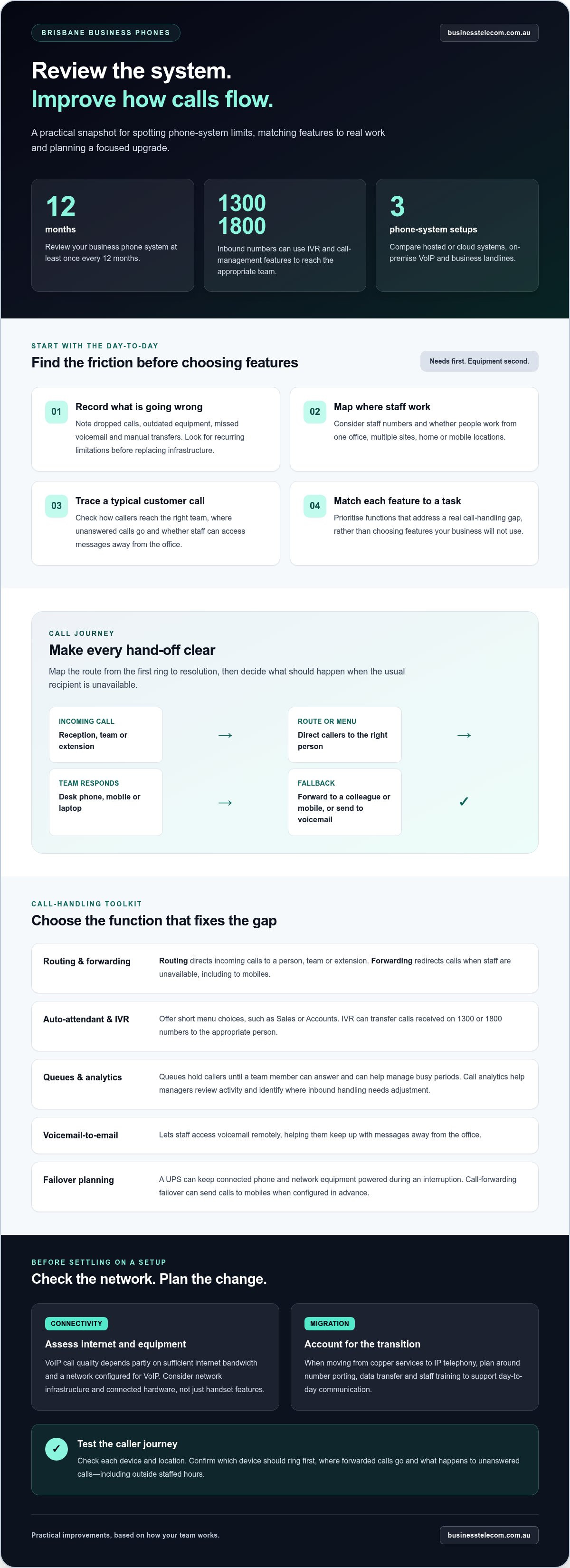
Review your business phone system at least once every 12 months. An annual check helps identify limitations before they disrupt everyday call handling. Note dropped calls, outdated equipment, missed voicemail and manual transfers. Then compare these issues with the features your staff need, rather than replacing infrastructure simply because it is older.
Start with the people who use the system. Record how many staff need calls and whether they work from one Brisbane office, multiple sites, home or mobile locations. A team split between office and remote work may need desk phones alongside mobile apps or softphones. Modern VoIP systems can support calls from desk phones, laptops and mobiles, giving staff a consistent setup across locations.
Next, trace a typical customer call from arrival to resolution. Can reception route a caller to Sales? Where do unanswered calls go, and can staff access messages away from the office? Voicemail-to-email lets staff access messages remotely. Call forwarding can also direct calls to a colleague or mobile when the usual recipient is unavailable.
Match each feature to a real work task. First list call-handling gaps, then prioritise functions such as call routing, forwarding, voicemail-to-email or mobile calling. A business phone system can route calls to the right person, while mobile apps and softphones let employees call from different locations. Focus on functions that solve an operational problem.
Include power and connectivity interruptions in your review. A UPS can keep connected phone and network equipment powered during an interruption, while call-forwarding failover can send calls to mobiles. Configure failover in advance: decide which calls should divert, which mobiles should receive them and how staff will handle returned calls.
Brisbane businesses can upgrade through providers offering hosted or cloud phone systems, on-premise VoIP or business landlines. Plans vary according to lines, users, features and calling usage. Compare these requirements with your current system before choosing a setup.
Upgrading phones doesn’t automatically make a Brisbane business eligible for a specific grant or tax deduction. Any programme depends on its eligibility rules, and tax treatment depends on the business’s circumstances and the nature of the expense.
Call routing, forwarding and inbound call management
Well-planned call handling helps callers reach the right person without unnecessary transfers. Map the caller’s route from the first ring to resolution, then configure each setting to match how your team works.
Call routing and forwarding
Routing directs incoming calls to a person, team or extension; forwarding redirects them when staff are unavailable. A small-business PABX can manage calls and direct callers to staff extensions. Map common paths, such as a customer calling reception for Accounts, then decide where unanswered calls should go. Include mobiles so calls can reach staff away from their desks.
Auto-attendant and call analytics
An auto-attendant gives callers menu choices, such as pressing 1 for Sales or 2 for Accounts. IVR menus can also transfer calls received on 1300 or 1800 numbers to the appropriate person. Keep menu wording short and make each option match a real team or task. Call analytics can help managers review call activity and spot where inbound handling needs adjustment.
For higher call volumes, queues hold callers until a team member can answer. They can help manage busy periods and reduce missed opportunities. Set rules around your work pattern: direct calls to an available team member, for example, then send unanswered calls to voicemail. Review the caller journey, including what happens outside staffed hours.
Check how the system works across each device and location. Staff may use a desk phone, mobile and laptop for business calls, so make clear which device should ring first. Test calls to confirm the route, forwarding destination and voicemail outcome. This can uncover confusing hand-offs before they affect customers.
Call quality depends partly on sufficient internet bandwidth and a network configured for VoIP. Assess network infrastructure and connected hardware, not just handset features. If calls sound unclear or drop during busy periods, record when it happens and which devices are affected. This helps distinguish a routing issue from a connectivity or equipment problem.
Businesses using 1300 numbers can configure inbound call-management functions, and cloud phone systems can integrate those numbers. List the teams that answer each number, the route callers should follow, and the fallback destination when nobody answers. This gives staff a consistent process while preserving flexibility as responsibilities change.
To make an upgrade decision, document the current call paths, recurring bottlenecks and desired outcomes, then compare them with the system’s routing, queue and analytics functions. A review of business call-handling needs can help shape the requirements for a more suitable phone setup.
Adding complementary features such as IVR
Brisbane businesses can choose cloud-based, hosted or on-premise VoIP systems. A cloud PBX hosts phone services online, while an on-premise system uses equipment at the business site.
Hosted PBX feature options
Hosted PBX options range from core call handling to tools for more involved workflows. Features can include call forwarding, auto attendant, queues, voicemail-to-email, call analytics and video conferencing. Match each option to a staff task, such as returning voicemail while away from the office.
Advanced features are worthwhile when they meet a specific operational need. A business that relies on Microsoft Teams or a CRM platform, for example, may value integration with those tools. Decide how staff would use the integrated workflow, what information they need during calls and whether the network can support clear VoIP calling.
Cloud-hosted services can make it easier to add users, phone numbers or features as requirements change. That flexibility doesn’t mean every feature belongs in the initial setup. List what you need now, then separate it from options that may support future changes.
IVR and call handling
IVR lets callers select a destination through spoken prompts or keypad choices. A simple example is “Press 1 for Sales” and “Press 2 for Accounts”. Build each option around a team that answers calls, and give callers a clear route when they choose incorrectly or need another department.
Call routing, queues and forwarding can work alongside IVR. A call for Sales might ring available staff, wait in a queue during busy periods, then follow a set fallback route. Test each path from the caller’s perspective, including what happens when the team is unavailable.
Call analytics can show patterns in inbound activity and help managers review call handling. Use the information to identify recurring queue pressure or calls that often reach voicemail, then adjust routing or staffing processes. Analytics are most useful when they answer a specific operational question.
Give AI calling features a defined purpose before adding them. Identify the task they should support, such as helping staff manage call information, and assess how they fit existing workflows. Consider who will use the feature, what information it processes and how employees will review its output. Keep a person responsible for customer decisions, and ensure the feature complements rather than complicates your calling process.
Choose features by operational value: first address caller access, then staff call handling, then integrations or AI tools. This sequence helps match hosted PBX functions to business needs without adding complexity for its own sake.
Assessing current phone services and business needs
Start by listing every service that supports business communication. Record phone numbers, lines, handsets, extensions, fax connections and call features. Note which teams rely on each service, such as reception answering the main number or Accounts receiving direct calls. This gives you a practical baseline for comparing a replacement system with current needs.
Include the network and internet connection in your review. VoIP call performance depends on sufficient bandwidth and a network configured for voice traffic. Note the busiest calling periods, the devices staff use and other demands on the connection, such as video meetings or large file transfers. Business fibre may be relevant where available, but the key question is whether the connection can support clear calls alongside everyday work.
Check call capacity against actual demand. Compare how many staff need to call at once with the number of simultaneous calls the current service supports. A business SIP service connects a phone system to calling services over an IP connection. Before changing services, consider how the SIP setup handles existing numbers, call volumes and your current PBX.
Map the tools staff use during customer conversations. Business phone systems can integrate with Microsoft Teams and CRM platforms, which can help keep calling within familiar workflows. Identify the information staff need during a call, such as a customer record or service history, then prioritise integrations that support that task. Assess the practical fit before selecting bundled features, and include only services employees will use.
Review continuity by documenting what happens if office internet or power is disrupted. Cloud-based phone systems can support business continuity during outages or other disruptions. Identify which calls matter most, who needs to remain reachable and how staff should handle customer enquiries. This gives your continuity plan a clear operational purpose.
Audit older equipment carefully before replacing it. A PABX may have accumulated years of extensions, hunt groups, door phones and fax lines. List each connection and the process that depends on it. For example, a door phone may reach reception through an extension that isn’t obvious from the handset inventory.
Finish by ranking requirements according to their operational impact. Separate essential functions, such as keeping existing business numbers and supporting daily call flows, from optional additions. Compare hosted PBX features with those requirements, then assess internet capacity, integration needs and continuity arrangements together. This joined-up review helps ensure the phone system suits the way your Brisbane team works.
Copper network shutdown and IP telephony migration
VoIP calls travel over the internet rather than traditional telephone lines, so moving from copper requires service and network planning. Australian business phone services are subject to telecommunications rules covering number porting and emergency calls. Plan the change to preserve access to emergency calling and move numbers through the porting process.
Migration planning and number porting
Build the migration plan around four tasks: document existing numbers, prepare the new VoIP system, transfer required data and train staff. Number porting commonly takes one to three weeks, while the old service stays live until the planned cutover. Record each number’s purpose, such as the main office line, a staff direct number or a published service line.
Before switching, map where each number will ring in the new system and test the call path. Confirm, for example, that the main number reaches reception and a direct number reaches its assigned staff member. Schedule cutover after staff training, and explain the new process to employees using desk phones, laptops or mobile devices.
NBN compatibility and migration
Check how your current telephone service connects to the NBN and whether existing equipment supports the intended setup. VoIP systems make calls over the internet, but performance depends on sufficient bandwidth and a network configured for VoIP. Professional advice can help assess NBN compatibility before you buy or upgrade a phone system.
An analogue telephone adapter may let a business retain some existing equipment for NBN compatibility instead of buying a new phone system. The right approach depends on the telephone hardware, required features and how the business handles calls. Include these details in the migration plan before deciding what to replace.
Plan the move as a coordinated change, not just a handset swap. Record existing services, numbers, extensions and connected equipment, then identify what the new IP telephony setup must retain. Include data transfer and staff training alongside number porting, so employees know how to make calls and access voicemail after the switch.
Test essential call paths before and after cutover. Check incoming and outgoing calls, voicemail, forwarding and any equipment connected to the old telephone service. For numbers used for customer enquiries, confirm the destination in the new system and keep the old service active until the planned transition.
A clear migration plan helps align office phone systems with the NBN connection, existing numbers and staff workflows. Plan your IP telephony migration around number porting, system setup and staff training.
Business Telecom: Business Phone System
Business Telecom helps businesses planning an office phone upgrade choose a suitable Business Phone System. Its services include Business Land Lines, Office Phone Systems and small business phone systems, giving Brisbane organisations options to suit their communication setup and staff needs.
Consider an upgrade if your current system limits call handling, doesn’t support remote staff effectively or needs a planned move to IP telephony. Bring together your team’s call flows, existing numbers, devices and work locations. A clear picture of these needs makes for a practical phone-system discussion.
Contact Business Telecom to discuss your business phone requirements.
Make your next phone-system decision with confidence
A phone upgrade is an opportunity to align business communication with how your team works now, while allowing for future operational changes. Before choosing a direction, prepare a short decision brief: note the call flows that matter, the tools staff rely on and the outcomes the new setup should support. This gives your business a clear basis for comparing options.
If you’re planning to upgrade office phones in Brisbane, Business Telecom offers Business Phone Systems, Business Land Lines and Office Phone Systems. These options can support organisations reviewing their current setup or planning changes to their business calling arrangements.
Use your decision brief to start a focused conversation about the phone system that fits your workplace. Contact Business Telecom to discuss your business phone requirements and take the next step with clarity.
Frequently Asked Questions
Ready for an Office Phone System That Just Works?
Consider an upgrade when call handling, staff mobility or ageing equipment causes recurring workarounds. Before contacting Business Telecom, note your current setup, the calls your team handles and the main issue to resolve. This gives Brisbane businesses a practical starting point for discussing a Business Phone System or Office Phone System, based on workplace needs rather than a generic feature list.
Are VoIP phone systems reliable?
VoIP phone systems support business calling when the internet connection has sufficient bandwidth and the network is configured for voice traffic. Assess call quality during busy periods, when video meetings or file transfers may also use the connection. Note whether several staff experience unclear calls at the same time. This helps identify whether the network, rather than a handset, needs attention.
Can a VoIP system support remote teams?
Yes. Staff can make and receive business calls remotely using mobile apps or softphones on laptops, alongside desk phones in the office. For example, a salesperson away from the Brisbane office can call from a mobile device while colleagues use desk phones. Set clear team processes for caller identification, voicemail access and handing a customer conversation to another staff member.
How much does it cost to upgrade office phones in Brisbane, including hardware, setup, and monthly fees?
The price depends on the setup and is provided after a quote request. Cost factors include the number and type of handsets, installation requirements, existing equipment, selected features, service lines and ongoing calling plan. Separate one-off hardware and setup costs from recurring charges when reviewing a proposal. This makes it easier to compare the total commitment with expected phone use.
How do Brisbane businesses choose the right number of handsets and phone features?
Choose handset numbers based on who needs a dedicated desk phone, not simply the number of employees. List reception, shared work areas and staff who mainly call from mobiles or computers. Then prioritise features around real tasks, such as routing customer enquiries or managing voicemail. Staff working across sites may need mobile calling rather than a handset at every location.
What is involved in migrating an existing Brisbane office phone number to a new system?
Number porting transfers an existing number to a new phone service. It commonly takes one to three weeks, and the old service stays live until the planned cutover. Record which staff or teams use each number, then assign its destination in the new system. After transfer, test incoming calls to important numbers, including the main customer enquiry line.
How long does an office phone system upgrade take, and what steps are involved?
A small-business phone system installation is typically completed in one day on site; PABX decommissioning adds a half-day. The work can include setting up the system, migrating phone lines and numbers, testing call functions and showing staff how to use it. Number porting commonly takes one to three weeks, so plan cutover around the transfer and keep the old service live until then.
What internet speed and network equipment are required for VoIP office phones?
There isn’t one internet speed suited to every office. Required capacity depends on simultaneous calls and other internet activity, such as video meetings or cloud applications. Assess the connection during busy periods, then consider how the network handles voice alongside other work. Include routers, switches and any power equipment connected to phones in your review, especially when calls rely on shared network hardware.