
A cloud phone system can have an impressive feature list and still fall short if its call flows, internet connection and support don’t suit the way your team works. A search for cloud pbx australia should lead to more than a feature checklist: reliability depends on how these practical pieces fit together.
It’s understandable to focus on call quality and the risk of disruption when moving business calls to a new system. Teams also need to know whether office and remote staff can use the same business number, and how calls will reach the right people.
This guide explains cloud PBX in practical terms and outlines what to assess before choosing a provider. You’ll learn how connectivity can affect calling, which features and support arrangements to compare, and how to plan a manageable transition. The focus is on decisions that help keep business calling clear, organised and reliable, not technical detail for its own sake.
Key Takeaways
- Understand how a cloud PBX connects callers to staff through a provider-hosted platform, using desk phones, computers or mobiles.
- Compare providers by how well their call features, supported devices, administration and support fit your team’s needs, not by feature count alone.
- Assess your business internet connection and calling requirements to set realistic expectations for call reliability.
- Prepare for setup by mapping users, numbers, extensions, call queues and business hours before speaking with providers.
- Use a clear checklist when comparing cloud pbx australia options, including how each provider can align call flows and support with your operations.
What is Cloud PBX in Australia and how can it help?
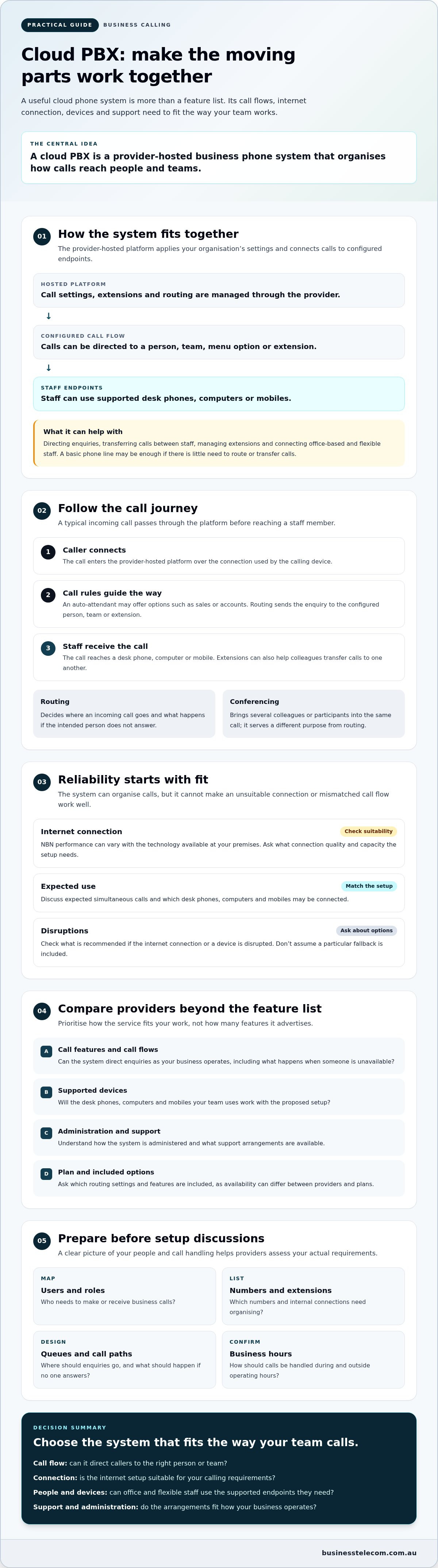
A cloud PBX is a business phone system hosted and managed through a provider, rather than run on phone equipment kept at your premises. Staff can make and receive business calls using desk phones, computers or mobiles configured as endpoints. The provider-hosted platform applies your organisation’s call settings and connects each call to the right person or team.
A cloud PBX is a managed business calling system with configurable extensions and call flows, not simply a single phone line that rings one handset. A single line may suit a straightforward setup, while a PBX can help a team direct enquiries, transfer calls between staff and manage extensions. For a broader overview of how these systems fit within a business telephone system, see Wikipedia’s explanation.
In day-to-day use, a caller might hear an auto-attendant directing them to sales or accounts, then be connected to an available staff member. If that person is away from their desk, the configured call flow may offer another route, depending on the system’s features and settings. Extensions give staff a way to reach one another without relying on a list of separate direct numbers. Conferencing can bring several colleagues into a call. The exact options depend on the provider and plan.
For businesses assessing cloud pbx australia options, suitability comes down to how calls need to be handled, whether the internet connection is ready for voice calling, and which capabilities the provider includes. A system can organise calls, but it can’t compensate for an unsuitable connection or a call flow that doesn’t reflect how the business operates.
How is cloud PBX different from a basic business phone line?
A basic fixed-voice service connects calls through a line, while a managed cloud PBX adds a central place to configure extensions and call flows. For example, a small business could direct new enquiries to a receptionist or sales group, while existing customers reach accounts. Staff can transfer calls to colleagues using their extensions, whether they’re at a desk or using a supported device elsewhere.
Which businesses can benefit from cloud PBX?
Cloud PBX can suit SMEs that share incoming calls across office-based and flexible staff, or need to connect people in different roles or locations. Extension management helps keep those connections organised as responsibilities change. A business with one main contact and little need to route or transfer calls may need fewer features, so assess the actual call tasks before choosing a system.
How does an Australian cloud PBX handle calls from connection to extension?
A cloud PBX call typically travels from the caller through the provider-hosted platform, follows your configured call flow, then reaches a staff member’s desk phone, computer or mobile. The platform applies the rules your business has set, such as directing calls to a team, offering menu options or ringing an assigned extension.
That journey relies on an internet connection between the calling device and the platform. NBN performance can vary with the technology available at your premises, so assess the connection alongside expected call volumes and device use. The On-Premises vs. Cloud PBX comparison from Forbes provides further context on how hosted systems differ from equipment managed at your workplace.
What happens between an incoming call and a staff member answering?
An auto-attendant can greet callers and present options, such as pressing a key for sales or accounts. Call routing then directs the enquiry to the configured person, team or extension. For example, selecting sales could ring the sales group, while a staff extension lets a colleague transfer a caller to a specific person. Conferencing serves a different purpose: it brings multiple participants into the same call rather than deciding where an incoming call goes.
Clear call rules make a difference. Decide what callers should hear, where each option leads and what should happen if the intended person doesn’t answer. Ask the provider which routing settings and features are included in the proposed plan, as availability can differ.
What should businesses check about NBN and connected devices?
Ask the provider what connection quality and capacity the proposed setup needs, and check whether the NBN service at your premises is suitable for your calling requirements. Consider how many simultaneous calls your team expects, as well as which desk phones, computers and mobiles may be connected. These details help the provider assess the setup against your actual usage, rather than a general feature list.
Also ask what options are recommended if the internet connection or a device is disrupted. Don’t assume a particular backup or failover arrangement is included; confirm what applies to the service you’re considering. A cloud PBX depends on connectivity, so no calling setup should be treated as immune to interruptions.
For a practical discussion about call flows, devices and connection requirements, discuss your business phone requirements with a provider.
How to compare cloud PBX providers in Australia without relying on feature lists
A long feature list doesn’t show whether a system will handle your calls well in practice. Compare providers against the work your team needs the phone system to do, then ask for clear answers about devices, administration, connectivity and support. This makes cloud pbx australia options easier to assess on operational fit rather than headline claims.
Use this framework to guide provider conversations:
- Call features: Will call routing, auto-attendants, extensions and conferencing support the way your team handles enquiries?
- Devices: Can staff use the desk phones, computers or mobiles they need for office and flexible calling?
- Administration: How will an authorised staff member add users or adjust call settings as roles change?
- Support: Where is the support team based, how can you contact it, and during what hours?
- Connectivity: What internet connection and capacity does the proposed setup require, and what happens if connectivity is disrupted?
For each answer, consider the business need behind it. A team that receives enquiries for several departments may value call routing and an auto-attendant. A smaller team with straightforward call handling may need fewer features. Confirm whether any feature you depend on is included in the specific plan being considered.
Which cloud PBX features should an SME prioritise?
Start with actual workflows. List where incoming calls should go, who needs an extension, and whether staff need desk phones, computer calling, mobile calling or a mix. Then ask how administrators manage users and call settings, and whether those controls suit the people responsible for keeping the system organised.
How can you assess reliability and support before choosing?
Ask each provider what happens to calls during an internet or power disruption, and what options are available for your particular setup. Confirm support hours, contact methods and service availability for your location directly. Businesses in Sydney, Brisbane or the Gold Coast should check local availability rather than assume it. If a provider describes service commitments, request the details in writing and clarify exactly what they cover.
Include number portability in your questions: can your existing business number be transferred, what information is needed, and how will calls be handled during the changeover? Consult a dedicated number-porting guide if you need more detail, and confirm the process with your chosen provider before planning a switch. Compare the answers side by side; clear, relevant responses are more useful than broad promises.
What should your business prepare before setting up a cloud PBX?
A smoother setup starts with a clear picture of how your business handles calls today and what needs to change. Before comparing cloud pbx australia options, document call requirements, map users and extensions, check internet readiness, confirm devices, then agree the proposed configuration with the provider.
Gather an inventory of your current business numbers, extensions, call queues and business hours. Include who answers each type of call, when call volumes peak and what should happen if the first person or team can’t answer. This gives the provider useful operational detail and helps you check that the suggested call flow suits your team.
How do you map users, extensions and call flows?
List teams and roles, the numbers they use, and who should receive each call type. Note busy periods, after-hours handling and escalation paths, such as redirecting an unanswered call to another team member. Record which staff need desk phones, computer calling or mobile access so device requirements are clear from the outset.
Before requesting provider advice, have this checklist ready:
- Current numbers, extensions and call queues
- Teams, call responsibilities and escalation paths
- Business hours and after-hours call handling
- Expected devices and internet connection details
What should you confirm with a provider before deployment?
Ask which devices are compatible, who will configure users and call flows, and what administrator guidance or training is available. Confirm the number-porting process, the information needed from your business and the provider’s expected timing. Treat porting dates as planning details to verify with the provider, not guaranteed outcomes.
Agree how the new system will be tested and how staff will become familiar with it around normal operations. Ask what the changeover plan involves, including any possible service interruption and how it will be communicated. Request the provider’s migration and downtime guidance before settling on a schedule.
Once you’ve documented your call needs, discuss your business phone requirements with Business Telecom to explore how a cloud phone system could fit your team.
Choosing a cloud PBX provider: how Business Telecom can support Australian SMEs
A useful provider discussion connects your business requirements with a practical system design. Compare options across five areas: call flows, connectivity, devices, administration and ongoing support. This helps you assess cloud pbx australia providers by how their service could fit your day-to-day calling, rather than by the length of a feature list.
Business Telecom provides VoIP and cloud phone systems for Australian SMEs, with calling across desk phones, computers and mobile devices. Its stated capabilities include call routing, auto-attendants, conferencing and extension management. These features can help organise how calls reach staff and how colleagues connect, depending on what is available with the plan you’re considering.
- Call design: Can the provider map your incoming enquiries to the right people or teams?
- Connectivity: What connection requirements apply to your premises and expected call activity?
- Devices and administration: Can staff use the devices they need, and who will manage users and call settings?
- Support: What support arrangements apply, and are they suitable for your location and operating needs?
What should a provider discussion cover?
Share your team size, locations, current numbers, typical call patterns and preferred devices. Then ask the provider to explain a proposed call flow using real examples, such as a new enquiry reaching the right team or an unanswered call moving to an agreed alternative. Confirm service availability, included capabilities and support arrangements directly, including details that vary by location or plan.
How can you take the next step with Business Telecom?
Business Telecom provides Australian-based technical support, with a local focus on Sydney, Brisbane and the Gold Coast. Confirm current availability and support arrangements for your location, and ask which features apply to the proposed plan. A provider discussion can help you assess an office phone system configuration against your call needs, devices and connectivity, without assuming every setup requires the same features.
Bring your requirements and questions to the conversation. Discuss your business cloud PBX requirements with Business Telecom.
Set your team up for clearer business calling
Choosing cloud pbx australia solutions is easier when you start with your call flows, internet readiness, devices and support needs. A provider’s features matter most when they match the way your team handles enquiries, transfers calls and works across locations. Preparing your numbers, users and business hours also gives provider discussions a practical starting point.
Business Telecom provides Australian SMEs with cloud calling across desk phones, computers and mobile devices, with capabilities including call routing, auto-attendants, conferencing and extension management. Australian-based technical support is another point to consider when assessing your requirements. Confirm which features and support arrangements apply to your chosen plan and location.
Ready to discuss a setup that fits the way your team works? Discuss your business cloud PBX requirements with Business Telecom. A clear plan can make the move to a new phone system more manageable and help your team stay connected.
Frequently Asked Questions
What is a cloud PBX phone system?
A cloud PBX is a business phone system hosted and managed through a provider. It connects calls to staff using configured call flows and extensions, rather than relying only on a single line and handset. Depending on the service, staff may use desk phones, computers or mobiles. Features can include call routing, auto-attendants and conferencing, so check which capabilities are included in the provider’s plan.
Is cloud PBX suitable for a small business in Australia?
Cloud PBX can suit a small business that needs to direct enquiries, share calls between staff or connect office-based and flexible workers. Its value depends on your call volumes, internet readiness, devices and preferred call handling. A business with one main contact and few routing needs may need a simpler setup. Map your call tasks first, then compare providers against them.
Does cloud PBX work over the NBN?
Yes, cloud PBX can use an NBN connection, but suitability depends on the connection at your premises and your business’s calling requirements. Ask providers what connection quality and capacity their proposed service needs, and discuss how many simultaneous calls and connected devices to plan for. NBN technology differs by location, so assess your specific connection rather than assuming every service will perform the same way.
Can staff use a cloud PBX on mobiles and computers?
Staff can use mobiles and computers for cloud PBX calling if those devices are supported and configured for the provider’s service. This can help flexible workers handle business calls when they’re away from a desk, while office staff use desk phones or computers. Confirm device compatibility, setup requirements and how calls are managed across endpoints before choosing a plan.
Can I keep my existing business phone number when switching to cloud PBX?
You may be able to transfer an existing business number to a new provider, but confirm eligibility and the process directly with both providers before scheduling a change. Ask what account details or documents are required, how long the transfer may take and how calls will be managed during the changeover. Don’t cancel the existing service until the new provider confirms the appropriate steps.
What happens to cloud PBX calls if the internet goes down?
If the internet connection used by your cloud PBX is interrupted, calling through devices that rely on that connection may be affected. The impact and any alternative call-handling options depend on the provider and your setup. Ask what is available during an internet or power disruption, whether another connection or device can be used, and what your team should do if service is interrupted.
How do I choose between cloud PBX providers in Australia?
Compare providers against your call flows, supported devices, administration needs, connectivity requirements and support arrangements, not just the number of features listed. Ask each provider to explain how your actual call scenarios would work, which capabilities are included and what happens during a disruption. Businesses in Sydney, Brisbane and the Gold Coast should also confirm current service availability and support arrangements for their location.