
The lowest advertised fee isn’t always the most affordable choice for a Sydney business. If plan inclusions are hard to compare, it’s difficult to tell whether a lower ongoing cost leaves your team without the call handling, devices or support it needs. Finding affordable business VoIP Sydney means looking beyond the headline plan.
A suitable system should match how your staff answer, transfer and manage calls, whether they work at a desk, on a computer or from a mobile device. The right balance can help you avoid paying for features your team won’t use while keeping everyday calling practical.
This guide explains how to compare VoIP options by total requirements, including setup and ongoing needs, rather than advertised price alone. We’ll cover call-handling features, devices and considerations when moving to a cloud phone system. Business Telecom provides business VoIP and cloud phone systems for organisations in Sydney, Brisbane and the Gold Coast, with features including call routing, auto-attendants, conferencing and extensions, plus Australian-based technical support.
Key Takeaways
- Assess affordable business VoIP Sydney options by separating one-off setup needs from recurring requirements, so comparisons reflect the full system.
- Map how calls move through your business to identify the call-management functions your team needs each day.
- Before comparing options, document user numbers, extensions, call flows and the devices staff need.
- Compare proposals using the same categories, including calling, devices, setup and ongoing support.
- Business Telecom’s cloud phone systems support calls on desk phones, computers and mobile devices, with features matched to your documented needs.
Affordable business VoIP in Sydney: what value should your business expect?
Business Voice over Internet Protocol, or VoIP, carries voice calls over an internet connection rather than relying on a traditional phone line for each call. The Voice over IP (VoIP) overview explains the technology and its broader applications. For a business, the practical question is how calls reach the right people and how staff can answer them across their working locations.
Affordability is about fit, not simply a low advertised fee. Your system should support everyday call handling, with requirements you can understand and plan for. A low headline cost may be poor value if the setup doesn’t suit how customers contact you or how your team shares incoming calls.
For businesses in Sydney, Brisbane and the Gold Coast, the right setup depends on how the team works: how many people need to make or receive calls, how busy the lines get, whether customers need to reach particular teams, and whether staff work in one office or across locations. These factors help define the users, extensions and call-management functions you need. The aim is to handle calls clearly without adding features or processes that don’t support your operations.
What makes business VoIP different from a basic calling plan?
A business phone system can organise calls across users and extensions. For example, a call to the main number can be directed to the appropriate person or team. A basic residential service is generally centred on an individual household line rather than shared business call handling.
A small Sydney office might direct incoming calls to reception, then route callers to the relevant staff member using extensions. Staff can use a desk phone, computer or mobile device, depending on the setup. This gives the business a structured way to manage customer calls instead of relying on one handset or a shared personal number.
When is an affordable VoIP setup worth considering?
Consider business VoIP when several people need to answer customer calls, when calls need to reach different roles, or when staff split their time between the office and other locations. These changes can make a single-line approach harder to manage, even if call volumes stay steady.
Start by mapping how customers contact your business. If they call a central number, decide how calls should be directed and who needs an extension. If staff answer from different locations, identify which devices suit their work. A small team with straightforward call flows may need a simpler arrangement than a business with multiple call handlers and more involved routing. Affordable business VoIP Sydney should mean choosing practical functionality for your needs, not paying for complexity that doesn’t support your operations.
What an affordable Sydney business VoIP system can include
A hosted cloud phone system runs its call-management platform off-site, so a business doesn’t need to maintain its own on-site PBX hardware. Staff connect through supported devices, while the system provides functions for directing and managing business calls. The FCC guide to VoIP offers a general explanation of internet-based calling. Its regulatory guidance relates to the United States, so Australian businesses should consider local requirements separately.
For an affordable business VoIP Sydney setup, focus on what staff need to do with calls. A clear greeting and a way to reach the right person may matter more than capabilities that don’t support your team’s routine.
Which call-management features support a small team?
Call routing directs incoming calls to the appropriate person or team. An auto-attendant plays an automated greeting and gives callers options, such as selecting a department or extension. Extensions help staff reach one another without relying on the main number, while conferencing lets several participants join a business call.
Think through a typical caller’s journey. They might hear a greeting, choose a team and reach the relevant staff member. A small team may need only a straightforward route and a few extensions. More involved call flows are useful when the business has a practical reason for them.
How do cloud phone systems support different work locations?
Cloud systems can support calls through desktop phones, computers and mobile devices. This gives a business options for matching devices to roles. Reception staff may prefer a desk phone, while colleagues who move between locations may use a computer or mobile. The system can bring those device types into one business phone setup without requiring every worker to use the same equipment.
Business Telecom’s cloud phone systems support these devices alongside call routing, auto-attendants, conferencing and extension management. Choose a combination based on where people work and how they handle calls, rather than buying a particular device for every employee.
Separate core needs from optional features by mapping the calls your team handles. Prioritise functions that solve a real task, such as directing callers or connecting colleagues. Leave out capabilities that add complexity without a clear use. This keeps the system easier to understand and aligns its features with day-to-day work.
For a practical starting point, explore Business Telecom’s cloud phone systems and consider how the device and call-management options relate to your team’s working patterns.
Compare affordable business VoIP costs by total requirements
A useful comparison shows what the business pays for and how often each charge applies. Look beyond the advertised plan: user charges, call arrangements, devices, setup needs and ongoing support can all affect the overall commitment. Record the same information for each option so you compare equivalent requirements, not different bundles with similar-looking headline fees.
Use this table as a working template. For each proposal, note which items apply, whether each charge is one-off or recurring, and what it covers.
| Requirement | Cost type | What to compare |
|---|---|---|
| Users and extensions | Recurring | Number of users or services covered, and how extensions are assigned |
| Call plan | Recurring | Included call types, any usage-based charges, and how billing is structured |
| Devices | One-off or recurring | Desk phones or other devices required, and whether they are purchased or provided through an ongoing charge |
| Setup | One-off | Any initial configuration or transition requirements shown in the proposal |
| Support | Recurring or included | What ongoing technical support covers and how it fits the business’s needs |
Which cost components should Sydney businesses compare?
Start with the number of people who need service and the extensions they’ll use, then record call-plan requirements separately. A team with different call types or usage may need a different arrangement from one with simpler calling needs. List required devices by role instead of assuming every staff member needs the same equipment. Keep setup work distinct from ongoing charges so initial requirements don’t disappear inside a recurring figure.
Include support in your value assessment. Business Telecom provides Australian-based technical support. Compare the support arrangement with your operating needs, alongside the users, devices, call plan and setup requirements. Affordable business VoIP Sydney means understanding the full requirements behind a proposal, not judging it by one line of pricing.
How can a business avoid paying for unused features?
Give every requested feature a job. Call routing might direct callers to the right team; extensions can help staff connect internally; conferencing may support regular group discussions. If a capability doesn’t address a current call-handling task or a documented business requirement, treat it as optional rather than essential. This keeps comparisons focused on a workable setup, not a long list of functions.
The lowest advertised fee isn’t necessarily the best value if essential requirements sit outside the plan or included features go unused. For wider context on assessing providers, use the business VoIP provider buying guide alongside your completed comparison.
A practical checklist for choosing business VoIP in Sydney
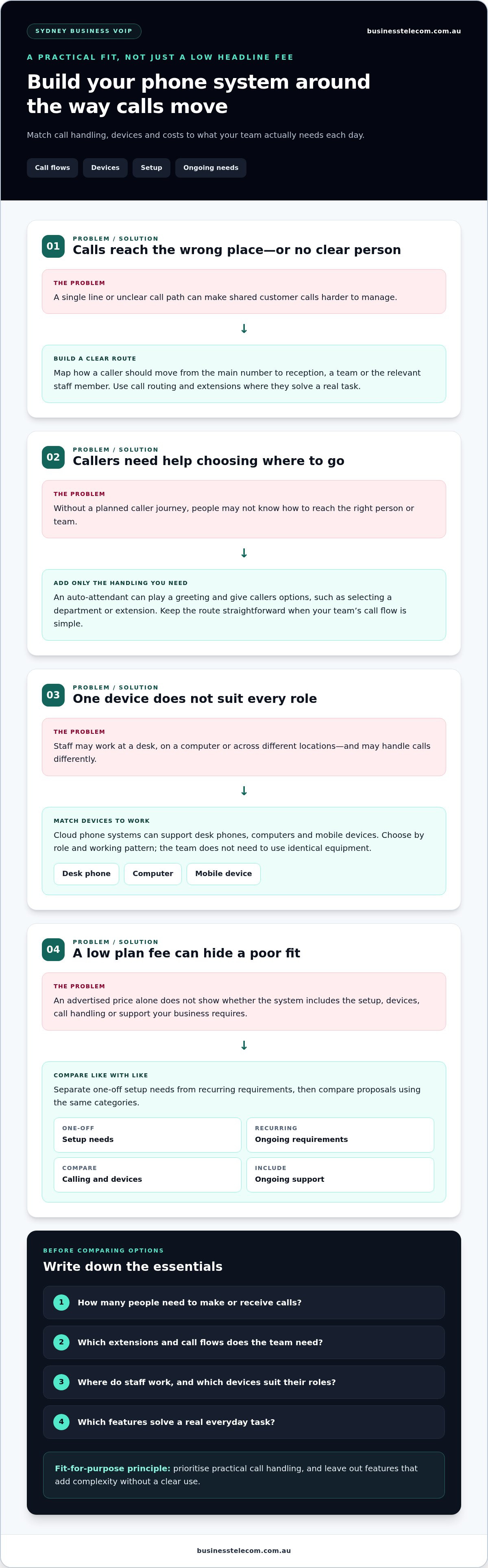
A clear brief makes it easier to compare business VoIP proposals on the same basis. Before requesting options, write down how calls work now, what staff need to do and where they need to answer. This gives you a practical way to judge whether a proposed setup fits your business in Sydney, Brisbane or the Gold Coast, rather than being swayed by a feature list alone.
- Record users and extensions. Note who needs to make and receive business calls, who needs an individual extension, and whether any roles share call-handling duties. Use current staffing needs as your baseline.
- Map incoming call flows. Write down who answers the main number, where callers should go next, and when calls need to be redirected. Include common scenarios, such as a caller choosing a team or reaching another staff member if the first person can’t take the call.
- Describe how the team collaborates. Note whether staff need to connect through extensions or hold conference calls. Tie each requirement to a real task, so every proposed feature has a clear purpose.
- List locations and devices. Record where each role works and whether staff need a desk phone, computer or mobile device for business calling. Include different work patterns across the office and other locations.
- Consider internet suitability. VoIP uses an internet connection, so include the connection used at each workplace in your planning. Consider other business activity that shares it and how staff use calls during busy periods. Assess the connection in the context of your working arrangements rather than relying on a generic performance threshold.
- Separate current and future needs. Mark which requirements are necessary now and which relate to possible changes in staffing or call handling. This keeps the initial brief focused while making future planning visible.
Once the brief is ready, assess each proposal line by line. Check that the suggested users, extensions, call flows and devices match your notes. Compare plan inclusions, recurring charges, one-off setup requirements and support arrangements using the same checklist. If a feature doesn’t connect to a recorded task, identify it as optional rather than essential.
Consider the whole working setup, too. The system should suit the internet connection staff will use and the locations from which they need to call. For broader context on comparing phone system approaches for Australian small and medium-sized businesses, consult this Australian SME business phone systems guide.
This process turns affordable business VoIP Sydney from a search for the lowest headline fee into a structured assessment of fit. To explore a business VoIP setup against your team’s requirements, view Business Telecom’s business VoIP options.
Sydney Business VoIP: plan a fit-for-purpose setup
Once you’ve mapped your users, call flows and device needs, match those requirements to a workable system. Business Telecom provides business VoIP and cloud phone systems for companies in Sydney, Brisbane and the Gold Coast, supported by Australian-based customer support. The aim is to shape an office communication setup around how your team works, rather than adding features without a clear purpose.
How Business Telecom’s cloud phone capabilities fit business needs
Business Telecom’s cloud phone systems support calls through desktop phones, computers and mobile devices. Staff can use devices suited to their roles and work locations within one business phone setup. Call routing directs incoming calls to the appropriate person or team, while an auto-attendant provides an automated greeting and caller options.
Extensions help staff connect within the business, and conferencing supports conversations involving several participants. The right configuration depends on your users and workflows. A team with a shared main number may prioritise routing, while staff who regularly coordinate across roles may value extensions and conferencing. Business Telecom designs office communication setups around business needs, keeping the focus on practical call handling.
What to prepare for a useful business VoIP discussion
A short, accurate brief helps make a discussion more productive. Bring details about how your business handles calls today and what you want the phone system to support. Include:
- The number of users and extensions required
- Office and other work locations where staff need to make or answer calls
- Your current call flow, including who answers and where callers should be directed
- Device preferences, such as desk phones, computers or mobiles
- Functions needed now, alongside any likely future requirements
Keep current needs distinct from possible future changes. Identify the call-handling tasks your team needs to manage now, then note anticipated changes in staff roles or locations. This makes it easier to discuss a setup that suits present workflows while keeping future requirements visible, without assuming every possible feature needs to be included from the outset.
If you’re also weighing up broader workplace technology and conferencing spaces, engaging an engineering consultancy like AVC Principles can help coordinate comprehensive audio-visual and ICT system design. For affordable business VoIP Sydney, use your documented requirements to focus the discussion on relevant capabilities, devices and support arrangements.
Ready to discuss a phone setup for your team? Discuss business VoIP for your Sydney team.
Turn your requirements into a practical next step
A useful VoIP decision starts with a clear picture of what your team needs from its phone system now and what may change as the business develops. Use that picture to guide the conversation, focusing on a setup that fits your call-handling needs rather than choosing features for their own sake. That’s the practical measure of affordable business VoIP Sydney: a system shaped around the work your people actually do.
Business Telecom works with small and medium-sized businesses on business VoIP and cloud phone systems, with Australian-based support and capabilities including call routing, auto-attendants, conferencing and extension management. These options can be considered against your users and workflows, so the discussion starts with your requirements.
Bring your notes on users, locations, call flows and device preferences. Then take the next step and plan a business VoIP setup for your Sydney team. A considered starting point can make the path to a suitable system clearer and more manageable.
Frequently Asked Questions
How much does affordable business VoIP cost in Sydney?
There isn’t one fixed cost for every Sydney business. The total depends on how many people need service, the calling arrangement, devices and setup requirements. Ask for an itemised proposal in Australian dollars, with GST treatment stated, and compare it against the same number of users and the same needs. This helps show whether a headline fee reflects your actual setup or leaves requirements outside the quoted plan.
Is VoIP suitable for a small business in Sydney?
Yes, VoIP can suit a small Sydney business if its features match the team’s call-handling needs. For example, a small consultancy could use a main business number and extensions to direct callers to staff, rather than relying on one person to answer every call. A smaller team can begin with a straightforward arrangement and consider additional functions if its roles, customer contact patterns or working locations change.
Can a business VoIP system work on mobiles and computers?
Yes, business VoIP can support calling through mobile devices and computers, as well as desktop phones. This can help a Sydney team keep its business calling arrangements consistent when staff work in the office, travel between appointments or work from another location. A business can choose devices by role: a receptionist may prefer a desk phone, while a staff member who moves around may use a mobile.
What features should I look for in business VoIP?
Choose features that solve a real call-handling need. A business with several departments may benefit from routing that directs callers to the right team, while an auto-attendant can provide a greeting and options. Extensions can help colleagues connect, and conferencing can support group discussions. Before selecting functions, write down a typical customer call and identify where staff need help managing or directing it.
Is business VoIP reliable over an internet connection?
VoIP relies on the business’s internet connection, so reliability depends in part on the connection and how it performs during normal work. Consider where staff will make calls and what other activity shares that connection. A practical assessment can include test calls from the locations and devices people will use, including during a representative busy period. This gives your team relevant information without assuming every connection performs the same way.
Can I keep my existing business phone numbers when switching to VoIP?
In Australia, businesses can generally retain existing phone numbers when changing services through number porting. Include the numbers you want to keep in your transition plan and coordinate the transfer before disconnecting the current service. Porting arrangements can depend on the number type and transfer process, so allow for the change to be completed before relying on the new system as the sole way customers can reach your business.
Do I need desk phones for a business VoIP system?
No, desk phones aren’t essential for every user. Staff may make and receive calls through computers or mobile devices, while roles that handle frequent calls at a fixed workstation may suit a desktop phone. A mixed setup can meet different work preferences across one business. Before choosing devices, consider where each person works, how often they call and whether they need a dedicated handset for their day-to-day responsibilities.
How do I choose a business VoIP provider in Sydney?
Compare providers against your written requirements, including user numbers, call flows, devices, charges and support arrangements. Look for a business-focused system that suits your team’s workflows, and consider how Australian-based support fits your operating needs. Business Telecom provides business VoIP and cloud phone systems for organisations in Sydney, Brisbane and the Gold Coast. Use your requirements to guide a practical discussion about a suitable business phone setup.