
A cloud phone system can disappoint if it doesn’t suit the way your team handles calls. Choosing a cloud phone system Gold Coast businesses can rely on takes more than comparing feature lists. Call quality depends on suitable internet connectivity, and useful features need to fit how staff and customers actually use the phone system.
When weighing up reliability, rollout complexity and ongoing support, start with your call flows and working arrangements. The right system should make calls easier to manage across your office and flexible work locations without adding unnecessary steps. This guide explains how to assess connectivity, match features to daily requirements and plan a practical transition for your Gold Coast business.
You’ll also see how call routing, auto-attendants, conferencing and extension management can support different workflows, and why technical support matters after installation. Business Telecom supplies cloud and office phone systems for businesses in the Gold Coast, Sydney and Brisbane, with Australian-based technical support. Use the guidance below to identify the requirements that matter before choosing a setup.
Key Takeaways
- Choose a cloud phone system Gold Coast businesses can use effectively by mapping how calls move between customers, teams and locations.
- Assess your internet connection and the devices staff will use before settling on a system.
- Compare call routing, auto-attendants, conferencing and extension management against real tasks your team needs to handle.
- Plan the rollout around call-flow mapping, connectivity and staff readiness, with system design and installation tailored to the project.
- Consider how Australian-based technical support and business VoIP experience fit your operational needs.
Why consider a cloud phone system for your Gold Coast business?
A cloud phone system moves call management from equipment housed at your premises to a platform hosted online. Staff make and receive calls using supported desk phones, computers or mobile devices, while the platform manages how calls are handled. This can reduce reliance on an on-site private branch exchange (PBX), the hardware traditionally used to connect office phones and direct calls.
The underlying model uses cloud computing: services run on remote systems and are accessed over an internet connection. That changes where call management happens, but not the need to decide who answers calls, where they should go and how staff transfer them. The platform and the devices employees use are separate parts of the setup.
How does a cloud phone system handle business calls?
When someone dials your business number, the hosted platform applies your call-handling settings. Depending on the configuration, a call might go to a team or extension, then be answered on a compatible desk phone, computer or mobile device. Staff can use different devices while working in the office or elsewhere, so calls don’t have to be tied to one handset at the premises.
This distinction is useful when planning a move to cloud calling. The platform manages calls; each employee’s device is what they use to speak and listen. Reception staff might use desk phones, while employees who move between locations may prefer computers or mobile devices. Choose the arrangement around working habits and how customers should reach your team.
Which Gold Coast businesses may benefit from cloud calling?
Cloud calling can suit small and medium-sized businesses that need an organised way to manage customer calls. A team with a main office and staff working remotely, for example, may want calls directed consistently even when employees aren’t at the same site. It can also suit businesses whose staff move between an office, work sites and other locations during the day.
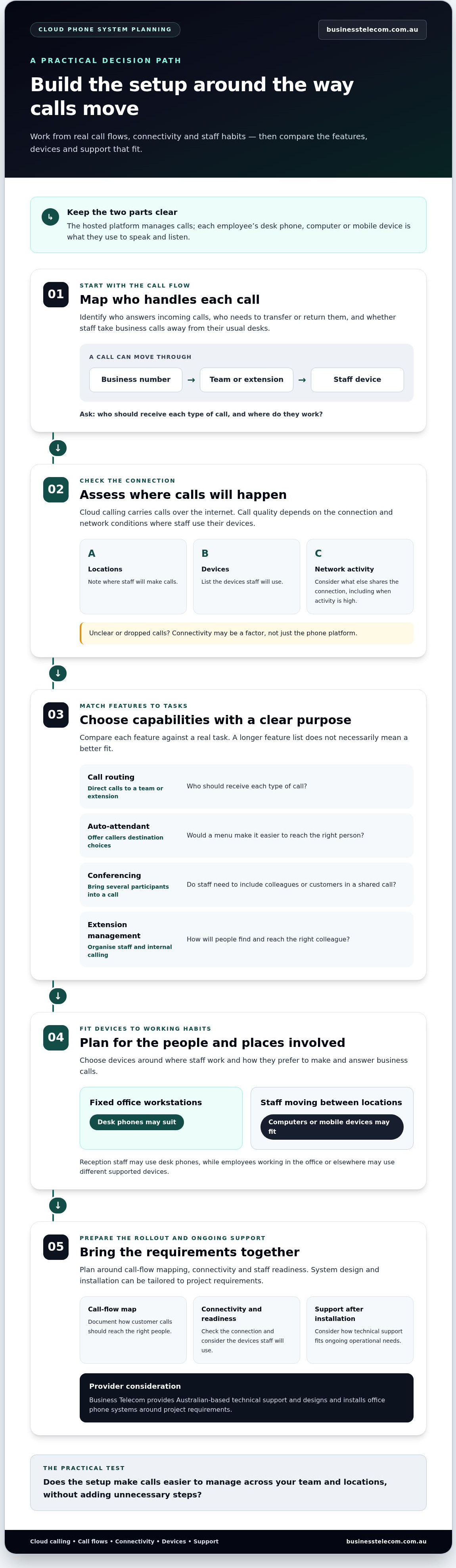
Start with the call flow, not a feature checklist. Identify who answers incoming calls, which colleagues need to transfer or return them, and whether employees need to take business calls away from their usual desks. These answers help you decide whether a cloud phone system Gold Coast businesses use will support your team’s real working pattern, rather than adding features without a clear purpose.
Connectivity is central to the decision. Cloud calling relies on internet access, so call quality depends on the connection and network conditions where staff use their devices. If calls sound unclear or drop out, connectivity may be a factor, rather than the phone platform alone. Before rollout, note where calls will be made, which devices staff will use and what other online activity shares the connection. This gives you a practical starting point for assessing the setup at your Gold Coast workplace.
Which cloud phone system features should Gold Coast businesses compare?
Compare each capability against a task your team needs to complete. A longer feature list doesn’t necessarily mean a better fit. A useful system should make it easier to direct, answer and manage customer calls across the people and locations involved. Use the table as a starting framework for assessing a cloud phone system Gold Coast businesses can put to practical use.
| Criterion | Why it matters | Question for your business |
|---|---|---|
| Call routing | Directs incoming calls to the appropriate team or extension. | Who should receive each type of call? |
| Auto-attendant | Can help callers choose a destination when your team handles several call types. | Would a menu make it easier to reach the right person? |
| Conferencing | Supports calls involving several participants. | Do staff need to bring colleagues or customers into a shared call? |
| Extension management | Helps organise staff and internal calling arrangements. | How will people find and reach the right colleague? |
| Devices and support | Connects the platform to staff habits and ongoing operational needs. | Which devices will staff use, and what technical support will they need? |
Match call-handling features to the way customers contact you
Compare devices, flexibility and provider support
List where staff work and how they prefer to make and answer business calls. Desk phones may suit fixed office workstations; computers or mobile devices may fit staff who move between locations. Then consider the support behind the system. Business Telecom provides Australian-based technical support and designs and installs office phone systems around project requirements. For broader system-planning context, see this Australian SME business phone systems guide.
Assess connectivity and plan for interruptions
VoIP carries calls over an internet connection. The Federal Communications Commission’s guide to Voice over Internet Protocol (VoIP) explains this basic principle. For your business, assess how the connection performs under normal working conditions, including periods when other network activity is high. Consider where staff will call from, and assess connectivity at each relevant workplace rather than assuming performance is uniform across the Gold Coast.
Plan separately for interruptions. Record who will respond if internet access is unavailable, how urgent customer calls will be handled and who will communicate the agreed process to staff. Treat this as a business procedure, not an assumed phone-system feature. For a practical next step, explore Business Telecom’s business phone solutions in the context of your call flows, devices and support requirements.
How should you prepare a Gold Coast cloud phone system rollout?
A clear rollout begins with how your business handles calls, then works through connectivity, devices and staff readiness. This sequence turns a broad system decision into practical requirements and helps the setup reflect daily operations. Business Telecom designs and installs office phone systems around business requirements, with the arrangement shaped for each project.
Use this checklist to prepare for a cloud phone system Gold Coast rollout:
- Map requirements. List staff, teams and extensions, then note where incoming calls should go. Record which calls may need an auto-attendant, a transfer to another team or a conference with several participants.
- Review connectivity. Identify where staff will make calls and consider how the internet connection performs during busy business periods. Include other regular network activity in your assessment, and note any locations where connectivity needs further attention.
- Plan devices. Match each role to the devices staff will use, such as desk phones, computers or mobile devices. Account for employees who work across office and remote settings, and choose devices that suit their routines.
- Prepare staff. Explain how the new devices and call-handling routines fit into everyday work. Identify who needs to answer, transfer or join calls, and give staff time to become familiar with their assigned setup.
- Validate workflows. Before the system goes live, review agreed call routes and extensions, then test key scenarios with the people responsible. Check that the call handling matches business processes and staff know which device to use.
Keep the plan clear and project-specific
Document who is responsible for each preparation task, what decisions remain and the agreed rollout sequence. Timing, migration arrangements and number-porting details depend on the project, so include them in the implementation plan rather than assuming a fixed timeframe or outcome. If your business expects team growth or changes to work locations, include those needs in the requirements while keeping the initial setup focused on essential call functions.
Preparation also gives staff a useful reference during the change. Keep call-flow notes accessible, clarify who can resolve routine questions internally and identify the contacts or call scenarios that matter most. Broader provider considerations are covered in this Australian VoIP provider buyer’s guide.
Once your requirements, connectivity considerations and workflow checks are documented, discuss a cloud phone system for your Gold Coast business with Business Telecom.
Choose a cloud phone system provider for your Gold Coast business
A practical provider decision comes down to how well the system fits your call workflows, whether your internet setup is suitable for cloud calling and what support is available as your requirements evolve. Use these three tests to compare options instead of relying on a headline feature list. A cloud phone system Gold Coast businesses can use effectively should reflect how staff answer, transfer and manage calls across their working locations.
What makes a provider a practical fit?
Look for a clear process that connects your team’s requirements to the proposed system design. A provider discussion should cover who uses the system, how incoming calls should be directed, which devices staff need and how connectivity affects calling at your premises. System design and technical support matter alongside capabilities such as routing, extensions and conferencing.
Use this short checklist to keep the comparison focused:
- Workflow fit: Does the proposed call handling reflect how customers reach the right person?
- Internet readiness: Have you considered the connection and network use at the locations where staff will call?
- Support and implementation: Is there a clear approach to system design, installation and technical support?
These criteria keep the decision grounded in what your business needs now, while leaving room to discuss team growth and changing work arrangements.
How Business Telecom supports business calling
Business Telecom supplies business VoIP and cloud phone systems to Australian businesses, including those in the Gold Coast, Sydney and Brisbane, and provides Australian-based technical support. Its office phone systems are designed and installed around operational requirements, with options that can include call routing, auto-attendants, conferencing and extension management. The aim is to align the system with how staff handle calls, rather than add complexity without a clear purpose.
If fixed-line calling remains part of your requirements, the Australian business landline options guide offers context on business landline choices alongside cloud calling.
Prepare a concise brief for your provider discussion
A short, specific brief makes it easier to discuss a system that reflects your setup. Note your team size, work locations and current call-handling arrangements. List essential functions, such as routing calls to teams, managing extensions or holding conferences. Describe any connectivity considerations that may affect staff calling from the office or elsewhere.
Also state the outcomes you want, such as helping callers reach the right team or giving staff a consistent way to handle business calls across locations. Recommendations and implementation arrangements should reflect your requirements and the project, not assumed timings or outcomes.
When you’re ready, talk with Business Telecom about your cloud phone system. Bring your brief and discuss the call workflows, connectivity, system design, installation and support your business needs. This keeps the conversation focused on day-to-day operations and the features that support them.
Turn your requirements into a practical next step
Before making a decision, turn your priorities into a brief your team can use to guide the provider discussion. Note what the business needs from its phone system now, which working arrangements may change and what a successful setup should make easier for staff and callers. A clear brief keeps the conversation focused on operational fit rather than features for their own sake.
Business Telecom supports Gold Coast businesses with business VoIP and cloud phone systems, Australian-based technical support, and office phone system design and installation tailored to business requirements. Your brief gives the discussion a useful starting point, whether you’re planning a new setup or considering how a cloud phone system Gold Coast organisations can use might fit your operations.
You don’t need every technical detail settled before taking the next step. Start with what your team needs to achieve, then discuss the system design and installation that fit those requirements.
Talk with Business Telecom about a cloud phone system for your Gold Coast business and plan a phone setup around the way your team works.
Frequently Asked Questions
Is a cloud phone system suitable for a small business on the Gold Coast?
Yes. It can suit a small business when the setup matches its call flows and staffing. A team with one person answering calls might need a simple way to direct callers and share responsibility when that person is unavailable. A larger team may need more extensions or call destinations. Start by listing common call situations, such as a new customer enquiry or an existing client asking for a particular staff member.
Can a cloud phone system work over the NBN?
Yes, cloud calling can use an NBN internet connection if the connection is suitable for your business’s voice and other online activity. Consider how it performs at your premises during busy periods, when staff may also use video calls, cloud applications or transfer large files. For a Gold Coast business, assess the connection at the actual worksite rather than relying on a general coverage assumption.
What happens to business calls if the internet goes down?
If the connection a cloud phone system relies on is unavailable, calls from devices that depend on it may be affected. The impact depends on the system and the circumstances, so don’t assume calls will automatically move elsewhere. Decide in advance who will monitor incoming enquiries, how urgent callers should reach the business and how staff will communicate while the connection is being restored.
Can staff use desk phones and computers with a cloud phone system?
Yes, cloud phone systems can support calls on desk phones and computers, depending on the system and devices used. Reception staff might prefer a desk phone, while a team member who moves between meeting rooms may use a computer. Before setup, list the devices already in use and the roles that need each type. This helps clarify equipment requirements without assuming every employee needs identical hardware.
How long does it take to set up a cloud phone system?
Setup time varies with the requirements and implementation plan, so there isn’t one timeframe for every business. The number of users, device arrangements, call flows and any migration work can affect the project. To help plan, identify key decision-makers, gather current call-handling details and agree which workflows need testing before staff begin using the system. Set timing and migration arrangements as part of the project plan.
Does moving to a cloud phone system mean replacing every business handset?
No, moving to a cloud phone system doesn’t automatically mean replacing every handset. Consider existing equipment against the proposed system and how staff will use it. Make an inventory that records handset types, where they’re used and who relies on them. This gives the implementation discussion a practical starting point and helps distinguish devices central to daily work from those that may not be needed in the new setup.
Can a Gold Coast business use a cloud phone system for remote staff?
Yes, cloud systems can support calls from computers and mobile devices as well as desk phones, which can help businesses coordinate office-based and remote teams. Decide how remote employees should handle calls intended for a shared team, and how callers should reach a particular person when they’re away from the office. Include each regular work location in your planning, as connectivity can differ between sites.
How should I compare cloud phone system providers on the Gold Coast?
Compare how each provider approaches your call flows, internet requirements, system setup and ongoing support. Ask how the proposed arrangement would handle actual tasks, such as directing a new enquiry to the right team. Business Telecom provides business phone solutions to organisations in Sydney, Brisbane and the Gold Coast, with Australian-based technical support. A concise list of users, locations and priorities can make the discussion more productive.