
Reliable office calling depends on how calls move through your team, not just which phones are on the desks. Choosing a Gold Coast VoIP phone service for office use means weighing call quality and internet dependence against the call flows your staff rely on each day.
It’s reasonable to want clear calls, useful features and a smooth changeover without disrupting customers or staff. This guide explains how to compare office VoIP options, assess your requirements and plan a practical setup.
You’ll learn how call routing, auto-attendants, conferencing and extension management can support everyday workflows, whether staff are in the office or working remotely. We’ll also cover what to consider about your internet connection, team size and implementation. Business Telecom provides business VoIP and cloud phone systems for businesses in the Gold Coast, Sydney and Brisbane, with Australian-based technical support.
Key Takeaways
- Map how incoming calls should reach your team, including who answers, when calls are redirected and how staff use extensions.
- Understand how a cloud PBX brings call routing, an auto-attendant and extensions together to support office workflows.
- Compare cloud VoIP with an on-site phone system by considering scalability, remote calling, equipment and call handling.
- Prepare for a changeover by documenting users, devices, internet requirements and call flows, then appointing an internal coordinator.
- Use this Gold Coast VoIP phone service for office guide to assess options for in-office and remote calling, including Australian-based technical support.
What a Gold Coast Office VoIP Phone Service Needs to Offer
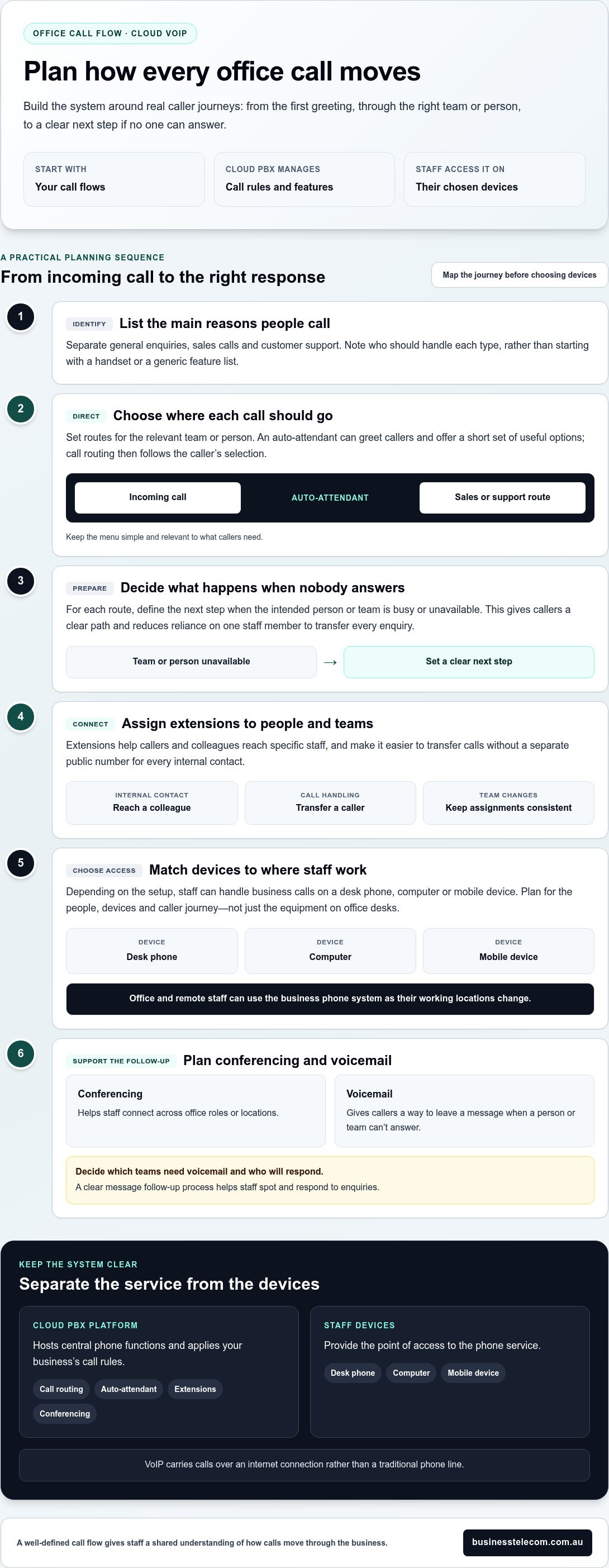
An office phone service should fit the way calls arrive and the way your team works. Before comparing handsets or features, identify who handles general enquiries, sales calls and customer support, and how callers should reach the right person. A Gold Coast VoIP phone service for office use can then be designed around your actual call flows instead of a one-size-fits-all setup.
VoIP, or Voice over IP, carries calls over an internet connection rather than a traditional phone line. The Voice over IP (VoIP) overview explains the technology. For an office, the practical question is how it supports daily work: staff may need individual extensions, call routing, conferencing and a way to handle business calls away from their desks.
Choose a system around your call flows, not simply the phones on your desks. That keeps the feature list focused on real tasks, such as directing a caller to a particular team or helping a staff member join a call while working remotely.
Which office call flows should you map first?
List your main call types and decide who should answer each one. General enquiries might go to a receptionist or shared team, while sales and customer support calls may need separate routes. Note what should happen when the first person is busy or unavailable, so callers have a clear next step.
Extensions let callers and colleagues reach specific staff without needing a separate direct line for every interaction. Call routing directs incoming calls according to your chosen workflow, while an auto-attendant can greet callers and offer options such as sales or support. Keep the menu simple and relevant. A short set of useful options is easier to navigate than choices callers rarely need.
How can VoIP support office and remote work?
Depending on the setup, staff can handle business calls on a desk phone, computer or mobile device. That gives teams flexibility to work in the office or remotely while using the business phone system. Extensions and routing help connect calls to the right person or team as working locations change.
For example, a staff member working away from the office may still need to answer calls assigned to their role, while colleagues on site use desk phones and shared call-handling arrangements. Conferencing can help staff connect across locations. Choose a configuration that suits your people, devices and caller journey. For broader planning considerations, see the Australian SME business phone systems guide.
How Cloud VoIP Fits Daily Office Call Flows
A cloud phone system hosts the central functions of a private branch exchange, or PBX, on a platform managed by the service provider. Instead of relying on an office-owned system to coordinate every call, the platform applies your business’s call rules, such as which team receives an incoming call and which extension a caller can reach.
Separate the service functions from the devices staff use. The platform manages features such as call routing, auto-attendants, extensions and conferencing. Staff access those features through their chosen devices. The device is the point of access; the service determines how calls are handled. Keeping the two distinct helps you plan around the office’s call requirements rather than treating a handset as the whole phone system.
When are an auto-attendant and call routing useful?
An auto-attendant can greet callers and offer a short set of options. Call routing then directs calls according to your chosen arrangement. For example, a caller selecting sales can be sent to that team, while a support selection follows a different route. Call routing guides incoming calls to the appropriate team or person.
This setup can help when several teams share a main business number or call volumes rise during particular periods. Clear routes make it easier for callers to reach the right area without relying on one staff member to transfer every enquiry. Keep options aligned with the services callers need, rather than an internal organisation chart that changes often. Decide what happens when the intended person or team can’t answer, so each route has a clear next step.
What do extensions, conferencing and voicemail do?
Extensions give staff and teams distinct points within the phone system. Colleagues can use them to reach one another or transfer a caller, without needing to memorise a separate public number for every internal contact. Consistent extension assignments also make call handling easier to explain to new staff and maintain as responsibilities change.
Conferencing supports conversations involving several participants, including discussions across office roles or locations. Voicemail gives callers a way to leave a message when a person or team can’t answer. Decide which teams need voicemail and who will respond to messages. The follow-up process matters as much as the feature itself, so avoid adding steps that make it harder for staff to spot and respond to enquiries.
For a Gold Coast VoIP phone service for office use, connect each feature to a real call-handling need before settling the configuration. Business Telecom provides business VoIP and cloud phone systems with office call-handling capabilities. A well-defined flow gives staff a shared understanding of how calls move through the business.
VoIP vs Traditional Office Phones: Gold Coast Guide
Compare systems by how they’ll operate in your business, not by their labels alone. A cloud VoIP service manages phone functions through a provider’s platform, while a traditional on-site system relies on equipment at the workplace. The right fit depends on your team, where people work and how the office handles calls.
| Consideration | Cloud VoIP | On-site phone system |
|---|---|---|
| How it operates | Phone functions are managed through a provider’s platform and accessed over an internet connection. | Core phone system equipment is located at the business premises. |
| Scaling and user changes | Users and extensions can generally be managed through the service configuration as requirements change. | Changes may involve updating local system settings or equipment, depending on the installation. |
| Remote calling | Can support staff working away from the office, subject to the service setup and devices used. | Often centres on the office system and its connected devices; remote access depends on the setup. |
| Equipment and call handling | Call handling is managed through the cloud service, with suitable end-user devices providing access. | Call handling is managed by the on-site system, with equipment installed at the workplace. |
Which factors should guide your comparison?
Start with a clear picture of daily demand. Record your team size, where staff work and the usual volume of incoming and outgoing calls. Note peak periods as well. A small team answering a shared line has different requirements from several departments handling calls at once.
Consider how you expect to add or remove users, manage extensions and adjust call flows as responsibilities change. Compare service features and support as well as the operating model. For a Gold Coast VoIP phone service for office use, check how the system fits your actual workflows, not just its initial configuration. These considerations also apply to businesses comparing options in Sydney and Brisbane.
What does internet dependence mean for a Gold Coast office?
VoIP calls rely on the internet, so call quality can be affected by the connection’s condition and how it’s being used. If staff are calling while other business activity places demand on the same connection, performance may vary. Local connection conditions matter, and an NBN connection should not be assumed to deliver the same experience at every workplace.
Review the office connection and network activity during busy periods before choosing a setup. Consider how many people may be on calls at once and what other work uses the connection. Plan for interruptions in a way that suits your operations: identify time-critical calls, who needs to know if service is affected and what staff should do. A phone system does not replace a business continuity plan.
Gold Coast-i irodai VoIP bevezetése: tervezés és hívásfolytonosság
A well-planned changeover begins with a record of how the office handles calls today. Gather the details before configuring the new system, then use them to organise users, call flows, devices and staff communications. This creates a practical sequence and helps the team prepare for changes to its daily calling routines.
What information should you prepare?
Work through these steps in order, so setup decisions follow from the office’s actual requirements:
- Document call needs. Record the main call types, busy periods, who handles each type and how calls should move between teams.
- List users and extensions. Note staff members, their roles, existing extensions and internal transfer requirements. Identify who needs to receive calls for each department.
- Review the internet connection. Record how the office connection is used during busy periods and consider the demands of simultaneous calls and other business activity.
- Map devices to people. Note which staff use desk phones, computers or mobiles for business calls. Match the setup to working arrangements rather than assuming everyone needs the same device.
- Set an implementation plan. Agree the sequence for configuring call flows, preparing users and moving existing numbers. Assign responsibilities and choose timing that suits the office.
Include the business numbers you use now and how callers reach each team. Number porting transfers an existing number to a new phone service, allowing a business to retain familiar contact details during a change. Include it in the transition plan alongside the call handling staff and customers will use.
How can you plan a changeover around customer calls?
Appoint an internal coordinator to gather decisions, communicate changes and keep user, extension and routing information consistent. They can work with team leads to confirm who answers each call type, which extensions staff need and what callers should experience as calls move through the office.
Set the rollout sequence around the business calendar. If the office has flexibility, avoid a major change during a known peak calling period. Allow staff time to learn the updated call flows before relying on them in their usual roles. Share concise instructions on answering and transferring calls, and explain where employees can direct questions about the new arrangement.
Continuity planning should reflect the phone system and the importance of calls to your business. Identify priority calls, who will communicate with staff if an issue arises and what temporary process the team should follow. No changeover plan can promise zero disruption, but clear responsibilities and preparation help the office respond in an organised way.
Use an office phone systems comparison alongside these implementation decisions. For a Gold Coast VoIP phone service for office use, review your office phone requirements with Business Telecom and plan the call flows, users and transition around your team’s needs.
Business Telecom VoIP megoldás a Gold Coast-i irodád működéséhez
A practical office phone setup should match the way staff handle calls, whether they work in the office or remotely. Business Telecom provides business VoIP, cloud phone systems and office phone setups for Australian SMEs, including businesses in the Gold Coast, Sydney and Brisbane. The service’s call-handling features can be arranged around your team’s roles, customer contact needs and working patterns.
Which office needs can a Business Telecom setup support?
Call routing directs incoming calls according to the workflow you define, while an auto-attendant can offer callers options for reaching the right team. Extensions help staff connect with colleagues or transfer calls, and conferencing supports meetings with multiple participants. Together, these features help an office organise how calls are answered, passed on and managed across teams.
Configure the system around your actual call patterns. A business with separate sales and support teams may want callers to choose a department, while a smaller office may prefer a simpler route to a shared team. Extension management can help keep staff contact arrangements organised as responsibilities change. The right combination depends on who takes calls, how calls are transferred and which conversations need conferencing.
Business Telecom’s service supports in-office and remote calling, so staff can handle business calls from different work locations. Device use can be considered as part of the setup, allowing the arrangement to suit your team without assuming everyone needs the same device. Australian-based technical support is also part of the service.
What should you prepare before discussing your requirements?
Prepare a short summary of your team size, the main types of calls your office receives and the phone system or numbers you use now. Add the departments and staff who need extensions, how calls should move between them, and whether employees need to handle calls away from the office. Include conferencing needs and the periods when call activity is busiest.
This gives the discussion a useful starting point. Connect each requirement to a real workflow: who answers a general enquiry, where a sales call should go, or how a remote staff member should take part in the team’s call handling. Business Telecom tailors office phone setups to business requirements, with call routing, auto-attendants, conferencing and extension management as relevant parts of the arrangement.
For a Gold Coast VoIP phone service for office use, start with a clear picture of your calls, users and current setup. Discuss your office VoIP requirements with Business Telecom.
Set your office phone system up for what comes next
Turn your comparison into a short decision brief. Note what your team needs from its phone service now, what may change as the business grows and which call-handling problems you want to solve. This gives the discussion a clear purpose and keeps decisions centred on how your office works.
For a Gold Coast VoIP phone service for office use, define what a successful change would look like for staff and customers. Clear call ownership, a practical transition plan and support for your team are useful considerations. Business Telecom works with Australian SMEs on business voice systems and provides Australian-based technical support, helping businesses plan a setup around their requirements.
Bring your brief and discuss the next step for your office with Business Telecom. Discuss a VoIP phone service for your Gold Coast office and plan a phone setup around the way your business works.
Frequently Asked Questions
Does VoIP work reliably in a Gold Coast office?
VoIP can work reliably when the service setup, internet connection and office network suit the business’s calling needs. Before choosing a Gold Coast VoIP phone service for office use, assess how the connection performs during busy periods and how much other activity shares the network. For example, check whether calls remain clear while staff use cloud applications or join video meetings. Include a continuity plan that tells staff what to do if calling is affected.
Can staff use mobile phones for office VoIP numbers?
Yes. Business Telecom systems support calls from desk phones, computers and mobile devices. The right mix depends on staff roles and working patterns: office-based reception staff may use a desk phone, while someone working remotely may handle business calls on a mobile. Plan how each role should receive and manage calls, and how callers can reach the team when someone is away from their usual workplace.
Can a business keep its existing phone number when switching to VoIP?
Number porting may allow a business to transfer existing phone numbers to a new service, but it isn’t automatic in every case. The numbers involved and applicable service conditions can affect what’s possible and how the transfer is arranged. Prepare a list of current numbers, including the departments or public contact points that use them, and include porting requirements in your changeover plan with Business Telecom.
What internet connection does an office VoIP system need?
VoIP calls use an internet connection, so connection quality and network demand both matter. The capacity an office needs depends partly on how many calls may happen at once and what else staff do online, such as using cloud software or holding video meetings. Rather than relying on a universal speed figure, assess the connection during normal and busy work periods and consider your office’s call patterns.
Will VoIP work if the office internet connection goes down?
An internet outage can affect calls that rely on that connection, including incoming and outgoing calls. Don’t assume calls will automatically redirect or that a backup arrangement is included. Decide which customer calls are most important, who will tell staff about an interruption and what temporary contact process the business can use. The continuity plan should reflect the service setup and operational needs.
Does every staff member need a separate desk phone?
No. Business Telecom’s systems support calls using desk phones, computers and mobile devices, so an office can plan device use around people’s roles and work locations. Staff who regularly handle calls at a fixed workstation may prefer a desk phone, while employees who split their time between the office and remote work may use another supported option. Assign clear responsibility for answering shared or departmental calls.
How does cloud VoIP differ from a traditional office phone system?
Cloud VoIP carries calls over the internet, with phone functions managed through a provider’s platform. A traditional office system typically relies on phone equipment installed at the business premises. Compare the options against your need for remote access, how you expect to manage users as the team changes and which call-handling functions staff use. The right fit is the system that supports your working arrangements and call requirements.