

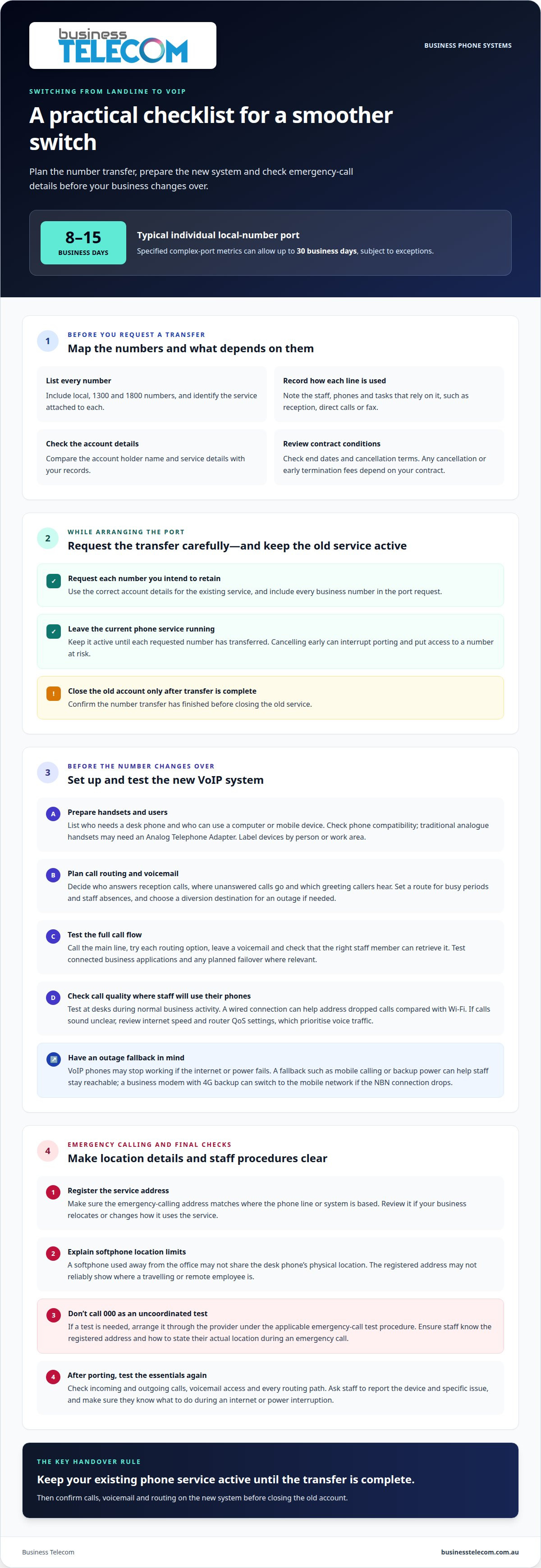
You can usually keep your existing business number when you switch a business landline to VoIP. An individual local-number port generally takes 8 to 15 business days, while specified complex ports can take up to 30 business days, subject to exceptions. Keep your current phone service active until the transfer completes, whether your business operates in Sydney, Brisbane or the Gold Coast.
Keeping your number is often the main concern, but a smooth switch also depends on preparing the new system and internet connection. Plan these details so your team can manage the change alongside its day-to-day calls.
This guide explains how to assess number portability, prepare your NBN connection and register the service address for emergency calls. You’ll also learn how to configure VoIP before the number transfers and prepare your business for the changeover.
Key Takeaways
- Map each existing number to the people, devices and call functions that rely on it before planning the transfer.
- Prepare handsets and call routing on the new system ahead of the number change to make the transition easier to manage.
- Register the correct service address for emergency calls, and arrange any test call through the provider rather than calling 000 as a test.
- Assess NBN stability, upload capacity and call-quality measures to understand whether your connection is ready for VoIP.
Can I keep my existing phone number?
You can generally transfer an active, portable Australian business number to a VoIP system. Start by listing your numbers and how each is used, arrange number porting, then keep the current service active until the transfer is complete. Any cancellation or early termination fees depend on your contract terms.
Assess Existing Numbers and Line Uses
- List every number and identify the service attached to it, including local, 1300 and 1800 numbers. Record which staff, phones and business tasks rely on each line, such as reception, direct calls or a fax service. Compare the account holder name and service details with your records. Review contract end dates and cancellation conditions before making changes, so you can factor any applicable termination charges into your decision.
Arrange Number Porting
- Request a transfer for each number you intend to retain, using the correct account details for the existing service. Australian number porting is regulated under the Telecommunications Numbering Plan 2025 and applicable registered industry codes. An individual local-number port generally takes 8 to 15 business days; specified complex-port metrics allow up to 30 business days, subject to exceptions. Include every business number in your port request.
Keep the Existing Service Until Porting
- Keep the old phone service running until each requested number has transferred. Cancelling early can interrupt porting and put access to a number at risk, leaving customers unable to reach your business on its usual line. A losing telco must port an active, portable number when properly requested and cannot refuse or delay the port because money is owed. Confirm the transfer is complete before closing the old account.
Why Switch from a Landline to VoIP?
The NBN can carry VoIP calls because the phone service uses an internet connection. If the internet or power fails, connected phones may stop working. A fallback, such as mobile calling or backup power, can help staff stay reachable.
- Prepare handsets before porting by listing which staff need desk phones and who can use a computer or mobile device. Check whether existing phones are compatible with the new system. Traditional analogue handsets may need an Analog Telephone Adapter to connect to a VoIP network. Label devices by person or work area to make setup and fault reporting easier.
- Plan call routing and voicemail before transferring the number. Decide who answers reception calls, where unanswered calls go and which greeting callers hear. Set a clear route for busy periods and staff absences. If calls need to divert during an outage, choose the destination number and make sure the responsible employee can answer.
- Test the complete call flow before the transfer. Call the main line, try each routing option, leave a voicemail and check that the right staff member can retrieve it. Test connected business applications where relevant, along with any planned failover. A business modem with 4G backup can switch to the mobile network if the NBN connection drops.
- Test call quality at the desks where staff will use their phones. A wired connection can help address dropped calls compared with Wi-Fi. If calls sound unclear, review internet speed and router QoS settings, which prioritise voice traffic. Test during normal business activity, when other devices and applications are also using the connection.
- After porting, have staff test incoming and outgoing calls, voicemail access and every routing path. Ask them to report the device and specific issue, such as one-way audio on a handset or a call that fails to reach its intended destination. Before relying on the fallback process, confirm employees know what to do during an internet or power interruption.
Emergency calling and service-address registration
Before using a VoIP phone, make sure the service address for emergency calling matches the location where the system is used. Plan how staff should handle calls from softphones used away from the office.
- Register the service address for the VoIP system. Australian cloud phone system providers are generally required to register an address for emergency calling under ACMA emergency call service rules. Provide the address where the phone line or system is based, and review it if your business relocates or changes how it uses the service.
- Check how caller-location details apply to each device. A desk phone at your registered premises and a softphone used elsewhere may not share the same physical location. Tell staff that using a VoIP app while travelling or working remotely can make the registered address an unreliable guide to their location.
- Set a clear emergency-calling procedure for staff. Don’t place an uncoordinated test call to 000. If testing is needed, arrange it through the provider under the applicable emergency-call test procedure. Make sure employees know the registered service address and how to state their actual location during an emergency call.
- Review calling features alongside the emergency procedure. Call forwarding can send incoming calls to a mobile or another number, while voicemail can capture messages when staff can’t answer. These features support everyday call handling, but they don’t replace emergency services or correct service-address details. Test routing and voicemail with ordinary calls, not by calling 000.
- Include softphones in staff instructions before enabling flexible calling. Explain which business number to use, how to access voicemail and what to do if the internet connection fails. If employees use the VoIP system from another worksite, keep location details clear and ensure the emergency procedure reflects that arrangement.
Checking NBN connection quality for VoIP
Hosted VoIP relies on your internet connection and the network inside your premises. Check both before porting the number: download speed alone won’t show whether calls will remain clear during busy periods.
- Measure the connection under normal business conditions. A stable internet service with at least 5 Mbps upload speed is recommended for high-quality VoIP calls. Run a test while staff use the broadband connection as usual, then compare results at quieter times. This helps reveal whether everyday traffic affects the connection.
- Check how much bandwidth calls and other devices use together. A VoIP call typically needs around 100 kbps in each direction. Consider video meetings, cloud applications and file uploads alongside simultaneous calls. A connection can meet the upload recommendation yet still struggle when competing activity creates congestion.
- Assess delay across the full path between your phones and the service. Recommended end-to-end one-way latency is no more than 150 ms for high-quality calls. Test from the locations where staff will use devices, including desks connected through Wi-Fi. A strong result near the router may not reflect performance elsewhere.
- Inspect your local network before changing phone services. Connect desk phones by cable where practical, and check router capacity, Wi-Fi coverage and other network activity. If your router supports suitable settings, separate voice traffic from heavy downloads. Test calls from work areas with the busiest connection use.
- Plan for internet and power interruptions. NBN outages affect hosted calling, while a premises power failure can stop powered routers and phones. Consider how a backup connection, power supply or mobile calling option would work together. Test the failover path and make sure staff know how to make business calls during an outage.
Business Telecom: Business Phone System
Business Telecom provides Business Phone Systems for businesses moving from traditional landlines to VoIP. The system can be a practical next step if you want to replace ageing equipment, retain business numbers where porting is available and plan how staff will handle incoming calls.
Before choosing a setup, gather your number list, handset requirements, call-routing needs and NBN connection details. This gives you a clear basis for assessing how a new phone system fits your daily operations. Business Telecom also provides Business Land Lines, Office Phone Systems and small business phone systems for different business requirements.
Contact Business Telecom to discuss your business phone system requirements.
Set your VoIP transition up for success
Treat the change as a business project, not just a phone-system replacement. Working with a technology partner such as IT Works can help ensure that network readiness and hardware integrate smoothly with your wider IT environment. Nominate someone to coordinate decisions, keep staff informed and record issues during the transition. A clear point of contact helps keep operational needs visible as plans take shape.
Before you switch your business landline to VoIP, agree on what a successful change looks like for your organisation. Consider how customers should reach your team, which calls need priority and how staff will report problems. A shared brief keeps decisions practical and aligned with the way your business works.
When you’re ready to discuss the next step, talk with Business Telecom about your VoIP requirements. A clear plan gives your team a steady starting point for moving forward.
Frequently Asked Questions
What happens if my internet goes down?
VoIP calls that rely on your business internet connection can be affected by an outage. If your usual connection is unavailable, staff may need another way to handle urgent calls, such as a mobile connection configured for business calling. Include internet and power failures in your continuity plan, and make sure employees know which fallback to use and how callers will be informed.
Can every business number be moved to VoIP?
No, number transfer depends on whether the number is portable and on its type and service details. Active portable numbers can generally be ported when properly requested, while complex transfers can take longer. List each local, 1300 or 1800 number separately and identify its account details and purpose. That makes it easier to plan which numbers move and how your team will use them.
Got a few lingering questions about VoIP?
Before you switch a business landline to VoIP, note how staff make and receive calls, which devices they use and how callers should reach the right person. These details help shape the setup and staff instructions. A concise list of call-handling needs can guide a practical discussion about the options, without requiring you to master technical terminology first.
Is it expensive to set up?
Setup costs depend on your requirements and are provided after a quote request. Key factors include the number of users and handsets, call-routing requirements, number transfers, and whether existing analogue phones need an adapter or replacement. Separate ongoing service charges from equipment and setup costs when reviewing a proposal, so you can see what each item covers.
What about outgoing calls?
Staff can make outgoing calls through a VoIP system using supported business devices. Decide which devices employees will use and how the business number should appear to people they call. Australian 13, 1300 and 1800 numbers can’t be used for caller ID overstamping. Test outbound calls to mobiles and landlines before relying on the new setup for customer conversations.
What changes after the number moves?
After switching a business landline to VoIP, callers can continue using the retained number while the new phone system directs calls to staff. Review business cards, email signatures and online listings to make sure the number is consistent. Ask a colleague to call from outside the business and check that the number appears as expected when staff make an outgoing call.