

A hosted PBX for a small business places call control in a provider-managed environment rather than relying on an on-site PBX appliance. Your team uses it to manage business calls, with settings directing calls through the organisation. The key question is how this setup fits your staff, customer contact and existing phone system.
This guide covers the practical choices involved. You’ll see how voicemail and call routing support daily call handling, and how hosted PBX differs from SIP trunking and cloud-based VoIP. It also explains what to plan when moving from an existing system, including number retention, device compatibility and management responsibilities. Use these considerations to decide which approach suits your business and what to plan before changing systems.
Key Takeaways
- Understand how an off-site phone system handles business calls and what your team needs to connect.
- See how voicemail, call recording and virtual reception can support day-to-day call management.
- Work out whether SIP trunking or a hosted system better fits your existing phone setup.
- Compare hosted PBX with cloud-based VoIP to identify the right option for your team’s calling needs.
What Are Business Phone Systems?
A business phone system manages calls between staff and customers. A PBX directs calls to extensions; a hosted PBX runs that system off site. Choosing one means considering more than phones: call flows, staff locations, number retention, device compatibility and emergency access all matter.
Choosing a System for Business Needs
Start by mapping who answers calls, where they work and what callers need to reach. A small practice, for example, might route its main number to reception, then to a team member if reception is busy. List the call steps, required extensions and devices before comparing systems. This turns everyday needs into clear selection criteria.
Migration, Numbers and Device Compatibility
Plan a move by recording current numbers, extensions and call flows, then configure and test the replacement before transferring service. Australian number portability lets businesses retain existing phone numbers when switching providers. Check each desk phone’s compatibility with the new system, including its connection method, and test headset functions such as answering and ending calls. Existing telephone hardware may work with some systems, depending on compatibility.
Telecommunications and Emergency Calling Requirements
For Australian privacy, the Federal Register of Legislation identifies the relevant law as the Privacy Act 1988. If calls or voicemail contain personal information, limit access to staff who need it and set clear handling procedures. Emergency calling needs separate attention: staff must know how their hosted phone system accesses emergency services and what location information they may need to communicate. For remote employees, explain that a call from a mobile or computer may not identify their current work location to responders. Include this guidance in onboarding and test the emergency-call process without placing a live emergency call.
Voicemail, call recording and virtual reception
A hosted PBX can bring voicemail, automated greetings and conference calling together in one phone system. An after-hours greeting, for example, can tell callers when the business reopens, while voicemail captures messages for staff to follow up. Depending on the setup, callers can be prompted to choose a department or leave a message rather than wait for an employee.
Call routing determines where incoming calls go. A ring group can alert several staff members at once, while a queue holds callers until someone is available. Forwarding can send a call to another extension or device if the first contact doesn’t answer. Map common situations, such as a busy reception desk or an employee away from the office, before setting these rules.
Virtual reception uses recorded greetings and menu options to direct callers without a receptionist answering every call. AI call handling is a separate capability, not an automatic feature of every PBX. Where included, it may use spoken requests to guide callers. Set clear routes for anyone who needs a person or doesn’t get the result they expect.
Voicemail and call recording have different purposes: voicemail stores messages when calls aren’t answered, while recording captures conversations. Before enabling recording, define its business purpose, decide who can access recordings and establish how long they’re kept. These controls help limit unnecessary access to customer conversations.
A hosted phone system can make and receive calls over the PSTN, the internet using VoIP, or a combination of both. The routing setup determines which path handles each call. For example, a business may route calls over the internet while retaining a traditional connection for others. Review the call flow, fallback arrangements and voicemail destination so staff know what happens when a line is busy or unanswered.
What is the difference between SIP trunk and hosted PBX?
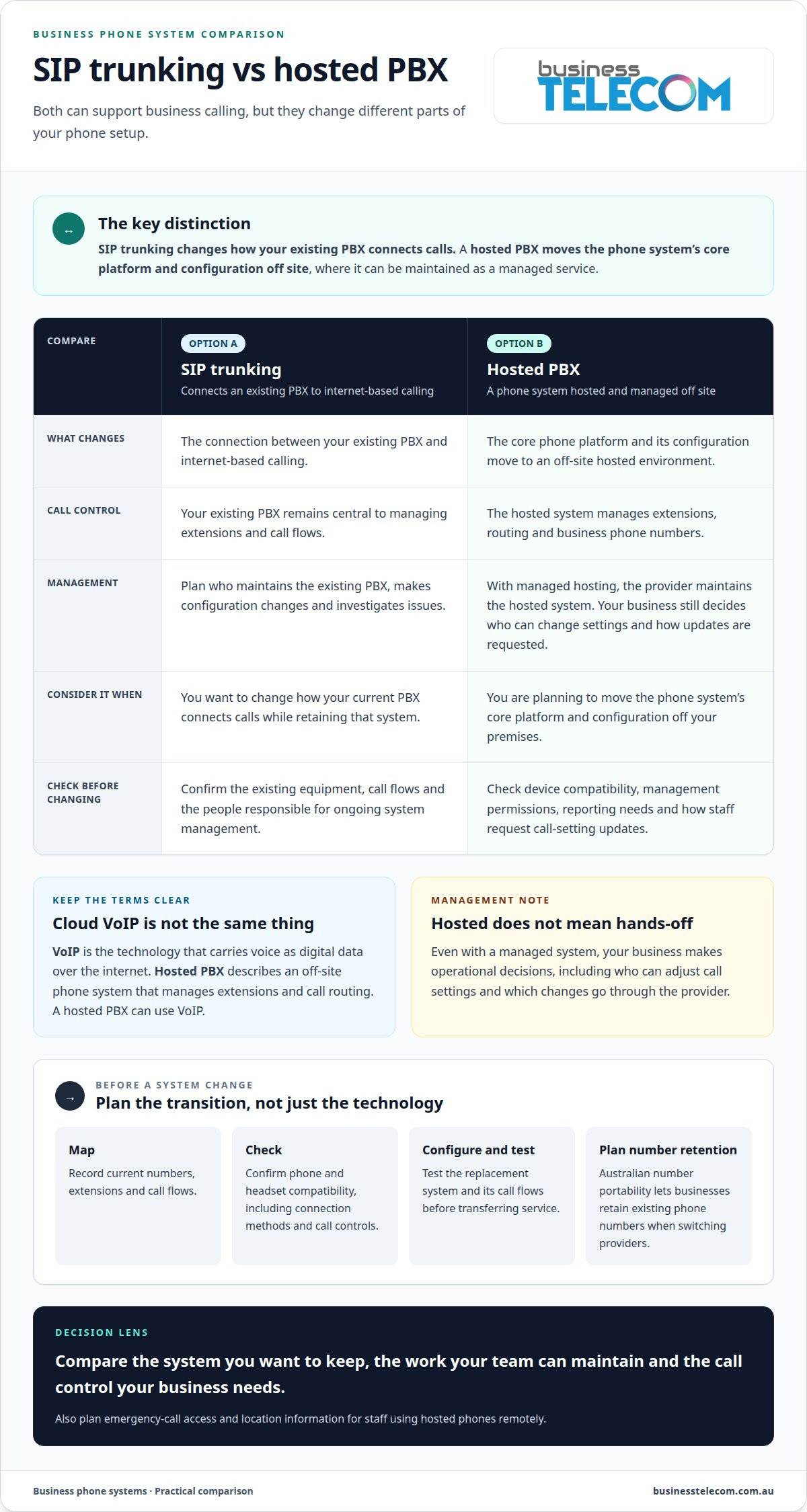
A SIP trunk connects an existing PBX to internet-based calling, while hosted PBX provides the phone system as an off-site managed service. This distinction matters when planning an upgrade: SIP trunking changes how your current system connects calls, while hosted PBX moves its core platform and configuration off your premises. Let your existing equipment, internal skills and appetite for ongoing system management guide the choice.
Self-hosting keeps the PBX equipment and configuration under your business’s control. Your team is responsible for maintaining the system, managing changes and monitoring its operation. This can suit a business with the technical capability and time to manage its platform. Before choosing it, identify who will handle routine tasks such as updating extensions, adjusting call flows and investigating reported issues.
With managed hosting, the provider maintains the hosted system, reducing the workload for internal IT staff. Your business still makes operational decisions, including who can change call settings and how staff request updates. A management portal may give authorised users access to account settings. Review its permissions and controls, then decide which changes your team will manage and which will go through the provider.
Reports and monitoring help you assess how the system supports daily call needs. Look for information relevant to your business, such as call volumes by team, unanswered calls or activity during opening hours. Use reports to identify where call flows need adjustment, rather than collecting data without a clear purpose. Compare dashboard, reporting and monitoring tools alongside the hosting model. The right fit depends on the control your team needs and the work it can realistically maintain.
Hosted PBX and cloud-based VoIP
Cloud-based VoIP describes internet calling delivered through online services; hosted PBX describes a complete phone system managed off site. VoIP converts voice into digital data for transmission over the internet. A hosted PBX can use VoIP, but the terms aren’t interchangeable: one describes the calling technology, while the other describes the hosted system that manages extensions, routing and business phone numbers.
For internet-based calls, a hosted PBX uses a SIP trunk to connect calls to the internet. The bandwidth a hosted PBX needs depends on the setup and call activity. A 24 Mbps connection can handle at least 300 simultaneous hosted PBX calls. These figures describe capacity, not a recommended connection for every office; other internet traffic and network conditions also affect call quality.
Consider how staff will connect before choosing a system. Your team might use desk phones at the office, softphones on computers or mobile devices while working remotely. With an internet connection, staff can use their office number and extension from different locations. This keeps communications connected without requiring every employee to sit beside a dedicated handset.
The distinction is straightforward: VoIP carries calls over the internet, while hosted PBX provides the managed system that organises business calling. A business needing internet calling alone may not need the same structure as a team requiring shared extensions and central call management. Assess how staff answer calls, where they work and what control your business needs before choosing an approach.
Business Telecom: Business Phone System
Business Telecom helps businesses assess hosted phone systems, including Business Phone System and Office Phone Systems options suited to their calling needs. If you’re replacing an older setup, consider how many people answer calls, where they work, which existing numbers matter and whether staff need desk phones, mobile access or both. These details help shape a system around your team’s call flows and daily operations.
For a smaller team, SMALL BUSINESS PHONE SYSTEMS are another option to discuss. Bring a clear picture of your current setup and the changes you want, such as simpler call routing or support for remote staff. Contact Business Telecom to discuss your business phone system requirements.
Plan a phone system around your next stage
Before choosing a hosted PBX for a small business, consider how calling needs may change as your team’s roles, work locations or customer contact patterns shift. Choose a system that fits how your business operates now and offers a practical way to adjust call handling later. Write down the changes you want, then use those priorities to guide a conversation with a phone system specialist.
Business Telecom offers a Business Phone System, Business Land Lines and Office Phone Systems. These options provide a starting point for businesses reviewing how their existing setup supports staff and customer calls. Share your priorities and discuss which direction suits your requirements. Explore phone system options with Business Telecom and take a considered next step for your business.
Frequently Asked Questions
How does a Hosted PBX work?
A hosted PBX applies your business’s call rules through a phone platform managed off site. A caller might dial your main number, select a department and reach an available team member’s extension. You decide how calls flow, including what happens when staff are busy. The system directs calls to connected devices or another destination, such as voicemail.
What is a hosted PBX system?
A hosted PBX is a business phone system whose PBX, or private branch exchange, is hosted and managed off site. It organises business calls and extensions without requiring the main PBX equipment at your premises. Staff connect through supported devices, such as desk phones or computers. This can suit a business that wants central call management without maintaining an on-site PBX appliance.
Hosted PBX vs On-Premise PBX: Keep the Box or Move to the Cloud?
With an on-premise PBX, the business keeps the equipment on site and manages the system. With hosted PBX, the provider hosts the system, moving that infrastructure management off site. A business with internal staff able to maintain its existing equipment may prefer to keep it; a team seeking less on-site upkeep may favour hosted management. Compare operational control, staff capability and reliance on the provider.
What internet connection speed is required for hosted PBX?
Allow 80 Kbps of internet connection speed for each simultaneous hosted PBX call. Estimate your requirement by considering how many calls may happen at once, rather than counting every employee or handset as a call. For example, a team with several staff members may still have fewer concurrent calls. Leave capacity for other internet use, and assess call quality during busy periods.
What is a hosted PBX and how does it work for a small business?
A hosted PBX gives a small business centrally managed call handling without an on-site PBX appliance. Staff answer calls on connected devices, while the system applies shared rules for extensions and call destinations. A hosted PBX for a small business can suit teams working across office and remote locations that need a consistent way to handle customer calls. Plan the main number’s call flow around who answers enquiries.
Which hosted PBX providers serve small businesses in Australia?
Business Telecom serves small businesses in Sydney, Brisbane and the Gold Coast, offering business phone systems, VoIP and cloud phone systems. Its service area is regional, not nationwide. When assessing a hosted PBX provider, consider where your team operates, how calls should reach staff and whether you need to retain existing numbers. These requirements help determine whether the service fits your locations and call management needs.