
Keeping your existing business number is often possible when moving to VoIP. The change involves more than choosing a phone system: it affects how your business manages communications, responsibilities and everyday calls. Australian-based VoIP support can help you plan those decisions.
Look beyond the technology. Consider how your staff work, who manages phone-system changes and what support your business needs when something goes wrong. These requirements give you practical criteria for assessing whether a proposed arrangement suits your operations.
This article explains how to assess support, how internet calling fits into business communications and why Australian infrastructure matters when planning a system. It also covers implementation and practical questions to consider as you choose an approach for your business.
Key Takeaways
- Your existing business number can usually move to a VoIP service, with transfer requirements shaped by the number type and current carrier.
- Review your internet connection and network setup as part of planning for clear, reliable business calls.
- A wired connection can help desk phones perform consistently, particularly where Wi-Fi is congested.
- Plan a VoIP changeover around number transfer, internet setup and hardware so your team knows what to expect.
Support availability and call response times
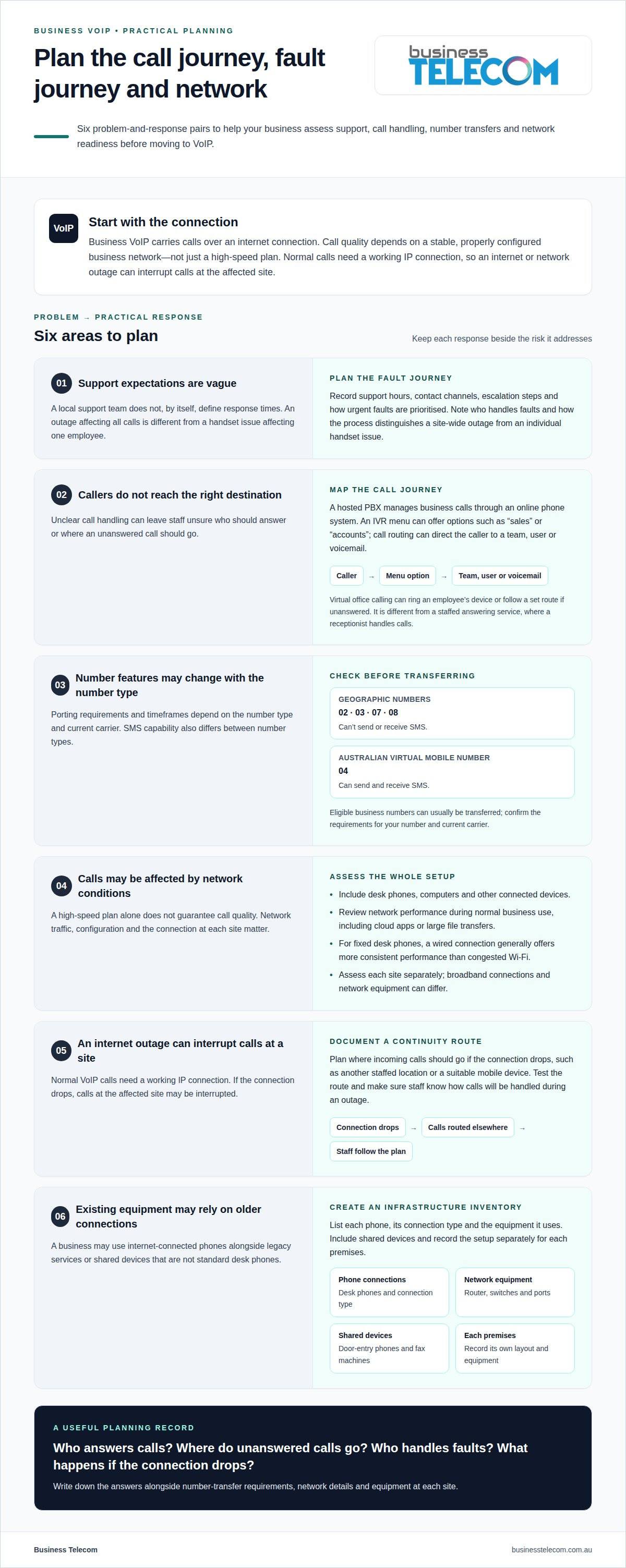
When comparing VoIP providers, consider where support is based and what consumer protections apply. A local team does not, by itself, define response times. Support hours, contact channels, escalation steps and fault severity all shape the service experience. A clear process distinguishes an outage affecting all calls from a handset issue affecting one employee.
Call handling also affects how quickly customers reach the right person. A hosted PBX, or hosted private branch exchange, manages business calls through an online phone system. An interactive voice response menu (IVR) can offer options such as “sales” or “accounts”. Call routing then directs callers to a team, user or voicemail destination. For example, a caller selecting accounts could be routed to that team rather than transferred manually.
Virtual office calling can help staff answer business calls when they are away from their desks. A call can ring an available employee’s device or follow a set route if unanswered. This differs from a staffed answering service, where a receptionist handles calls for a business. Understanding the distinction helps you choose a system that matches your team’s call-handling needs.
Number type matters during a changeover. Australian geographic numbers with 02, 03, 07 and 08 prefixes can’t send or receive SMS. An Australian virtual mobile number with an 04 prefix can send and receive SMS. Eligible business numbers can usually be transferred, while porting requirements and timeframes depend on the number type and current carrier.
Assess the call journey and the fault journey separately. Record who answers incoming calls, where unanswered calls go and who handles system faults. Then note support hours, contact channels, escalation steps and how urgent faults are prioritised. Call analytics can show call volumes, duration, missed calls and peak periods, helping managers identify where call handling needs attention.
Business VoIP calling over an internet connection
Business VoIP carries calls over an internet connection rather than a traditional phone line. For Australian businesses, the NBN or another broadband connection supports call quality and stability.
Calling over an internet connection
A VoIP phone system converts speech into data and sends it over your internet connection. Call quality depends on a stable, properly configured business network, not just a high-speed plan. VoIP does not require excessive bandwidth, but poorly managed network traffic can affect performance. Include desk phones, computers and other connected devices when assessing your setup.
Cloud phone system features can help manage calls beyond the handset. Call analytics show call volumes, duration, missed calls and peak periods, helping managers identify busy times and adjust call handling. If call recording matters to your business, include it in your feature evaluation instead of assuming it comes with every system.
Reliability for rural and remote businesses
For rural and remote businesses, VoIP reliability depends on the workplace internet connection and how consistently the network performs during business hours. Location alone cannot predict call quality. Assess the connection during normal operations, including when staff use cloud applications or transfer large files. A stable connection and suitable network configuration support clearer calls.
Teams across multiple locations should assess each site separately. A regional office and a city office, for example, may have different broadband connections and network equipment. Reviewing each setup can reveal where congestion might affect calls and where network settings need attention before transferring numbers or moving devices to VoIP.
Outages and business continuity
Normal VoIP calls require a working IP connection, so an internet or network outage can interrupt calls at the affected site. Plan how to handle incoming calls if the connection drops. VoIP services can route calls elsewhere during an internet outage, rather than relying on the affected connection.
Document the preferred destination, such as another staffed location or a suitable mobile device. Test the route as part of continuity planning, and make sure staff know how to handle calls during an outage. A clear plan helps prevent callers and employees from being left unsure what to do.
Australian infrastructure and network reliability
Australian business phone infrastructure can include NBN services, internal network equipment and connected handsets. In most areas of Australia, the NBN has replaced the old copper phone network. Before changing systems, identify services that still rely on older connections. An office, for example, might use internet-connected phones alongside a separate legacy fax service.
An inventory clarifies what your business needs to retain or replace. List each phone, its connection type and the equipment it uses, such as a router or network switch. Include shared devices like door-entry phones and fax machines. This gives the implementation team a practical picture of the site, rather than treating every connection as a standard desk phone.
For fixed desk phones, a wired network connection generally offers more consistent performance than congested Wi-Fi. A cable connects the handset directly to the local network, while wireless performance can vary with signal coverage and competing network use. Map desk locations and available network ports to see where wired phones can connect and where Wi-Fi is needed.
Network equipment also affects phone connections. Record the make and model of your router and switches, and note which ports serve staff devices. If a handset behaves differently from nearby phones, comparing its connection and equipment can help narrow down the cause. Not every fault points to the carrier connection.
For businesses with multiple premises, keep a separate infrastructure record for each site. A Brisbane office and a Gold Coast office, for example, may have different routers, cabling and phone layouts. Documenting these differences helps technicians understand each setup and plan consistent communications across locations without assuming the equipment is identical.
Australian-based VoIP implementation and support
A practical implementation plan covers number transfers, system configuration and ongoing support. It should also explain how your business will handle faults and emergency calls if connectivity is unavailable.
VoIP implementation and managed services
Before switching, map business numbers, users, devices and call flows. Eligible business numbers can usually be transferred, with porting requirements and timeframes depending on the number type and current carrier. A typical Australian business VoIP switch can take a few days, depending on the internet setup and hardware.
Agree who manages configuration, user changes and fault escalation. For example, document whether an internal IT contact or the phone support team handles handset setup.
Business phone support options
Australian businesses choosing VoIP should consider the Privacy Act and Telecommunications Act. For emergency calls, remember that normal VoIP calling requires a working IP connection, so an internet or network outage can affect calling.
Ask how support handles call-routing changes, number-transfer issues and faults affecting multiple users. Clear responsibilities help staff direct each issue to the right place.
Checking support team location
To establish whether a support team is based in Australia, ask where its support and billing staff are located. An Australian-operating provider has staff in the country and provides services under Australian regulations and consumer protection laws.
Clarify support contact channels, operating hours and escalation procedures. These details show how your team can report an issue and follow its progress.
Troubleshooting common VoIP problems
Support teams can investigate failed calls, handset registration, number-transfer problems and incorrect call routing. When reporting a fault, provide the affected user, device and approximate time. This information helps pinpoint whether the issue involves one handset or a broader part of the service.
If you’re planning a system change, discuss your users, number transfers and call-routing needs through Business Telecom’s business phone system support to help shape the implementation plan.
Business Telecom: VoIP PHONE SYSTEMS
Business Telecom can help businesses considering a phone system change understand their business calling requirements. Its offerings include Business Phone System, Business Land Lines, Office Phone Systems and small business phone systems.
If you’re reviewing how your team handles calls, start with the practical requirements: who needs a phone, how customers reach the right staff and whether you want to keep your existing business number. These details help shape the discussion about a suitable system. Business Telecom serves businesses in New South Wales and Queensland, including Sydney, Brisbane and the Gold Coast, delivering reliable australian based voip support.
Contact Business Telecom to discuss your business phone system requirements.
Set your next phone system priorities
Before changing your business calling setup, decide what a workable result looks like. You might prioritise clear responsibility for call changes, an easier process for staff or a system that fits daily operations. These priorities give Australian-based VoIP support a practical focus and keep the decision grounded in how your business works.
Business Telecom offers phone system options for businesses reviewing their current setup. Bring your main requirements and proposed changes to the conversation so the next step can focus on your needs.
Start a conversation about your business calling needs. A clear plan is a useful foundation for moving forward.
Frequently Asked Questions
Can I keep my existing phone number?
Eligible business numbers can usually be transferred to a VoIP service. Before porting, list every number your business uses and identify linked services, such as a fax line or alarm. Keep the existing service active until the transfer is complete to avoid a gap caused by cancelling it too early.
Does switching to VoIP impact performance?
It can, if the network connection or configuration does not suit your calling needs. Congested network traffic can affect call quality, so assess performance during your busiest periods, not just quiet times. Test calls on the devices staff will use, including desk phones and computers. This can reveal issues before the system becomes part of everyday customer communications.
What happens if the internet goes down?
Calls using the affected internet connection may be disrupted. Business continuity planning should also account for power loss, which can switch off local network equipment even if the internet service remains available. Decide how staff will communicate during an outage and document who manages the response. Testing the plan helps your team respond confidently instead of improvising during a fault.
What Australian-based VoIP providers offer local customer support?
Business Telecom provides business VoIP and cloud phone systems with dedicated Australian customer support. Its business phone solutions serve organisations in Sydney, Brisbane and the Gold Coast. Assess the support arrangement alongside the system, including how your business will manage call changes, user setup and technical issues. The right fit depends on your team’s calling needs and operating arrangements.
Which Australian VoIP providers offer 24/7 technical support?
24/7 technical support is a provider-specific service commitment, not something guaranteed by an Australian location. Check the published support terms for the hours covered, how urgent faults are escalated and whether after-hours assistance means live technical help. Round-the-clock fault reporting is different from having a technician available to respond at any time.
What are the support hours and contact options for Australian VoIP providers?
Support hours and contact channels vary between providers. Look for clearly stated service hours, the relevant time zone and options such as phone, email or an online support portal. Check how to report urgent faults outside standard hours, then compare the coverage with your business’s calling schedule, especially if customers call beyond typical office hours.