
The best business phone setup may use fewer desk handsets, not more. Choosing a voice ip phone starts with how your team handles calls: some staff need a physical handset, while others work more effectively from a computer or mobile. The handset is only one part of the picture.
The terms can be confusing. An IP phone is the device or software used to make calls over an internet connection. A VoIP service carries and manages those calls, while a cloud phone system adds business tools such as extensions and call routing. Call quality also depends on the network, so plan for your workplace’s internet connection and power arrangements.
This guide explains how voice IP phones work, compares desk handsets with computer and mobile options, and shows how each can fit into a business phone system. You’ll learn what to consider when matching devices and calling features to different roles, including for teams working in an office, remotely or in the field. The goal is a practical setup that supports clear, manageable business calling.
Key Takeaways
- Understand how a voice ip phone fits into a business calling setup, and how its device differs from the service carrying calls.
- Follow the call path across your network to see how the phone service and internet connection work together.
- Compare desk phones, softphones and adapters to match calling options with staff roles and work locations.
- Use a practical checklist to map call flows, connectivity, existing numbers and the needs of reception, sales and remote staff.
- See how Business Telecom brings desktop phones, computers and mobiles into a business phone system with features such as call routing and extensions.
Voice IP Phone vs VoIP Service: What’s the Difference?
A voice IP phone makes calls using an internet protocol network. It may be a physical handset on a desk or an application on a computer or mobile, so the term describes how calls are made rather than one standard piece of hardware.
A voice IP phone is the device or application a person uses to call, while the VoIP service carries and manages the call. Separating those roles helps you identify what your team needs: a suitable way to place and answer calls, connected to a service that manages business calling.
Think of the phone as the user-facing endpoint, not the whole phone system. The calling service and network each have a different job. A handset can be one part of a wider setup that also supports computers, mobiles and shared business functions.
Voice IP phone, VoIP and cloud phone system: what is the difference?
Voice over IP (VoIP) is the method of transmitting voice over an IP network. A voice IP phone is the device or app staff use to make and receive calls through that method. A cloud phone system adds hosted calling and management capabilities, bringing users and calling functions together without requiring everyone to use the same type of phone.
In practice, these terms describe connected parts rather than interchangeable products:
- VoIP describes the technology that carries voice as data across an IP network.
- The phone is the handset or software interface a staff member uses.
- The phone system organises business calling, with functions such as extensions, call routing or auto-attendants where included.
This distinction matters when planning a business setup. A physical handset can sit alongside computer and mobile calling within one broader system. The service and system determine the calling arrangements, not simply the type of handset on a desk.
How does a voice IP phone connect to a business call?
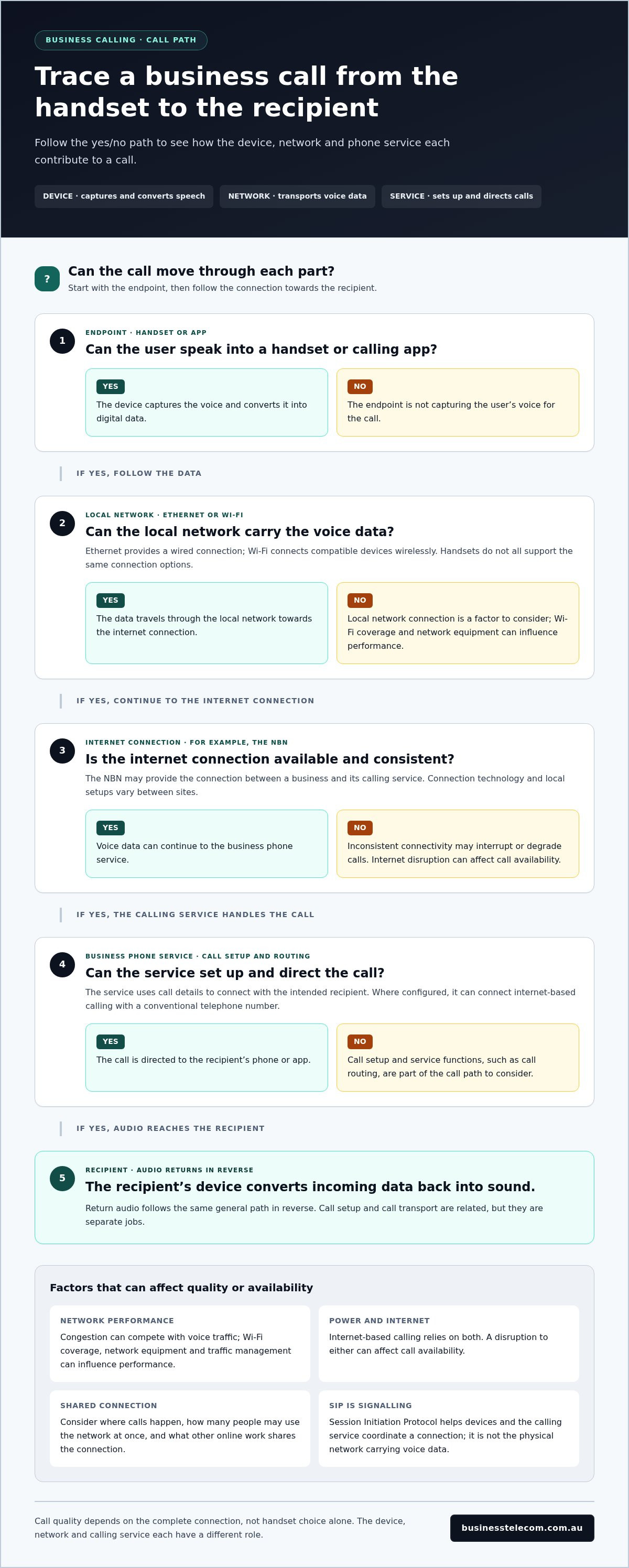
When someone speaks, the phone’s microphone captures their voice and converts it into digital data. The business network transports that data to the calling service, which handles the call and directs it towards the intended recipient. At the other end, the recipient’s device turns the incoming data back into sound.
A typical call follows this path:
- The user speaks into a handset or through an app.
- The device converts the voice into digital data.
- The business network carries the data to the calling service.
- The service routes the call to the recipient, then audio travels back in the other direction.
The service manages calling functions; the network transports the data. Where configured, the service can also connect internet-based calling with conventional telephone numbers. Devices and call arrangements can vary, even though the underlying process is similar.
For a broader view of how devices, extensions and call handling fit together, explore this Australian SME business phone systems guide. It puts the voice IP phone in context as one part of a business calling setup, rather than a complete system on its own.
How Voice IP Phones Carry Calls Across Your Business Network
A voice IP phone turns speech into digital data and sends it across a network to a calling service. The service sets up and directs the call, while the network carries the data between the phone and its destination. Return audio follows the same general path in reverse.
A typical call moves through these steps:
- You speak into a handset or the microphone in a calling app.
- The device converts your voice into digital data.
- Your local network sends the data over Ethernet or Wi-Fi, then through the internet connection to the business phone service.
- The service uses the call details to connect with the intended recipient, including a conventional telephone number where configured.
- The recipient’s phone or app converts the incoming data back into audio.
Call setup and call transport are related but separate jobs. The business phone service manages functions such as call routing and extensions, while the network transports voice data. If either part is affected, users may notice a problem even when the handset is working normally.
What roles do SIP, Ethernet and the NBN play?
Session Initiation Protocol (SIP) is a commonly used signalling method for setting up and managing calls. It helps devices and the calling service coordinate a connection; it isn’t the physical network that carries voice data. Ethernet provides a wired connection between a device and the local network, while Wi-Fi connects compatible devices wirelessly. For organisations planning structured physical runs for their VoIP endpoints, IT infrastructure specialists such as Trinity Networx, LLC highlight how clean network cabling prevents bottlenecks and voice degradation. Handsets don’t all support the same connection options.
The NBN may provide the internet connection between a business and its calling service. Connection technology and local network setups vary between sites, so there isn’t one connection type or speed that suits every organisation. Consider where calls happen, how many people may use the network at once and what other online work shares the connection.
What can affect voice quality and call availability?
Call quality depends on the complete connection, not handset choice alone. Network congestion can compete with voice traffic, while inconsistent internet connectivity may interrupt or degrade calls. Wi-Fi coverage, network equipment and how traffic is managed can also influence performance.
Internet-based calling relies on power and an internet connection. A disruption to either can affect call availability, so don’t assume calls will continue through an outage. Before deployment, assess the connection at each work location and decide how the business will manage calls if internet or power is disrupted. Consider which roles need alternative ways to communicate and how critical incoming calls should be handled.
These checks connect device choice to real operating conditions, rather than treating a handset as the whole solution. Business Telecom’s business VoIP and cloud phone systems bring calling across desktop phones, computers and mobile devices into a broader business phone setup.
Desk Phone, Softphone or Adapter: Which Voice IP Phone Suits Each Role?
Choose a calling device around the work people do, where they do it and how they prefer to answer calls. A voice IP phone might be a dedicated desk handset or a software application, while an adapter can connect compatible analogue equipment to a VoIP service. These options serve different purposes, and none replaces the broader phone system that manages business calls.
Use this comparison as a starting point. The right fit depends on your team’s workflows, user preferences and the calling options supported by the phone system.
| Device type | Suitable roles | Practical strengths | Considerations |
|---|---|---|---|
| Desk IP phone | Reception, fixed workstations and shared desks | Provides a dedicated handset at a regular calling point. | Plan for its location, network connection and how it fits the wider phone system. |
| Softphone | Staff who call from a computer or mobile, including remote workers | Supports business calling through an application on a device the user already works from. | Users need a compatible device and a suitable connection in each work setting. |
| Analogue telephone adapter | Teams with compatible analogue phone equipment they want to connect to a VoIP service | Can link suitable existing equipment to internet-based calling. | It connects equipment; it isn’t a complete business phone system. Compatibility and setup matter. |
When does a physical desk phone make sense?
A desk phone can suit reception staff who answer calls from a fixed position, or employees who spend much of the day at one workstation. It can also provide a clear, shared calling point at a hot desk or in a common area, provided the team’s call-handling arrangements account for shared use.
The practical benefit is a dedicated handset where staff regularly work. Before choosing this option, consider where the phone will sit, how it connects to the business network and how users will access extensions or incoming calls. The handset should fit the office setup and the functions managed by the phone system.
When are softphones or analogue adapters a better fit?
A softphone is an application for making and receiving business calls on a computer or mobile device. It can suit staff who move between an office and remote work, or whose role doesn’t centre on a fixed desk. For example, a team member could use a computer at a workstation and a mobile device in another work setting, depending on the calling service and setup.
An analogue telephone adapter has a narrower job. It connects compatible analogue phone equipment to a VoIP service, which can help a business use suitable existing equipment. It doesn’t provide the full call management of a business phone system by itself.
Start by mapping how each role handles calls, then match the device to that routine. A business phone system can bring desk phones, computers and mobile devices into one broader calling arrangement, with functions such as extensions and call routing supporting the way staff work.
What to Check Before Introducing Voice IP Phones at Work
A smooth rollout starts with how your business handles calls, not with a device order. Map who answers each number, where staff work and what customers need to do to reach the right person. This gives you a practical basis for selecting devices and setting up a voice IP phone system that fits daily operations.
Use this checklist to capture the essentials before planning the change:
- Users and roles: List reception, sales, remote staff and shared teams, including who regularly handles incoming calls.
- Locations: Record each office, shared workspace and remote work pattern, noting where calls need to be answered.
- Call flows: Trace what happens when a customer calls, from the first number dialled to the staff member or team who responds.
- Numbers and extensions: Document current business numbers, extensions and any numbers customers rely on.
- Connectivity and power: Review internet performance, internal network capacity and the equipment each calling location depends on.
- Priorities: Separate essential call handling from optional features so the initial setup addresses operational needs first.
How should a business map its calling needs?
Start with a user and location register. For each team, note its main calling responsibilities, typical call patterns and whether staff use a fixed workstation, shared desk or more than one location. Reception may need a clear process for directing incoming calls, while sales staff may need calls to reach them across different work settings.
Next, document the customer journey for each important number. Note whether a call goes to reception first, reaches a team extension or needs an alternative destination when someone is unavailable. Record existing numbers and extensions before making changes, then define which arrangements must be preserved. A wider view of service features and planning considerations is available in this Australian business VoIP provider selection guide.
What connectivity and continuity details should be planned?
Review the connection and local network at each intended calling location rather than assuming one office’s performance represents every site. Consider other work sharing the network and whether staff will call over a wired connection or Wi-Fi. Requirements depend on the number of users, their devices and how the business operates.
Plan for disruptions before rollout. Identify what staff should do if internet access, power or calling equipment is unavailable, and decide how essential incoming calls should be handled during that period. Don’t assume internet-based calls will continue through an outage. For teams across Sydney, Brisbane and the Gold Coast, include each office and remote work arrangement so call handling reflects where staff actually work.
Once the checklist is clear, Business Telecom can shape a business phone system around your team’s roles, locations and call flows. Plan a business phone system that fits how your organisation handles calls.
How Business Telecom Fits Voice IP Phones into a Business Phone System
A voice IP phone works best as part of a calling setup designed around how people in your business communicate. Business Telecom provides business VoIP, cloud phone systems and office calling, supporting calls across desktop phones, computers and mobile devices. This lets organisations use different device types within one broader system, rather than treating each handset or app as a separate solution.
Call management features help organise how calls move through the business. Call routing can direct incoming calls to the appropriate person or team, while auto-attendants provide an automated way to guide callers. Extensions help identify users within the system, and conferencing supports group conversations. The right combination depends on your call flows and how staff work.
How can a business phone system support different work locations?
A cloud phone system can bring office-based and remote staff into a shared business calling arrangement. For example, a customer might call the main business number, then be directed to reception or a relevant team. Staff could use a desktop phone at an office, or a computer or mobile device elsewhere, depending on their role and the system configuration.
Extensions can organise users across teams, while call routing can direct calls according to the business’s preferred call flow. This is useful when staff work from more than one location, but the setup should reflect real responsibilities: decide who answers key numbers, where calls should go next and how shared teams handle calls. These arrangements support coordination, but do not mean calls will remain available during an internet or power disruption.
What is the next step for an Australian business?
Use a clear sequence to move from planning to a suitable phone system:
- Map staff roles, locations and the calls each role handles.
- Assess connectivity and note the network and power dependencies at each workplace.
- Select desk phones, computer-based calling or mobile options to suit users’ routines.
- Plan numbers, extensions, call routing and other call-handling requirements.
Business Telecom provides business phone systems for Australian organisations, with Australian-based customer support and service coverage in Sydney, Brisbane and the Gold Coast. If you’re weighing up office setup options, this office phone systems comparison guide can help you consider how different arrangements fit your workplace.
Once you’ve mapped the roles, devices and call flows, shape them into a practical system. Discuss a business phone system suited to your operations with Business Telecom.
Shape a Phone Setup That Can Grow with Your Business
Make your next decision about how your team works, not just what equipment to install. A voice ip phone setup can address today’s priorities while leaving room to adjust as responsibilities or work patterns change. Set clear expectations for who manages incoming calls and how staff should handle them, then review those arrangements as your organisation evolves.
Bring the people who handle calls into the planning process. Their day-to-day experience can reveal practical requirements that aren’t obvious from a device list alone. With those priorities in view, you can plan a business phone system that suits your operations and gives your team a clear way forward.
Discuss a phone system for your business with Business Telecom and take the next step with confidence.
Frequently Asked Questions
What is a voice IP phone?
A voice IP phone is a handset or calling application that lets you make and receive calls over an internet protocol network. It can be used at a desk or through a computer or mobile device. The phone is the tool a staff member uses; the phone service handles the calling connection and related business functions. For example, a receptionist might use a desk handset connected to the organisation’s business calling service.
Does a voice IP phone need an internet connection?
Yes, internet-based calling needs a functioning network connection between the phone and its calling service. The connection may use a wired network or Wi-Fi, depending on the device and setup. Requirements vary with the number of users, other network activity and where staff make calls. Before rollout, assess the connection at each work location, including any home office used by remote staff.
Can a voice IP phone use an existing business phone number?
In many cases, a business can request to transfer an existing number to a VoIP service through a process known as number porting. The number’s eligibility and transfer arrangements depend on the circumstances, so don’t assume every number can be moved or that a specific timeframe applies. Keep a record of current numbers and plan the transition so staff know how incoming calls will be handled during the change.
How many voice IP phones does a small business need?
There isn’t a fixed number. Base the device count on which staff need their own calling point, who shares a workstation and how calls are answered across each location. A receptionist may benefit from a dedicated handset, while a remote team member may use computer-based calling. For businesses working across Sydney, Brisbane or the Gold Coast, include each office and remote role in the count.
Do voice IP phones need a separate power supply?
Power arrangements depend on the handset and network equipment. Some compatible devices can receive power through an Ethernet connection from suitable network equipment, while other setups use a separate power supply. Softphones rely on the computer or mobile device they run on, which also needs power. Review the equipment at each desk before deployment, and include power requirements in your workplace’s continuity planning.
What happens to business calls if the internet goes down?
If the internet connection your phone service relies on is interrupted, calls using that connection may not be available from the affected location. The impact depends on the service and system configuration, so don’t assume calls will automatically continue elsewhere. Decide in advance how staff should respond, how customers will be informed if needed and which alternative communication methods are appropriate for your business.
Are voice IP phones compatible with the NBN?
VoIP can operate over an internet connection provided through the NBN, but the connection and network setup need to suit the business’s calling requirements. Performance can vary with the connection technology at a premises, local network configuration and competing internet use. Assess each site rather than assuming one office’s setup will suit another. This is relevant for businesses with premises in Sydney, Brisbane and the Gold Coast.