

What happens to your business calls when the internet drops? A Brisbane VoIP installation service should account for that risk: standard VoIP calls rely on a working IP connection, so an internet or network outage can affect calls.
That matters when your team depends on incoming enquiries and clear customer communication. VoIP offers flexible call handling, but reliable use depends on a stable, properly configured business network and a plan for connection problems.
This article explains what professional VoIP installation involves, from matching the phone system to your team’s call-handling needs to connecting compatible phones. You’ll learn what your network needs, how a wired connection can support consistent desk-phone performance, and how options such as mobile failover or call diversion can help during an outage. Understanding both the setup and its limits helps you plan a phone system for your Brisbane business.
Key Takeaways
- Understand how a cloud-hosted PBX can organise business calls and support staff working across different locations.
- See what professional installation, system testing and staff training can involve before your phone system goes live.
- Learn which network conditions affect call quality and what continuity options may help if your internet connection fails.
- Know what to consider when planning VoIP installation for a Brisbane business or a team elsewhere in Queensland.
Cloud-hosted PBX and VoIP for Queensland small businesses
For Brisbane businesses, a cloud-hosted PBX manages calls through an internet-based system. Its configuration should reflect staff roles, call flows and how customers need to reach your team.
Cloud-hosted PBX and VoIP
VoIP carries calls over an internet or IP network; a cloud phone system is one way to deliver it. A PBX is a private business phone network that lets users share external calling lines. With a hosted PBX, call management sits in the cloud, and staff connect through compatible phones or software.
Map the caller’s journey before selecting features. Call routing, forwarding, voicemail and ring groups can direct enquiries to relevant staff. An auto attendant can offer options, such as pressing 1 for Sales. Hosted PBX can route 1300 numbers and connect handsets across business sites.
Consider which call-management tools your team needs. Voicemail-to-email can send messages to an inbox, while call recording can support later review. Some hosted PBX systems also include a customer portal where authorised staff can update settings remotely as roles or call flows change.
Brisbane installation providers
Australian telecommunications providers that install business VoIP and hosted PBX systems serve Brisbane businesses. Assess the proposed call plan, network review, number-transfer process and staff handover. A suitable installation plan should reflect your team’s responsibilities and customer call journey, rather than treating each handset as an isolated device.
To port a business number, provide the number and relevant account details to the incoming provider. That provider coordinates the transfer while you plan when staff will move to the new system. Include existing numbers and important call destinations in the migration plan to reduce confusion during the changeover.
Pricing depends on the system’s scope, including user and handset requirements, equipment, call features, number porting and installation. Recurring charges depend on the service and support arrangements you choose. Request an itemised breakdown of setup, equipment and ongoing service charges so you can see what each component covers.
Installation, testing, training and ongoing support
Professional VoIP installation includes configuration, testing, staff handover and ongoing technical support. For a Brisbane business, each stage should align the phone system’s settings with daily call handling and the way staff use their phones.
During setup, the installer configures handsets or softphones, user extensions and agreed call flows. They can also set up ring groups, voicemail and call forwarding where included. Clear extension labels help staff identify the right person or team when transferring calls, while a record of the configuration gives support teams useful context later.
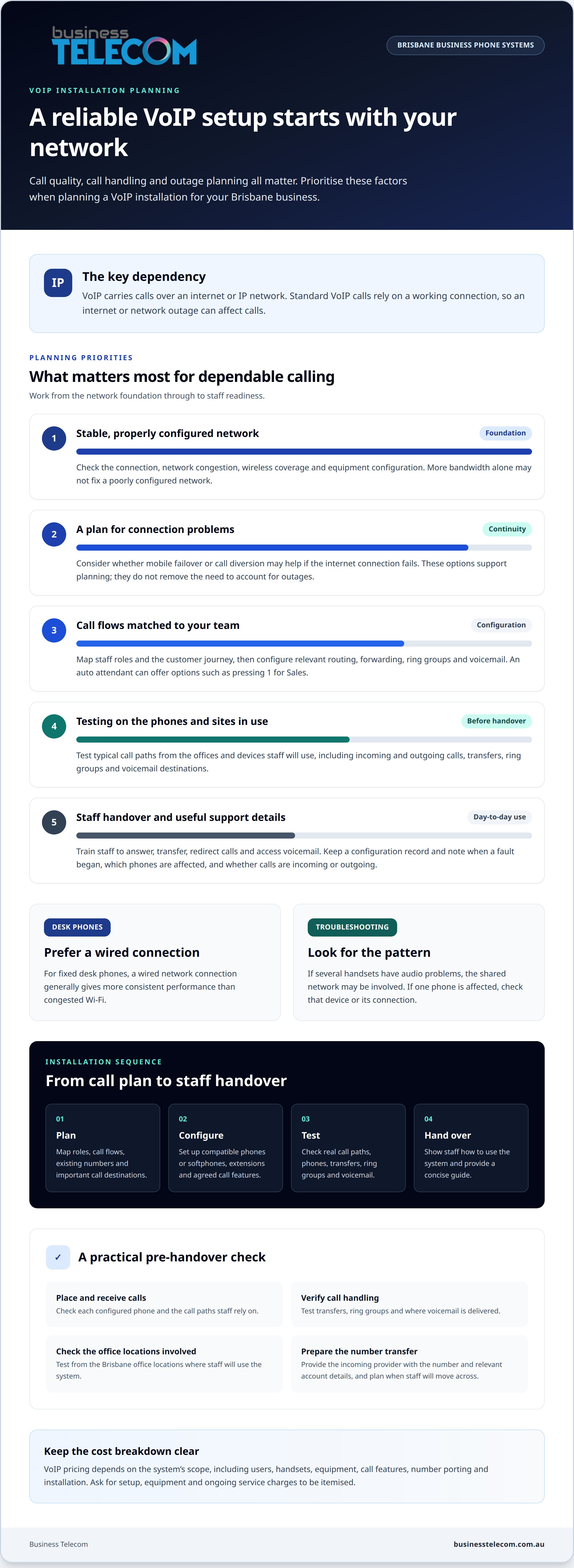
Before handover, test typical call paths, such as a customer calling the main number or leaving voicemail. A practical test plan can include:
- Place and receive calls on each configured phone.
- Test transfers, ring groups and voicemail destinations.
- Confirm staff can use the system from the Brisbane office locations involved.
Training should cover answering, transferring and redirecting calls, as well as accessing voicemail. For example, a receptionist can practise transferring an enquiry to Accounts and returning to the caller if the transfer does not connect. A concise guide helps staff repeat these tasks after installation, particularly when team members have different phone roles.
Remote technical support can troubleshoot hosted PBX settings and make changes for Brisbane businesses without requiring an in-person visit for every adjustment. This can help when an extension needs updating, a call route changes or a user’s access needs attention. Describe the affected phone and issue clearly to help support staff investigate.
Ongoing support can also help diagnose call problems and explain system settings. When reporting a fault, note whether it affects one handset or several, whether calls are incoming or outgoing, and when the problem began. These details help narrow down whether the cause relates to a device, configuration or internet connection.
For a Brisbane team planning its setup, discuss business phone system requirements as part of the installation process.
Network requirements and call quality
VoIP needs a stable, properly configured business network, not excessive bandwidth. Common problems include network outages, congested Wi-Fi and configuration issues. Protect system access by limiting it to authorised users.
Network requirements
Each office needs an IP connection between its phones and the VoIP service. The network must handle voice traffic consistently while staff use other internet services. A business network assessment can identify congestion, weak wireless coverage or equipment that needs configuration before installation.
For fixed desk phones, a wired network connection generally provides more consistent performance than congested Wi-Fi. This is especially relevant when staff make frequent calls or rely on desk handsets throughout the day. If the network is poorly configured, improving its setup may matter more than simply adding bandwidth.
Call quality
Unclear or interrupted calls can disrupt customer conversations and staff coordination. Call quality depends on the stability of the internet connection and how the business network handles voice traffic. For example, a cabled desk phone may perform more consistently than one using busy office Wi-Fi.
Test calls from the offices and devices staff will use. If audio problems affect several handsets, the shared network connection may be involved; an issue on one phone may point to that device or its connection. Record when and where problems occur to help narrow down the cause.
Normal VoIP calls require a working IP connection, so an internet or network outage can affect calls. Businesses can reduce disruption risk with a secondary internet connection, mobile failover or automatic call diversion. For teams relying on cellular backup, hardware from Telco Antennas can help ensure strong signal reception and reliable mobile data continuity. Each option works differently: a secondary connection provides another internet path, while diversion sends calls elsewhere.
Security planning should cover who can access phone-system accounts and change call settings. Limit access to staff who need it, and include account access in installation testing. For Brisbane businesses, assess call quality, outage arrangements and system access together, as part of the wider communications setup.
VoIP installation across Brisbane and regional Queensland
Business VoIP installation is for business communications, not household phone plans. In Brisbane and the Gold Coast, a hosted phone system can connect office staff, remote workers and teams at other business sites through a shared call platform.
For example, a local business with teams at multiple sites could use one hosted PBX to coordinate incoming calls. Staff might use desk phones in the office and softphones while working remotely. Configure the system around who handles enquiries, which teams need to transfer calls and how each location identifies itself to callers.
Plan each site as part of the same operating model rather than simply copying one office’s settings. A Brisbane reception team might answer the main number, while another team handles a separate queue. Clear ownership of each call path helps staff know who should respond and reduces confusion when calls move between locations.
Hosted systems can support staff in the office, at home or on the road. IP handsets, softphones or mobile apps provide options for different roles. Cloud phone systems can also scale up or down from one month to the next, which may suit changing staffing needs.
If your business has more than one site, plan these details before implementation:
- Decide which teams need shared extensions or call groups.
- Set distinct call flows for each office’s main number.
- Identify which staff need access when working away from the office.
- Agree how managers will request future changes to users and call routing.
These decisions help shape a system around actual work patterns, rather than geography alone. Business Telecom provides a professional Brisbane VoIP installation service to connect your business locations. Discuss phone system requirements for your business locations when planning your setup.
Business Telecom
Business Telecom helps Brisbane businesses plan phone systems around their staff, call-handling needs and existing setup. If you’re considering VoIP installation, start by deciding how calls should reach your team, which locations need access and what continuity arrangements suit your business.
Business Telecom provides business phone systems, office phone systems, business landlines and small business phone systems. Discuss your current phone numbers, handset needs and how your team works across offices or remotely. These details give the installation plan a practical starting point, focused on the features your business needs.
For a Brisbane team weighing up its next phone system, contact Business Telecom to discuss your requirements.
Plan your next phone system step
Before moving ahead, decide what your team needs a better phone system to make easier. That might mean directing customer calls more clearly, supporting staff across locations or having a practical response when connectivity is interrupted. These priorities give the installation discussion a clear business purpose.
Choosing a Brisbane VoIP installation service is an opportunity to plan for change, not just replace existing phones. Consider how call needs may shift as roles, work arrangements or office locations change. If your business is also upgrading broader facility technology, gemwireless.com.au provides wireless control solutions for lighting and switching systems to modernise commercial spaces. A system designed around those needs gives your team a clearer foundation for future decisions.
Business Telecom can discuss a phone system suited to your Brisbane business and its requirements. Contact Business Telecom about your VoIP requirements to take the next step with a clear understanding of what your team needs.
Frequently Asked Questions
What happens if the internet goes down?
VoIP calls can be affected when the connection carrying them fails. First identify whether the issue affects one device, the office network or the internet service more broadly, as each points to a different cause. Give staff a simple outage procedure: who handles urgent enquiries, how they notify colleagues and which alternative contact method to use with customers.
How much does VoIP installation cost in Brisbane, including hardware and setup?
The total cost depends on the system and what the proposal includes; there is no single installation price for every business. Compare setup work, hardware, ongoing service, optional features and number-porting charges. Check whether equipment is purchased or supplied as part of an arrangement, and whether quoted amounts include GST, to make proposals easier to compare.
What internet speed and network equipment are needed for a reliable VoIP installation?
There is no universal speed threshold for every office. Requirements depend on simultaneous calls, other internet activity and network configuration. A network review should consider the router and switches already in use, how many people share the connection, and whether voice traffic competes with large file transfers or video meetings during busy periods.
What is the process and timeline for installing VoIP in a Brisbane office?
The work usually involves agreeing on the system scope, preparing accounts and users, configuring the service, then handing it over to staff. Business Telecom states that onboarding can take as little as 3 business days; that refers to onboarding, not necessarily every project’s full timeline. Number transfers, equipment delivery and internal scheduling can affect when the complete changeover is ready.
Can Brisbane VoIP installers port existing landline numbers and migrate phone systems?
Yes, business numbers can be ported when moving to a VoIP system. Before migration, decide which numbers should remain active, which are no longer needed and where each retained number should direct callers. Include numbers printed on signage, invoices and customer communications in the transition plan, and update those materials if your business changes how it presents its contact details.
Do Brisbane VoIP installers provide on-site support, maintenance and after-hours service?
Business Telecom provides ongoing support through an Australian-based team available 24/7/365. This gives businesses a support contact outside standard office hours when a phone-system issue affects work. The stated support information does not establish that every issue involves an on-site visit, so describe the fault clearly, including the affected user and business impact, when seeking assistance.