A medical practice phone system in Brisbane is an operational decision, not just a choice of desk phones. The right setup depends on how your clinic handles calls, how much flexibility staff need, and how you plan to manage ongoing costs. Compare options by separating essential requirements from features that are useful but not necessary.
This guide covers the decisions behind a suitable setup, from organising patient enquiries to choosing between cloud and on-site systems. It also explains how to handle sensitive messages, plan for changes in staff or locations, and identify factors that affect recurring charges. Use these points to prepare a requirements brief and compare options against your workflows. The goal is a phone system that can adapt as your practice develops.
Key Takeaways
- Group calls into clear menu options for appointments, scripts, referrals, results and accounts so patients can reach the right team.
- Match VoIP seats and desk phones to staff who need to make or answer calls, then allow for growth without adding unnecessary capacity.
- Plan voicemail routing and after-hours messages around who needs to receive patient enquiries and how calls should be handled outside opening hours.
- Health information is sensitive information under the Privacy Act 1988, according to the Australian Government, so include privacy and security in voicemail decisions.
Call menus for appointments, scripts, referrals, results and accounts
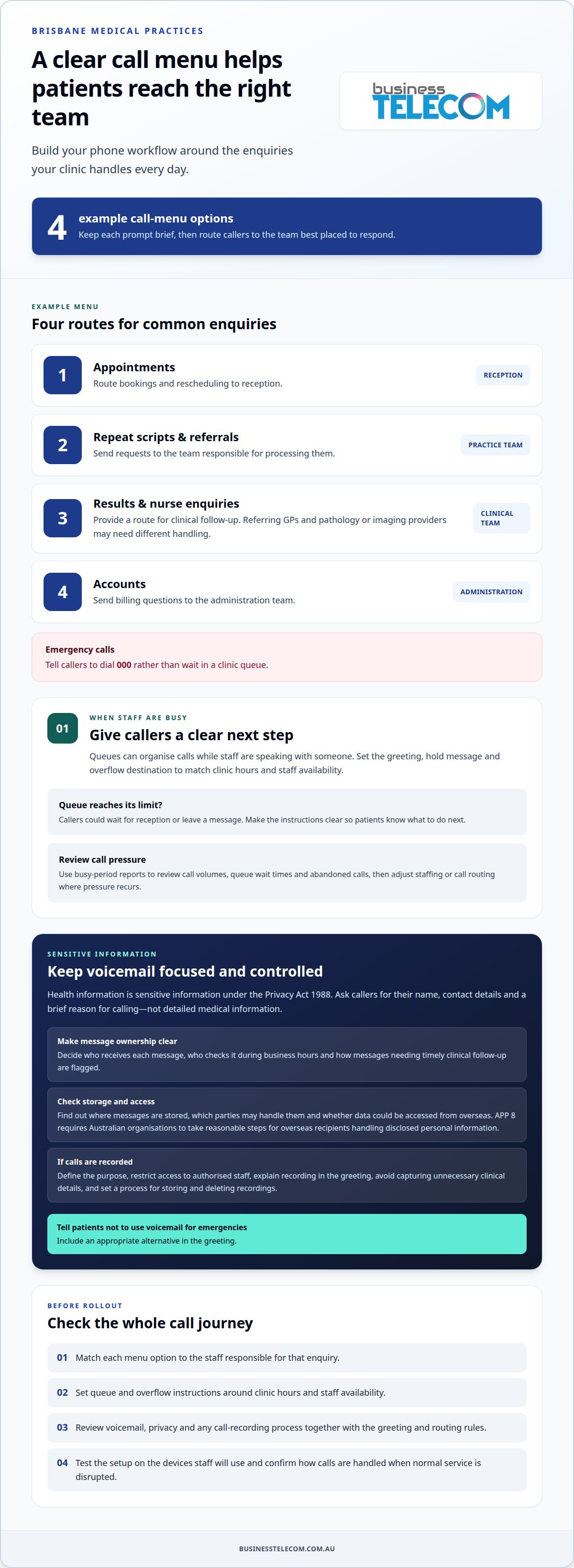
A clinic menu should direct patient calls to the team best placed to respond. A practical example uses option 1 for appointments, option 2 for repeat scripts and referrals, option 3 for results and nurse enquiries, and option 4 for accounts. Keep each prompt brief, then route callers to reception, clinical staff or administration as appropriate.
Referring GPs need a clear path to discuss cases, while pathology and imaging providers may call with results. These calls can need different handling from appointment requests. Set up separate routes where staff responsibilities allow, and make sure the greeting tells callers what each option covers. For emergencies, direct callers to dial 000 rather than wait in a clinic queue.
- Appointments: Route bookings and rescheduling to reception.
- Scripts and referrals: Direct requests to the team responsible for processing them.
- Results and nurse enquiries: Provide a route for clinical follow-up.
- Accounts: Send billing questions to administration.
Use busy-period reports to review call volumes, queue wait times and abandoned calls, when callers disconnect before reaching staff. Compare patterns across opening hours, then adjust staffing or call routing where pressure recurs. A desktop reporting view can help managers relate call activity to reception coverage. Telehealth teams may need a separate route for relevant enquiries.
If calls are recorded, define the purpose and restrict access to authorised staff. Explain recording in the greeting, avoid capturing unnecessary clinical details, and set a process for storing and deleting recordings. Treat recording as a privacy-sensitive communication process, not just a platform setting. Review the greeting, queue rules and hardware setup together to keep call handling consistent.
Cloud PBX and VoIP for Brisbane healthcare practices
Cloud and on-site systems differ in where call management runs and how staff access it. Compare each option against your workflows, locations and continuity plans.
Cloud PBX and VoIP options
Hosted VoIP and cloud PBX systems run through an internet-based platform, while an on-premises system keeps the phone exchange at the practice. Australian clinics can use VoIP instead of traditional copper phone lines. Softphones let medical secretaries make and receive calls from different locations over the internet. For a multi-site group, plan how extensions, call transfers and the existing business number will work across sites.
Features and practice software integration
Provider support and system comparisons
Business Telecom provides business phone systems for Brisbane practices considering VoIP or cloud communications. Hosted VoIP and cloud PBX use an external platform, while an on-premises system relies on equipment at the clinic. Compare support arrangements, healthcare call-handling needs, number transfers and setup processes. Consider how referral calls, reception queues and staff changes will be managed, then weigh those needs against the system’s ongoing administration.
Service continuity during outages
Internet-based calls may be disrupted if a site loses internet access. A local power outage can also affect network equipment and desk phones. When configured with an available alternative, a cloud platform may support call rerouting during an outage. Plan and test the fallback route, such as directing calls to another location. Confirm what callers will hear and who will handle calls until normal service resumes.
Voicemail handling and patient health information
Voicemail workflows should make clear who receives a patient’s message and what happens next. A clinician-specific mailbox can send messages intended for that doctor directly to them instead of placing every enquiry in a shared inbox. Set a process for checking messages during business hours and flagging those that need timely clinical follow-up.
According to the Australian Government, the Privacy Act 1988 applies to health information as sensitive information in Australia. Keep voicemail prompts focused: ask callers to leave their name, contact details and a brief reason for calling, rather than detailed medical information. Tell patients not to use voicemail for emergencies, and provide an appropriate alternative in the greeting.
Storage arrangements matter when a voicemail contains identifiable patient information. Find out where the platform stores messages, which parties may handle them, and whether the data could be accessed from overseas. Under APP 8, Australian organisations must take reasonable steps to ensure an overseas recipient handles disclosed personal information consistently with the Australian Privacy Principles.
Doctors working away from the clinic may need to return calls without sharing a personal mobile number. Before rollout, decide how outgoing calls should appear to patients, then test the process on the devices clinicians will use. Give staff a simple procedure for returning voicemail, including how to confirm a caller’s identity before discussing a sensitive matter.
For practices with multiple locations, assign each mailbox to a named role or clinician and keep its greeting relevant to that team. When someone changes roles, update the mailbox owner and instructions so messages aren’t still directed to a former staff member. A clear voicemail workflow helps your practice handle patient messages consistently.
Phone system sizing and monthly costs by practice size
Size the system by the people who need calling access, and count physical handsets separately. A receptionist may need a desk phone, while a GP could use a mobile or desktop softphone. Separating user capacity from handset requirements helps avoid paying for equipment or capacity the practice won’t use. For a medical practice phone system in Brisbane, start by mapping each person’s calling needs.
Use these setups as planning guides, not fixed rules:
- Solo practice: One GP and one or two reception staff may suit 2-3 VoIP seats and two desk phones.
- Small practice: With 2-5 GPs and 2-3 reception staff, consider 4-6 seats and 3-4 desk phones.
- Mid-size practice: A team of 5-10 GPs and 3-5 reception staff may need 8-12 seats and 4-6 desk phones.
- Group practice: Multiple locations and 10 or more GPs need capacity planned around each site’s staff and call handling.
These estimates show why user count and handset count aren’t interchangeable. Reception staff may share call handling, while clinicians may need individual extensions without desk phones. Mobile calling can also reduce the number of handsets needed. Before selecting capacity, map who answers incoming calls, who makes outgoing calls, and where each person works.
Monthly costs depend on seats, handsets, calling requirements, call routing and infrastructure across locations. The price depends on the practice’s requirements and is provided after a quote request. Compare recurring charges with separate equipment, setup and optional costs. Avoid paying for unused capacity by matching the plan to the practice’s actual calling needs. These factors help shape a medical practice phone system in Brisbane around actual usage.
For a Brisbane clinic, prepare a staff-and-device list and match each role to its calling method. Discuss phone system sizing for your practice to consider a setup suited to your team.
Business Telecom: Business Phone System
Business Telecom provides business phone systems for practices reviewing call handling, team capacity or outdated phone equipment. A suitable setup can reflect who answers patient calls, which staff need individual access, and whether clinicians work across locations or remotely.
For a Brisbane clinic, the figures in this guide provide a starting point for mapping users and desk phones. Requirements also depend on call flows, voicemail processes and how the practice handles calls during outages. Business Telecom’s business phone systems are designed for small and medium-sized businesses, with scalable VoIP and cloud phone options.
If you’re planning a new system or reviewing your current setup, contact Business Telecom to discuss your practice’s requirements.
Plan your practice’s next phone system step
Choosing a medical practice phone system in Brisbane is an opportunity to shape communications around how your team works and how the practice may change. Before deciding, agree who will manage the system, how staff changes will be reflected, and when you’ll review whether it still suits the practice.
A short decision brief helps your team move forward with clarity. Record the outcomes you want, the workflows that matter most, and who is responsible for managing changes. This gives your practice a practical basis for discussing suitable options without getting distracted by features that don’t support day-to-day needs.
When you’re ready to discuss a phone system for your practice, contact Business Telecom about your requirements. A clear starting point can make the next decision easier.
Frequently Asked Questions
Can doctors call patients from home without showing their mobile number?
Yes. A cloud phone system can let a doctor make work calls through the practice system instead of calling directly from a personal mobile. For example, a doctor working from home can use a softphone connected to the clinic’s system. Set the outgoing caller ID to the clinic’s number so patients recognise the call and can return it through the usual practice channel.
Can the greeting tell patients to call 000 in an emergency?
Yes, a clinic greeting can direct callers to dial 000 in an emergency. Keep that instruction clear and easy to hear, including in any after-hours message. For example, state that the phone line isn’t an emergency service, then give the emergency direction before other menu options. Review the wording whenever the practice changes its opening hours or contact process.
Can a phone system help manage patient appointment bookings?
Yes. Call routing can send booking and rescheduling enquiries to reception, helping staff manage appointments alongside other clinic tasks. The phone system handles the call path; appointment availability and booking records are managed through the practice’s scheduling process. For example, route callers to reception during staffed hours and provide a clear alternative when the booking team can’t answer.
How are calls handled when the practice is closed?
After-hours settings can play a greeting that gives the clinic’s opening hours and instructions for callers. The message can explain the appropriate next step, with urgent medical assistance information kept separate from routine appointment instructions. Practices can also set up a diversion to an on-call practitioner or answering service where that arrangement is in place.
Can the phone system connect multiple locations in a medical group?
Yes. A cloud phone system can manage extensions and call handling across multiple practice locations. For example, a group could use a shared directory while directing each site’s incoming calls to its own reception team. Plan how staff will transfer calls between locations and what callers will hear if their preferred site is unavailable.
Is installation disruptive to the practice?
Careful planning helps limit disruption when changing phone systems. List existing numbers, extensions, call routes and equipment, then schedule staff familiarisation around clinic operations. Test incoming and outgoing calls, reception workflows and remote calling before relying on the new setup. Keep staff informed about the changeover so they know which phones and procedures to use.