
The lowest cloud PBX quote isn’t always the lowest-cost option. For businesses comparing the cost of cloud PBX Gold Coast providers quote, a per-user price can hide separate charges for numbers, calls, setup or features your team doesn’t need.
Quotes can be difficult to compare because providers may charge by user, line or concurrent call, and call inclusions can have different limits. Start with what your business needs: the number of people and locations, how calls are answered and transferred, and which devices staff use. These are useful starting points for businesses in the Gold Coast, Brisbane and Sydney.
This guide explains the main parts of a cloud PBX quote and how to compare proposals against consistent requirements. It also covers call inclusions, optional features, number continuity and planning a changeover with minimal disruption. Business Telecom supplies cloud phone systems that support calling across desk phones, computers and mobile devices, with call routing, auto-attendants, conferencing and extension management. Australian-based support and scalable systems help keep the decision focused on fit, not just the headline price.
Key Takeaways
- Cloud PBX costs depend on your team size, call patterns and system scope, so a quote should reflect how your business operates.
- Separate ongoing service and call charges from setup, hardware and optional features to see what you’ll pay over time.
- Compare quotes using the same requirements for users, numbers, calls, features, hardware and support. This makes the cost of cloud PBX Gold Coast proposals easier to assess fairly.
- Map your users and call flows, review connectivity, then prioritise the features your customer-facing, mobile or multi-site teams need.
- Choose a system for its overall fit, support and ability to scale. Business Telecom’s cloud phone systems support Australian SMEs across office and flexible working arrangements.
What determines the cost of a cloud PBX for a Gold Coast business?
A cloud PBX is a business phone system hosted online rather than run through PBX hardware installed at your office. Depending on the service and setup, staff can use compatible desk phones, computers or mobile devices. For background on how traditional and hosted phone systems fit into the broader category, see Private Branch Exchange (PBX) systems.
There’s no single price that suits every Gold Coast business. A small office with a few users and straightforward call handling has different requirements from a multi-site team routing calls to several departments. The cost of cloud PBX Gold Coast businesses need to assess depends on the full scope: users, phone numbers, call usage, selected features and implementation requirements. The key is to compare the same requirements rather than rely on a headline figure.
What does a cloud PBX subscription usually cover?
Recurring charges may be calculated per user, extension, number or plan. Those models aren’t directly comparable: a per-user quote and a per-number quote could cover different parts of the service. Establish what each charge includes, then identify any separate usage, setup or equipment costs.
The hosted phone service is separate from physical handsets. A business may use desk phones, computer-based calling or mobile devices, depending on how staff work. Review features against actual call workflows, including:
- Call routing, queues or an auto-attendant to direct incoming calls.
- Voicemail and conferencing for messages and team conversations.
- Extension management to reach colleagues across teams or locations.
Treat these as items to assess, not assumptions about what every subscription includes. A clear quote should distinguish included features from optional ones.
Why team size and call patterns change the quote
A small team may need an extension for each staff member and a simple way to answer the main business number. A larger team might require additional extensions, call groups for departments or routing across more than one location. Employee numbers alone don’t show the full requirement. Consider who needs access and how calls move through the business.
Call patterns matter too. An inbound-focused customer service team may prioritise queues and reliable call distribution, while an outbound-heavy team needs to know how its plan treats calls to mobiles and other destinations. Don’t assume a call allowance covers every type of call. Check which calls are included and which are charged separately.
Office-based and remote staff may also use different devices and access arrangements. Some may rely on desk phones, while others take business calls on a computer or mobile. Documenting this mix helps clarify the number of extensions, applicable licences and equipment needed before comparing proposals. The result is a quote shaped around real users and call flows, rather than a headline figure alone.
Cloud PBX cost components: separate monthly charges from setup
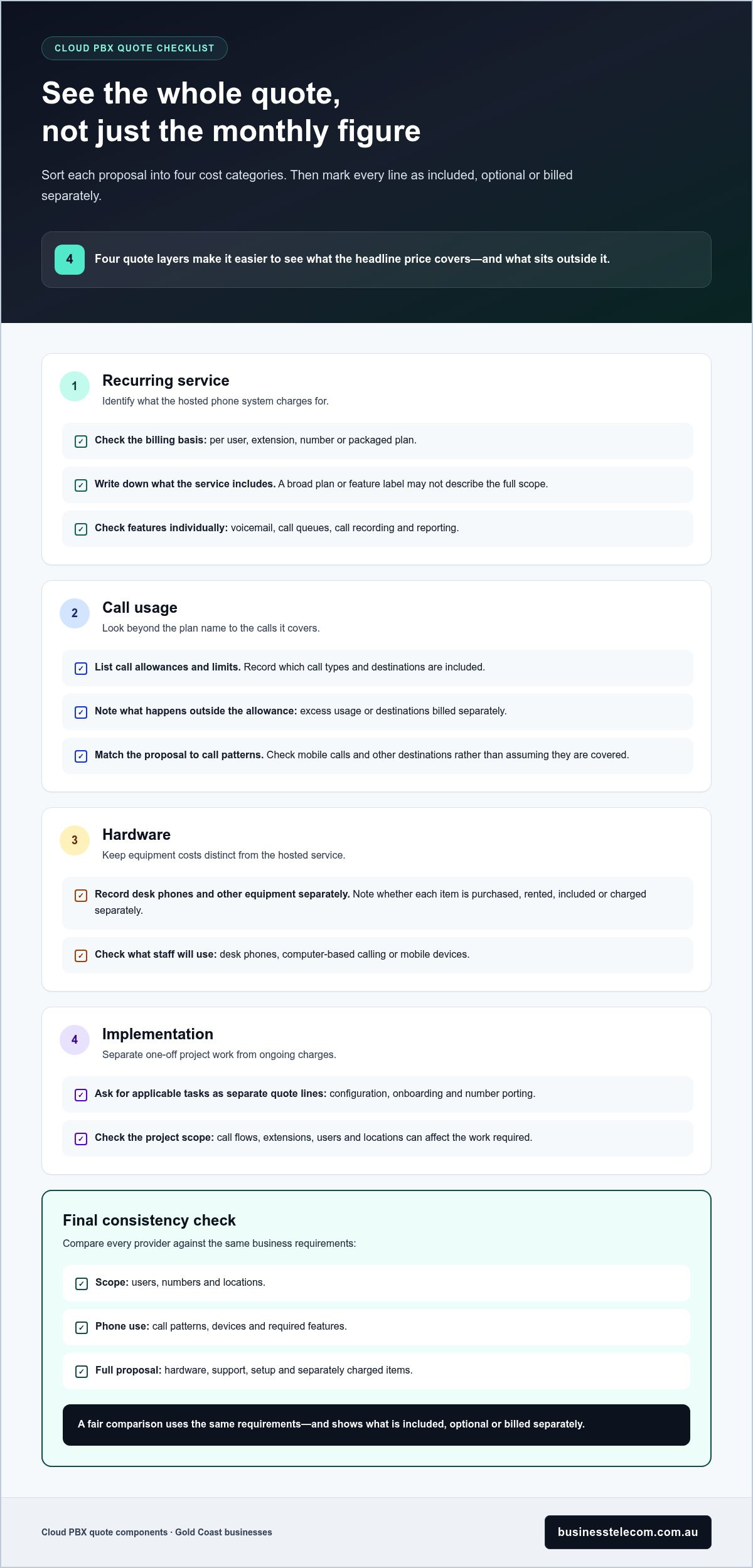
A quote is easier to assess when you separate the ongoing service from usage, equipment and one-off work. This shows whether a low monthly figure covers your full phone system or only part of it. For a fair view of the cost of cloud PBX Gold Coast businesses may encounter, record each item under a consistent heading and mark it as included, optional or billed separately.
Use these four categories to organise the proposal:
- Recurring service: the hosted system and its charging basis, such as users, extensions, numbers or a packaged plan.
- Usage: call allowances, destinations covered and charges for usage outside those allowances.
- Hardware: desk phones or other equipment, recorded separately from the hosted service.
- Implementation: configuration, onboarding and number porting where these are part of the project.
Then distinguish what the quote explicitly includes from optional features and separately charged items. A feature mentioned in a product description isn’t necessarily included in your plan, so check the proposal.
Recurring service, users and call usage
First identify whether the recurring subscription is priced per user, extension, number or as a packaged plan. These models measure different things, so compare the scope as well as the billing unit. Then note which call types are included, any usage limits and how excess use or separately billed destinations are treated.
Record features only where the proposal specifies them. For example, list voicemail, call queues, call recording and reporting as included, optional or separately charged. This gives your team a practical view of the monthly service instead of relying on a broad feature label.
Setup, devices and optional features
One-off charges depend on the work required to prepare the system. Configuration can vary with call flows, extensions, users and locations, while number porting and staff onboarding depend on the project scope. Ask for each applicable task to appear as its own quote line, separate from recurring service.
Keep equipment and add-ons visible too. A handset purchase or rental is a separate cost from the hosted phone service, and integrations or advanced features can add to the overall scope. For teams calling from mobile devices, the Australian Mobile Telecommunications Association (AMTA) provides information about the Australian mobile telecommunications sector, a useful reference when considering how mobile calling fits into your setup.
- Record handsets as purchased, rented or not required.
- Separate configuration, onboarding and porting from monthly charges.
- Show optional integrations and advanced features as distinct line items.
This breakdown helps you understand what a proposal covers before comparing totals. Business Telecom’s cloud phone systems support calls across desk phones, computers and mobile devices, with call routing, auto-attendants, conferencing and extension management.
How to compare Gold Coast cloud PBX quotes without missing costs
A headline monthly charge tells you only part of the story. A lower advertised rate may exclude call usage, equipment or implementation work your business needs, so compare the complete system scope rather than the starting figure. To assess the cost of cloud PBX Gold Coast businesses are quoted, use the same assumptions for every proposal and separate recurring charges from variable or one-off items.
Build a like-for-like cloud PBX quote comparison
Give each proposal the same baseline: user count, existing numbers, locations, expected call patterns and required features. If one quote covers fewer users or omits a call-handling feature, its total isn’t directly comparable. Use a simple comparison template and enter “not stated” where a proposal leaves a detail unclear.
Comparison field | Proposal A | Proposal B
Users and billing unit | ______ | ______
Numbers and locations | ______ | ______
Call allowances and variable charges | ______ | ______
Features included and optional | ______ | ______
Hardware and implementation | ______ | ______
Support details | ______ | ______
Contract conditions, if stated | ______ | ______
Keep recurring service, call usage, equipment and implementation in separate fields. Record whether each amount is recurring, one-off or variable, and note the basis of any charge, such as per user, extension or number. Include contract conditions only when the quote states them. This makes exclusions easier to spot and helps you compare proposals without filling gaps with assumptions.
Check number continuity and service support
List the business numbers you use now and identify which need to remain active, including numbers assigned to particular teams or locations. Compare the porting process and any associated charges stated in each proposal, then note how number continuity will be managed during the changeover. Include support arrangements in the same review, using written details on Australian-based support, escalation pathways and service hours.
Before weighing up totals, run through this checklist:
- Inclusions: Which users, numbers, call types and features are covered?
- Exclusions: Which required items sit outside the quoted service?
- Variable charges: What usage or destinations may be billed separately?
- Implementation: Are configuration, onboarding and number porting itemised?
- Support: What support channels, escalation steps and hours are stated?
Mark every field as included, optional, separately charged or not stated. Then compare proposals against your business’s actual requirements, not the lowest entry price. This gives you a clearer view of the system’s operating scope and makes it easier to identify meaningful differences between quotes.
Match cloud PBX costs to your Gold Coast team and connectivity
A suitable quote starts with how your team works, not a guessed number of users or features. Before comparing systems, complete a short needs assessment. It helps you describe the service your business needs and avoid paying for capacity that doesn’t support day-to-day calls.
- Map users: Note who needs a business extension and whether they work in the office, remotely or across multiple sites.
- Document call flows: Record how calls arrive, who answers, where calls transfer and what happens when a team is unavailable.
- Review connectivity: Assess the business internet connection and network readiness at each location where staff will make or receive calls.
- Prioritise features: Identify functions that support current workflows, then separate essential requirements from useful extras.
Map the calls your Gold Coast business needs to handle
Write down opening hours, busy periods, after-hours calls and the destinations calls currently reach. A customer-facing team may need calls directed to reception or a queue, while a smaller office may only need a clear route to the right person. Choose ring groups, queues or an auto-attendant to match actual call flows, not simply because they appear on a feature list.
Local numbering and geography also belong in your requirements. List any existing 07 numbers that need to remain in use, and note how teams across the Gold Coast and nearby border areas, such as Tweed Heads and Coolangatta, share calls. If your business also operates in Brisbane or Sydney, document how those teams handle calls across locations. These details help define a proposal’s scope.
Assess connectivity, devices and room to scale
Hosted calling relies on your business connectivity, so review the internet connection and network readiness at each worksite before settling on a system. Consider how your business will manage continuity if internet access or power is interrupted. The right planning depends on how critical phone access is to your operations and what fallback arrangements your business needs.
Match devices to staff roles. Office-based employees may prefer desk phones, while mobile staff or remote workers may use computers or mobile devices. Business Telecom’s cloud phone systems support calling across desk phones, computers and mobile devices, giving teams options for in-office and flexible work.
Allow for likely changes, such as new users, another location or revised call routing, but base the initial scope on current needs. A growing business can plan for future capacity without treating every possible expansion as a requirement today. This balance makes the cost of cloud PBX Gold Coast proposals easier to assess against how your team operates now.
Plan a cloud phone system around your team’s needs, including users, call flows and the devices your staff rely on.
Choose a cloud PBX provider for your Gold Coast business
The right choice is the system that fits your operations, not simply the quote with the lowest monthly charge. Compare total scope, call-handling fit, support arrangements and flexibility together. A system should cover the users, numbers and workflows you need today, with a practical way to adjust as those needs change.
Use your comparison to identify what matters most. A customer-facing team may place greater value on call routing and queues, while a business with staff working across the office and remotely may prioritise access from different devices. Check that the quoted features and support align with those requirements, and that exclusions are clear before you decide.
What to expect from Business Telecom’s cloud phone systems
Business Telecom supplies cloud phone systems for Australian SMEs, supporting business calls across desk phones, computers and mobile devices. Call routing and auto-attendants help direct callers through office workflows, while conferencing and extension management support communication between colleagues and teams. Business Telecom also provides Australian-based customer support for business phone system needs.
These capabilities are most useful when they reflect how your staff actually answer, transfer and manage calls. Consider which roles need an extension, where calls should go when a team is busy, and whether people outside the office need to make and receive calls through the business system. Matching functions to day-to-day tasks keeps the system scope relevant.
Prepare a clear brief before requesting a tailored discussion
A concise brief makes the discussion specific to your business. Bring together the details you’ve used to compare proposals, then describe requirements that could affect system configuration or future growth. Focus on current operations first, and separate must-have capabilities from features that may be useful later.
- Users and locations: Note how many people need access and where they work.
- Numbers and continuity: List current business numbers and any number-porting requirements.
- Call patterns: Describe typical inbound and outbound calls, busy periods and call destinations.
- Features and devices: Identify essential call handling, plus whether staff use desk phones, computers or mobile devices.
With these details in hand, you can discuss a system scope that reflects your users, locations and call workflows. That gives the conversation a practical starting point, whether you’re replacing an existing phone system or planning for a flexible team.
Discuss a business phone system with Business Telecom and outline the requirements you’ve identified.
Turn your comparison into a confident next step
Use your quote comparison as a working brief, not just a way to choose between monthly totals. It can help decision-makers agree on what the phone system must do now, which requirements can wait and what changes might affect the business later. That keeps the focus on operational fit as well as the cost of cloud PBX Gold Coast businesses are weighing up.
Before moving ahead, make sure the people responsible for calls, connectivity and budgets share the same priorities. A short internal discussion can surface overlooked needs, such as how teams handle busy periods or what staff rely on when working away from the office. Resolve those points early so the next conversation can focus on a system scope that supports the way your business works.
When you’re ready to move from comparison to planning, discuss a cloud phone system for your business. A clear brief gives the discussion a practical starting point and helps you take the next step with confidence.
Frequently Asked Questions
How much does a cloud PBX cost on the Gold Coast?
There isn’t one standard price for every business because the total depends on the system scope and how it’s billed. A small team with basic calling needs will have a different quote from a business with several sites, higher call volumes or additional features. To understand the cost of cloud PBX Gold Coast businesses may be quoted, compare the full recurring and one-off charges, not just the advertised starting rate.
What is usually included in a cloud PBX plan?
Plans commonly provide access to a hosted business phone platform, but the exact inclusions vary. A proposal may specify features such as voicemail, call routing, auto-attendants, conferencing or extension management, while handsets, call usage or advanced features may be separate. For example, a business that needs calls directed to different departments should check whether that routing is included in the quoted plan or listed as an add-on.
Is cloud PBX cheaper than an on-site phone system?
Not automatically. Cloud PBX can reduce the need to maintain PBX hardware at the office, but it usually involves ongoing service charges and may require compatible devices or implementation work. An on-site system has a different cost profile, which can include equipment and maintenance. Compare expected costs over the period you plan to use the system, including support, upgrades, call usage and hardware, rather than judging by the initial outlay alone.
Can a Gold Coast business keep its existing phone number with cloud PBX?
In many cases, a business can retain an existing number by arranging to port it to the new phone service. The process and any applicable charges depend on the number and changeover arrangements. Record each number, where it’s used and which staff or customer channels rely on it. Include porting and transition steps in the project plan so the move accounts for numbers customers already know.
Does a cloud PBX need NBN internet to work?
A cloud PBX needs an internet connection suitable for voice calls, but it doesn’t inherently require a specific NBN service. The connection available at each workplace and its performance under normal business use are practical considerations. If staff share the connection with video meetings, file transfers and other tasks, include that existing usage in your readiness assessment. Make sure the system’s connectivity requirements suit your business locations.
What information do I need to compare cloud PBX quotes?
Prepare a short brief with user numbers, business locations, current phone numbers and typical inbound and outbound call patterns. Note which teams need to transfer or receive calls, the devices staff use and any essential functions, such as conferencing. Include number-porting needs and current connectivity constraints. This gives each proposal the same starting point and helps reveal whether a quote leaves out an important part of your operating setup.
Are cloud PBX charges usually per user or per phone number?
Both models are used, and some plans use extensions or a packaged subscription instead. A per-user charge relates to staff access, while a per-number charge relates to the phone numbers covered. The labels alone don’t tell you what call usage or features are included. Check the billing unit and what it applies to, especially if several staff share a number or one employee needs access from multiple devices.