

The phone system that suits your Sydney business isn’t necessarily the one with the most features. To improve business call quality in Sydney, start with clear calls on a stable connection, then make sure callers reach the right person without unnecessary transfers.
The practical challenge is balancing customers’ expectations for clear, timely conversations with staff’s need for a setup that works in the office and remotely. Cloud and VoIP systems rely on a stable, business-grade internet connection for reliable calls, so quality depends on more than the handset.
This guide explains how to assess business phone systems in Sydney, organise call routing and greetings, and maintain consistent service through monitoring and coaching. It also compares traditional landlines, hosted PBX and cloud-based systems, so you can choose an arrangement that fits your team’s call patterns. The goal is straightforward: clearer calls, sensible call flows and fewer avoidable hand-offs.
Key Takeaways
- Design call routes and greetings around who handles each enquiry, so callers reach the right team with fewer hand-offs.
- Match your phone system to your team’s work patterns, including how staff handle calls across office and remote settings.
- Trace poor call quality to its likely cause before changing equipment or settings; the connection and setup both matter.
- Weigh hosted PBX, VoIP and landlines against your business’s call needs, internet reliability and ongoing costs.
Call routing and professional greetings
Clear routing gives each caller a defined path instead of an unexplained transfer. Start by grouping common enquiries, such as bookings, accounts and existing customer support. Direct each channel to the team member best placed to help, then set a fallback destination for busy periods or staff absences.
For example, a Sydney medical practice might direct appointment enquiries to reception and billing questions to its accounts team. A concise greeting can name the business, outline the available options and tell callers what to do next. Keep menu choices distinct, use plain language and remove options that no longer match the team’s responsibilities.
- Map the call flow: connect each enquiry type to a responsible person or team.
- Set a fallback: send unanswered calls to another suitable team or voicemail.
- Review the wording: update greetings when opening hours or responsibilities change.
Call-centre software can record and monitor conversations for managers to review with staff. Look for repeated transfers, unclear explanations or delays in resolving enquiries. A leader can then offer focused coaching, recognise effective call handling and agree on a practical improvement to review next time. For organisations exploring multilingual customer support and voice intelligence, resources from Ubestream – AI Translation Service Provider highlight practical ways to evaluate the return on investment when implementing AI-driven customer service solutions.
Customer feedback adds another measure. A survey can use a 5-point or 10-point satisfaction scale. On a 5-point scale, respondents might use 4 to indicate satisfaction, 5 very high satisfaction, 3 a neutral response, 2 dissatisfaction and 1 very low satisfaction. On a 10-point scale, a business might group 9-10 as very high satisfaction, 7-8 as satisfied, 5-6 as neutral, 3-4 as dissatisfied and 1-2 as very dissatisfied. These labels are examples; scale wording and interpretation vary between surveys.
There is no universal interpretation for a call-centre CSAT score between 75% and 85% or above 90%. How to interpret a score depends on the survey method, scale and context. Treat these figures as context, not a substitute for reviewing individual feedback. Combine survey results with call monitoring to identify whether routing, greeting clarity or staff coaching needs attention. Where staff need broader support with conversational selling and customer engagement, resources from Just Go Sell can help teams refine their skills alongside technical phone improvements. That evidence helps make service more personalised and keeps each channel focused on a useful outcome.
Business phone system options in Sydney
Businesses can compare phone system approaches against their call patterns, setup and connectivity needs. Before deciding, compare call clarity, reliance on internet connectivity, staff needs and ongoing costs.
Hosted PBX, VoIP and traditional systems
A traditional landline uses the phone network, while VoIP carries calls over the internet. A hosted PBX manages business call functions through a remote platform, which can support staff working in different locations. Choose based on operational needs, not the system label alone.
Cloud and VoIP systems need a stable, business-grade internet connection for reliable calls. Include connection capacity and resilience in your cost comparison, alongside equipment, subscriptions and transition requirements. A landline may suit a business that prefers its current setup; VoIP may offer more flexibility for a team with remote staff.
To troubleshoot dropped calls, echo or audio delay, test another handset and connection. Check whether the problem affects one user or the whole team, note when it happens, and share those details with your phone system provider to help identify the cause.
Risks of switching to VoIP
VoIP depends on internet performance, so congestion or an unstable connection can affect call quality. Switching systems also takes planning for number transfers, call flows, staff readiness and equipment changes. Sydney businesses may be able to retain existing phone numbers when switching phone systems, but transfers depend on number eligibility and the providers involved.
Reduce disruption by documenting current inbound call paths, checking which handsets or devices need replacing, and scheduling number transfers around operational requirements. Plan how calls will be handled during the change, and test the new setup before relying on it for customer conversations. A considered transition supports efficiency and helps agents engage callers without unnecessary confusion, which can contribute to customer satisfaction.
For a team weighing flexibility against its current setup, business phone system options can help frame the decision around practical call requirements.
What causes poor business call quality in Sydney?
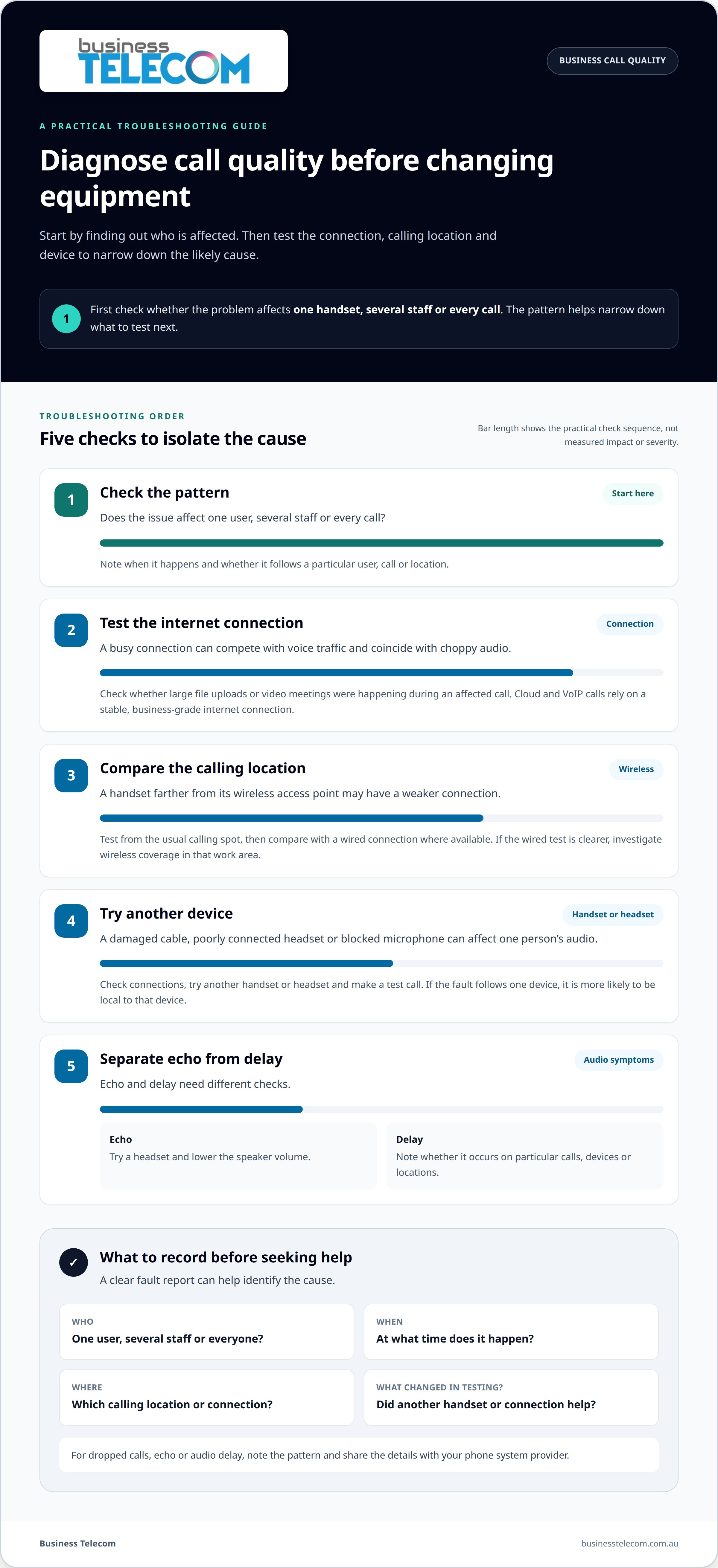
Poor call quality often relates to the connection, device or calling environment. First identify whether the issue affects one handset, several staff or every call. That pattern helps narrow down the cause before you change settings or equipment.
On internet-based calls, a busy connection can compete with voice traffic. Large file uploads or video meetings, for example, may coincide with choppy audio. Note what else was happening during an affected call, then compare the pattern across different times and users.
Wireless coverage can affect calls, too. A handset used far from its access point may have a weaker connection than one nearby. Test from the usual calling location, then compare with a wired connection where available. If the wired test is clearer, investigate wireless coverage in that work area.
Devices are another possible source of trouble. A damaged cable, poorly connected headset or blocked microphone can make one person sound faint or distorted. Try another headset or handset, check the connections and make a test call. If the fault follows one device, the cause is more likely local than system-wide.
Echo and delay require different checks. Echo may result from sound travelling between a speaker and microphone, so test with a headset and lower the speaker volume. Delay can make conversation difficult as speakers begin talking over each other. Note whether it occurs on particular calls, devices or locations.
Use this sequence to narrow the fault:
- Record the time, caller, device and location for each affected call.
- Test another handset and, where possible, another connection.
- Compare one affected user with a colleague making a call at the same time.
- Share the pattern and test results with the phone system provider.
A Sydney office might find that calls sound muffled in one meeting room while desk calls remain clear. That points to the room’s device or connection, rather than every user’s setup. Consistent notes turn this observation into useful troubleshooting evidence.
Hosted PBX, VoIP & Landlines: Quality & Cost in Australia
For an Australian business, call quality depends on both the phone system and the connection supporting it. Compare hosted PBX, VoIP and traditional landlines against your call volume, staff locations and current equipment. No option is automatically clearer or less expensive in every setup.
VoIP carries calls over an internet connection. A hosted PBX uses an externally hosted platform to manage business calls, while traditional landlines use phone-line infrastructure. Cloud and VoIP systems need a stable, business-grade internet connection for reliable calls. If your Sydney office has inconsistent connectivity, factor that into your decision before choosing an internet-based system.
Quality also depends on how the system fits daily work. A team taking calls from one office may prefer familiar desk phones, while staff splitting time between the office and remote work may prioritise flexibility. Hosted PBX or VoIP can support different working arrangements, but call clarity still relies on suitable connectivity and devices. Traditional lines may suit businesses whose existing equipment and call processes meet their needs.
Compare the full cost structure, not just the headline subscription. List recurring service charges, handsets or other equipment, installation and optional features. Then consider the cost of keeping existing equipment, maintaining separate lines or changing the internet setup. The right comparison depends on what your business already owns and the capabilities it needs.
- Call pattern: note peak periods, inbound call needs and remote staff.
- Connection: assess internet stability before selecting an internet-based system.
- Equipment: identify which handsets can stay and which may need replacing.
- Overall cost: compare ongoing charges and setup requirements together.
For a practical discussion of business phone system options, consider how each setup matches your team’s calls, connection and equipment.
Business Telecom
Business Telecom provides business phone systems to help Sydney businesses manage call quality and customer conversations. If unclear calls, awkward call flows or outdated equipment are causing problems, start by reviewing how your team handles incoming calls and where quality issues occur.
That review can help identify whether a Business Phone System, Business Land Lines or Office Phone Systems best fits your setup. For a smaller team, SMALL BUSINESS PHONE SYSTEMS may also be suitable. Consider your current equipment, how staff work and the connection supporting calls.
Note the call issues your team experiences, the devices in use and how calls move through your business. Contact Business Telecom to discuss a phone system for your Sydney team.
Make call quality part of your next system decision
A practical plan to improve business call quality in Sydney starts with the conversations customers rely on most. Define what a clear, well-handled call means for your team, then use that standard to guide system decisions and staff discussions.
Bring together the people who manage calls and the staff who answer them. Agree on which problems to address first, such as recurring audio faults, unclear hand-offs or call flows that no longer suit the business. This gives your next phone system discussion a practical focus instead of centring on features for their own sake.
When you’re ready to explore an approach that fits your team, contact Business Telecom to discuss your requirements. A clear starting point can help you make steady progress towards more consistent customer conversations.
Frequently Asked Questions
What is the best business phone system for a Sydney business?
The right fit depends on how your business handles calls, where staff work and what equipment you use. A team with employees answering calls from different locations may value cloud-based options, while a single-site business may prefer another arrangement. Compare the practical trade-offs with your operating needs, including how the system can accommodate changes to your team.
What internet connection is required for a cloud or VoIP phone system?
Choose a connection that can carry voice traffic alongside your business’s usual online activity. Consider how many calls may happen at once, whether staff use video conferencing and how much other data-intensive work takes place. Share these usage patterns when planning a cloud phone setup, so the connection is assessed in the context of your actual workload.
How can Sydney businesses improve phone call quality?
A practical way to improve business call quality in Sydney is to set a baseline for the calls customers rely on most. Review feedback by enquiry type, such as bookings or account questions, and identify recurring causes of poor experiences. Use those findings to prioritise one operational change at a time, then assess whether customers and staff notice a difference.
How do internet speed, latency, jitter and packet loss affect VoIP call quality?
These measures describe different aspects of network performance. Speed reflects capacity; latency is how long voice data takes to travel. Jitter is variation in that travel time, while packet loss means some data never arrives. Calls can sound broken or arrive late even when a speed test looks adequate, because speed alone does not show consistency or successful delivery.
What internet speed and network requirements does business VoIP need?
There is no single speed figure that suits every VoIP setup. Network planning should account for simultaneous calls, the number of users and the applications sharing the connection. A network can also prioritise voice traffic over less time-sensitive activity. This can reduce competition between applications, though the result still depends on the connection and network setup.
How can businesses test and monitor VoIP call quality?
Where available, use system reports to identify recurring quality patterns across teams or during busy call periods. Compare those trends with staff observations and customer feedback rather than relying on one test result. Repeated complaints about one call queue, for example, may point to a different issue than scattered reports across unrelated teams. Record the pattern to guide follow-up.