

The cheapest phone system may not be the most cost-effective choice for a hybrid team. A phone system for a hybrid workforce in Brisbane should let staff manage business calls from the office, home or on the move, while keeping call handling straightforward. Its price depends on factors such as the number of users, handset requirements, features and setup, with pricing provided after a quote request.
It’s reasonable to focus on cost, but the system also needs to fit your team’s day-to-day work. Cloud VoIP can make an office extension available through an app or computer, while staff who prefer a desk phone can use a handset in the office.
This article explains the options for hybrid teams, the features that support call handling and the factors that shape a system’s cost. It also covers what a professional considers when planning, testing and deploying a system, so you can understand how the setup fits your Brisbane team before deciding on a next step.
Key Takeaways
- Build a realistic system budget by separating user licences, handsets, headsets and setup requirements.
- Plan call routing around how your team answers enquiries, including when staff are away from their desks.
- Understand what installation and ongoing support involve for a Brisbane business before choosing a system.
- Include call-quality and outage testing in deployment planning so the setup is assessed under everyday working conditions.
How much does a business phone system cost in Australia?
For a Brisbane business, the right phone system for a hybrid workforce depends on how staff make and receive calls. Desk phones, mobile apps and computer-based calling can suit different roles. User numbers, selected features and setup needs shape the configuration. If your business uses Microsoft Teams, consider how business calls should work alongside it.
Cloud-hosted PBX manages calls in the cloud, while VoIP uses an internet connection. Pricing factors include user licences, handsets, headsets, selected functions and setup. Ask for recurring service charges, equipment and setup to be itemised separately, making each cost easier to understand. The price depends on your requirements and is provided after a quote request.
Australian rules for recording business phone calls depend on the circumstances. Before recording, establish a clear process for notifying callers and handling consent, taking account of where participants are located.
When choosing a phone system for a hybrid workforce in Brisbane, assess how it supports office and remote staff, call handling and separation between personal and business numbers. A mobile app or computer-based softphone may suit someone who moves between work locations, while a desk phone may suit a fixed office role. Match devices and features to job requirements rather than assuming everyone needs the same equipment.
Historical tax measures aren’t current phone-system prices. According to the Australian Taxation Office, eligible Australian businesses could claim up to $100,000 of eligible technology spending in their 2022-23 tax return, for spending up to June 30 2023. That measure applied to past spending, not a present-day discount.
Auto attendants, call routing and inbound call management
For Brisbane teams, inbound call management determines the path from greeting to staff response. Clear routing helps callers reach the right person and directs enquiries to the appropriate team.
Auto attendants and call routing
An auto attendant greets callers with menu options, such as Sales or Accounts. Call routing directs each choice to a team or staff member. Review the wording and destinations together: a menu that names one department but sends callers elsewhere creates friction. Keep options relevant to the enquiries your business receives, and update them when responsibilities change.
Queues, IVR prompts and callbacks
A call queue holds callers until staff can answer, while IVR prompts guide them through recorded choices. Keep prompts concise and offer only options that reach an active team. Callback scheduling can let callers request a return call instead of waiting in the queue. Review answer times and abandoned calls regularly, then adjust queue rules and messages as needed.
Hunt groups and call forwarding
A hunt group rings several nominated staff, helping share responsibility for incoming calls. Call forwarding can send unanswered calls to another extension or device. Mobile apps and softphones let staff handle business calls away from an office phone, while voicemail provides another destination when nobody answers. Assign someone to monitor forwarded calls so enquiries don’t go unattended.
Call quality depends on the internet connection and the network carrying voice traffic. During testing, assess audio on each device and make sure staff know how to report faults. A clear support process helps identify whether an issue involves a handset, connection or call routing.
Phone system installation and ongoing support in Brisbane
An NBN 25 plan may or may not suit multiple simultaneous VoIP calls; suitability depends on call volume and network conditions. Switching providers involves planning the number transfer, configuring users and testing the new service before cutover.
Installation and provider switching
For a Brisbane changeover, the provider maps existing numbers, extensions, devices and call flows before configuring the replacement system. The switch plan should identify who manages each task and how staff report issues. According to ACMA, a standard geographic-number port generally takes 8 to 15 business days under the ACMA Local Number Portability Code. Coordinating this process helps manage the transition.
Hosted system management
Depending on the hosted system and provider, setup, updates and support may be managed remotely, without a technician visiting your business. This can reduce reliance on on-site phone hardware and its associated maintenance. A Brisbane business should clarify which tasks sit with the hosted provider and which remain with internal IT, such as managing user access, devices and network settings.
Technical support
Confirm the support arrangements for your business phone system, including where support is based, contact methods, coverage hours, escalation steps and who is responsible for different faults. Staff should know whether an issue with a handset, internet connection or hosted service goes to the provider or the business’s internal IT team.
Internet and network setup for VoIP
Internet speed is one part of VoIP performance; the network must also handle simultaneous calls and other business traffic. Whether an NBN 25 plan is suitable depends on call volume and network conditions. The provider can review the connection and network setup during deployment, helping identify issues that could affect call quality before staff rely on the service.
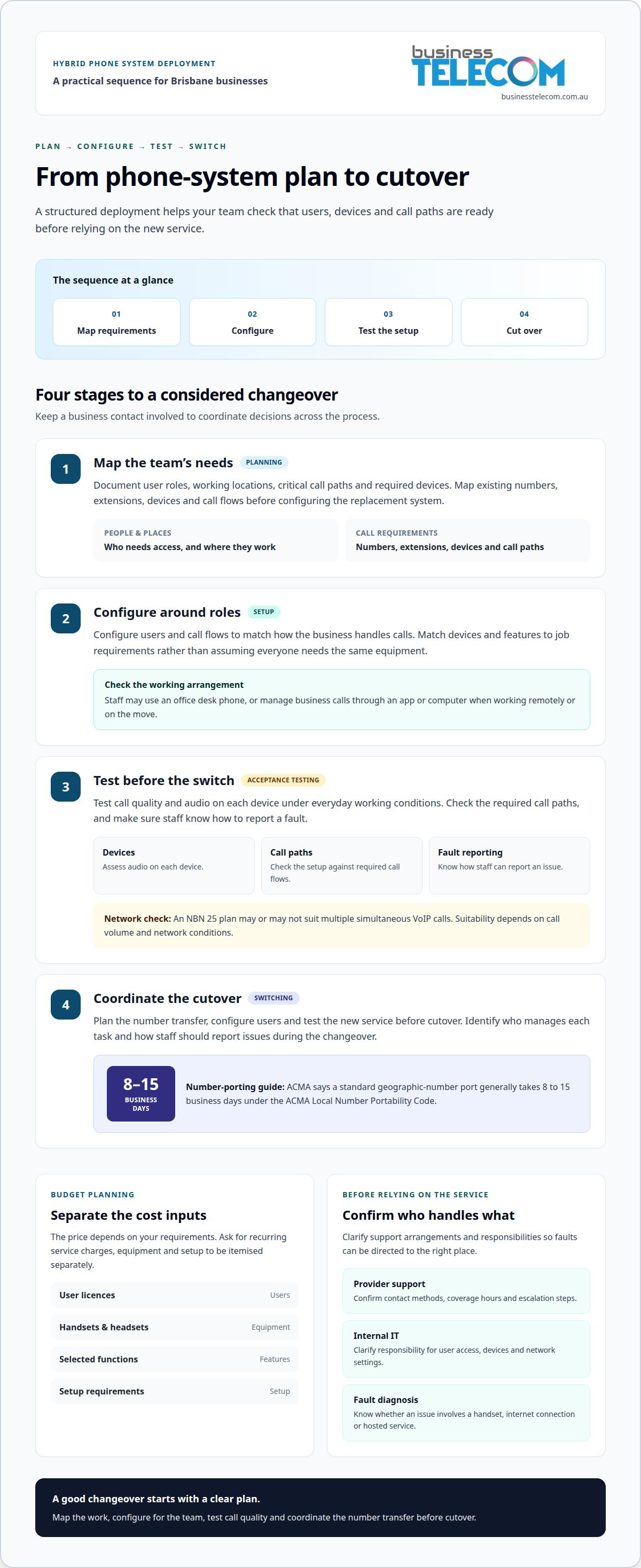
Provider testing and deployment of a hybrid phone system
A Brisbane deployment should move through planning, configuration, acceptance testing and cutover, with a business contact coordinating decisions. Before configuration, document user roles, working locations, critical call paths and required devices. This gives everyone a reference for checking that the setup meets the business’s communications needs.
During configuration, organise users by role rather than applying identical settings across the workforce. A receptionist may need access to shared calls, while a manager may need an individual extension on work devices. As a general planning example, a provider could configure call routing and extension management to agreed requirements. Record exceptions, such as employees covering another team, so temporary responsibilities are included in the design.
Acceptance testing should involve representative staff, not just an administrator. Confirm that each role can complete its regular calling tasks, then log issues, assign responsibility and record resolutions. Testing before cutover can reveal confusing labels or missing access while changes are easier to coordinate. Include remote staff as well as employees at the Brisbane office.
Plan cutover around business operations. Agree on the change window, responsibilities, staff communications and fallback process. The provider coordinates the transition, while the business supplies current user and number information and identifies decision-makers. After launch, review outstanding issues and clarify who will manage future user changes, device replacements and system configuration.
Deployment is complete when representative employees can use the agreed setup and know where to raise issues, not merely when the service is switched on. A documented handover gives the business a practical reference for everyday use and future changes.
Business Telecom: Business Phone System
Business Telecom discusses business phone system options with businesses reviewing how their teams handle calls across office and remote work. These options may suit a Brisbane business replacing older equipment, supporting staff who work away from the office or bringing business calling into one system. The right arrangement depends on how many people need access, which devices they use and how callers should reach the team.
Before discussing a system, outline your call requirements. Identify which employees need desk phones, which need to make business calls from mobiles or computers, and whether callers should reach a shared team or a specific person. Note existing numbers and any landlines you want to retain. These details help shape a practical discussion about available phone system options without assuming every employee needs a physical handset.
Ask Business Telecom which office phone system, business landline and small business phone system options are currently available. A business with staff mainly based at one site may prioritise office calling, while a hybrid team may need calls to work beyond the office. Explain how your team works, which call flows it relies on and what needs to change. This keeps the discussion focused on your operating requirements rather than features you may not use.
For a Brisbane business, the next step is to discuss the number of users, preferred devices, existing phone numbers and the way incoming calls should be handled. Business Telecom can discuss relevant options with you. Contact Business Telecom to talk about your requirements.
Frequently Asked Questions
How can a provider improve a small business office phone setup?
A phone system can be designed around how staff use existing lines, extensions and devices. For example, a professional practice could give reception a shared call flow while assigning individual extensions to practitioners. Ask providers which call-handling features they offer, such as call routing, auto-attendants, conferencing and extension management, and how those features could support your team’s day-to-day calls.
Cloud VoIP or SIP trunking?
Cloud VoIP hosts the phone system online, while SIP trunking connects a compatible on-site PBX to internet-based calling. Cloud VoIP may suit a business that wants calls managed across compatible desk phones, computers and mobiles without maintaining on-site PBX hardware. SIP trunking may suit a business that wants to keep its existing PBX. The choice depends on your equipment, desired call management and how much infrastructure you want to retain.
What is Cloud PABX?
Cloud PABX is a business phone exchange hosted online rather than on equipment maintained at your premises. It can manage functions such as extensions and call handling, with users accessing the system through compatible devices. For example, one employee might use an extension from a computer while another answers through a desk phone. It’s also commonly called hosted PBX or a cloud phone system.
Which Brisbane providers offer cloud-based business phone systems?
When comparing providers for a Brisbane business, ask whether their cloud phone systems support your required call flows, numbers and devices, and what support they provide. Check the platform’s capabilities against your needs rather than assuming all systems offer the same features. These practical details can help you assess whether cloud calling fits your operations.
How much do business phone systems cost in Brisbane, Australia?
The appropriate option depends on your business requirements, including users, devices and calling needs. Ask for plan inclusions and any setup or equipment requirements to be clearly itemised, so you can understand the full arrangement. Costs vary with the system configuration and services included.
What features should a hybrid workforce phone system include?
Prioritise features that help staff handle calls across work locations, such as extensions on suitable devices, voicemail, call forwarding and clear call routing, if these are available on the system you choose. A shared directory can help employees find colleagues without relying on personal contact lists. For a Brisbane team using desk phones and mobiles, consider how callers will reach the right person when someone is working remotely or unavailable.