
More hardware doesn’t automatically mean a more reliable system. In a cloud phone vs traditional pbx comparison, the practical question is where call control sits, who manages the infrastructure and how your business will handle disruptions.
It’s worth weighing internet dependence against the local control of an on-site system, as well as considering ongoing costs, existing numbers and equipment. The right fit depends on how your team works and who will manage the phone system day to day. Cloud calling can support staff using desk phones, computers and mobiles, while a traditional PBX keeps more of the infrastructure at your premises.
This guide explains the differences, trade-offs and continuity considerations for Australian businesses. You’ll learn how each option can suit office, hybrid and remote teams, what to consider when comparing service costs with on-site infrastructure, and which questions to resolve about your connection, phone numbers and equipment before planning a change.
Key Takeaways
- Understand where each system’s core infrastructure sits and who manages it.
- Follow how calls travel through each system to see the role connectivity plays in everyday calling.
- Compare administration, expansion and staff mobility, including the reduced need for on-site PBX hardware with cloud systems.
- Use the cloud phone vs traditional pbx decision checks to match your calling needs, team locations and continuity requirements to a system.
- See how Business Telecom’s cloud phone and VoIP systems support business calling with features such as call routing, auto-attendants and extension management.
Cloud phone vs traditional PBX: what is the difference?
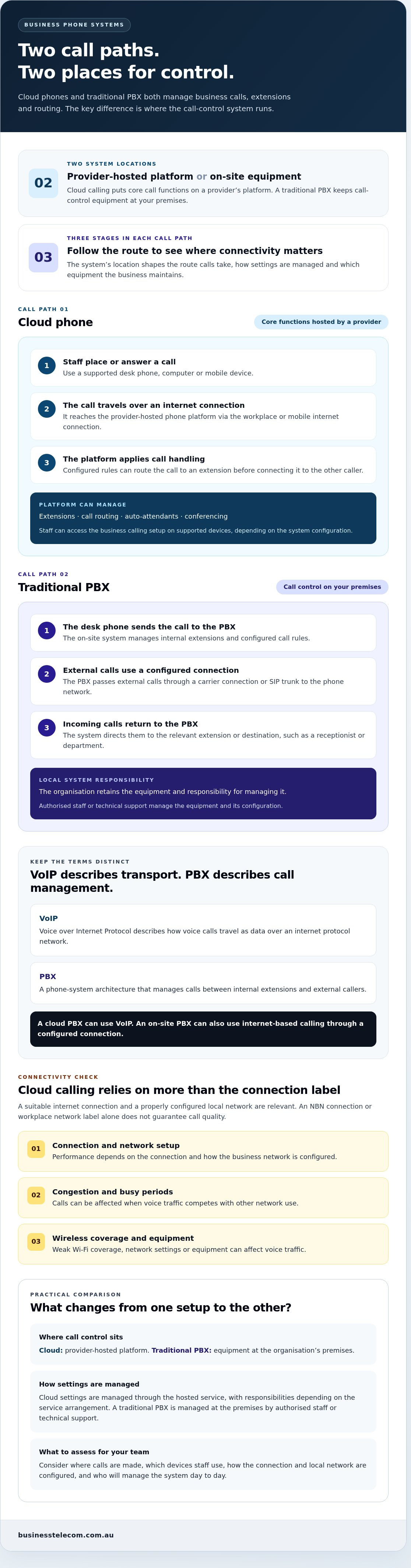
Both cloud phones and traditional private branch exchange (PBX) systems manage business calls, extensions and call routing. The main difference is where the system’s core equipment and functions sit. With a cloud phone, a provider hosts the phone platform and users access it over the internet. With a traditional PBX, the organisation keeps call-control equipment on its premises and manages it there.
It helps to separate two terms that are often used together. VoIP, or Voice over Internet Protocol, describes how voice calls travel as data over an internet protocol network. PBX describes a phone-system architecture that manages calls between internal extensions and external callers. A cloud PBX can use VoIP, and an on-site PBX can also use internet-based calling through a configured connection. The terms describe different parts of the setup.
This distinction is useful when assessing the cloud phone vs traditional pbx choice: one describes where call management is hosted, while the other describes how voice is transmitted. A business telephone system can combine call management, extensions and external connections in different ways, so the location of its infrastructure is a practical starting point for comparison.
What a cloud phone system does
A cloud phone system hosts core call-management functions on a provider’s platform, rather than requiring the business to maintain a traditional PBX cabinet on site. Staff can use supported desk phones, computers or mobile devices to access the business calling setup. The platform can manage features such as extensions, call routing, auto-attendants and conferencing, bringing a team together on its chosen devices.
A cloud phone is more than a basic internet calling app. An app may let one person make calls, but a business phone platform can organise how incoming calls reach a team, direct callers through an auto-attendant and manage staff extensions. For example, an employee could answer a business call on a desk phone at the office or on a supported device elsewhere, depending on the system’s configuration.
What a traditional PBX does
A traditional PBX is call-control equipment installed at the organisation’s premises. It connects internal phones and manages functions such as extensions and call routing. External calls can reach the system through configured carrier services or SIP trunking, which connects the PBX to a voice service over an IP network. The organisation retains the on-site equipment and responsibility for managing it.
In practice, the PBX acts as the business’s local call hub. A caller might dial the main number, then be routed by the system to a receptionist, department or staff extension. The on-site equipment manages that call logic, even if an IP-based connection carries external calls. The setup can therefore use internet protocol without becoming a hosted cloud phone system.
In short: a cloud phone system hosts core call functions with a provider, and users connect over the internet. A traditional PBX runs those functions on equipment at the organisation’s premises. Both can manage business calls, but they locate infrastructure and system management differently.
How cloud phones and traditional PBX handle calls, connectivity and control
Follow a call from the person answering it to the person calling in, and the difference becomes clearer. In a cloud phone vs traditional pbx comparison, the route shows where the system depends on an internet connection, where settings are managed and which equipment the business needs to maintain.
Follow the call and the control path
A cloud call typically travels through these stages:
- A staff member places or answers a call using a supported desk phone, computer or mobile device.
- The call travels over the workplace or mobile internet connection to the provider-hosted phone platform.
- The platform applies configured call handling, such as routing the call to an extension, then connects it to the other caller.
With a traditional PBX, the call flow is centred on the organisation’s premises:
- The user’s desk phone sends the call to the on-site PBX, which manages internal extensions and configured call rules.
- For an external call, the PBX passes it through its configured carrier connection or SIP trunk to the phone network.
- Incoming calls travel back through that external connection to the PBX, which directs them to the relevant extension or destination.
These call paths also shape administration. Cloud settings are managed through the hosted service, with responsibilities depending on the service arrangement. A traditional PBX puts more system control at the premises, where authorised staff or technical support manage the equipment and its configuration. In either setup, changes such as updating call routing must be made in the relevant system.
Internet, NBN and local network considerations
Cloud calling relies on a suitable internet connection and a properly configured local network. In Australia, the NBN connection and workplace network are relevant parts of the setup, but neither label alone guarantees call quality. Performance depends on the connection and how the business network is configured.
Congestion can affect calls when voice traffic competes with other network use. Weak Wi-Fi coverage may cause problems for staff using wireless devices, and network settings or equipment can also affect voice traffic. Assess where calls are made, how devices connect and whether busy periods place extra demands on the connection.
Equipment, maintenance and service responsibility
A traditional PBX requires on-site equipment that the organisation must maintain as part of its phone setup. A cloud system reduces reliance on core on-site PBX hardware, but still needs compatible devices and dependable connectivity at each workplace. Desk phones, computers and mobiles must all connect appropriately for staff to use the service.
Responsibility for platform updates, technical support and resilience depends on the service arrangement. Clarify which tasks sit with the hosted service and which remain with your business, including responsibility for local network equipment and devices. Business Telecom provides Australian businesses with cloud phone systems that support calling across desk phones, computers and mobiles.
Cloud phone vs traditional PBX: compare the trade-offs side by side
The practical choice is less about which architecture is universally better and more about where your business wants infrastructure, administration and continuity responsibilities to sit. Cloud systems can reduce reliance on on-site PBX hardware, while traditional systems keep call control closer to the organisation. Both depend on equipment and connections working as intended.
- Infrastructure: A cloud phone provider hosts core system functions, and your business uses compatible devices to access them. A traditional PBX runs on equipment at your premises, which remains part of your local infrastructure.
- Internet reliance: Cloud calling needs a suitable internet connection between users and the hosted platform. A traditional PBX can manage internal calls locally, but external calls still rely on its configured carrier connection or SIP trunk.
- Administration: Cloud settings are managed through the hosted service, with responsibilities depending on the arrangement. On-site PBX administration centres on local equipment and the people responsible for maintaining and configuring it.
- Expansion: Cloud systems may make it easier to add users or adjust call handling through the service, depending on its features and plan. Expanding a traditional system can involve changes to its equipment or configuration.
- Staff mobility: Cloud calling can support access through desk phones, computers and mobiles, which can suit hybrid teams. Traditional PBX calling is often centred on the workplace, although remote options depend on its configuration.
Flexibility, extensions and distributed teams
Extension changes and feature administration vary by system design. Cloud changes are made through the hosted service; on a traditional PBX, they’re configured on or through the on-site system. Map everyday tasks, such as redirecting calls or adding a staff extension, and compare how each system would handle them.
Continuity and potential points of failure
Cloud calling can be affected by the internet connection, local network, power, user devices or hosted service. A desk phone without power, for example, may not be available even if other parts of the phone setup are working. Plan how staff will handle calls if one of these components is disrupted.
A traditional PBX has different dependencies, including the on-site system, local power and the external connection used for calls. Keeping equipment on the premises provides local control, but local equipment and maintenance remain important to continuity.
Neither cloud hosting nor an on-site PBX removes the need for continuity planning; each places potential disruptions in different parts of the system. Map those dependencies against your team’s locations, call-handling needs and capacity to manage the infrastructure. That is the operational question at the centre of the cloud phone vs traditional pbx decision.
Which phone system fits your business? Use these decision checks
The right system fits how your team handles calls and where you want responsibility for the infrastructure to sit. Use these checks to make the cloud phone vs traditional pbx comparison practical, rather than choosing on the basis of a single feature.
- Map your calling needs. Note how incoming calls are answered, how staff transfer calls and use extensions, and which features your team relies on. Include everyday call handling and busy periods so you can assess systems against real workflows.
- Locate your staff. Record who works in the office, across multiple sites or remotely. Consider which devices staff need for business calls and whether a consistent calling experience across locations matters.
- Review your current infrastructure. Identify the PBX equipment, phones and connections already in use, along with who manages system settings and maintenance. Existing infrastructure may affect the practical value of moving call control elsewhere.
- Set continuity requirements. Consider what staff need to do if the internet, local power, a device or a phone-system component becomes unavailable. Compare each architecture’s dependencies with your operational response plan.
Cloud phone may suit businesses prioritising flexibility
Cloud hosting may suit teams with office-based, hybrid or remote staff who need business calling through supported desk phones, computers or mobiles. It can also suit organisations seeking to manage extensions and call handling without maintaining traditional PBX equipment on site. This can be useful for businesses whose staff move between locations or whose team structure changes.
Flexibility still depends on the foundations. Assess the internet connection and local network at each workplace, the devices staff will use and the features covered by the service arrangement. Cloud hosting changes where core system functions sit; it doesn’t remove the need to plan how staff will make and receive calls if a connection or device is unavailable.
Traditional PBX may suit businesses prioritising on-site control
An existing on-site PBX may remain suitable when established equipment and processes support the way the organisation operates, and local control is important. Keeping the system on the premises can align with in-house management practices, but the business retains responsibility for the equipment and its maintenance. Include local power and external calling connections in continuity planning.
Don’t assume an on-site setup is automatically more reliable or less costly. Weigh the value of existing infrastructure against the effort and responsibility involved in maintaining it, then compare that with the connectivity and service dependencies of cloud hosting. If you decide to move, use the separate guide to switching to a cloud phone system for implementation detail.
Business Telecom’s cloud phone systems support flexible business calling across supported devices.
How Business Telecom can support a move to cloud calling
Once you’ve weighed the cloud phone vs traditional PBX trade-offs, connect your preferred approach with the way your business handles calls. Business Telecom provides business VoIP and cloud phone systems for Australian businesses, supporting calling across desk phones, computers and mobile devices. The goal is a setup that fits your users, locations and call flows, not simply a change in where the phone system is hosted.
What a business cloud phone setup can include
A configured cloud phone system can organise incoming calls so callers reach the right person or team. Call routing directs calls according to your requirements, while an auto-attendant can present options for callers to reach the appropriate destination. Extensions help staff contact one another through the business phone system, and conferencing supports team discussions when participants aren’t in the same room.
Staff can use supported desk phones, computers or mobiles, bringing office-based and distributed workers into a shared calling arrangement. The right combination of devices and features depends on your operational requirements. For example, one business may prioritise routing calls to the right team, while another may focus on extension management across its staff. The setup can be tailored to those needs.
Plan your next steps with an Australian phone-system specialist
Start by documenting how your current phone system is used. This gives you a clearer basis for discussing system fit and the ongoing responsibilities that matter to your organisation. Record:
- Who needs a business phone extension and where each person works.
- The devices staff use or need for business calls, including desk phones, computers and mobiles.
- How incoming calls should flow, from the main number through routing to the right person or team.
- Which calling features support everyday work, such as conferencing and auto-attendants.
- What your team needs to consider for continuity if connectivity, local power or a device is disrupted.
Include existing numbers and equipment in your notes, along with the person or team currently responsible for phone-system administration. This brings practical details into the conversation, including what to retain and where cloud calling could reduce reliance on on-site PBX hardware. Business Telecom’s Australian-based technical support is also relevant when assessing the ongoing assistance that comes with a business phone system.
A clear picture of your users, locations, call flows and priorities is enough to start assessing a suitable setup. Discuss a cloud phone system for your business.
Set your next phone-system priorities
Before making a change, turn your decision into a practical brief. Identify what your phone system must support now, which parts of your current setup need to remain and what may need to change as your team’s work patterns evolve. This gives you a clearer way to assess cloud phone vs traditional pbx options against real business needs, rather than getting caught up in features that won’t improve day-to-day calling.
Include the call flows your customers and staff rely on, the devices people use and the continuity arrangements your business needs. Then consider not only which system fits, but also how much control and ongoing responsibility you want to keep in-house. A considered decision can help your phone system support the way your organisation works as it grows or changes.
Business Telecom provides cloud phone and VoIP solutions for small and medium-sized businesses, with Australian-based technical support. Plan your business phone system around your team’s requirements, and take the next step with a clear brief.
Frequently Asked Questions
Is a cloud phone system the same as a traditional PBX?
No. A cloud phone system may use PBX functions, but the key difference is where those functions are hosted. With a cloud setup, the core platform is hosted by a provider; a traditional PBX runs on equipment at the business premises. This distinction matters when planning responsibility for system administration, maintenance and changes, even if both systems offer familiar features such as business extensions.
Does a cloud phone system need the internet to make calls?
Yes, cloud calling needs an internet connection between the user’s device and the hosted phone platform. A desk phone may connect through the workplace’s local network before calls reach the internet, while a computer or mobile may use another suitable connection. For a business in Sydney, Brisbane or the Gold Coast, assess the connection at each workplace and how staff will call when working away from the office.
Can a traditional PBX use VoIP?
Yes. A traditional PBX can use VoIP if it is configured to carry voice over an IP network, such as through SIP trunking. That doesn’t make it a cloud phone system: the PBX can still be installed and managed on the organisation’s premises. This distinction helps you understand whether an existing system uses internet-based voice without assuming its core call-control equipment is hosted.
What happens to cloud phone calls if the internet goes down?
Calls using a device and connection affected by an internet outage may not reach the cloud platform, so users could be unable to make or receive calls through that route. What happens to incoming calls depends on the service configuration and available alternatives. A continuity plan might account for another connection or call redirection if supported. Identify who can make changes and how staff will communicate during an outage.
Is cloud phone better than traditional PBX for a small business?
Not automatically. A small business with staff working across locations may value cloud access, while a business with established on-site equipment and the capacity to manage it may prefer local control. Consider who administers the system, what devices staff need and whether the internet connection suits business calling. For an SME in Australia, the best fit is the arrangement that matches its daily call flows and available technical resources.
Can I keep using desk phones with a cloud phone system?
Often, yes, provided the desk phones are compatible with the cloud service and configured for it. Before planning a change, record each phone’s make and model, how it connects to the network and which users rely on it. This helps identify whether existing handsets can be included or whether a different device approach is needed. Don’t assume every desk phone will work with every hosted platform.
Is a cloud phone system the same as an internet calling app?
No. An internet calling app may focus on individual calls, while a cloud phone system is designed to manage business calling across users and extensions. It can organise how calls to a business number are handled and give administrators tools to manage users and call flows. For example, a receptionist may need to direct a caller to a team member, rather than simply place a call from an app.