
A low-risk cloud phone migration is planned around call continuity, not just cutover day. If you’re asking “how to switch to cloud phone system” without disrupting customer calls, prepare number porting, call handling and staff before moving the service.
It’s reasonable to be cautious. A porting delay, an incompatible handset or an untested call route can create avoidable pressure for your team and customers. Keep your existing service active until the number port is complete, and map how calls should reach people during the transition.
This guide takes you through the migration stages, from checking your current numbers, hardware and internet readiness to configuring and testing the new system. You’ll see who should be involved, how to plan call routing and extensions, and how to help staff use business calling on desktop phones, computers or mobile devices. Whether your team is in Sydney, Brisbane, the Gold Coast or working remotely, a clear sequence and practical checks can help keep customer calls moving.
Key Takeaways
- Get a practical answer to “how to switch to cloud phone system” by planning the migration around continuity, not just the activation date.
- Build a clear inventory of business numbers, extensions, opening hours and call flows before configuring the new system.
- Coordinate number transfer and activation as part of a controlled cutover, keeping customer calls moving through the change.
- Test key call functions and representative devices, then prepare staff to use the new setup confidently.
- See how a tailored Australian cloud phone setup can support office-based and remote teams with call routing and extensions.
Switch to Cloud Phones Without Losing Call Continuity
Moving to a cloud phone system means migrating an existing business service, not simply creating new accounts and asking staff to sign in. Your business numbers, extensions, call routes and customer-facing contact details need to work together before the new system takes over. The goal is to keep customers reaching the right person throughout the change.
Cloud calling carries calls through an internet-connected service hosted off-site, rather than relying solely on an on-site private branch exchange (PBX). Staff can use supported desktop phones, computers or mobile devices to handle business calls. The phone-system migration is separate from changing your internet service: assess the connection you already have, but don’t assume both services must be replaced together.
Continuity depends on more than transferring numbers. A number could be assigned to the wrong destination, a queue might not reflect current staffing, or employees may not know how to answer from a new device. Customers can also be confused if websites, email signatures or other contact details show inconsistent numbers.
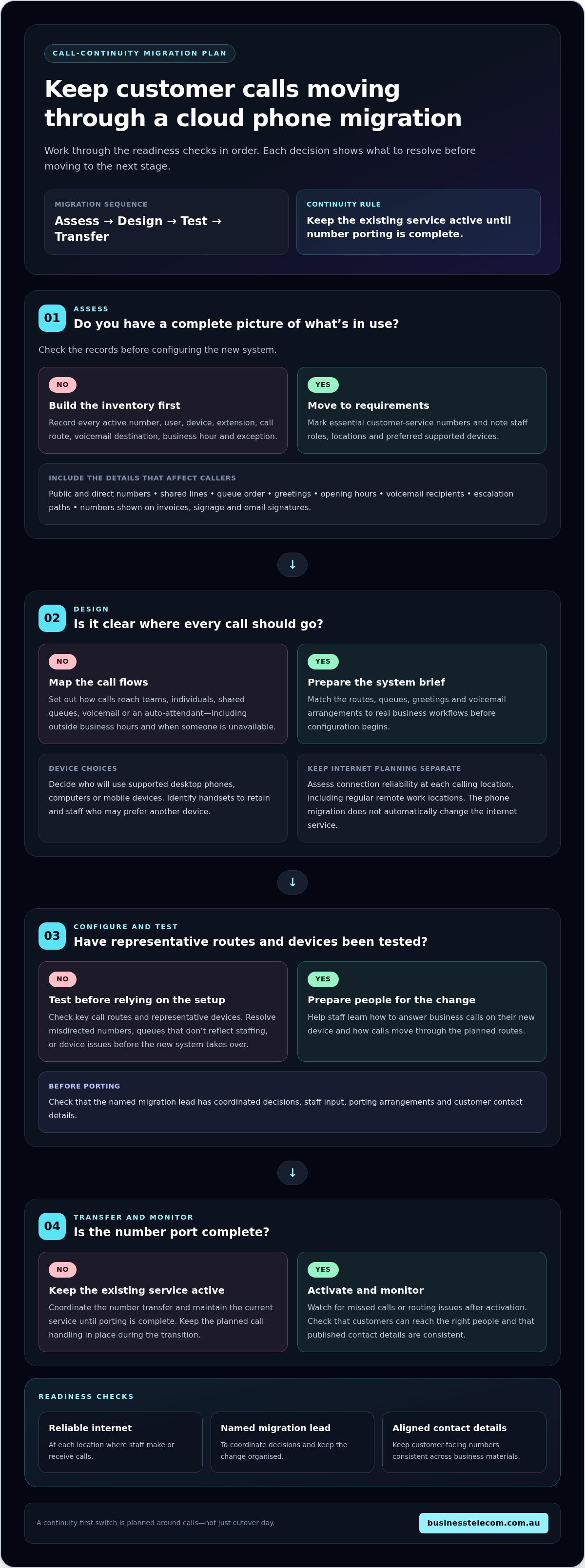
A continuity-first migration follows four stages: assess what’s in use, design how calls should flow, configure and test the cloud setup, then coordinate the number transfer and monitor service after activation. Each stage reduces a different risk before the next one begins.
- Assess: Record numbers, users, devices, extensions and existing call handling so nothing essential is overlooked.
- Design: Set out how calls should reach teams, individuals, voicemail or an auto-attendant, including outside business hours.
- Configure and test: Prepare the system and check representative call routes and devices before relying on them.
- Transfer and monitor: Coordinate number porting, activate the service and watch for missed calls or routing issues.
What changes when a business phone system moves to the cloud?
With an on-site PBX, call control depends on equipment installed at the business. A hosted service moves that call management off-site, while staff connect through supported devices. This can suit teams working in an office or across locations, but it doesn’t remove the need to plan extensions, permissions and call routing. Decide which handsets remain useful and which staff may prefer a computer or mobile device.
Keep internet planning separate from phone-system planning. Check that the business connection is reliable for calling, including at any regular remote work locations. A cloud phone migration doesn’t automatically change the internet service itself.
Which signs show your business is ready to plan a switch?
Ageing phone equipment, staff working across multiple locations or frequent team changes can signal that the current setup needs review. Check whether your extensions still match responsibilities and whether calls should now reach a shared queue, another location or an auto-attendant. These decisions help define what the new system needs to do before configuration starts.
Two practical prerequisites are reliable internet access at calling locations and a named migration lead. That person can bring together staff who understand current call handling, manage decisions and keep customer contact details aligned during the change.
Plan a cloud phone system migration around numbers, users and call flows
A reliable migration starts with a record of how calls work today and what the business needs them to do next. Work through the preparation in order: inventory numbers and users, define requirements, assess connectivity, design call flows, then assign migration ownership. This gives system configuration and number transfer a clear operational brief.
A complete pre-migration inventory records every active number, user, device, call route, voicemail destination, business hour and exception that could affect how a customer or colleague reaches the right person.
- Inventory: Capture public numbers, direct lines, shared lines, extensions and existing call handling.
- Set requirements: Identify which staff need desk phones, computer calling or mobile access, and note any changes to team size or location.
- Assess connectivity: Review the internet connection at each calling location alongside expected call volume and network use.
- Design: Map the new routes, queues, greetings and voicemail arrangements against real business workflows.
- Assign ownership: Name a migration lead to coordinate decisions, staff input, porting arrangements and communications.
Build an inventory of numbers, users and current call handling
Include every number customers or suppliers use, not only the main published line. Record direct numbers, shared lines, extensions and any numbers printed on invoices, signage or staff email signatures. For each one, note who answers and where calls should go if that person is unavailable.
Write down opening hours, greetings, queue order, voicemail recipients and escalation paths. Include less obvious workflows, such as a supplier calling a direct line or staff transferring urgent calls to another team. These details help preserve familiar service rather than simply reproducing the old equipment setup.
- Mark numbers and call paths that are essential to customer service or daily operations.
- Record each staff member’s role, location and preferred supported device.
- Flag shared handsets, remote users and teams with changing schedules.
Check Australian connectivity and plan number porting
Assess the internet connection where calls will be made, including offices and regular work locations in Sydney, Brisbane and the Gold Coast. Consider expected concurrent calls and normal network activity. Choose a migration window that suits the business’s call patterns, and include time to coordinate the transfer and activation sequence.
For number porting, prepare a recent bill, the account name as held by the current provider, relevant business identifiers and a complete number list. Keep the existing phone service active until porting is complete; cancelling it early can put number continuity at risk. For a closer look at retaining your number, see this guide to Business Telecom’s cloud phone systems as part of planning the move.
These steps make how to switch to cloud phone system a practical planning exercise: document what callers rely on, agree how the new setup will handle it, and keep a named person accountable for the details.
Cut Over to Cloud Calling and Keep Business Calls Moving
A controlled cutover gives the team time to confirm the new system is ready before customer calls depend on it. Treat activation as a sequence, not a single switch: configure the system, test its call flows, coordinate number transfer and activation, then monitor calls and resolve issues. Agree who can make decisions at each stage so a problem doesn’t leave staff waiting for instructions.
No migration plan can promise zero interruption. Number transfers and activation can involve dependencies outside your team’s direct control. Preparation reduces avoidable disruption by ensuring staff know what to do, key call routes are checked and an interim method is ready if the change takes longer than planned.
- Configure: Set up users, numbers, greetings, extensions and routing in line with the agreed call plan.
- Test: Check representative inbound and outbound calls, transfers, voicemail and any queues before live traffic moves.
- Coordinate: Align number transfer and activation timing, including any dependencies that could affect the change.
- Activate: Move to the cloud service only when the agreed go-live steps are ready.
- Monitor: Watch call handling after activation and give staff a clear way to report faults or missed routes.
Choose and communicate a cutover window
Choose a period that limits the impact on customers while keeping the migration lead and key decision-makers available. Avoid a time when the business relies on its busiest call queue or a staff member who can’t help resolve issues. The window also needs to align with number-porting arrangements and technical dependencies, rather than being selected in isolation.
Before the change, tell staff what is happening, when calls may move and who is coordinating the work. Give them a support contact and a simple temporary call procedure, such as which approved device or alternate contact method to use if their usual setup isn’t ready. Keep the message direct and consistent across teams.
Keep customer calls covered during the transition
Agree in advance how urgent incoming calls will be handled if number transfer or activation takes longer than planned. Depending on the existing service and agreed arrangements, this could mean keeping the old service available, using a pre-arranged alternate number or assigning a staff member to monitor a designated contact channel. Make the responsibility clear: a fallback only helps if someone is watching it.
Before live traffic moves, verify the business number, greeting and main routing destinations. Check that customer-facing contact details reflect the intended arrangement, and keep the existing service active until the transfer is complete. A guide to retaining a landline number when moving to VoIP can help clarify the number-continuity steps. For businesses learning how to switch to cloud phone system, a tested fallback and clear staff instructions matter as much as activation.
Test the cloud phone system and prepare staff before go-live
Testing turns a configured phone system into a setup staff can rely on. Before go-live, check both call features and the devices people will use, including a representative office handset, computer and mobile device where relevant. Test from the locations where staff actually work, since a successful sign-in at one desk doesn’t confirm that calls will work elsewhere.
Test real call flows, not just logins, because customers experience where a call goes, who answers and what happens if nobody is available.
Run call-flow tests before the new system becomes the main service
Place test calls to each main business number and confirm they reach the intended person, team or queue. Ask staff to test outbound calls, transfers between colleagues, greetings, voicemail and after-hours routing. If a queue has overflow handling, check that calls follow the agreed next step rather than ending unexpectedly.
- Call each public number and confirm the greeting and destination.
- Test a transfer, voicemail message and return call.
- Check after-hours handling and any overflow route.
Record each issue, who owns resolving it and the retest result. A fault is not closed simply because someone has adjusted a setting; repeat the affected call flow and confirm it now behaves as intended. Use the results to decide whether the system is ready to handle live traffic.
Help staff adopt new calling tools with minimal friction
Keep instructions short and relevant to each role. Desk-phone users need clear steps for answering, placing and transferring calls; computer and mobile users need to know how to sign in, select the business calling option and check voicemail. Include the support contact and a simple fallback for anyone who can’t access their usual device.
Before launch, nominate a staff contact to collect issues during the first days and pass them to the migration lead. This gives employees one clear place to raise problems and helps the business spot patterns, such as a transfer step several people find confusing.
Go-live readiness checklist:
- Main numbers, inbound routes and outbound calling have been tested.
- Transfers, voicemail, greetings and after-hours routing behave as planned.
- Representative devices and work locations have been checked.
- Staff have role-specific instructions and know where to report an issue.
- Outstanding faults have an owner and a successful retest before launch.
A structured test and staff handover make how to switch to cloud phone system easier to manage, because the team can identify gaps before customers depend on the new setup. For a cloud phone system tailored to your business calling requirements, discuss a cloud phone system for your business.
Complete the switch with a supported Australian cloud phone setup
A well-managed migration connects preparation, configuration and staff readiness into one practical transition. Your inventory explains what the business relies on, the call design translates those needs into the cloud system, and testing helps confirm the setup is ready for staff and customers. After activation, support can help address questions as people settle into new calling tools.
Business Telecom tailors business VoIP and cloud phone setups to the calling requirements of small and medium-sized businesses. The design can reflect how your teams work, whether they’re office-based, remote or split across locations, and the devices they use to answer business calls. This suits businesses across Sydney, Brisbane and the Gold Coast looking to manage calls across office and remote teams.
What an implementation partner contributes to the transition
Translating existing call flows into a cloud configuration takes more than copying a list of extensions. A planned setup can connect each workflow to suitable features: call routing can direct callers to the right team, an auto-attendant can guide them through options, conferencing can support group conversations, and extensions can help people reach colleagues. The right combination depends on the requirements documented for your business.
Migration coordination brings users, numbers and operational needs into the same plan, keeping configuration and activation decisions aligned. Business Telecom provides Australian-based customer support as your team adapts to the cloud phone setup.
Choose the next step for your business migration
Before discussing a tailored setup, gather the information that will make the conversation useful: your active business numbers, a current user and device list, and a clear record of how calls are handled. Include the workflows that matter most, such as how customers reach a team, how calls are transferred and what should happen when someone is unavailable. This gives planning a practical starting point without requiring you to settle every technical decision first.
If you’re still assessing options, consider the broader requirements covered in an Australian SME business phone systems guide. Businesses comparing fixed-voice services can also review a business landline options guide. These topics help frame what the current service does well and what a new setup needs to support.
For Australian businesses working out how to switch to cloud phone system, the next step is to turn that inventory into a migration plan shaped around real call handling, staff needs and number continuity. Plan your business cloud phone system with Business Telecom.
Set your business up for its next stage of growth
Your phone system should support the way your business works now and leave room for teams, locations and customer expectations to change. Treat migration planning as an opportunity to shape a calling setup around those needs, rather than carrying every old process forward by default. A clear view of how to switch to cloud phone system can help you make the move with purpose and give staff a setup that fits their day-to-day work.
Business Telecom’s cloud calling supports desktop phones, computers and mobile devices, with call-management options such as routing, auto-attendants, conferencing and extensions. The right mix depends on your business workflows, and Australian-based customer support is available for business voice services.
Start with the changes you want the new system to make possible, whether that’s easier collaboration across locations or a more straightforward way for customers to reach the right team. Then take the next step with a setup shaped to your requirements.
Plan your business cloud phone system with Business Telecom. A considered start can help your team move forward with confidence.
Frequently Asked Questions
How long does it take to switch a business to a cloud phone system?
There’s no single timeframe, as setup, testing and number-porting complexity all affect the schedule. In Australia, straightforward single-number ports, known as Category A, are regulated to complete within 8 to 15 business days in 98% of cases. More complex Category C ports can take 15 to 30 business days. Allow time for planning and testing as well, and keep your current service active until the transfer is complete.
Can a business keep its existing phone number when switching to a cloud phone system?
Yes, Australian businesses can generally retain eligible existing numbers through a process called Local Number Portability. Before the transfer, make sure each number is associated with the correct business account and that the account details supplied for porting match the current provider’s records. This helps avoid delays caused by mismatched information. Keep the existing service active until the port is complete to protect continuity.
Do I need NBN internet for a cloud phone system in Australia?
No, a cloud phone system doesn’t specifically require NBN, but it does need a reliable internet connection. Assess the connection at each calling location, including offices in Sydney, Brisbane or the Gold Coast, and consider how many staff may make calls at once. Other internet use can affect call quality, so test calling during a normally busy period rather than relying only on a quiet-time check.
What happens to business calls if the internet goes down?
Calls using the affected internet connection may be interrupted or unavailable until connectivity returns. The impact depends on how staff and call routes are set up. A practical contingency could include using a supported mobile device over mobile data, if configured and coverage is available, or directing urgent callers to an alternate contact method. Decide who activates the fallback and how customers will be told about it.
Can staff use mobile phones with a cloud phone system?
Yes, staff can handle business calls on supported mobile devices as well as desktop phones or computers. The specific experience depends on the system configuration and the device’s internet connection. Before relying on mobile calling, have staff test making and receiving business calls away from the office, check how they identify business calls, and make sure they know what to do if they can’t sign in.
Should I cancel my current phone service before the cloud system is active?
No. Keep your current service running until the number transfer is complete and the cloud setup is active. Cancelling too early can disrupt calls and may put the number port at risk. Confirm the transfer has finished, then check that customers can reach the business on the retained number before arranging to close the old service. This avoids creating a gap between services.
What should a business test before switching its phone system over?
Test more than whether users can sign in. Call from an external mobile to check that callers hear clearly, the business number displays as intended on outbound calls, and audio works in both directions. If staff will handle several calls at once, test that scenario too. Include an office and a remote location, then record any faults, assign someone to resolve them and repeat the affected test before relying on the setup.