
The best voip phone system isn’t the one with the longest feature list. It’s the one that handles customer calls reliably, whether your team answers at a desk, on a computer or through mobile devices.
To compare systems, start with the calls your staff handle and what should happen when someone is unavailable or the internet connection is disrupted. Then match desk phones, computer calling and mobile access to where each person works. This makes it easier to choose a setup that can adapt as staff numbers, responsibilities or call volumes change.
This guide shows you how to assess a system against real call workflows. You’ll learn how routing, auto-attendants, conferencing and extensions support daily operations, what to consider about internet readiness and continuity, and how different devices suit different working styles. You’ll also find practical planning steps for businesses in Sydney, Brisbane and the Gold Coast, so you can make a considered choice for your team.
Key Takeaways
- A voip phone system carries business calls over an internet connection and manages call handling centrally.
- Map the route from your main number to a greeting, routing rule and suitable staff endpoint.
- Choose calling options to suit your team, from desk phones in one office to computer or mobile access for remote staff.
- Before setup, document key numbers, call destinations, users and busy periods, then test typical call journeys.
- Business Telecom designs and installs business phone systems for Australian SMEs, with capabilities matched to their call workflows.
What a VoIP Phone System Changes About Business Calling
A VoIP phone system carries business calls over an internet connection. The change is not only how a call travels. Instead of each desk line working largely on its own, a central setup can manage numbers, call handling and staff endpoints. This gives your team a consistent way to direct incoming calls.
Voice over Internet Protocol (VoIP) is the technology used to transmit voice over internet networks. In a business, VoIP is the call delivery method; the phone system is the call-handling layer that determines where calls go and how staff answer. Understanding the difference helps you focus on the capabilities your team needs, not just the technology behind them.
For example, a customer calls your main business number, hears a greeting or menu, then selects an option that routes the call to the right team member. That person might answer on an office desk phone, a computer or a mobile device. If another colleague needs to take over, an extension can connect the caller without requiring them to dial the main number again.
Central call handling can make shared responsibilities easier to manage. Calls can be directed to the right people rather than relying on customers to know individual numbers or staff to pass every call between separate lines. The aim is a clear route for customers and a practical way for staff to answer from their usual work location.
How a VoIP phone system fits into a business
Think of the system as the connection between callers, business numbers and staff. Call routing sets the path, extensions provide a way to reach people or teams, and endpoints are the devices staff use to speak. A centrally managed setup can support office-based and remote staff through desk phones, computers and mobile devices. Consumer calling apps, by contrast, generally focus on individual communication rather than organised business call handling.
This distinction matters when a call belongs to the business, not just to one employee. A shared number and planned call path can direct enquiries according to their purpose, while staff use a device that suits their role. A receptionist may answer on a desk phone, for instance, while a colleague working away from the office answers through a computer or mobile device.
Which businesses may benefit from a VoIP system?
A small team may need a simple way to share calls to one business number. A growing office might need calls directed to separate teams, while a business with staff in different locations may value access across devices. The right setup depends on call volume, who is responsible for answering and how quickly customers need to reach the right person.
Business size alone does not determine the best fit. Consider how customers contact you, where calls should go and who needs to answer them. A compact business with frequent shared enquiries may need more deliberate call handling than a larger team whose calls go directly to individual staff. Let the workflow guide your choices instead of selecting features simply because they are available.
How a VoIP Phone System Routes Calls Across Your Team
Good call handling gives customers a clear path and staff a practical way to manage enquiries. A typical call moves from the business number to a greeting or menu, through a routing rule, and then to a staff endpoint. The best route depends on how your team shares responsibility for incoming calls.
Call routing is the process a business phone system uses to direct an incoming call to the appropriate person, team or endpoint.
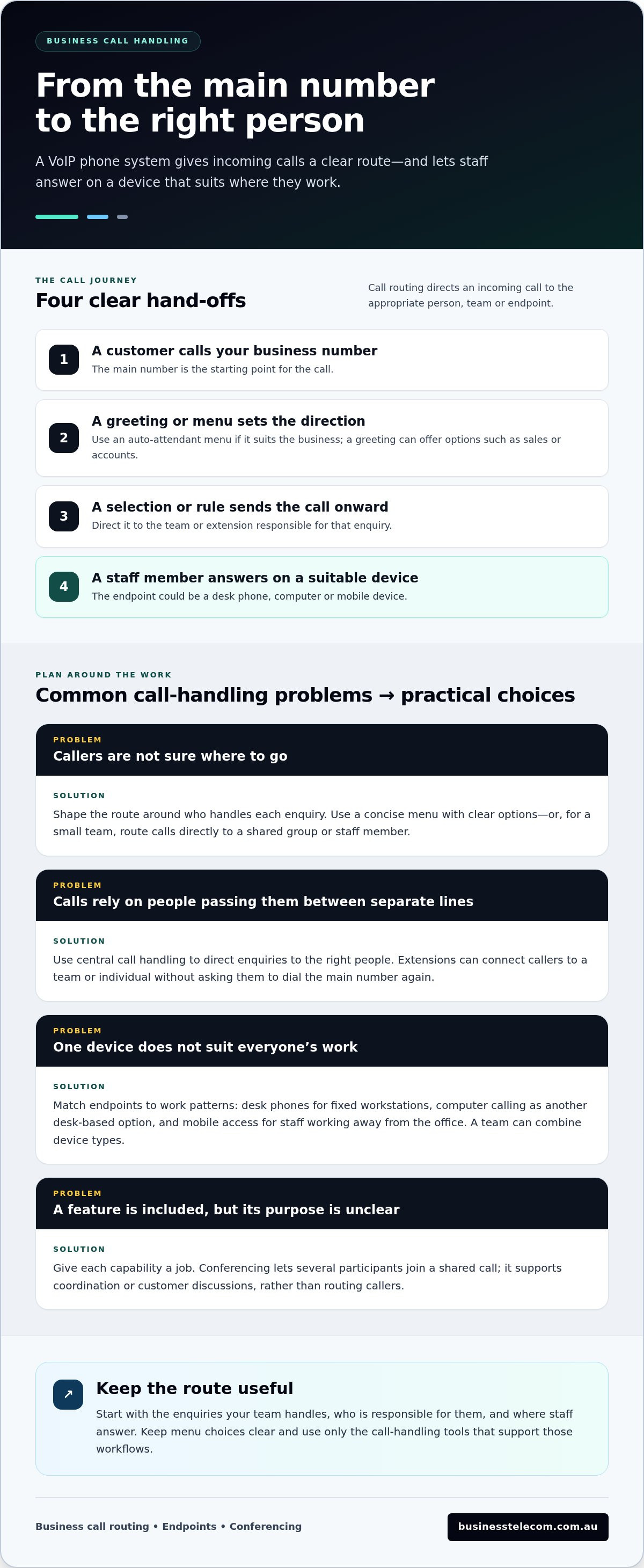
- A customer dials the business number.
- A greeting or auto-attendant offers a menu, if one suits the business.
- The caller’s selection or the call-handling rule directs the call to a team or extension.
- A staff member answers on a desk phone, computer or mobile device.
From an incoming call to the right person
An auto-attendant plays a recorded greeting and lets callers choose an option, such as sales or accounts. Extensions are short internal numbers that can direct callers to a team or individual. For example, a small plumbing business might route new-job enquiries to the person handling bookings and account questions to an administration colleague. Design the options around who handles each enquiry, rather than adding a menu without a clear purpose.
Not every business needs an automated menu. A small team may prefer a direct route to a shared group or staff member, while a business with distinct departments may benefit from giving callers a few clear options. Keep menus concise and use words customers recognise. If callers regularly need to speak with more than one person, extensions can make those transfers easier to manage.
Choosing desk phones, computers or mobiles
Choose endpoints based on where people work and how they handle calls. Desk phones suit fixed workstations where staff answer throughout the day. Computer calling gives desk-based staff another option without tying calls to one handset. Mobile access can help staff who work away from the office stay connected to business calling. A team can combine devices rather than requiring everyone to use the same type.
Conferencing serves a different purpose from routing. It lets several participants join a shared call, which can help with internal coordination or a customer discussion involving colleagues in different locations. Treat it as a tool for a specific workflow, not a must-have simply because it appears on a feature list.
Call paths also depend on endpoints and the network being managed sensibly. For background on VoIP security considerations, businesses can review Security Considerations for Voice Over IP Systems by NIST. Practical safeguards depend on the wider setup, so include security in planning alongside call flow and device choices.
Before settling on a configuration, sketch one or two common caller journeys and note who should answer at each step. Business Telecom designs and installs business VoIP systems for Australian SMEs. Explore business VoIP systems while planning how your team will manage calls.
Compare VoIP Options by the Work They Need to Do
Compare systems against the calls your team handles, not the length of a feature list. A single office with shared reception may need a simple call path and desk phones. Remote staff or several teams sharing enquiries may need flexible endpoints and clearer routing. Use the table to separate core requirements from capabilities that matter only for particular workflows.
| Capability | One office | Remote or distributed staff | Several teams sharing calls |
|---|---|---|---|
| Call routing | Direct calls to a receptionist or shared answering point. | Route calls to the people responsible, regardless of their work location. | Use clear rules to direct enquiries to the relevant team. |
| Endpoints | Desk phones may suit fixed workstations. | Include computer or mobile calling for staff away from the office. | Mix endpoints to suit different roles and work patterns. |
| Conferencing | Useful if staff regularly need to join the same call. | Can help colleagues in different locations speak together. | Consider it where a customer discussion involves several teams. |
| Extensions | Keep internal transfers straightforward. | Help callers reach named staff or teams through the business system. | Organise access to the right team or individual. |
Use these comparisons as planning prompts, not as a reason to make the setup more complex than necessary. Mark a capability as essential if calls depend on it today. Treat it as optional if it supports only an occasional or future need. This helps keep the system practical and avoids choosing functions staff are unlikely to use.
Match call features to customer and staff needs
Prioritise routing and extensions if callers often need specific teams or staff. An auto-attendant can organise the first point of contact when the business receives different types of enquiries and callers benefit from a short menu. Conferencing deserves priority when colleagues regularly discuss customer matters together. Otherwise, it may be a secondary requirement.
Consider the caller’s experience as well as internal convenience. Make menu options reflect real enquiry types, and clarify who is responsible for shared calls. A small team with one main contact point may need fewer rules than a business where sales, service and administration handle separate calls.
Assess flexibility as the business changes
Consider likely changes in staffing, work locations and call responsibilities. A voip phone system should accommodate the endpoints your team uses, whether desk phones, computers, mobile devices or a combination. Flexibility is valuable when it supports a realistic working pattern, not as an abstract promise of unlimited growth.
For a broader framework on assessing provider fit, use this Australian VoIP provider buying guide alongside your workflow comparison. Start with the calls customers make, identify who should handle them, then select capabilities that make each caller journey clear and manageable.
Prepare Your Australian Business for a VoIP Phone System
A dependable setup starts with a clear picture of how your business handles calls today. Before choosing equipment or setting dates, document the numbers customers dial, where those calls need to go and when demand is busiest. This gives your team a practical basis for system design, testing and staff familiarisation.
- Map call flows. Record what happens when someone calls each main number, including greetings, menu choices, transfers and the teams or staff who should answer.
- Identify users and responsibilities. List the teams and staff who make or receive business calls, the extensions they need and their usual work locations.
- Plan endpoints. Note which roles need desk phones, computer calling or mobile access, and where each device will be used.
- Test real scenarios. Check call paths, devices and the network under conditions that reflect normal work, including busier periods.
Document requirements before implementation
Record the everyday problems the new system should address. These might include calls reaching the wrong person, unclear responsibility for a shared number or staff needing to answer from different locations. Note busy periods and regular changes in who handles enquiries, too. This makes it easier to separate essential call-handling requirements from features that add little value.
Include connectivity in the plan. VoIP call quality depends on the internet connection and local network, so consider how your business’s NBN connection and other network activity may affect calls at busy times. For high-demand environments such as medical practices, guidance from MEDITIL outlines how strategic network management prevents voice degradation under heavy usage. Test the parts of the office where calls will be made instead of assuming performance is identical throughout the premises. Also decide what staff should do if power or internet access is disrupted. A contingency plan can set out alternative ways to manage urgent customer contact, but it cannot guarantee uninterrupted service.
Test the system against everyday scenarios
Test an incoming call from the main number through its greeting or menu, routing rules, extensions and intended staff endpoints. Try transfers and conferencing if they are part of the team’s routine. Check calls from the office and from locations where remote staff usually work, then repeat tests during a representative busy period. Record unclear prompts, missed destinations or call-quality issues, and adjust the setup before relying on it day to day.
Include staff familiarisation in the rollout. Show each person the tasks relevant to their role, such as answering, transferring or joining a conference call. Plan implementation around customer-facing responsibilities so the team understands the process before handling normal call traffic. For broader planning across system types, the business phone systems guide for Australian SMEs can help put the VoIP decision in context.
Keep the rollout aligned with business operations
Use documented call flows and test results to shape the setup, rather than treating installation as a device change alone. Business Telecom designs and installs VoIP phone systems for Australian SMEs. Plan a business VoIP phone system around your team’s call workflows and working locations.
Choose a VoIP Phone System That Fits Your Australian Team
Choose a system by starting with the calls your business needs to manage. Map how customers reach you and who should handle each enquiry, then match the capabilities and staff endpoints to those workflows. A small team may need a straightforward shared call path, while a business with several teams or remote staff may need more deliberate routing and a mix of devices. The aim is a voip phone system that supports how your people work without adding unnecessary complexity.
How Business Telecom supports business calling
Business Telecom designs and installs business VoIP and cloud phone systems for Australian small and medium-sized businesses. These systems carry calls over a high-speed internet connection and support calling on desk phones, computers and mobile devices, allowing the setup to reflect different roles and work locations.
Call routing, auto-attendants, conferencing and extensions each support different parts of call handling. Routing can direct enquiries to the right team, an auto-attendant can provide an organised greeting, conferencing can bring participants together, and extensions can help callers reach staff or teams. Business Telecom guides system design and installation by your operational requirements, rather than expecting you to use every feature.
Planning with a local team helps address practical details, from the main numbers customers call to the devices staff use. Business Telecom provides Australian-based technical support and serves businesses in Sydney, Brisbane and the Gold Coast.
Plan the next step with a local team
A useful planning conversation starts with your current call flows, staff locations and the endpoints each person needs. Bring examples of common enquiries, busy periods and call-handling issues you want the new setup to address. These details help shape a system around day-to-day requirements and give the implementation a clear operational focus.
For a wider view of system planning, the business phone systems guide offers additional context for Australian SMEs. Read more about business VoIP phone systems as you consider the requirements of your team.
Make Your Next Phone System Decision With Confidence
Treat your phone setup as part of how the business serves customers, not simply as a collection of devices. As responsibilities and work patterns change, review whether the way calls are handled still suits the team. This helps keep your voip phone system aligned with daily operations instead of letting old call processes dictate how staff work.
Involve the people who answer calls and those who depend on reaching the right person. Their experience can surface practical requirements that may not appear in a technical checklist, from how customers describe their needs to where handovers slow down. Use those insights to focus the system decision on real working priorities.
Business Telecom designs and installs business phone systems, with Australian-based technical support for businesses across Sydney, Brisbane and the Gold Coast. Discuss a VoIP phone system for your business and plan a setup that fits your team.
Frequently Asked Questions
Is a VoIP phone system suitable for a small business?
Yes, a voip phone system can suit a small business when its call-handling capabilities match the way staff work. A compact team might need a shared business number and a simple way to transfer calls, while a growing firm may need distinct extensions or access for staff working off-site. Start by identifying who handles customer calls and what happens when that person is unavailable. The right setup depends on those workflows, not headcount alone.
Does a VoIP phone system need an NBN connection?
No. It needs a suitable internet connection, which may be delivered through the NBN or another internet service. Call quality depends on the connection’s performance and the local network, particularly if staff make calls while other work uses significant internet capacity. Assess the connection at the premises and consider how it performs during busy periods. This matters for businesses across Sydney, Brisbane and the Gold Coast, where connection types and conditions can vary.
Can a VoIP phone system support desk phones and mobile devices?
Yes, business systems can support calls across desk phones, computers and mobile devices. A fixed workstation may suit a desk phone, while staff who move between locations may prefer computer or mobile access. A business can combine endpoint types, so reception staff and field-based employees use different devices while remaining connected to business calling. Plan around each role and the places where staff regularly make or receive calls.
Is a VoIP phone system secure for business calls?
A VoIP phone system can be managed with security in mind, but no calling setup should be treated as automatically secure. Protect account access with unique passwords, limit access to authorised staff and keep network equipment maintained. Establish a process for changing access when someone leaves the business. Ask staff to report unexpected calling activity promptly, and include the phone system in the organisation’s wider technology and security procedures.
Can staff make emergency calls from a VoIP phone system in Australia?
Emergency calling can depend on the VoIP service, its configuration and where a staff member is calling from. Do not assume a desk phone or computer-based call will behave exactly like a mobile, especially if staff work remotely or connectivity is disrupted. Before relying on the system, establish how emergency calls are handled and make sure staff know an alternative way to call Triple Zero (000) if the service is unavailable.
Can a VoIP phone system work with a fax machine?
Possibly, but do not assume an existing fax machine will work simply by plugging it into a VoIP setup. Fax performance can depend on the equipment, the connection and how the service handles fax signals. If your business still sends or receives faxes, include that requirement in the system plan and test sending and receiving with the actual machine before relying on it for important documents.
What happens to a VoIP phone system during a power outage?
Calls may stop if an outage cuts power to the network equipment, desk phones or other devices the system depends on. Internet access can also be affected, so a phone system that relies on that connection may not be available during the disruption. Consider a battery backup for essential network equipment and agree on an alternative contact method, such as a charged mobile phone, for staff who need to stay reachable.
To plan a business phone setup around your team’s call flows and working locations, speak with Business Telecom about a VoIP phone system.